The Outline Slide
The Outline Slide
◼
A Brief History of Chemistry in the Wolfram Language
◼
ChemicalData Entity Molecule
◼
Chemical representations
◼
ChemicalFormula
◼
ChemicalReaction
◼
MoleculeName
◼
FindIsomers
◼
Molecule visualization
◼
Atom and Bond Labels
◼
New drawing capabilities
◼
Pattern matching
◼
MoleculeMatchQ
◼
MoleculeSubstructureCount, MoleculeContainsQ, MoleculeFreeQ
◼
Chemical Conversions
◼
FeaturespacePlot
◼
Wolfram Chemistry Resources
A Brief History of Chemistry in the Wolfram Language
A Brief History of Chemistry in the Wolfram Language
In[]:=
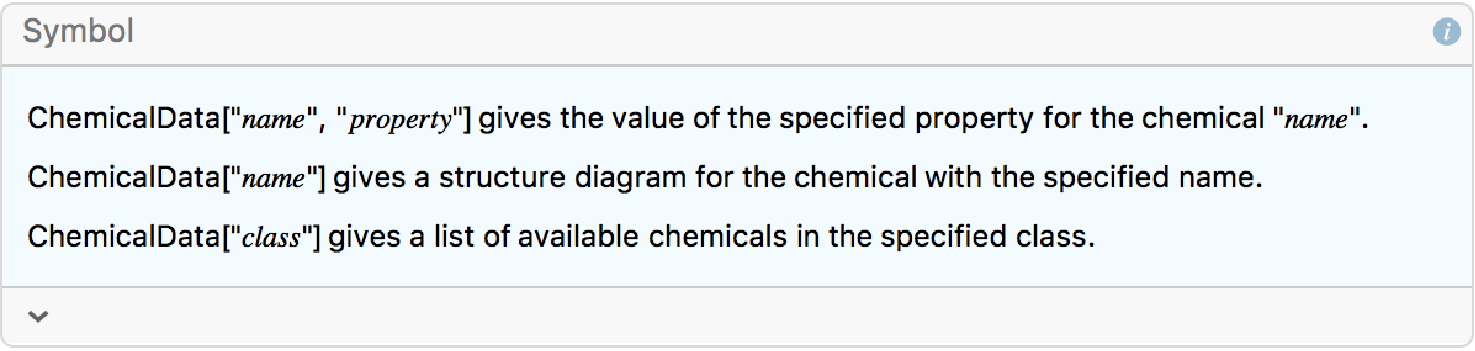
?ChemicalData
Out[]=
In[]:=
ChemicalData["Water","MeltingPoint"]
Out[]=
Chemical Representations
Chemical Representations
In[]:=
BioSequence["Peptide","GATTACA"]
Out[]=
BioSequence


In[]:=
BioSequence["Peptide","T"]
Out[]=
BioSequence
In[]:=
Molecule@%
Out[]=
In[]:=
InputForm/@{%,%%}
Out[]=
{Molecule[{"N","C","C","O","C","O","C","O"},{Bond[{1,2},"Single"],Bond[{2,3},"Single"],Bond[{3,4},"Double"],Bond[{2,5},"Single"],Bond[{5,6},"Single"],Bond[{5,7},"Single"],Bond[{3,8},"Single"]},{StereochemistryElements->{<|"StereoType"->"Tetrahedral","ChiralCenter"->2,"Direction"->"Counterclockwise"|>,<|"StereoType"->"Tetrahedral","ChiralCenter"->5,"Direction"->"Counterclockwise"|>}}],BioSequence["Peptide","T",{}]}
In[]:=
ToEntity@%13
In[]:=
In[]:=
ChemicalFormula@%
In[]:=
ChemicalFormula["Properties"]
Out[]=
{AtomCount,ElementCounts,ElementMassFraction,EmpiricalFormula,Formula,FormulaString,HillFormula,HillFormulaString,MolarMass,MolecularMass,NetCharge,Phase,RelativeMolecularMass}
In[]:=
Out[]=
True
entities
entities
◼
Introduced in version 10, Entities provide a unified interface to the Wolfram Knowledgebase
◼
Expanded syntax for querying multiple entity or multiple properties
In[]:=
Out[]=
Molecule: A Computable Chemical Object
Molecule: A Computable Chemical Object
Version 12 introduced Molecule, a computable object that can represent any single molecule:
In[]:=
mol=Molecule["water"]
Out[]=
In[]:=
InputForm@%
Out[]//InputForm=
Molecule[{O, H, H}, {Bond[{1, 2}, Single], Bond[{1, 3}, Single]}, {}]
A molecule is composed of atoms and bonds:
In[]:=
Out[]=
Molecule properties are computed on demand:
In[]:=
{mol["MolecularMass"],mol["PointGroupDisplay"]}
Out[]=
,
C
2v
In[]:=
MoleculeValue[mol,"AdjacencyMatrix"]
Out[]=
Easily change the structure using :
In[]:=
MoleculeModify[mol,{"SetMassNumber",{22,32}}]
Out[]=
In[]:=
Molecule["CCCCOOOOC(CCCOOOC)CCOOOCCCOOOCCOO"]
Out[]=
In[]:=
MoleculePlot@%
Out[]=
In[]:=
MoleculePlot[Molecule@"(2S)-N-[(1S)-2-carbamoyl-1-[[(2S)-1-[(2S)-2-[[(1S)-1-[[(1S)-1-carbamoyl-2-(4-methoxyphenyl)ethyl]carbamoyl]-4-(diaminomethylideneamino)butyl]carbamoyl]pyrrolidin-1-yl]-1-oxo-3-sulfanylidene-propan-2-yl]carbamoyl]ethyl]-2-[[(2S)-2-[[(2S)-3-(4-hydroxyphenyl)-2-[[2-(1-sulfanylcyclohexyl)acetyl]amino]propanoyl]amino]-3-phenyl-propanoyl]amino]pentanediamide"]
Out[]=
In[]:=
MoleculePlot3D[Molecule@"(2S)-N-[(1S)-2-carbamoyl-1-[[(2S)-1-[(2S)-2-[[(1S)-1-[[(1S)-1-carbamoyl-2-(4-methoxyphenyl)ethyl]carbamoyl]-4-(diaminomethylideneamino)butyl]carbamoyl]pyrrolidin-1-yl]-1-oxo-3-sulfanylidene-propan-2-yl]carbamoyl]ethyl]-2-[[(2S)-2-[[(2S)-3-(4-hydroxyphenyl)-2-[[2-(1-sulfanylcyclohexyl)acetyl]amino]propanoyl]amino]-3-phenyl-propanoyl]amino]pentanediamide"]
Out[]=
ChemicalFormula
ChemicalFormula
◼
A “Chemical” entity represents a single chemical species with a record in the knowledgebase, complete with curated properties, e.g. melting point, specific heat capacity, etc
◼
A Molecule can be any chemical structure, must have connectivity specified
◼
A ChemicalFormula has only a list of atom types and their coefficients - it represents any (or all) chemical species with a given formula
In[]:=
Molecule["C6H5OH"]

Out[]=
Molecule[C6H5OH]
In[]:=
ChemicalFormula["C6H5OH"]
◼
A formula has a distinct molecular mass and charge
◼
A Molecule can match to a given formula
ChemicalReaction
ChemicalReaction
Get the reactants or products
Get the counts for the products:
Get a display equation:
Create a chemical reaction from an equation string:
Here the inputs are interpreted as chemical formulas:
Create a reaction from a ReactionSMILES string:
Here the components of the reaction are Molecule objects:
Visualizing Molecules
Visualizing Molecules
Create a molecule using an IUPAC name.
Use plot themes to control whether hydrogens are shown or how aromatic bonds are depicted.
Highlight an atom or a bond by referring to the atom indices:
AtomLabels
AtomLabels
◼
AtomLabels and BondLabels are new options for MoleculePlot and MoleculePlot3D
Example: Plot of TNT labeling all carbon and nitrogen atoms by their oxidation state
Example: Plot of TNT labeling all carbon and nitrogen atoms by their oxidation state
MoleculeMatchQ
MoleculeMatchQ
◼
Joins other Molecule pattern-matching functions:
◼
FindMoleculeSubstructure
◼
MoleculeContainsQ
◼
MoleculeFreeQ
◼
MoleculeSubstructureCount
Test whether two molecules match each other:
Test whether a molecule matches a formula:
Test whether a molecule matches a pattern:
A diatomic molecule can be matched against a Bond:
By default stereoisomers do not match each other:
Example: Make a 2D plot of a sugar labelling atoms by their stereo
Example: Make a 2D plot of a sugar labelling atoms by their stereo
Example: Filter a list of isomers using a substructure pattern
Example: Filter a list of isomers using a substructure pattern
◼
Find isomers of caffeine that have an aromatic bond between oxygen and nitrogen and align them on their maximum common substructure
◼
This example uses FindIsomers, MoleculeContainsQ, MoleculeMaximumCommonSubstructure, and MoleculeAlign
◼
Now take every molecule and align them in 3D
Chemical Conversions
Chemical Conversions
Calculate the number of millimoles in 2300 milligrams of sodium:
Calculate the number of molecules in 10 mL of water:
Calculate the volume in cubic feet of 10 moles of helium:
FeatureSpacePlot
FeatureSpacePlot
Version 12.3 introduced new built-in feature extractors for molecule objects:
Wolfram Chemistry Resources
Wolfram Chemistry Resources
A curated portal for chemistry resources in the Wolfram universe.
Tools for Chemistry
Tools for Chemistry
Wolfram|Alpha - Natural language chemistry calculations
Wolfram|Alpha - Natural language chemistry calculations
Wolfram|Alpha Notebook Edition - Multistep chemical calculations in digital notebooks
Wolfram|Alpha Notebook Edition - Multistep chemical calculations in digital notebooks
Wolfram Demonstrations Project - Interactive chemical demonstrations
Wolfram Demonstrations Project - Interactive chemical demonstrations
Wolfram Data Repository - Computable chemical datasets
Wolfram Data Repository - Computable chemical datasets
Calculators
Calculators
Reduce cognitive load and facilitate deeper chemical thinking in experimental design.
Tutorials
Tutorials
Videos - Quick takes, courses and seminars
Videos - Quick takes, courses and seminars
Blogs - In-depth chemistry use cases
Blogs - In-depth chemistry use cases
Examples - Use cases from the documentation
Examples - Use cases from the documentation
Chemical Education
Chemical Education
Course Assistant App - General Chemistry
Course Assistant App - General Chemistry
$Compute-To-Learn - A chemical demonstrations collection
$Compute-To-Learn - A chemical demonstrations collection
Virtual Chemistry Laboratory - Chemistry laboratory activities
Virtual Chemistry Laboratory - Chemistry laboratory activities
Literature Highlights - See how Wolfram tools are used in the classroom
Literature Highlights - See how Wolfram tools are used in the classroom
See what’s in the pipeline!