CITE THIS NOTEBOOK: Filzbach: a general purpose MCMC package for Bayesian estimation by Gareth Russell. Wolfram Community NOV 17 2022.
Original code* developed at Microsoft Research (Cambridge, UK) by Vassily Lyutsarev, Mark C. Vanderwel and Drew W. Purves
Mathematica implementation by Gareth J. Russell
1 Computational Ecology and Environmental Science Group, Microsoft Research, Cambridge, UK.
2 Department of Biology, University of Florida, Gainesville, FL, 32611, USA.
3 Department of Biological Sciences, New Jersey Institute of Technology, Newark, NJ, 07102, USA.
*Compiled original code: https://www.microsoft.com/en-us/download/details.aspx?id=52465
R version: https://www.microsoft.com/en-us/download/details.aspx?id=52314
GitHub source: https://github.com/predictionmachines/Filzbach
1
1,2
1
Mathematica implementation by Gareth J. Russell
3
1 Computational Ecology and Environmental Science Group, Microsoft Research, Cambridge, UK.
2 Department of Biology, University of Florida, Gainesville, FL, 32611, USA.
3 Department of Biological Sciences, New Jersey Institute of Technology, Newark, NJ, 07102, USA.
*Compiled original code: https://www.microsoft.com/en-us/download/details.aspx?id=52465
R version: https://www.microsoft.com/en-us/download/details.aspx?id=52314
GitHub source: https://github.com/predictionmachines/Filzbach
Introduction
Introduction
This notebook contains a Mathematica implementation of the Filzbach algorithm for Markov Chain Monte-Carlo estimation of a Bayesian posterior probability distribution. Filzbach was originally developed at the Cambridge laboratory of Microsoft Research as a user-friendly tool for Bayesian inference. In particular, it tried to eliminate as much as possible the need for an end-user to specify somewhat obscure parameters such as the ‘proposal width.’
As a platform, Mathematica has built-in capabilities which arguably make the process even more user friendly. In particular:
◼
Mathematica has a huge library of built in statistical distributions, which can be used to specify virtually any kind of prior very simply. (Other implementations of Filzbach allow the user to specify Normal priors for unconstrained parameters and Lognormal priors for strictly positive parameters. Other priors would need to be built into the log-likelihood function)
◼
The symbolic and automatic code-generation capabilities of Mathematica mean that as long as the end user can provide some kind of code for generating a log-likelihood value, this can be converted, behind the scenes, to a highly optimized, compiled function which is used during the MCMC process. This lowers the bar for users, who do not need to be highly skilled programmers.
Ultimately, a user needs to do just one programming task: write a function to calculate a log-likelihood value based on a dataset and a list of parameters. Everything else is taken care of automatically
Code
Code
Examples
Examples
Univariate linear regression
Univariate linear regression
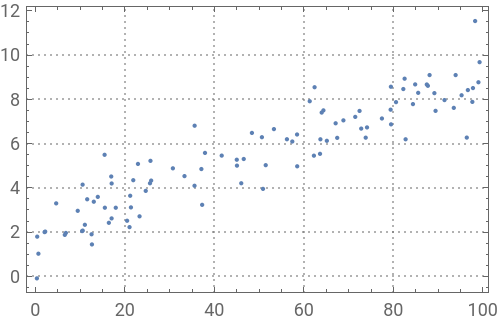
This is perhaps the simplest example. It is one of those cases where a Bayesian approach is more complex, and adds very little, compared to a traditional least-squares fit. But it serves to illustrate the process, and allows us to compare the kinds of inference we can make from the two approaches. Here are some data
Data
Data
In[]:=
trueIntercept=2;trueSlope=0.07;sampleSize=100;noise=1;regData=Table[x=RandomReal[{0,100}];y=trueIntercept+x*trueSlope+RandomVariate[NormalDistribution[0,noise]];{x,y},{sampleSize}];Clear[x,y];ListPlot[regData]
Out[]=
Filzbach MCMC
Filzbach MCMC
All that the user needs to do in preparation is write a log-likelihood function, specify some names for the parameters, and specify a list of prior distributions. Note that the function below is extremely slow, to illustrate the point that it doesn’t matter because it will be replaced by an optimized function.
In[]:=
myLogL[data_,{b0_,b1_,mu_}]:=Module[{predictions,logLikelihoods},predictions=b0+b1*data[[All,1]];logLikelihoods=Log[MapThread[PDF[NormalDistribution[#1,mu],#2]&,{predictions,data[[All,2]]}]];Total[logLikelihoods]]
These names are used in the function optimization, and for various graphics. Note that they should NOT be in quotes: they are symbol names, not strings
In[]:=
myParameterList={intercept,slope,sd};
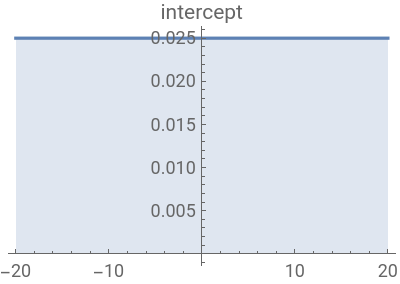
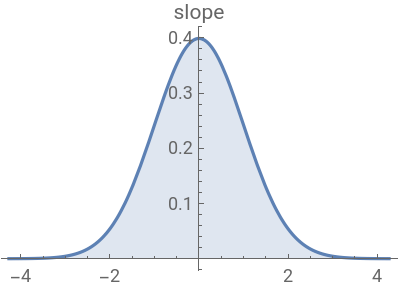
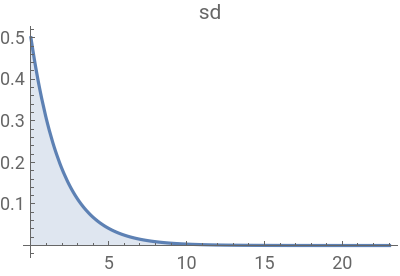
Three different prior distributions for the three parameters, to illustrate how easy it is to do. Note that as the noise term must be positive, a distribution with domain 0 to infinity (the Gamma distribution) is used.
In[]:=
myPriors={UniformDistribution[{-20,20}],NormalDistribution[0,1],GammaDistribution[1,2]};
In[]:=
priorBounds=Map[Quantile[#,{0.00001,0.99999}]&,myPriors];Row[MapThread[Plot[Evaluate[PDF[#1,x]],{x,#2[[1]],#2[[2]]},PlotRangeAll,Filling0,PlotLabel#3,PlotTheme"Default",ImageSize200]&,{myPriors,priorBounds,myParameterList}]]
Out[]=
Then you simply run the following function, sending it the data, names for the parameters, the likelihood function, the prior function, and three numbers that specify the behavior of the MCMC: the number of iterations for the burn-in phase, the interval between recorded samples in the sampling phase, and the total number of samples you want. The function will generate a few diagnostic plots along the way, and return the posterior samples as an array.
In[]:=
regPost=mcmcFilzbach[regData,myParameterList,myLogL,myPriors,10000,100,10000];
Setting up functions and other constraints
Burn-in phase
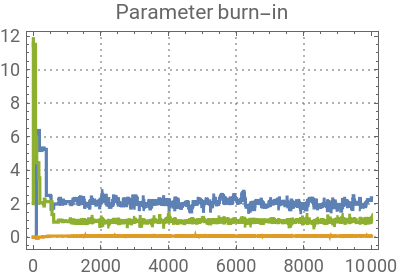
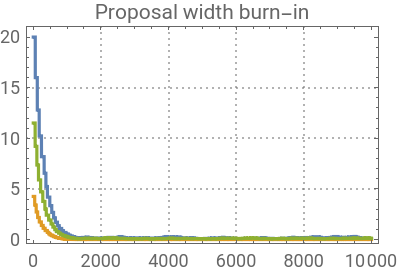
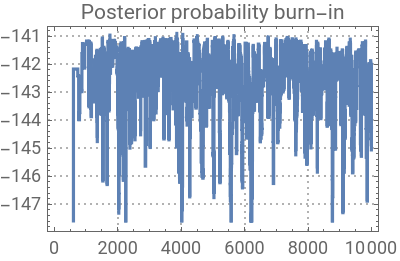
Sampling phase
Processing output
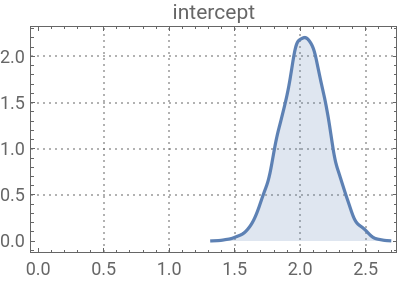
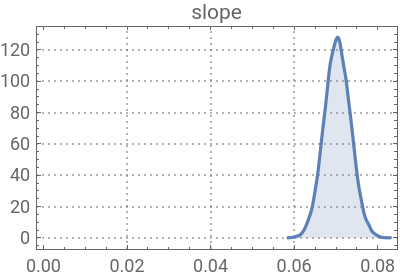
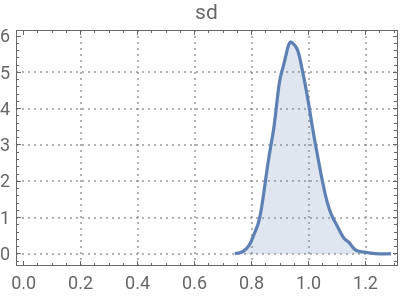
The single output is an array describing the joint posterior probability distribution obtained from the MCMC sampling. All other products (visualizations, etc.) are produced from that output.
In[]:=
Dimensions[regPost]
Out[]=
{10001,3}
Let’s have a look at it. In this case there are three parameters, so we can make a 3D plot.
In[]:=
Graphics3D[{GrayLevel[0.8],Line[regPost],Black,Point[regPost]},AxesTrue,AxesLabel{"Intercept","Slope","SD"},BoxRatios{1,1,1}]
Out[]=

The lines connect each point in the sequence in which it was sampled. This therefore shows a ‘walk’ around the 3D parameter space. The MCMC algorithm is the ‘rule’ for this walk. As you can see, it fills the space corresponding to the posterior probability distribution, for example by turning back when it drifts to regions of low probability. Here is it for just the intercept and slope parameters.
In[]:=
Graphics[{GrayLevel[0.8],Line[regPost[[All,{1,2}]]],Black,Point[regPost[[All,{1,2}]]]},AxesFalse,FrameTrue,FrameLabel{"Intercept","Slope"},AspectRatio1]
Out[]=
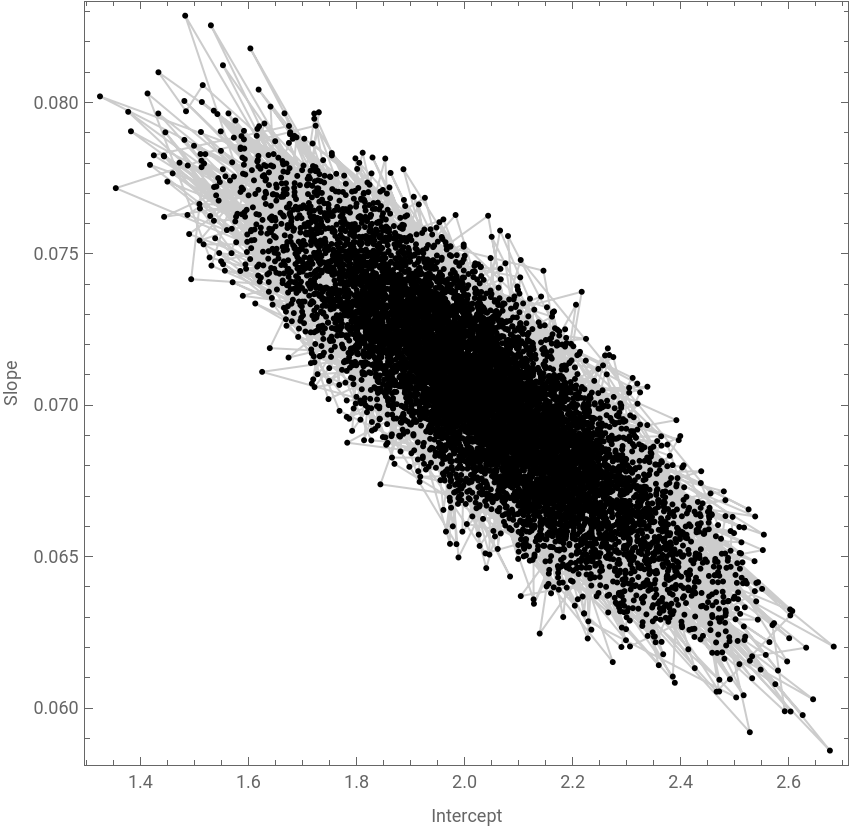
From these 10,001 points, we can create either a discrete density map (a histogram) or a smooth density map. Here are the joint distributions corresponding to the two parameters of main interest, the intercept and slope.
We can also look at individual parameters (these are marginal posterior distributions).
These are the means of the three posterior distributions
Least squares (for comparison)
Least squares (for comparison)
This is how you do a regular linear regression in Mathematica:
See how close the parameters are to the posterior means of the Bayesian method?
As you know, from the linear model information is available on the fit, as well as on the confidence intervals of the parameters
The underlying assumption of the parameter confidence intervals is that these estimated parameters follow a Normal distribution (this is the Central Limit Theorem). The Bayesian fit will allow us to test this. Here I plot the posterior distributions from the Bayesian fit overlaid with Normal distributions based on the data from the parameter least-squares fit.
Conditional logistic regression
Conditional logistic regression
In this second example we will use a non-trivial dataset and model. It consists of data on four sampled environmental variables — reed density, tree density, distance to water and distance to human settlement — that surround the GPS fix locations of an African elephant. The model to be fit is called a conditional logistic regression, which treats each location fix as a choice the elephant makes out of a set of alternative locations in the vicinity. The hypothesis is that the choice is affected by one or more of the environmental variables, plus the distance each fix is from the previous location (as this is a measure of energy expenditure, which is a cost of movement). For more details on the model, read Mashintonio et al. 2014.
Data
Data
The data here come from loading a dataset that should be in the same directory as this notebook. Here are the first 10 rows out of 30,300!
Note that with the exception of the Step Distance column, the other predictor variables have been standardized (translated and scaled to have a mean of 0 and a standard deviation of 1), which is why you can see negative densities and distances. While not strictly necessary here, this can help with some fitting processes, and is a characteristic of this dataset. Here is some more information about it:
Filzbach MCMC
Filzbach MCMC
The log-likelihood version of this is efficiently coded as follows:
Here is the log-likelihood calculation for this dataset, with all parameters set to 0.
We will use standard Normal(0,1) priors for each variable.
Here we run the MCMC code.
We can summarize these with 95% confidence intervals based on the 0.025 and 0.975 quantiles of the posterior probability distributions.
How do we interpret this? First, the strong evidence for a negative relationship to distance indicates that this elephant doesn’t like to move further than necessary. No surprise there!
Second, there is no effect of reeds: the distributions of the regular and squared terms both sit solidly around 0.
Third, there is an effect of trees. The regular term is positive, and the squared term is negative. What does that mean? Let’s plot a function using the posterior mean values for the tree parameters:
This shows that elephants prefer an intermediate density of trees. Why might that be?
Fourth, elephants like being near water (in the model this appears as a strong negative linear relationship with distance from water).
Fifth and finally, these elephants keep their distance from human settlements, but don’t go as far away as they could. That is likely because they are afraid of people, but people tend to live near water, and grow crops, both of which elephants are drawn to.
Using MCMC, we were able to quite quickly fit a 9-variable model to a dataset with over 30,000 observations.
Supplemental coding details
Supplemental coding details
Filzbach set-up, explained
Filzbach set-up, explained
Perhaps uniquely to Mathematica, one can create a very fast compiled function by writing any algorithm that successfully performs the log-likelihood calculation, providing it with symbolic arguments to generate a single algebraic expression in the unknown parameters, and then compiling that expression. For the vast majority of users, this will execute faster than any function they could write on their own, and allows even those with limited programming skills to generate an efficient function to plug into Filzbach
Here is how to generate a fast log-likelihood function for linear regression. First we write a ‘regular’ Mathematica function. It doesn’t need to be especially efficient, and this one isn’t!
Here we make some linear regression data.
For simplicity, it helps to create a list of parameter names corresponding to those that go into the log-likelihood function.
Next we generate an expression with symbolic unknown parameters. It will be very large, so we won’t display it! Note that this has the data ‘baked’ into it.
If we replace the unknowns with values, we get the log-likelihood
Now we turn this expression into a compiled function
And put that inside a wrapper that checks for numeric input (so that it will work inside functions like FindMaximum).
Let’s compare the processor time it takes to perform 1000 likelihood calculations.
It’s a bit of an unfair comparison because the original function was extremely inefficient, but that’s kind of the point!
Now that we have a log-likelihood function, we can fit the model simply by maximizing the log-likelihood over the values of the parameters.
But on its own, this doesn’t give us very much information.
Now, for a Bayesian analysis, we also need to specify prior distributions for our parameters. Mathematica has a huge number of distributions built in, which gives us great flexibility. But for speed, we also need to compile these. First, we just specify them as a list, one per parameter (in the same order they enter the log-likelihood function). Here is one option. Note that the noise term must be positive, so we use a Lognormal distribution.
There is one more step, related to the way Mathematica handles compiled functions. They only take separate arguments, but we will want to send them a list of arguments, so these lines generate ‘list-enabled’ versions.
[Random: this will generate scatterplots to look for correlations among the parameters.]