My research focuses on simulating the Magnus effect using computational fluid dynamics. I use the Navier Stokes equations to model how a rotating object, such as a spinning disk, interacts with the surrounding fluid. As the object spins, it drags the fluid along with it, creating a pressure imbalance on opposite sides. This imbalance generates a force perpendicular to the object’ s motion, causing its path to curve. Through various simulations, I have visualized how spin influences the trajectory of objects. For example, I modeled the behavior of a spinning disk moving through fluid, showing how the resulting pressure differences lead to lift. I also simulated how a spinning ball falls through air, mimicking real world scenarios like a basketball being dropped off a dam, demonstrating how spin affects its descent.
Introduction
Introduction
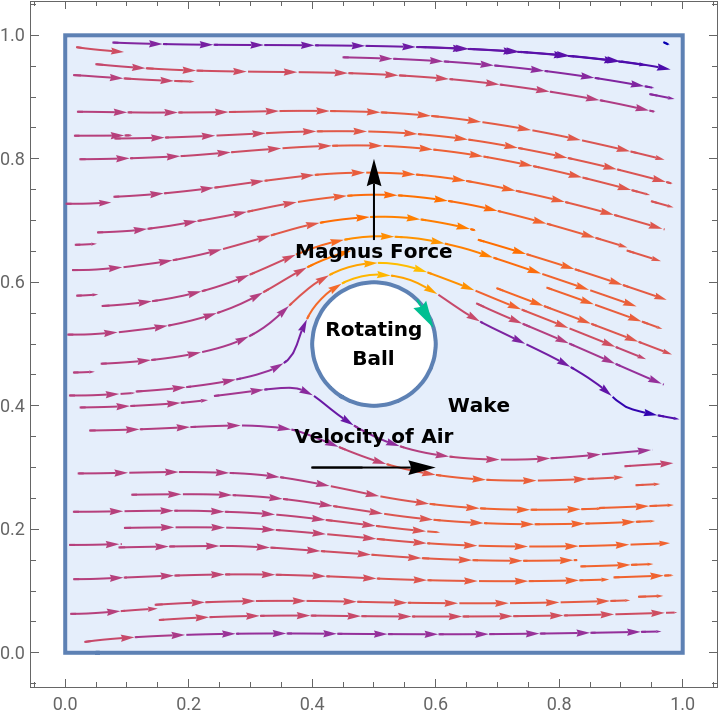
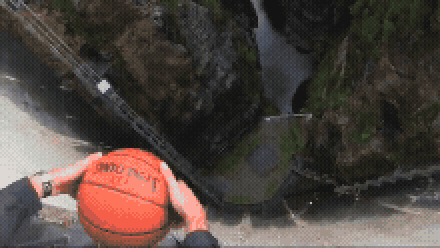
The Magnus effect is a phenomenon where a spinning object moving through a fluid experiences a force perpendicular to the direction of motion and axis of rotation. This effect plays a major role in the behavior of balls in sports, as well as in various engineering applications. In this computational essay, we explore the Magnus effect using fluid dynamics simulations to visualize how spin alters flow patterns and generates lift. By modeling the interactions between a rotating object and its surrounding fluid, we aim to gain a deeper understanding of the forces at play and how parameters such as spin rate, velocity, and object size affect their outcomes.
In coming simulations, boundary conditions are very important in shaping how fluid behaves as it moves through the domain and interacts with an object. At the left edge, a constant inflow boundary introduces a steady horizontal stream, representing a uniform flow entering the system. The top, bottom, and any non-inlet or outlet walls have no-slip conditions, where both velocity components are set to zero, modeling how real fluids adhere to solid surfaces. At the right boundary, the pressure is set to zero, creating an outlet that allows fluid to exit the domain without buildup or reflection. Together, these conditions model the effects of drag, and pressure differences that affect the movement of the ball. Throughout the project some of these conditions are slightly altered, but these (along with the later spin condition) create the basis for this project.
In coming simulations, boundary conditions are very important in shaping how fluid behaves as it moves through the domain and interacts with an object. At the left edge, a constant inflow boundary introduces a steady horizontal stream, representing a uniform flow entering the system. The top, bottom, and any non-inlet or outlet walls have no-slip conditions, where both velocity components are set to zero, modeling how real fluids adhere to solid surfaces. At the right boundary, the pressure is set to zero, creating an outlet that allows fluid to exit the domain without buildup or reflection. Together, these conditions model the effects of drag, and pressure differences that affect the movement of the ball. Throughout the project some of these conditions are slightly altered, but these (along with the later spin condition) create the basis for this project.
Intro to Fluid Mechanics
Intro to Fluid Mechanics
Reynolds Number:
Reynolds Number:
Reynolds number is a way to describe how fluid flows around an object, comparing how much a fluid’s movement is affected by its speed and size against how viscous the fluid is. In the case of the Magnus effect, we use the Reynolds number to help determine how a fluid (usually air) moves around a ball. At lower Reynolds numbers the fluid is calmer, with the air moving more evenly, making the Magnus effect weaker, but at higher Reynolds Numbers the flow becomes more chaotic. This causes stronger differences in pressure that increases the sideways force on the ball.
Reynolds number can be calculated with the equation: Re= ρUL/μ , where ρ is the fluid density, U is the characteristic velocity, L is a characteristic length (such as the diameter of a ball), and μ is the dynamic viscosity of the fluid, though for this project we do not solve for it, but rather use it as a variable to visualize how changes may influence the effect.
Reynolds number can be calculated with the equation: Re= ρUL/μ , where ρ is the fluid density, U is the characteristic velocity, L is a characteristic length (such as the diameter of a ball), and μ is the dynamic viscosity of the fluid, though for this project we do not solve for it, but rather use it as a variable to visualize how changes may influence the effect.
Spin of an Object:
Spin of an Object:
Spin is the key factor that triggers the Magnus Effect. When an object spins while moving through a fluid (such as air), it drags some of the surrounding fluid along with it, which causes the fluid to move faster on one side of the object and slower on the other. According to Bernoulli’s principle, a faster moving fluid results in lower pressure, so the side where the fluid moves faster experiences low pressure, while the opposite side experiences high pressure. This pressure difference creates a lift force perpendicular to the direction of motion, curving the path of the object. The greater the spin, the stronger the imbalance of pressure, and thus the stronger the Magnus force.
FluidFlowPDEComponent
FluidFlowPDEComponent
Wolfram Language’s FluidFlowPDEComponent is especially useful for this project because it provides a built-in representation of the Navier Stokes equations, which are the fundamental equations in representing fluid motion. Instead of manually specifying the system of partial differential equations, FluidFlowPDEComponent automatically generates the correct PDEs based on the provided velocity and pressure variables. This simplifies the setup, reduces the risk of errors, and makes the code easier to modify and extend for different configurations (as explored later in the project).
In[]:=
FluidFlowPDEComponent[{{u[x,y],v[x,y],p[x,y]},{x,y}},<|"DynamicViscosity"->μ,"MassDensity"->ρ|>]//MatrixForm
Out[]//MatrixForm=
{ρu[x,y],ρv[x,y]}. ∇ {x,y} ∇ {x,y} ∇ {x,y} (1,0) u (0,1) u (1,0) v |
{ρu[x,y],ρv[x,y]}. ∇ {x,y} ∇ {x,y} ∇ {x,y} (0,1) u (1,0) v (0,1) v |
ρ (0,1) v (1,0) u |
The project begins with the following code from the Wolfram database, which models 2D incompressible fluid flow using the Navier Stokes equations. This code models two-dimensional incompressible fluid flow using the Navier Stokes equations over a square domain from (0, 0) to (1, 1). The fluid behavior is influenced by a high Reynolds number (1000), while boundary conditions are defined to control the flow: fluid enters from the top edge with a horizontal velocity, simulating a uniform inflow along that boundary. All other edges where y < 1, including the bottom and vertical walls have no-slip conditions, meaning the fluid sticks to the boundaries and mimics the behavior of flow near solid surfaces. To complete the setup, a pressure reference point is placed at the bottom-left corner, where p = 0, making sure that the pressure field is well-defined and stable across the domain.
The NDSolveValue function works with FluidFlowPDEComponent to solve for the fluid’s velocity (u, v) and pressure (p) using the finite element method, which breaks the flow area into many small parts to make the equations easier to solve. In each part, the solution is estimated, and all the parts are combined to get the full flow. The flow is then visualized with StreamPlot, which shows the paths that fluid particles follow through the domain. This 2D setup helps demonstrate how boundary conditions shape fluid motion and serves as the foundation for more advanced simulations, such as those modeling spinning objects and the Magnus effect by modifying the geometry and adding rotational motion.
The project begins with the following code from the Wolfram database, which models 2D incompressible fluid flow using the Navier Stokes equations. This code models two-dimensional incompressible fluid flow using the Navier Stokes equations over a square domain from (0, 0) to (1, 1). The fluid behavior is influenced by a high Reynolds number (1000), while boundary conditions are defined to control the flow: fluid enters from the top edge with a horizontal velocity, simulating a uniform inflow along that boundary. All other edges where y < 1, including the bottom and vertical walls have no-slip conditions, meaning the fluid sticks to the boundaries and mimics the behavior of flow near solid surfaces. To complete the setup, a pressure reference point is placed at the bottom-left corner, where p = 0, making sure that the pressure field is well-defined and stable across the domain.
The NDSolveValue function works with FluidFlowPDEComponent to solve for the fluid’s velocity (u, v) and pressure (p) using the finite element method, which breaks the flow area into many small parts to make the equations easier to solve. In each part, the solution is estimated, and all the parts are combined to get the full flow. The flow is then visualized with StreamPlot, which shows the paths that fluid particles follow through the domain. This 2D setup helps demonstrate how boundary conditions shape fluid motion and serves as the foundation for more advanced simulations, such as those modeling spinning objects and the Magnus effect by modifying the geometry and adding rotational motion.
{uVel,vVel,pressure}=NDSolveValue[{FluidFlowPDEComponent[{{u[x,y],v[x,y],p[x,y]},{x,y}},<|"ReynoldsNumber"->1000|>]=={0,0,0},DirichletCondition[{u[x,y]1,v[x,y]0},y1],DirichletCondition[{u[x,y]0,v[x,y]0},y<1],DirichletCondition[p[x,y]0,x0&&y0]},{u[x,y],v[x,y],p[x,y]},{x,y}∈Rectangle[{0,0},{1,1}],Method{"FiniteElement","InterpolationOrder"{u->2,v2,p1}}];
StreamPlot[{uVel,vVel},{x,y}∈Rectangle[{0,0},{1,1}]]
Out[]=
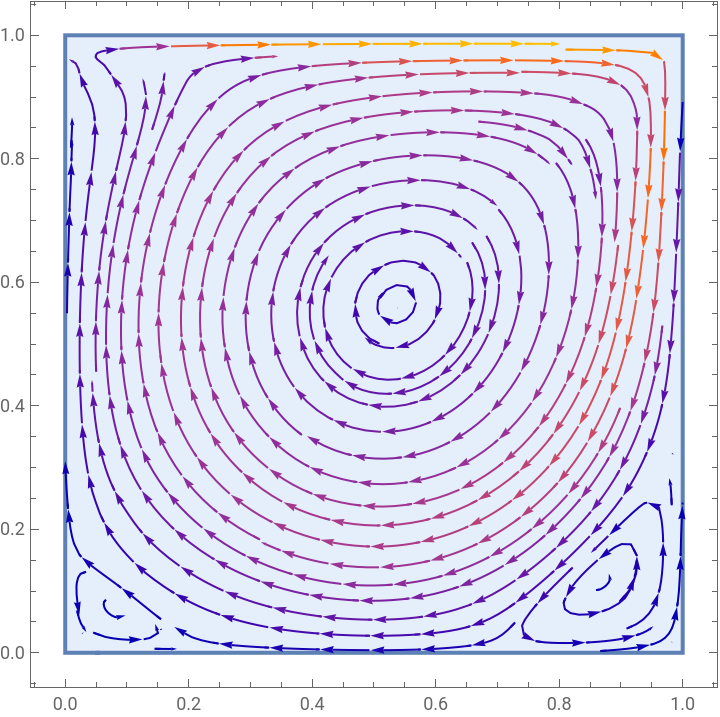
The Taylor-Hood pairing of the Interpolation order also combines a quadratic approximation for velocity and a linear approximation for pressure This pairing ensures a stable and accurate solution for both velocity and pressure fields .
2D Stationary Disk
2D Stationary Disk
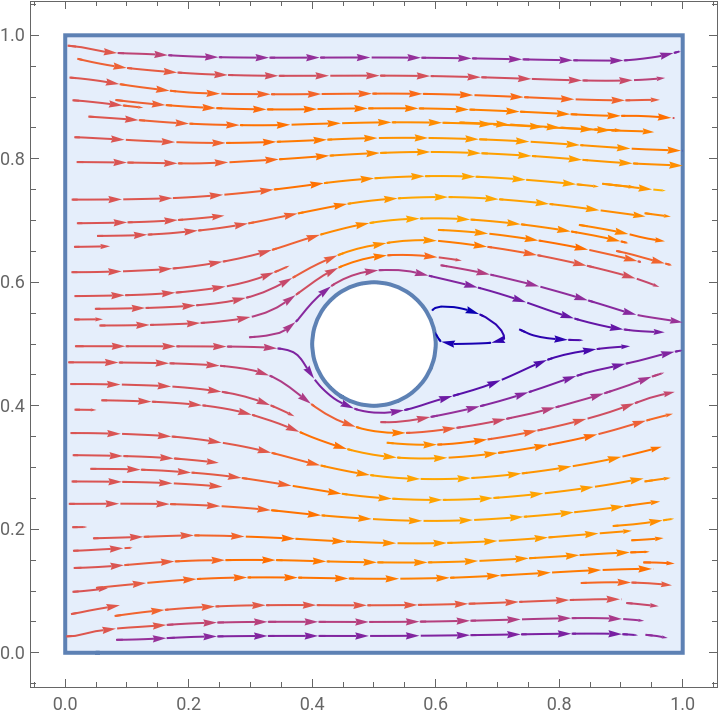
The original flow model is expanded by introducing a circular object (a Disk) in the center of the fluid domain. The main rectangular domain is defined from (0, 0) to (1, 1) and then we use RegionDifference to subtract the object from the rectangular region, creating a circular obstruction within the flow simulating an obstacle. The boundary conditions are also modified: flow enters from the left side with horizontal velocity, and as before all other walls enforce no-slip conditions for the rest of the domain boundaries (x > 0), and pressure is fixed at the outlet. Instead of solving for just one Reynolds number, ParametricNDSolveValue is used to parameterize the Reynolds number (ℛ), making it easier to explore how different flow regimes behave around the obstacle. Finally, the velocity field is visualized using StreamPlot for a Reynolds number of 100, showing how the fluid interacts with the object.
The Code:
The Code:
The first thing we did was clear all the variables we are planning to use.
ClearAll[u,v,p,x,y]
Then we set up the variables, such as the objects center, its radius, the size of the rectangle, the region in which fluid will flow (the object subtracted from the rectangle).
size=1;domain=Rectangle[{0,0},{size,size}];object=Disk[{0.5,0.5},0.1];Ω=RegionDifference[domain,object];
Next we initialize the boundary conditions for fluid flow from left to right (bcInlet), no-slip walls (bcWalls), and outlet at x = size (bcPressure).
bcInlet=DirichletCondition[{u[x,y]==1,v[x,y]==0},x==0];bcWalls=DirichletCondition[{u[x,y]==0,v[x,y]==0},x>0];bcPressure=DirichletCondition[p[x,y]==0,x==size];
Then we use ParametricNDSolve and FluidFlowPDEComponent to solve the the Navier Stokes equation based on the conditions and a given Reynolds number.
sol=ParametricNDSolveValue[{FluidFlowPDEComponent[{{u[x,y],v[x,y],p[x,y]},{x,y}},<|"ReynoldsNumber"->ℛ|>]=={0,0,0},bcInlet,bcWalls,bcPressure},{u[x,y],v[x,y]},{x,y}∈Ω,ℛ,Method->{"FiniteElement","InterpolationOrder"->{u->2,v->2,p->1}}];
Finally we plot the output using StreamPlot.
StreamPlot[sol[100],{x,y}∈Ω]
Out[]=
2D Rotating Disk
2D Rotating Disk
The fluid simulation is extended to include a spinning object, laying the groundwork for modeling the Magnus Effect, the lift force generated by rotation in a moving fluid. As in the previous version, we define a square flow region and subtract a circular object (disk) from its center to form the fluid domain Ω. The new addition here is the rotational boundary condition around the object. we introduce a spin velocity ω = -15 (negative ω for front spin, and positive ω for backspin), and use it to define tangential flow around the object’s boundary using the rigid-body rotation formulas:
u = ω(y − y0), and v = −ω(x − x0)
This is enforced through the bcSpin condition along the edge of the disk. The mesh is adjusted with “MaxCellMeasure” -> 0.0001 to ensure better resolution near the spinning boundary. As before, the other boundaries are set up so that flow enters from the left, no-slip walls are applied at the top and bottom, and pressure is fixed at the outlet. Finally, using ParametricNDSolveValue, we compute the velocity field for a Reynolds number of 500, and plot the resulting streamlines (*note* values such as Reynolds number, size (and pressure with that), and other variables can be altered to try other variations).
u = ω(y − y0), and v = −ω(x − x0)
This is enforced through the bcSpin condition along the edge of the disk. The mesh is adjusted with “MaxCellMeasure” -> 0.0001 to ensure better resolution near the spinning boundary. As before, the other boundaries are set up so that flow enters from the left, no-slip walls are applied at the top and bottom, and pressure is fixed at the outlet. Finally, using ParametricNDSolveValue, we compute the velocity field for a Reynolds number of 500, and plot the resulting streamlines (*note* values such as Reynolds number, size (and pressure with that), and other variables can be altered to try other variations).
The Non-Animation:
The Non-Animation:
The first thing we did was clear all the variables we are planning to use .
In[]:=
ClearAll[u,v,p,x,y,ℛ];
Then we set up the variables, such as the objects center, its radius, the size of the rectangle, the region in which fluid will flow (the object subtracted from the rectangle), as well as the spin rate.
objectCenter=0.5;objectRadius=0.1;size=1;domain=Rectangle[{0,0},{size,size}];object=Disk[{objectCenter,objectCenter},objectRadius];Ω=RegionDifference[domain,object];ω=15;
Next we initialize the boundary conditions for fluid flow from left to right (bcInlet), no-slip walls (bcWalls), outlet at x = size (bcPressure), and the angular velocity of the object (bcSpin).
Create arrow parameters in order to better visualize the direction of spin on the disk.
Then we use ParametricNDSolve and FluidFlowPDEComponent to solve the the Navier Stokes equation based on the conditions and a given Reynolds number.
Here we call our sol variable, setting the Reynolds number equal to 500.
Finally we plot the output using StreamPlot.
Force on Points on 2D Disk
Force on Points on 2D Disk
Finding Force:
Finding Force:
This section of the code computes and visualizes the pressure force acting on a spinning object, an essential step in visualizing the Magnus effect. First, it calculates the pressure gradient using Grad, which represents the force due to pressure (explained in the above section). This gradient is evaluated at a set of points along the object’s boundary, specifically, evenly spaced positions around the circle. At each point, the force vector is computed and stored, creating a list of arrows that indicate how pressure acts on different parts of the surface. By summing all these vectors, we get the net force on the object, which in this case is {55.14, 28.55}, suggesting a significant lift component in the vertical direction. The plot at the end shows all local force vectors as arrows around the circle and overlays the total net force in red.
Here the code is the mostly same as in the 2D rotating disk, with one small change in sol as well as in our stream plot.
In this sol, p[x,y] is also returned so the force due to pressure can be calculated.
Because we are now returning three variables rather than just two, when we make our steam plot, we must specify that we are still plotting with the first two components (the x-direction velocity (u), and the y-direction velocity (v)).
Here we create a variable “force” that computes the force due to pressure (with the 3rd component of eval giving the pressure output).
Then forceFunction is initialized, calculating the force at a given point by using the variable created before.
Here we get a sample of points along the surface of the disk by using table to iterate around the circumference of the disk in steps of Pi/10.
Then we map the points found above through forceFunction to calculate their magnitude.
Calculate the vector difference between each pair of points in pointVectors.
Sum all the difference vectors to get the total force.
Calculate the average of the starting points (first elements of each pair), representing the center of force application (as you might expect, it is extremely close to the center we initialized before)
Plot all original point vectors as arrows,then overlay the total force arrow from the center point in red
Animation (Movement Due to Force):
Animation (Movement Due to Force):
Next, we employ our force equations from the last section in order to create frames that show the movement of a ball due to the Magnus effect. This flowFrames function generates a sequence of animated frames showing the evolution of a spinning object in a 2D fluid flow, effectively simulating the Magnus effect in motion. For each frame, the code places a disk inside a rectangular flow domain and applies a rotational boundary condition based on a specified angular velocity ω. The Navier Stokes equations are solved, and the resulting velocity and pressure fields are used to compute the pressure gradient on the object’s surface.
The key feature here is the update of the object’s position: at every timestep, the net pressure force acting on the object is calculated from sampled points around its boundary. The object is then moved slightly in the direction of that force (scaled by a small step size k). This mimics how a real spinning object would be deflected in a fluid due to lift generated by the Magnus effect. Streamlines are plotted for each frame to visualize the changing flow field, and an arrow indicates the direction of spin (clockwise or counterclockwise).
The key feature here is the update of the object’s position: at every timestep, the net pressure force acting on the object is calculated from sampled points around its boundary. The object is then moved slightly in the direction of that force (scaled by a small step size k). This mimics how a real spinning object would be deflected in a fluid due to lift generated by the Magnus effect. Streamlines are plotted for each frame to visualize the changing flow field, and an arrow indicates the direction of spin (clockwise or counterclockwise).
Due to size constraints, this is the only animation that we include output of, for the rest of the project, code can be run locally to generate the animations.
2D Trajectory:
2D Trajectory:
Here the code also tracks its trajectory over time to visualize the Magnus effect in action. By computing the pressure gradient at discrete points along the object’s boundary, the net force acting on the disk is estimated in each frame. This force is then used to update the position of the object, allowing it to move in response to the lift generated by spin. The resulting center positions are recorded in a list and plotted at the end to show the disk’s path through the fluid.
3D Stationary Ball
3D Stationary Ball
This code sets up and solves a 3D incompressible fluid flow problem using the Navier Stokes equations inside a cubic domain with a spherical obstacle in the center. The cubic domain ranges from 0 to 1 in all three spatial directions, and the sphere is positioned at the center with a radius of 0.1, creating a hollow region where fluid cannot flow. Boundary conditions specify a uniform inflow velocity at the left face, no-slip conditions on the walls perpendicular to the y and z directions, and a fixed pressure of zero at the outlet to allow fluid to exit. The fluid flow equations are solved over a Reynolds number of 200 and a mesh is specified to capture more accurate flow features around the sphere. Finally, the solution at Reynolds number 200 (can be altered) is visualized with a 3D stream plot showing how fluid moves around the spherical object.
3D Rotating Ball
3D Rotating Ball
The simulation is extended to include a spinning object in three dimensions, allowing for a different view of the Magnus effect. The fluid domain is constructed by removing a central spherical object from a unit cube, and rotational motion is introduced via a boundary condition that enforces rigid-body spin. This is done again by using the equations u=ω(y−y0) and v = −ω(x−x0), where ω is the angular velocity, applied at the surface of the sphere. Inlet and outlet conditions create flow from left to right, with no-slip walls at the boundaries. The simulation solves the Navier Stokes equations using ParametricNDSolveValue at a Reynolds number of 200, and the resulting 3D streamlines visualize how the imposed spin alters the flow field.
Other Interesting Outcomes
Other Interesting Outcomes
Animation for Increased Spin Over Time:
Animation for Increased Spin Over Time:
This code simulates fluid flow around a spinning disk whose rotation speed increases in magnitude over time, allowing for the visualization of how stronger spin influences the flow and the resulting forces on the object. The simulation domain is a square with a circular disk placed initially near the top left, and at each frame, the angular velocity ω of the disk is gradually decreased by 0.5 (making it more negative and increasing the spin rate in counter clockwise direction). Boundary conditions set a inlet on the left, no-slip walls on the top and bottom, zero pressure at the outlet on the right, and the same spin condition used before (but now updated with a new ω for each iteration). At each step, the Navier Stokes equations are solved using the finite element method to compute the velocity and pressure fields in the fluid. The pressure gradient around the disk is used to calculate the total force acting on it, which then slightly moves the disk in the direction of that force. The code generates a sequence of stream plots showing the changing flow patterns along with arrows indicating the disk’s spin direction.
Animation for Increased Velocity Over Time:
Animation for Increased Velocity Over Time:
This simulation models a spinning disk moving through a fluid under the combined effects of the Magnus force and gravity. The disk starts near the top left of a square domain, spinning at a fixed rate Ω, and the fluid flow is driven by a inlet starting on the left, no-slip conditions on the top and bottom walls, and a zero-pressure outlet on the right. At each frame, the Navier Stokes equations are solved around the disk, which enforces a rotational velocity on its surface to simulate spin. The pressure gradients around the disk are used to calculate the Magnus force, which acts perpendicular to the flow due to the spinning motion. Additionally, a constant downward external force simulating gravity is added to the system, pulling the disk downward as it moves. The disk’s velocity and position are updated each frame by combining the Magnus force from the fluid and the external force (simulating gravitational force), allowing the disk to move through the fluid domain. The code generates a series of stream plots showing the flow patterns around the disk with arrows indicating the spin direction, while the disk’s motion reflects the interaction between rotational lift or drop (depending on the sign of ω) and gravity.
Basketball Drop Recreation
Basketball Drop Recreation
Negligible Spin (Just Dropping):
Negligible Spin (Just Dropping):
This code simulates a spinning disk falling through still fluid under gravity, with no background flow. To model this, the boundary conditions were changed so that the fluid velocity at the domain boundaries is zero, meaning the fluid is initially at rest and the disk falls through it without any flow. Specifically, the velocity components u and v are set to zero along the bottom and side boundaries, and pressure is fixed at the top boundary, creating an model that simulates still air. The disk itself spins with a small (negligible) angular velocity ω, enforced by a rotational velocity boundary condition on its surface. As in previous simulations, the Navier Stokes equations are solved for velocity and pressure fields around the disk. The pressure gradients around the disk generate the Magnus force (again negligible), which acts perpendicular to the disk’s motion due to its spin. A constant gravitational force pulls the disk downward, and the disk’s velocity and position are updated at each time step by combining both forces. The resulting flow and motion presents a visual model of how an object drops through a still fluid (like air) with almost no rotation.
With Spin (Magnus + Gravity):
With Spin (Magnus + Gravity):
This simulation models how backspin causes a spinning ball to move as it falls through still fluid, similar to the real-world example of a basketball being thrown off a dam. The ball starts near the top-right of the domain and spins with a positive angular velocity (Ω=15), creating a backspin effect. The fluid domain is initially at rest, represented by boundary conditions that set zero velocity on all edges except for pressure fixed at the top, again simulating a calm environment. The disk’s spinning surface enforces a rotational velocity that mimics the ball’s backspin. As the ball falls under gravity, the spinning motion creates an asymmetric pressure distribution around it, generating the Magnus force. This force, combined with gravity, influences the ball’s trajectory, causing it to deviate from a straight fall. The simulation solves the Navier Stokes equations to capture the fluid flow and pressure fields around the ball, then calculates the net forces acting on it. By updating the ball’s velocity and position frame by frame, the simulation visually recreates how backspin causes the ball to curve during its fall, mirroring the behavior seen in the video of a basketball thrown off a dam.
Limitations and Areas for Further Research
Limitations and Areas for Further Research
This project encountered several limitations that shaped what was realistically achievable, particularly regarding computational efficiency and the handling of more complex numerical calculations. One major challenge was the optimization of the code, especially when performing high-precision calculations with small time steps and fine meshes. This significantly increased computation time and made it difficult to experiment with more advanced or extended simulations. It also complicated the process of identifying problems and implementing fixes in the code.
For instance, the original plan for the project was to also develop a full 3D animation of a spinning ball moving through fluid, but the long run times and the lack of a function to parallelize the computations would have made this process very slow. Pursuing that direction would have also taken time away from other valuable and more feasible aspects of the project that were ultimately explored in greater depth.
In the future, this work may be expanded by investigating how higher Reynolds numbers influence the strength and direction of the Magnus effect, creating more turbulent conditions. Additional goals include modeling more real-world examples, such as how spin affects the motion of a soccer ball through incorporating additional forces like wind, drag, and variable gravitational effects to find trajectories.
For instance, the original plan for the project was to also develop a full 3D animation of a spinning ball moving through fluid, but the long run times and the lack of a function to parallelize the computations would have made this process very slow. Pursuing that direction would have also taken time away from other valuable and more feasible aspects of the project that were ultimately explored in greater depth.
In the future, this work may be expanded by investigating how higher Reynolds numbers influence the strength and direction of the Magnus effect, creating more turbulent conditions. Additional goals include modeling more real-world examples, such as how spin affects the motion of a soccer ball through incorporating additional forces like wind, drag, and variable gravitational effects to find trajectories.
Conclusion
Conclusion
This project explored the Magnus effect through a series of fluid dynamics simulations that demonstrated how spin influences the motion of objects in a fluid. By solving the Navier–Stokes equations around spinning disks using FluidFlowPDEComponent, the project presented visualizations of how pressure differences create lift forces, causing an object to curve from its expected path. Simulations included both stationary and moving objects, as well as systems with gravity and increasing spin, recreating real-world behaviors such as a spinning ball falling through air or the video of a basketball being dropped off a dam. These visualizations made it clear how asymmetries in pressure due to spin shape the trajectories of objects, providing a look into the physics behind the Magnus effect.
Throughout the project, domain geometries were adjusted, boundary conditions were changed, and external forces like gravity were added to simulate different scenarios. While computational limits prevented some advanced simulations, such as 3D trajectories and animations, the project provided a foundation for understanding the mechanics of the Magnus effect.
In conclusion, this project demonstrated the principles behind lift due to spin in fluid environments. In future work, these simulations could be expanded to model real-world trajectories in 3D, incorporating variables like wind, turbulence, and object topology to capture the full complexity of rotational motion in fluid flow.
Throughout the project, domain geometries were adjusted, boundary conditions were changed, and external forces like gravity were added to simulate different scenarios. While computational limits prevented some advanced simulations, such as 3D trajectories and animations, the project provided a foundation for understanding the mechanics of the Magnus effect.
In conclusion, this project demonstrated the principles behind lift due to spin in fluid environments. In future work, these simulations could be expanded to model real-world trajectories in 3D, incorporating variables like wind, turbulence, and object topology to capture the full complexity of rotational motion in fluid flow.
Acknowledgements
Acknowledgements
I want to thank to my mentor Joseph Brennan for his continuous support and guidance through the entirety of my project as well as all the TAs (especially Ritvik), for their help and assistance, and directors of the WSRP25 program.
References
References
1
.Cross, Rod, and Crawford Lindsey. “The Physics of Tennis: Tennis Ball Trajectories — The Role of Aerodynamic Drag and Lift in Tennis Shots.”” Tennis Warehouse University, 22 December 2013, https://twu.tennis-warehouse.com/learning_center/aerodynamics2.php.
2
.“Guide to Aerodynamics | Glenn Research Center | NASA.” Glenn Research Center, 7 December 2023, https://www1.grc.nasa.gov/beginners-guide-to-aeronautics/learn-about-aerodynamics/#resources.
3
.Murad, Jousef. “The Magnus Effect – Ball Design & Turbulence.” https://www.engineered-mind.com/fluid-mechanics/the-magnus-effect-ball-design-turbulence/.
4
.FluidFlowPDEComponent: https://reference.wolfram.com/language/ref/FluidFlowPDEComponent.html
CITE THIS NOTEBOOK
CITE THIS NOTEBOOK
Spin it to win it: modeling the Magnus effect
by Zamir Ashraf
Wolfram Community, STAFF PICKS, July 10, 2025
https://community.wolfram.com/groups/-/m/t/3501536
by Zamir Ashraf
Wolfram Community, STAFF PICKS, July 10, 2025
https://community.wolfram.com/groups/-/m/t/3501536