Quick reverence about Wolfram Language programming, recap...
We can explore a bit more about Wolfram Language syntax (grammar):
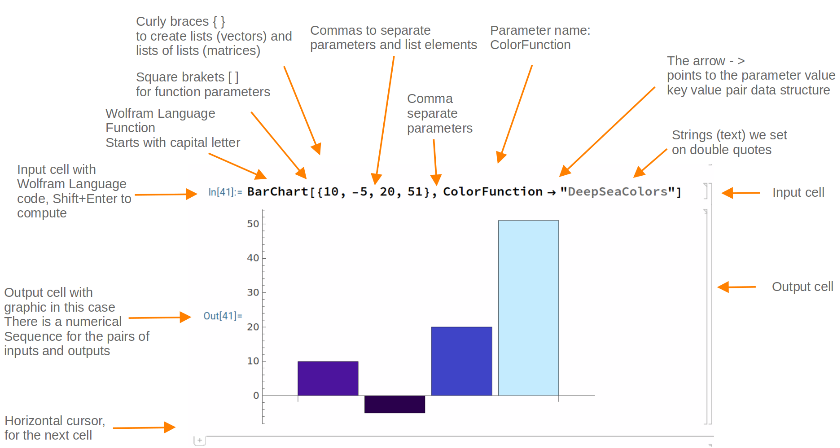
With a AI LLM prompt, we get a beginners view of Wolfram Language Syntax:
In[]:=
ResourceFunction["ImportMarkdownString"][LLMSynthesize["Explain Wolfram Language sintaxe such as the symbols \" [ ] ( ) and functions, and general programming language usage"]]
Out[]=
The Wolfram Language, associated with Mathematica and Wolfram Alpha, is a symbolic programming language that emphasizes mathematical computation, data manipulation, and functional programming paradigms. Here's a brief explanation of its syntax and programming features: 1. Function Application: 2. Lists: 3. Groups: 4. Assignment: Functions in the Wolfram Language can take multiple arguments and can be defined in multiple ways:1. Built-in Functions: 2. Defining Functions:
3. Anonymous Functions: 1. Conditional Statements:
2. Loops:
3. Pattern Matching:
1. Module:
2. Packages: 3. Mathematical Computation:
Overall, the Wolfram Language combines symbolic computation capabilities with a flexible syntax that supports both functional and procedural programming styles. Its rich set of built-in functions and symbolic capabilities make it particularly powerful for scientific computing, data analysis, and visualization.
• Functions are expressed using square brackets . For example, to apply the function f to the argument x, you write .
• Example: calculates the sine of 45 degrees.
• Lists are created using curly braces .
• Example: creates a list containing the numbers 1, 2, and 3.
• Parentheses are used to group expressions and control the order of operations.
• Example: ensures that 3 and 4 are added before being multiplied by 2.
• The assignment operator is . To assign a value to a variable, you write .
• Example: assigns the result of to x.
• Functions like , , , etc., are predefined.
• Example: generates a plot of the sine function from 0 to .
2π
• You can create your own functions using (SetDelayed):


• In this case, would return .
• Use or the shorthand notation.
• Example: or is a function that squares its argument.
• statements allow for conditional execution.
• You can use , , and for iterations.
• Functions can use patterns to match inputs. The underscore represents a single argument, while (double underscore) represents one or more arguments.
• You can create local variables with .
• You can organize code into packages and use to include them.
• The Wolfram Language is particularly strong in mathematical functions, symbolic computation, and data science operations.
• Defining Variables and Functions:
• Using Lists and Operations:
• Creating a Simple Plot:
We have some symbols for short input form, Map for example can be made as /@
In[]:=
Map[f,Range[-10,10]]
Out[]=
{f[-10],f[-9],f[-8],f[-7],f[-6],f[-5],f[-4],f[-3],f[-2],f[-1],f[0],f[1],f[2],f[3],f[4],f[5],f[6],f[7],f[8],f[9],f[10]}
It does the same as above:
In[]:=
f/@Range[-10,10]
Out[]=
{f[-10],f[-9],f[-8],f[-7],f[-6],f[-5],f[-4],f[-3],f[-2],f[-1],f[0],f[1],f[2],f[3],f[4],f[5],f[6],f[7],f[8],f[9],f[10]}
And we can create an inline function (pure function or anonymous function) using the symbols # (slot) and &:
In[]:=
Map[1/#&,Range[10]]
Out[]=
1,,,,,,,,,
1
2
1
3
1
4
1
5
1
6
1
7
1
8
1
9
1
10
Now the same result with short Map and pure function together:
In[]:=
1/#&/@Range[10]
Out[]=
1,,,,,,,,,
1
2
1
3
1
4
1
5
1
6
1
7
1
8
1
9
1
10
Another example, Map short is /@, and pure function with # and &, functional programming style:
In[]:=
If[#<=0,#^2,1/#]&/@Range[-10,10]
Out[]=
100,81,64,49,36,25,16,9,4,1,0,1,,,,,,,,,
1
2
1
3
1
4
1
5
1
6
1
7
1
8
1
9
1
10
Postfix notation with pure function:
Another example of functional programming, // is a post fix symbol:
It does the same as the code in the cell above:
A simple example about postfix symbol:
Nest list to recursively map the function f, functional programming style:
Using pure function (#, &) with NestList:
To learn more:
◼
◼
Wolfram Language: Introducción rápida para programadores
https://www.wolfram.com/language/fast-introduction-for-programmers/es/?source=footer
https://www.wolfram.com/language/fast-introduction-for-programmers/es/?source=footer
◼
Mathematica y Wolfram Language Introducción rápida para estudiantes de matemáticas
https://www.wolfram.com/language/fast-introduction-for-math-students/es/?source=footer
https://www.wolfram.com/language/fast-introduction-for-math-students/es/?source=footer
◼
How to | Use Brackets and Braces Correctly
https://reference.wolfram.com/language/howto/UseBracketsAndBracesCorrectly.html
https://reference.wolfram.com/language/howto/UseBracketsAndBracesCorrectly.html
◼