
Last year, Yohei Nakajima created an autonomous agent that relies on Large Language Models (LLMs), named BabyAGI. The original Python implementation can be found in his GitHub repository. In this post, we will implement a variation of the original BabyAGI using Wolfram Language. BabyAGI became viral on social media, and the community has since developed several other versions. You can follow Yohei on X and watch his recent TED talk to learn about his journey in creating AI agents with LLMs.
How it works
BabyAGI comprises three primary sub-agents: Execution, Task Creation, and Prioritization Agents, which work together to perform tasks based on a given objective.
Out[]=
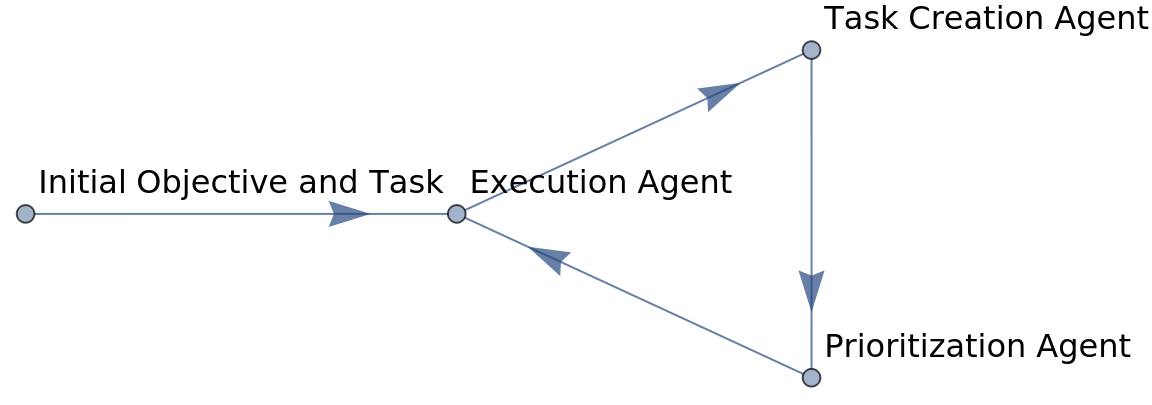
BabyAGI state as an association
BabyAGI state as an association
Understanding BabyAGI’s functionality requires comprehension of its state representation. This involves an association that tracks the objective, incomplete tasks, completed tasks, and the results of those tasks.
In[]:=
babyAGI := <| "objective" -> "", "incompleteTasks" -> {}, "completeTasks" -> {}, "completeTasksResults" -> {}|>;
In[]:=
Dataset@babyAGI
Out[]=

The following helper functions facilitate state manipulation, enabling the setting of objective, addition of tasks, and logging of completed tasks along with their outcomes:
In[]:=
(* helper functions *)setObjective[babyAGI_Association, objective_String] := Association[babyAGI, "objective" -> objective];addIncompleteTask[babyAGI_Association, task_String] := Association[babyAGI, "incompleteTasks" -> Append[babyAGI["incompleteTasks"], task]];addCompleteTask[babyAGI_Association, task_String] := Association[babyAGI, "completeTasks" -> Append[babyAGI["completeTasks"], task]]addCompleteTaskResult[babyAGI_Association, completedTask_] := Association[babyAGI, "completeTasksResults" -> Append[babyAGI["completeTasksResults"], completedTask]];
Execution Agent
Execution Agent
The Execution Agent uses the given objective, an initial given task, and the list of complete and incomplete tasks to make a prompt for an LLM (in this particular case GPT-4) to perform a task. It also adds extra context to the prompt by retrieving relevant completed tasks results via emebeddings, giving it a sort of “memory”. The execution agent also has access to an “external memory”, in our case we give it access to relevant Wolfram Language symbols documentation pages:
Out[]=
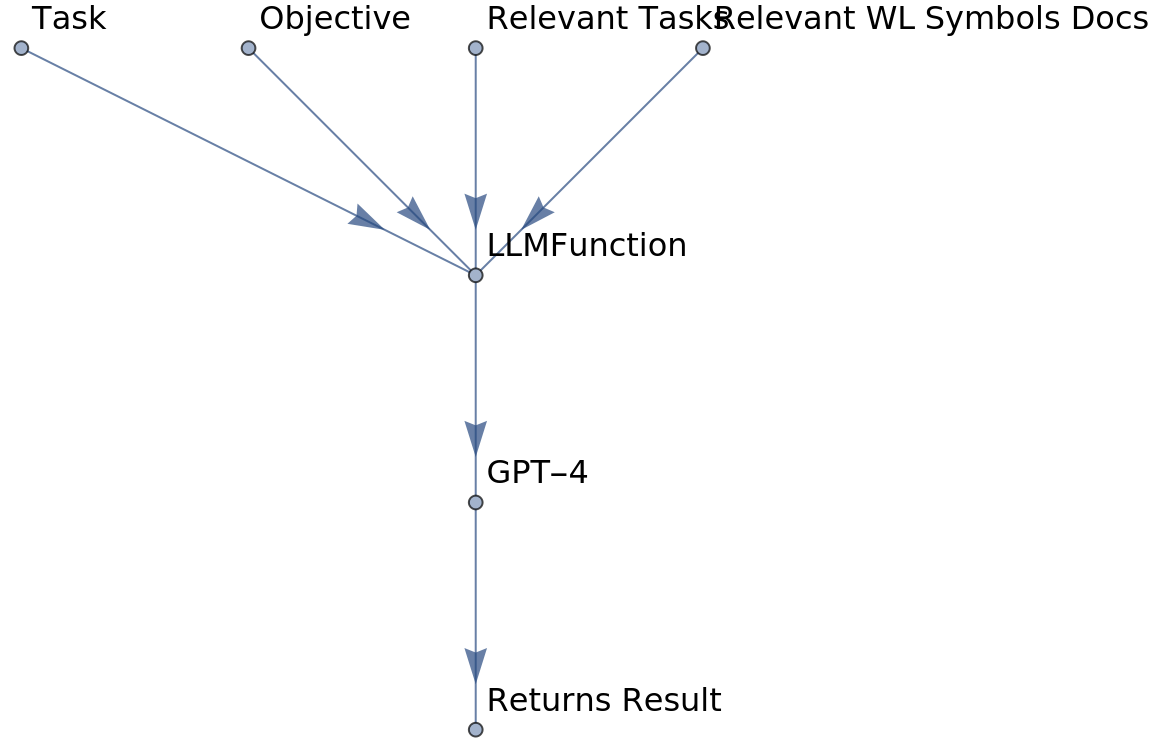
Retrieving relevant Wolfram Language documentation examples using embeddings
Retrieving relevant Wolfram Language documentation examples using embeddings
To reduce “hallucination” and enhance task reliability, we use Retrieval Augmentation Generation (RAG), a technique introduced by Meta researchers in 2020. This approach, combined with OpenAI’s new OpenAI embedding models and NearestFunction, allows us to create our own information retrieval system.
Using ServiceConnect and ServiceExecute, we can access to OpenAI’s new efficient embedding model, known as “text-embedding-3-small”:
In[]:=
ServiceExecute["OpenAI","Embedding",{"Input"->"Hello World!","Model"->"text-embedding-3-small"}]//Short
Out[]//Short=
objectlist,data{objectembedding,1,embedding{-0.00306076,1534,-14}},1,usageprompt_tokens3,total_tokens3
Visualizing sentences embeddings with FeatureSpacePlot
Visualizing sentences embeddings with FeatureSpacePlot
To clearly demonstrate the differences between various text embeddings, we can use the FeatureSpacePlot function. This method is especially valuable for visualizing semantic similarities and differences of a wide range of sentences:
In[]:=
sentences = { "An apple a day keeps the doctor away.", "Apple Inc. revolutionized personal technology.", "Oranges are a rich source of Vitamin C.", "Orange S.A. specializes in telecommunications.", "Amazon rainforests are vital to global ecology.", "Amazon.com, Inc. is a giant in e-commerce and cloud computing."};
We then obtain embeddings for these sentences using OpenAI’s embedding service, specifying our choice of model.
These embeddings represent high-dimensional vectors that capture the essence of each sentence’s meaning.
These embeddings represent high-dimensional vectors that capture the essence of each sentence’s meaning.
In[]:=
sentenceEmbeddings = ServiceExecute["OpenAI", "Embedding", { "Input" -> sentences, "Model" -> "text-embedding-3-small"}];
Finally, we plot these embeddings in a feature space to visualize the semantic relationships between the sentences. FeatureSpacePlot uses Method->”UMAP” by default. We can try another method like “LatentSemanticAnalysis”:
In[]:=
FeatureSpacePlot[ Thread[Labeled[sentenceEmbeddings[["data", All, "embedding"]], sentences]], LabelingFunction -> None, Method->"LatentSemanticAnalysis"]
Out[]=

Creating embeddings for Wolfram Documentation Pages
Creating embeddings for Wolfram Documentation Pages
We can create embeddings for Wolfram documentation pages within a specific sub-domain, such as symbols featured in the guide for “Iterated Maps & Fractals”:
Alternatively, we can obtain more information about each documentation page using an LLMTool named DocumentationLookup, which converts documentation notebooks into plain text facilitating its readability by an LLM. You can explore other tools on the Wolfram LLM Tool Repository. For each symbol the tool retrieves plain text corresponding to its usage section plus some basic examples:
Now, we can get all the plain text documentation pages for the symbols related to fractal geometry:
We can check the standard format of one these documentation texts:
With the documents at hand, we can proceed to compute the embedding using the OpenAI API:
It’s good practice to export the obtained embeddings in case we need to restart the session.
Each generated embedding includes additional information, such as the model used and the number of tokens in the plain texts:
Computing a NearestFunction for information retrieval
Computing a NearestFunction for information retrieval
To create our NearestFunction for information retrieval, we are primarily interested in the plain text of the documents and their corresponding embedding vectors, each having a dimension of approximately 1500.
We simply need to organize our data into a list of key-value pairs, with keys representing the embeddings and values representing the plain text. Here is a simple example to illustrate this:
In our case, we initially need to compile a list of key-value pairs that map embeddings to their corresponding plain text documentation:
Next, we must define our preferred DistanceFunction, which, in our case, will serve as a “similarity metric” between text fragments. A metric frequently utilized in Natural Language Processing (NLP) is CosineDistance, which measures the angular cosine distance between two vectors:
Once again, it’s a good practice to save our computed result in case we need to restart our session:
Now, with this nearest function, we can conduct a semantic search to identify the most relevant functions for a given task.
With Snippet we can get the first line of each of the retrieved docs:
It works! Given the task “Create a lecture introducing the Mandelbrot set using Wolfram Language”, our information retrieval system returned the three most relevant symbols’ documentation pages.
ExecutionAgent using LLMFunction
ExecutionAgent using LLMFunction
Now, we are in a position to construct the Execution Agent using LLMFunction. Briefly, an LLMFunction enables us to craft a prompt by applying a StringTemplate with various arguments and then invoking an LLM to generate a response programmatically.
Here, we use a slightly modified version of the original prompt from the BabyAGI repository, where we first instruct the LLM to act as an AI that performs one task based on a global objective. Secondly, we retrieve some relevant, previously completed tasks for context using the embeddings of those tasks. Then, we retrieve relevant documentation pages using our custom NearestFunction. Finally, we inform the LLM of the current task to be executed:
Here, we use a slightly modified version of the original prompt from the BabyAGI repository, where we first instruct the LLM to act as an AI that performs one task based on a global objective. Secondly, we retrieve some relevant, previously completed tasks for context using the embeddings of those tasks. Then, we retrieve relevant documentation pages using our custom NearestFunction. Finally, we inform the LLM of the current task to be executed:
Creating the prompt template
Creating the prompt template
While it’s possible to directly write the prompt template via LLMFunction, it’s considered good practice to first create a prompt template with StringTemplate and review the structure of the generated prompts before submitting them to an LLM.
The blue boxes within the template indicate slots to be filled (see TemplateSlot). Let’s experiment with this prompt template using a specific objective and task:
One way to apply an StringTemplate is by giving an Association. Note that, since relevantDocs is a list of three strings, we can use StringRiffle to merge them into a single string, separated by 2 new lines each:
Checking prompt’s number of tokens with GPTTokenizer
Checking prompt’s number of tokens with GPTTokenizer
Ensuring the prompt has the correct structure is crucial, as even minor details, such as a missing newline “\n”, can confuse the LLM.
Additionally, the number of tokens in the prompt sent to the LLM is significant. Currently, the context windows for most large language models exceed 2,000 tokens. However, creating a prompt that surpasses this context window could lead to issues. To avoid this, it’s advisable to verify the prompt’s token count before sending it to the LLM. Fortunately, a function called GPTTokenizer, available in the Wolfram Function Repository, can be used directly for this purpose:
Additionally, the number of tokens in the prompt sent to the LLM is significant. Currently, the context windows for most large language models exceed 2,000 tokens. However, creating a prompt that surpasses this context window could lead to issues. To avoid this, it’s advisable to verify the prompt’s token count before sending it to the LLM. Fortunately, a function called GPTTokenizer, available in the Wolfram Function Repository, can be used directly for this purpose:
Applying a prompt to it yields a list of token IDs.
Thus, we can get the number of tokens from our previous prompt as follows:
For this instance, we are within the safe zone. However, as we iterate through BabyAGI’s loop multiple times, the prompts will become larger and eventually exceed the maximum number of tokens allowed.
Set the LLMFunction
Set the LLMFunction
The LLMFunction will be utilized to generate text using a large language model (LLM), specifically GPT-4 for our experiments. The LLMEvaluator option enables us to specify the model and other parameters, such as the sampling temperature:
Note that the temperature was set to 0. Typically, for chat, you might want to increase the temperature, but for coding tasks or outputs that are well-structured, a lower temperature will yield more “deterministic” results.
Now, we can utilize this LLMFunction by providing the previously mentioned Association:
Now, we can utilize this LLMFunction by providing the previously mentioned Association:
Define Execution Agent function
Define Execution Agent function
We can create a custom function for the execution agent, specifying certain options to make the function more streamlined:
Now, using the same objective and task as before, the executionAgent should produce a lecture similar to the previous one:
Great! Here is a code example of the output generated by the execution agent:
Task Creation Agent
Task Creation Agent
The Task Creation Agent is designed to generate new tasks based on the results from the Execution Agent. It takes into account the objective, the outcome of the last task, its description, and a list of incomplete tasks. It ensures that the newly created tasks do not overlap with the incomplete ones.
As we did with the Execution Agent, we begin by first creating the StringTemplate for the prompt:
Then, we create the LLMFunction, using the same LLMEvaluator configuration. Since this task is somewhat simpler, we could opt for the gpt-3.5-turbo model instead of the more costly gpt-4 model.
Let’s explore what new tasks the Task Creation Agent will generate based on our previous outcome:
Fantastic! We can now write a custom function for the Task Creation Agent that incorporates the LLMFunction and also post-processes the generated tasks:
Let’s give it a try.
Prioritization Agent
Prioritization Agent
The Prioritization Agent receives a list of tasks and an objective. It cleans up the incomplete task list’s formatting and reorders them, considering the main objective and completed tasks. The agent does not eliminate any tasks.
Once again, we begin by first creating the StringTemplate for the prompt:
Then, we create the LLMFunction:
Similarly to what we’ve done for the Task Execution Agent, we can create a custom function for the Prioritization Agent that incorporates the LLMFunction and also post-processes the generated tasks:
Let’s put it to the test.
In this specific instance, it reversed the order, likely considering that the lecture on the concept of self-similarity should be created before the lecture on the Julia set.
Integrating BabyAGI’s Components
Integrating BabyAGI’s Components
Initializing BabyAGI involves setting a main objective and starting with a preliminary task. Through a structured loop, BabyAGI executes tasks, logs completions, generates new tasks, and reorders them, iteratively advancing towards its main goal.
Initialize BabyAGI
Initialize BabyAGI
Let’s initialize BabyAGI with a main objective and an initial incomplete task:
Constructing BabyAGI’s main loop
Constructing BabyAGI’s main loop
Now, we can establish the main loop for BabyAGI as follows:
1. Retrieve the first incomplete task.
2. Execute the task.
3. Log the completed task in BabyAGI.
4. Remove the completed task from the list of incomplete tasks.
5. Generate new incomplete tasks.
6. Add the new incomplete tasks to BabyAGI.
7. Reorder the list of incomplete tasks based in priority.
1. Retrieve the first incomplete task.
2. Execute the task.
3. Log the completed task in BabyAGI.
4. Remove the completed task from the list of incomplete tasks.
5. Generate new incomplete tasks.
6. Add the new incomplete tasks to BabyAGI.
7. Reorder the list of incomplete tasks based in priority.
Iterating through the loop n times
Iterating through the loop n times
Now that we have established the main loop for BabyAGI, we can execute it multiple times using Nest:
Running BabyAGI for 4 iterations
Running BabyAGI for 4 iterations
Now that we’ve assembled all the components, let’s test the code by running BabyAGI for 4 iterations:
Note that in the 4th lecture, there are empty lines where one might expect formulas/code. This issue is due to a bug that will be addressed in the next paclet update for LLMFunctions. Currently, StringTemplate does not properly handle code wrapped with triple backticks (```), resulting in the text from the documentation pages sent to the LLM lacking some of the code examples.
Alternatively, we can review the generated incomplete tasks:
Adding more chapters to the lecture with additional iterations
Adding more chapters to the lecture with additional iterations
One advantage of representing BabyAGI’s state as an association is that we can perform additional iterations while retaining the previous results. Suppose we want to add two more chapters to the course; we can simply execute BabyAGI for two additional iterations:
Conclusions
Conclusions
Although BabyAGI may not be the pinnacle of autonomous agents based on LLMs, it serves as an accessible entry point for those interested in developing their own AI solutions. By leveraging the Wolfram Language and LLMs, enthusiasts can experiment with creating versatile, task-driven agents like BabyAGI.
Further Reading and References
Further Reading and References
The field of building autonomous agents using LLMs is rapidly evolving. For those intrigued by the possibilities of enhancing LLM results through multi-agent systems, the following resources provide valuable insights in this dynamic field:
◼
A Survey on Large Language Model based Autonomous Agents: https://arxiv.org/abs/2308.11432
◼
Long list of papers on Large Language Model Agents: https://github.com/zjunlp/LLMAgentPapers
◼
AutoGen: Enabling Next-Gen LLM Applications via Multi-Agent Conversation: https://arxiv.org/abs/2308.08155
◼
Improving Factuality and Reasoning in Language Models through Multiagent Debate: https://arxiv.org/abs/2305.14325
◼
Agents is all you need: https://arxiv.org/pdf/2402.05120.pdf
Generated Lecture on Fractal Geometry
Note: Below is the lecture on fractal geometry generated by BabyAGI, with minor formatting edits applied.
Lecture 1: Introduction to the Mandelbrot Set
Lecture 1: Introduction to the Mandelbrot Set
Introduction
Introduction
The Mandelbrot set is a set of complex numbers defined by a simple iterative algorithm, and it is one of the most famous examples of mathematical visualizations. It is named after the mathematician Benoit Mandelbrot, who studied and popularized it.
Definition of the Mandelbrot Set
Definition of the Mandelbrot Set
The Mandelbrot set is defined by the iterative equation:
where z[0] = 0 and c is a complex number. The Mandelbrot set consists of all values of c for which the sequence remains bounded.
Visualizing the Mandelbrot Set with Wolfram Language
Visualizing the Mandelbrot Set with Wolfram Language
Wolfram Language provides a function MandelbrotSetPlot to visualize the Mandelbrot set. Let’s start by plotting the whole set:
This will generate a plot of the Mandelbrot set over a default rectangle.
Zooming and Coloring
Zooming and Coloring
We can zoom into a specific region of the set and change the color scheme . For example, let’s zoom into the rectangle defined by the corners - 1.3 - 0.1i and - 1.2 + 0.1i, and use the “SunsetColors” scheme :
Böttcher Coordinate
Böttcher Coordinate
The Böttcher coordinate is a complex coordinate that is used in the study of the Mandelbrot set. It is defined for points outside the Mandelbrot set. We can compute it using the MandelbrotSetBoettcher function. For example, let’s compute the Böttcher coordinate of 1 + i:
Mandelbrot Set Distance
Mandelbrot Set Distance
The MandelbrotSetDistance function computes the distance from a point to the Mandelbrot set. This can be used to create stark binary images of the set. For example, let’s compute the distance from 1 + i to the set:
In the next lecture, we will explore more properties of the Mandelbrot set and learn how to create animations using Wolfram Language.
Lecture 2: The Julia Set and its Relationship with the Mandelbrot Set
Lecture 2: The Julia Set and its Relationship with the Mandelbrot Set
Introduction
Introduction
The Julia set, named after the French mathematician Gaston Julia, is a set of complex numbers that is defined by an iterative function, similar to the Mandelbrot set. However, while the Mandelbrot set iterates over different complex numbers for a fixed function, the Julia set uses a fixed complex number for different functions.
Definition of the Julia Set
Definition of the Julia Set
The Julia set is defined by the iterative equation:
where z[0] is a complex number and c is a fixed complex number. The Julia set consists of all values of z[0] for which the sequence remains bounded.
Visualizing the Julia Set
Visualizing the Julia Set
Wolfram Language provides a function `JuliaSetPlot` to visualize the Julia set. Let’s start by plotting the Julia set for c = -0.8 + 0.156i:
This will generate a plot of the Julia set for the given value of c.
The Relationship between the Mandelbrot Set and the Julia Set
The Relationship between the Mandelbrot Set and the Julia Set
The Mandelbrot set can be seen as a map of all Julia sets. For each point c in the complex plane, we can generate a Julia set. If the Julia set for a given c is connected, then c is in the Mandelbrot set. If the Julia set is not connected, then c is not in the Mandelbrot set.
We can visualize this relationship by plotting the Mandelbrot set and the Julia set for a given c side by side:
We can visualize this relationship by plotting the Mandelbrot set and the Julia set for a given c side by side:
In the next lecture, we will explore more properties of the Julia set and learn how to create animations using Wolfram Language.
Lecture 3: Understanding Fractal Dimension using Wolfram Language
Lecture 3: Understanding Fractal Dimension using Wolfram Language
Introduction
Introduction
Fractal Dimension is a key concept in Fractal Geometry. Unlike traditional dimensions, which are integer values, Fractal Dimension can take on non-integer values. This reflects the complex, ‘self-similar’ nature of fractals.
Definition of Fractal Dimension
Definition of Fractal Dimension
Fractal Dimension is a statistical quantity that shows how a fractal scales differently than the space it’s embedded in. It’s a measure of how the detail in a pattern changes with the scale at which it’s measured.
Calculating Fractal Dimension
Calculating Fractal Dimension
where N is the number of self-similar pieces and S is the scaling factor.
Hilbert Curve
Hilbert Curve
The Hilbert Curve is a continuous fractal space-filling curve. Let’s generate a 3rd step Hilbert curve and calculate its Fractal Dimension.
The Fractal Dimension of the Hilbert Curve is log(4)/log(2) = 2.
Menger Sponge
Menger Sponge
The Menger Sponge is a three-dimensional fractal. Let’s generate a 2nd step Menger Sponge and calculate its Fractal Dimension.
The Fractal Dimension of the Menger Sponge is log(20)/log(3) ≈ 2.727.
Cantor Set
Cantor Set
The Cantor Set is a one-dimensional fractal. Let’s generate a 4th step Cantor Set and calculate its Fractal Dimension.
The Fractal Dimension of the Cantor Set is log(2)/log(3) ≈ 0.631.
In the next lecture, we will explore more fractals and their properties using Wolfram Language.
CITE THIS NOTEBOOK
CITE THIS NOTEBOOK
BabyAGI à la Wolfram: a task-driven autonomous agent using Wolfram Language
by Jofre Espigule-Pons
Wolfram Community, STAFF PICKS, March 5, 2024
https://community.wolfram.com/groups/-/m/t/3135678
by Jofre Espigule-Pons
Wolfram Community, STAFF PICKS, March 5, 2024
https://community.wolfram.com/groups/-/m/t/3135678