In my previous post about word ladders I showed that very interesting patterns can be found in the weighted adjacency matrices which store the “word ladder distance” between each pair of words. e.g. “lest” has a word ladder distance of 0 from itself, 1 from “last,” 2 from “fast” 3 from “fact” and 4 from “word.” While making that project, I accidentally discovered an interesting connection between “word Manhattan distance” and the bitwise XOR pattern.
Distance Between two Words
Distance Between two Words
It is useful to have a function which gets the all the words from WordList[] with a centian number of letters.
wordsNLetters[n_]:=Select[WordList[],#==ToLowerCase[#]&&StringLength[#]==n&];Length@wordsNLetters[6]
Out[]=
4618
Since there are to many such words, I made 2 more functions, one which gets the first 300 words, and another which attempts to get 300 words which are evenly spaced from a to z (kind of like a zoomed-out lower-resolution list of all the words).
wordsFirst300[n_]:= wordsNLetters[n][[;; Min[200, Length@wordsNLetters@n]]];wordsSkip[n_] := wordsNLetters[n][[;; ;; Max[Floor[Length[wordsNLetters@n]/200], 1]]];Length@wordsFirst300[6]Length@wordsSkip[6]
Out[]=
200
Out[]=
201
In[]:=
wordToVector[a_] := Flatten[ToCharacterCode /@ StringSplit[a, ""]] - 97wordLadderDist[word1_,word2_] := Total[(Boole[#1>=1]&)/@Abs/@(wordToVector[word2]-wordToVector[word1])]wordManhattanDist[word1_,word2_] := ManhattanDistance[wordToVector[word1],wordToVector[word2]]
Making Readable Tables
Making Readable Tables
I wanted to make a function to visualize the top left corner of each table with labels. I found a useful article in the wolfram docs showing how to do what I wanted.
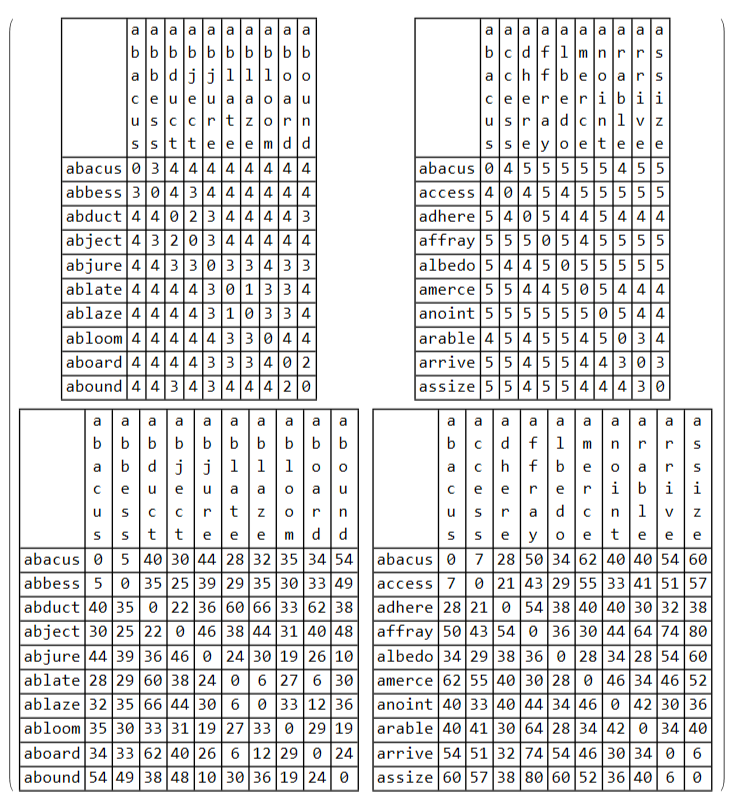
The first row is the word ladder distance, and the second row is the word Manhattan Distance, and the columns are for the first few words with or without skips.
Notice how the word Manhattan distances are much larger than the word ladder distances.
The first row is the word ladder distance, and the second row is the word Manhattan Distance, and the columns are for the first few words with or without skips.
Notice how the word Manhattan distances are much larger than the word ladder distances.
miniTable[func_,words_] := Module[{outputTable,x,y,n},n=10;(*outputTable = Table[func[words[[x]],words[[y]]],{y,1,n},{x,1,n}];*)outputTable = Table[func[words[[x]],words[[y]]],{y,1,n},{x,1,n}];(*outputTable = Prepend[outputTable,Table["",{x,1,10}]];*)outputTable = Prepend[outputTable,Column/@StringSplit[words[[;;n]],""]];outputTable = MapThread[Prepend,{outputTable,Prepend[words[[;;n]],""]}];(*outputTable//MatrixForm*)Grid[outputTable,Frame->All]];MatrixForm[{{miniTable[wordLadderDist,wordsFirst300[6]], miniTable[wordLadderDist,wordsSkip[6]]},{miniTable[wordManhattanDist,wordsFirst300[6]], miniTable[wordManhattanDist,wordsSkip[6]]}}]
Making Bigger Tables (with ArrayPlot[])
Making Bigger Tables (with ArrayPlot[])
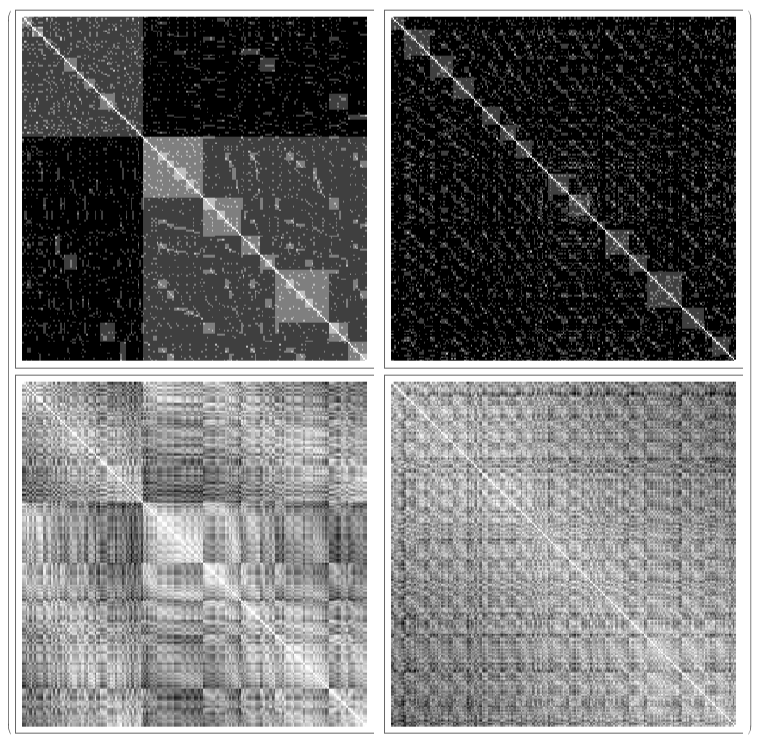
The small tables were just to help explain the algorithm, but things really get interesting when we look at array plots of the distances over: first 300 words (left column
bigTable[func_,words_] := Module[{outputTable,x,y,n},n=Length[words];(*outputTable = Table[func[words[[x]],words[[y]]],{y,1,n},{x,1,n}];*)outputTable = Table[func[words[[x]],words[[y]]],{y,1,n},{x,1,n}];ArrayPlot[outputTable,ImageSizeMedium]];MatrixForm[{{bigTable[wordLadderDist,wordsFirst300[4]], bigTable[wordLadderDist,wordsSkip[4]]},{bigTable[wordManhattanDist,wordsFirst300[4]], bigTable[wordManhattanDist,wordsSkip[4]]}}]
The Bitwise XOR Pattern
The Bitwise XOR Pattern
The Exclusive Or (XOR) operator is a common logical operator often represented by the symbols ⊻, ⊕, ↮, ⇎, and its American National Standards Institute (ANSI) logic gate symbol.
The Bitwise Exclusive Or operator is a slightly more esoteric operator which is a generalization / analog to the XOR operation from single binary digits or truth values to nonnegative integers.
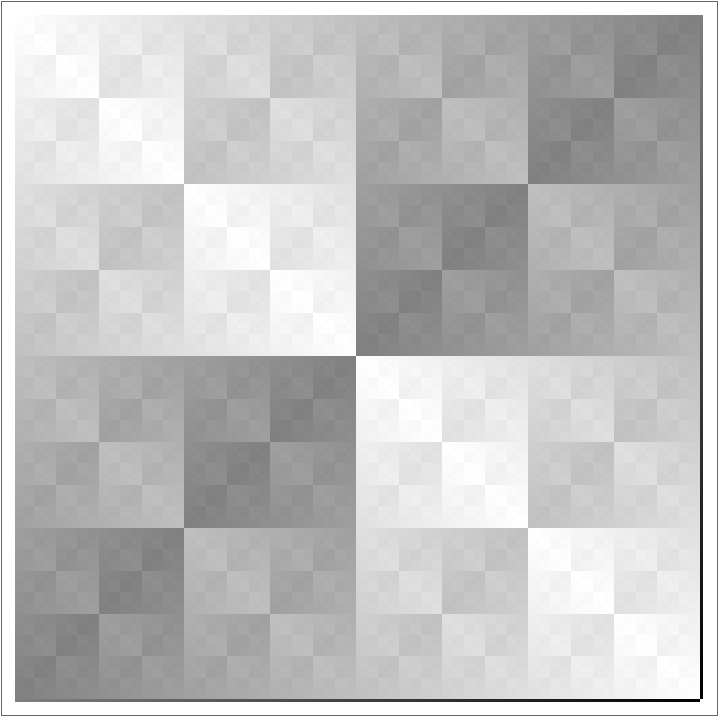
The Bitwise XOR pattern is an even more esoteric mathematical concept which is realized by plotting the bitwise XOR of two numbers with the input space being pixel coordinates and the output space being color. I found out about it because of a user named mtrn on Khan Academy who made amazing 3D graphics using it as a texture that is much cheaper to compute than an image. It is also mentioned in a Wolfram MathWorld article about XOR.
The Bitwise Exclusive Or operator is a slightly more esoteric operator which is a generalization / analog to the XOR operation from single binary digits or truth values to nonnegative integers.
The Bitwise XOR pattern is an even more esoteric mathematical concept which is realized by plotting the bitwise XOR of two numbers with the input space being pixel coordinates and the output space being color. I found out about it because of a user named mtrn on Khan Academy who made amazing 3D graphics using it as a texture that is much cheaper to compute than an image. It is also mentioned in a Wolfram MathWorld article about XOR.
ArrayPlot[Table[BitXor[x,y],{y,256},{x,256}], ImageSize->Medium]
Out[]=
Binary words
Binary words
I realized (when working on my previous project) that the word manhattan distance looked kind of similar to this graph, with the 3D lighting aesthetic.
wordsBaseDim gives the list of all d-length (dimension) words with an alphabet with b (base) letters.
Here, I demonstrate a use of the function to list out all the binary words with 3 letters.
wordsBaseDim gives the list of all d-length (dimension) words with an alphabet with b (base) letters.
Here, I demonstrate a use of the function to list out all the binary words with 3 letters.
Small tables
Small tables
I applied the same functions I used on the ordinary English words above to the binary words. Since there are only 256 binary words of length 8, it is not necessary to truncate or skip like I did with wordsFirst300 and wordsSkip. So there is only one list with the 2 functions applied to it.
Big tables
Big tables
Note how the word Manhattan distance is identical to the word ladder distance for the binary words. This is because there are only two letters, a and b, so if one is different it only increases the Manhattan distance by 1, while also (as any different letter would) only increasing the word ladder distance by 1.
Concluding Remarks
Concluding Remarks
You can make different ways of assigning “distances” to words based on their letters, including the word ladder distance (number of different letters), the Manhattan distance (sum of distances between letters), and the Bitwise XOR function. Color vs position plots of these functions generates fractal shapes which have a similar aesthetic to reflective metal, probably because of the increased lightness along certain straight lines, reminiscent of the reflection of a point light source on cylinders or other common surfaces.
Keywords (and other symbols)
Keywords (and other symbols)
◼
Word Ladders
◼
Exclusive Or (XOR)
◼
Bitwise Operators
◼
Manhattan Distance
◼
Tables
◼
Adjacency Matrix
◼
⊻
◼
⊕
CITE THIS NOTEBOOK
CITE THIS NOTEBOOK
The bitwise XOR pattern and connection to Manhattan distance
by Chase Marangu
Wolfram Community, STAFF PICKS, June 25, 2023
https://community.wolfram.com/groups/-/m/t/2943295
by Chase Marangu
Wolfram Community, STAFF PICKS, June 25, 2023
https://community.wolfram.com/groups/-/m/t/2943295