The Wolfram Language is unusually strong on 3D — hundreds of objects ship in the box, and the same Graphics3D head covers everything from a built-in Stanford Bunny to a million- triangle iPhone LiDAR scan to an AI-generated GLB pulled off Replicate. The catch is texture: Import silently drops the material binding for every multi-material OBJ in practice. This post tells the full story — built-in, downloaded, scanned, AI-generated — and ships a small importer that makes textures actually arrive.
Marco Thiel, May 2026 — github.com/mthiel74/Wolfram3DObjects
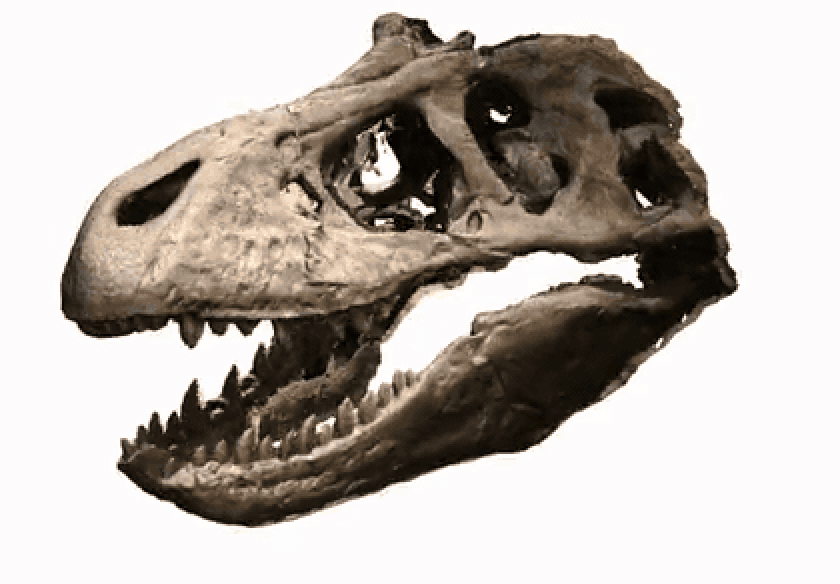
Above: a free Sketchfab download of a Tyrannosaurus rex skull (~620 k triangles, single 4 k photogrammetric atlas), imported with ImportTexturedOBJ from this post and rendered as a slow turntable. The same one-line import works on iPhone-LiDAR scans, AI-generated meshes, and CAD exports.
How to read this post (and where the raw assets live)
The headline story is simple: Wolfram has world-class 3D out of the box; pulling outside assets in is mostly easy except for textures, and this post solves that. Three things to know:
• What you are reading right now is the slim, Wolfram-Community-attachable version (~17 MB). Every dense iPhone-LiDAR / photogrammetry / Hunyuan demo appears as a 5-second turntable rendered ahead of time and inlined as animation frames. Open it cold and everything plays without re-evaluation.
• For the fully interactive version — every output a live Graphics3D you can rotate, zoom, slice with RegionIntersection, or feed into Tour3DVideo yourself — there are two ways in. Either download the prebuilt 3DObjects-post-v2.nb (1.82 GB) directly from Dropbox and open it locally, or clone the GitHub repo (link below), open build_notebook.wls (no v3 suffix), set the path constants at the top, and run wolframscript -file build_notebook.wls to rebuild 3DObjects-post-v2.nb (1.82 GB) yourself. The heavy build is too large for git or for Community attachments, so the binary is not on the repo; the Dropbox copy and the script that makes it are how you get it.
• For the source material — the importer code, both build scripts, the cached Replicate predictions, the iPhone scans, the GIF turntables embedded above, and the un-executed copy of this notebook — clone github.com/mthiel74/Wolfram3DObjects. wolframscript -file community/build_notebook_v3.wls rebuilds this 17 MB notebook from scratch in about three minutes once you have ffmpeg and the cached assets in place. Both build scripts pull from the same ImportTexturedOBJ.wl library.
The headline story is simple: Wolfram has world-class 3D out of the box; pulling outside assets in is mostly easy except for textures, and this post solves that. Three things to know:
• What you are reading right now is the slim, Wolfram-Community-attachable version (~17 MB). Every dense iPhone-LiDAR / photogrammetry / Hunyuan demo appears as a 5-second turntable rendered ahead of time and inlined as animation frames. Open it cold and everything plays without re-evaluation.
• For the fully interactive version — every output a live Graphics3D you can rotate, zoom, slice with RegionIntersection, or feed into Tour3DVideo yourself — there are two ways in. Either download the prebuilt 3DObjects-post-v2.nb (1.82 GB) directly from Dropbox and open it locally, or clone the GitHub repo (link below), open build_notebook.wls (no v3 suffix), set the path constants at the top, and run wolframscript -file build_notebook.wls to rebuild 3DObjects-post-v2.nb (1.82 GB) yourself. The heavy build is too large for git or for Community attachments, so the binary is not on the repo; the Dropbox copy and the script that makes it are how you get it.
• For the source material — the importer code, both build scripts, the cached Replicate predictions, the iPhone scans, the GIF turntables embedded above, and the un-executed copy of this notebook — clone github.com/mthiel74/Wolfram3DObjects. wolframscript -file community/build_notebook_v3.wls rebuilds this 17 MB notebook from scratch in about three minutes once you have ffmpeg and the cached assets in place. Both build scripts pull from the same ImportTexturedOBJ.wl library.
Abstract
Abstract
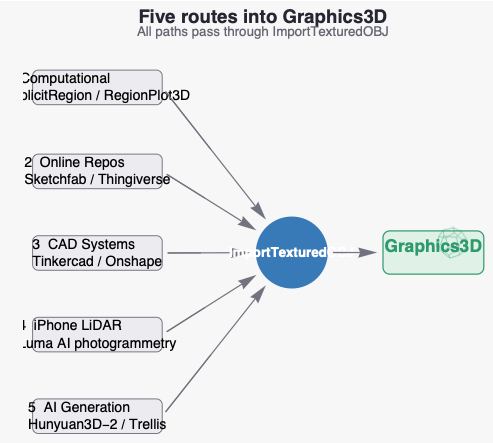
The Wolfram Language has been good at 3D for a long time. Graphics3D is a first-class scene type, MeshRegion gives you the full constructive-solid-geometry stack, AnatomyPlot3D hands you over 1700 anatomical structures, Tour3DVideo orbits a turntable for free, and ExampleData["Geometry3D"] ships a starter catalogue of meshes that need no setup. For most pedagogical purposes that is everything.The interesting work begins when you want a specific object that does not happen to be in the built-in catalogue. This post walks the four routes that get you there — in the order you would discover them yourself — plus the piece of plumbing they all share. 1. Computational construction — RegionPlot3D, DiscretizeRegion, ImplicitRegion on any formula or Boolean combination of regions. 2. Pull from the public web — Sketchfab, Thingiverse, TurboSquid, Free3D between them host millions of OBJ / GLB / STL files. 3. Build it yourself in CAD — Tinkercad, Onshape, Fusion 360, SolidWorks all export OBJ. 4. Scan it with an iPhone — a Pro-model phone with the LiDAR sensor plus a photogrammetry app gets you a textured mesh of any real-world object in ten minutes. 5. Generate it with an AI model — Hunyuan3D, Trellis, and the rest of the 2025–2026 image-to-3D wave will turn a photograph or a text prompt into a textured mesh in under two minutes on Replicate.All five end in the same place: a GraphicsComplex (or a MeshRegion) in your notebook. But there is a stubborn snag that takes most people by surprise the first time: Import["something.obj"] silently drops material-to-texture binding for any OBJ that uses more than one map_Kd image. Photogrammetric scans always have 30–60 of those. AI-generated GLBs need one external converter step. The asset arrives as flat grey geometry, the texture stays on disk untouched, and you stare at it for a while wondering what you did wrong.The deliverable in this post is a small file, ImportTexturedOBJ.wl, that parses the .mtl, groups faces by usemtl, and emits the colour information the way the front end expects to see it. Every demo below uses it as a one-liner.
0. Setup
0. Setup
One initialisation cell. repoDir resolves to the parent of this notebook (the GitHub repo root) so every later import works whether you open the notebook from the repo, downloaded it elsewhere, or just re-evaluate a single cell. ImportTexturedOBJ is loaded from the package alongside this file.
repoDir=ParentDirectory[NotebookDirectory[]];Get[FileNameJoin[{NotebookDirectory[],"ImportTexturedOBJ.wl"}]];asset[parts__String]:=FileNameJoin[{repoDir,parts}];cached[parts__String]:=FileNameJoin[{NotebookDirectory[],"cached",parts}]
1. Built-in 3D objects
1. Built-in 3D objects
Long before any of the import workflows below, the Wolfram Language ships with a working catalogue of 3D models that need no setup. ExampleData["Geometry3D"] enumerates a couple of dozen, ranging from textbook objects (Stanford Bunny, Utah Teapot) to characters (Beethoven, the Space Shuttle). Every entry returns a ready-to-display Graphics3D expression.
ExampleData[{"Geometry3D","SpaceShuttle"}]

Higher-level helpers build on the same pile of geometry. AnatomyPlot3D pulls 3D meshes from the curated AnatomicalStructure entity domain (1700+ structures — every joint, organ, and muscle group) and colour-codes the submeshes for you:
AnatomyPlot3D

Anything you can write as a parametrisation or an implicit equation joins the same family. A Klein bottle is one line:
ParametricPlot3D2+CosSin[u]-SinSin[2u]Cos[v],2+CosSin[u]-SinSin[2u]Sin[v],SinSin[u]+CosSin[2u],{u,0,2π},{v,0,2π},
v
2
v
2
v
2
v
2
v
2
v
2

2. Online repositories
2. Online repositories
Built-in geometry runs out fast. The next stop is the public web. Thingiverse, Sketchfab, TurboSquid, and Free3D between them host millions of meshes in OBJ, STL, GLB, FBX, and PLY — every format the Wolfram Language imports natively. Pick a model, download the ZIP, and call our textured importer. Here is a tyrannosaurus skull (~620 k triangles, single 4 k × 4 k photogrammetric atlas) from a free Sketchfab download:
A note on file formats
OBJ ships geometry, normals, and texture coordinates as plain text plus a sidecar .mtl that points at PNG / JPG textures. GLB is the binary glTF — geometry, materials, animations, and textures all packed in one file. Wolfram imports both, but the OBJ path is the one with the texture-binding wart we will fix in section 5. Rule of thumb: prefer GLB when you can; reach for OBJ + ImportTexturedOBJ when you cannot.
OBJ ships geometry, normals, and texture coordinates as plain text plus a sidecar .mtl that points at PNG / JPG textures. GLB is the binary glTF — geometry, materials, animations, and textures all packed in one file. Wolfram imports both, but the OBJ path is the one with the texture-binding wart we will fix in section 5. Rule of thumb: prefer GLB when you can; reach for OBJ + ImportTexturedOBJ when you cannot.
3. CAD systems
3. CAD systems
Browser CAD tools (Tinkercad, Onshape, Fusion 360, SolidWorks) all export OBJ. Tinkercad in particular is great for quick parametric mock-ups and exports a multi-material OBJ where each colour-block in the editor becomes its own material with a solid Kd RGB triple in the .mtl — no textures, no UVs. Stock Import loses the colour assignment for the same reason it loses textures (it discards the usemtl grouping); ImportTexturedOBJ keeps it. Here is a Tinkercad mock-up of a milk carton being smashed by a hammer — five materials, each one a flat colour:
4. Computational construction
4. Computational construction
Many of the most useful 3D objects are not scanned or modelled at all but constructed from a formula or an algorithm. RegionPlot3D, DiscretizeRegion, ImplicitRegion, MeshRegion, and the constructive-solid- geometry Boolean operations on regions cover most cases. This is also the right tool when you want to modify an imported mesh — cap a hole, smooth out scan noise, intersect two scans — before passing it on.
5. iPhone LiDAR scans (and the multi-material trap)
5. iPhone LiDAR scans (and the multi-material trap)
This is the section you came for. The deliverable is to scan a real object on an iPhone, drop the export into the notebook, and have it appear as a properly textured MeshRegion you can rotate, slice, decimate and otherwise hand to the rest of the language. We will work all the way through, including a working code import that matches the texture.
5.1. Capturing the scan
5.1. Capturing the scan
5.2. The multi-material trap
5.2. The multi-material trap
Here is the snag. Hit Import on the .obj and the geometry comes back fine but every texture is silently dropped:
All 87 atlases are sitting on disk in textures/. The .mtl literally lists them one after another (map_Kd textures/mesh_material0001_map_Kd.png and so on). Yet the import returns flat geometry without any of them attached. This is not a bug in any single file. The OBJ format is correctly formed; the .mtl is correctly formed; the textures exist on disk; and Import parses all of them. What the front end does not do is keep the per-face usemtl grouping that ties a triangle to its atlas tile. The information is read but discarded.
This hits anything with more than one map_Kd: every photogrammetric scan (LumaLabs, Polycam, RealityCapture), every Tinkercad export with multiple colour blocks, and every Replicate output that comes back through trimesh.export (section 6.2 below). A model with one texture works; a model with two does not.
This hits anything with more than one map_Kd: every photogrammetric scan (LumaLabs, Polycam, RealityCapture), every Tinkercad export with multiple colour blocks, and every Replicate output that comes back through trimesh.export (section 6.2 below). A model with one texture works; a model with two does not.
5.3. The fix
5.3. The fix
The fix is to read the .mtl ourselves, group faces by usemtl, and emit colour information the way the front-end's surface renderer actually expects to see it. About 80 lines of Wolfram Language; ships in ImportTexturedOBJ.wl. Two paths, picked automatically by triangle count: small meshes (< 200 k tris) get Graphics3D[{Texture[img], GraphicsComplex[..., VertexTextureCoordinates -> ...]}] with per-pixel UV sampling; dense scans (≥ 200 k tris) get a single MeshRegion with per-corner VertexColors sampled at build time, plus Method -> {"DeleteDuplicateCoordinates" -> False} so MeshRegion does not silently merge the per-corner duplicates back to a single colour per shared vertex.
With that loaded, the same robot from above:
With that loaded, the same robot from above:
And the same trick on a gingerbread-man-shaped novelty mug I have on my desk — 40 k triangles, single 1024 × 1024 albedo, small enough to keep as live Graphics3D:
And on a scanned car (855 k triangles spread over 55 photographic tiles — the worst case for the default importer):
Why the photogrammetric scans look slightly mottled
Luma's iPhone exporter chops the mesh into ~50 sub-meshes and bakes each into its own 1024 × 1024 atlas, sourced from a different cluster of capture frames per sub-mesh. Different photographs have different lighting and white balance, so the boundary between two sub-meshes is visible as a slight colour discontinuity. This is intrinsic to the multi-atlas export, not an importer bug, and shows up identically in Blender or three.js. For a single seamless atlas, route the asset through Luma's GLB exporter or run theFroh/imagepacker or crobi/BakeObj before import.
Luma's iPhone exporter chops the mesh into ~50 sub-meshes and bakes each into its own 1024 × 1024 atlas, sourced from a different cluster of capture frames per sub-mesh. Different photographs have different lighting and white balance, so the boundary between two sub-meshes is visible as a slight colour discontinuity. This is intrinsic to the multi-atlas export, not an importer bug, and shows up identically in Blender or three.js. For a single seamless atlas, route the asset through Luma's GLB exporter or run theFroh/imagepacker or crobi/BakeObj before import.
6. AI-generated 3D objects via Replicate
6. AI-generated 3D objects via Replicate
The fastest moving piece of the 3D ecosystem in 2025-2026 has been single-image (or text-prompt) 3D generation. Replicate hosts essentially every open-weight model in this category behind one HTTP API; you sign in with GitHub, get an API token, and call them all the same way — no GPU required on your laptop. The state of the art as of May 2026:
1
.Hunyuan3D 2.1 — Tencent. Image-to-3D, returns a clean GLB with a single PBR material. Wall-clock typically 90–120 s per call on Replicate's L40S tier. Slug ndreca/hunyuan3d-2. This is what we use below.
2
.TRELLIS / TRELLIS.2 — Microsoft, CVPR 2025 spotlight. Comparable image-to-3D quality. Replicate's deployment takes a single image (parameter named
3
.TripoSR — the speed pick. 6–8 GB VRAM, MIT-licensed, a textured GLB in well under a second on an A100. Slug camenduru/tripo-sr.
4
.FLUX schnell, SDXL, Stable Diffusion 3 — Replicate hosts every popular text-to-image model behind the same API. We chain FLUX into Hunyuan in 6.3.
5
.DreamGaussian, Shap-E — older direct text-to-3D pipelines, included for completeness. Output quality is well behind anything in the text image 3D chain below.
6.1. A 30-line Replicate client in pure Wolfram
6.1. A 30-line Replicate client in pure Wolfram
Replicate's REST API is small enough to wrap from scratch. Three calls do everything we need:
• POST /v1/predictions to start a job (with a version hash for one of the model variants below)
• GET /v1/predictions/{id} to poll until status is "succeeded"
• a plain URLDownload of the output URL
• POST /v1/predictions to start a job (with a version hash for one of the model variants below)
• GET /v1/predictions/{id} to poll until status is "succeeded"
• a plain URLDownload of the output URL
A note on the API token
Generate one at replicate.com/account/api-tokens. Tokens start with r8_; SystemCredentialAdd stores them in your OS-level keychain (macOS Keychain, Windows Credential Vault) so the literal string never lives in a notebook file or a shell history. Do not paste your real token directly into the SystemCredentialAdd call you see below — type it into the front end after the cell evaluates and clear the cell, or run the call once from a scratch kernel.
Generate one at replicate.com/account/api-tokens. Tokens start with r8_; SystemCredentialAdd stores them in your OS-level keychain (macOS Keychain, Windows Credential Vault) so the literal string never lives in a notebook file or a shell history. Do not paste your real token directly into the SystemCredentialAdd call you see below — type it into the front end after the cell evaluates and clear the cell, or run the call once from a scratch kernel.
6.2. Image textured 3D with Hunyuan3D-2
6.2. Image textured 3D with Hunyuan3D-2
The simplest case is image-to-3D. Pick any photo of a single isolated object on a plain background, base64-encode it into a data: URL, post to Hunyuan3D-2, and import the resulting GLB. Here is the source image I used — a stylised gingerbread mug rendered by OpenAI's DALL-E (this very obviously is not a photograph, which makes it a useful stress test: AI image AI 3D model is a clean end-to-end synthetic pipeline). Re-feeding the same JPEG through Hunyuan lets us compare the AI reconstruction against the genuine iPhone-LiDAR scan in section 5:
First-time setup before running the cell below
pip install trimesh in any shell once; the cell uses ExternalEvaluate to shell out to a Python one-liner that converts Hunyuan's GLB into the OBJ + MTL + PNG triple ImportTexturedOBJ expects. Wolfram 15 registers GLTF as an import format but does not map the .glb extension and the importer fails on binary glTF in practice, so the trimesh hop is the safest path.
pip install trimesh in any shell once; the cell uses ExternalEvaluate to shell out to a Python one-liner that converts Hunyuan's GLB into the OBJ + MTL + PNG triple ImportTexturedOBJ expects. Wolfram 15 registers GLTF as an import format but does not map the .glb extension and the importer fails on binary glTF in practice, so the trimesh hop is the safest path.
And here is the cached result, loaded with our textured importer:
The trimesh export writes a companion .mtl and texture .png next to the .obj; ImportTexturedOBJ handles the result the same way as any other multi-material OBJ in this notebook (mikedh/trimesh).
6.3. Text image 3D
6.3. Text image 3D
For text-to-3D, the cleanest 2026 recipe is to chain a text-to-image model into Hunyuan3D-2 (or Trellis). Direct text-to-3D models like DreamGaussian and Shap-E produce visibly weaker output, and the chained version costs almost nothing extra: FLUX schnell renders a 1024 px image in about 1 s of GPU time on Replicate, which is rounding error next to Hunyuan's 40 s shape generation. Both run behind the same replicateRun client we wrote in 6.1.
A prompt I tried: "a low-poly retro 1960s race car, single object, isolated on white background, studio photo, isometric".
A prompt I tried: "a low-poly retro 1960s race car, single object, isolated on white background, studio photo, isometric".
What FLUX gave back:
And the cached result:
Notice the loop closes neatly: every Replicate result, whether from FLUX, Hunyuan, or the iPhone scans in section 5, lands as an OBJ + MTL + PNG triple that ImportTexturedOBJ loads with full texture binding.
6.4. Which model when?
6.4. Which model when?
Production-grade textured assets: ndreca/hunyuan3d-2 (default in the demos above) or firtoz/trellis. Both produce GLBs with PBR materials that drop straight into a game engine or a TraceObjects pipeline. Trellis takes the input as a list of images (multi-view friendly); Hunyuan takes a single image.
Speed-first prototyping: camenduru/triposr. Sub-second turnaround on an A100; quality plateau is well below Hunyuan but it is fine for ideation.
Text input: always chain a text-to-image model into one of the image-to-3D models above. FLUX schnell (used in 6.3) is the fastest and cheapest; stability-ai/stable-diffusion-3 or bytedance/seedream-3 produce a more photorealistic still that Hunyuan reconstructs more crisply.
Replicate also supports webhooks so you can avoid the polling loop entirely if you can stand up an endpoint to receive a callback. For interactive notebook work, the 30-line client above is enough.
Speed-first prototyping: camenduru/triposr. Sub-second turnaround on an A100; quality plateau is well below Hunyuan but it is fine for ideation.
Text input: always chain a text-to-image model into one of the image-to-3D models above. FLUX schnell (used in 6.3) is the fastest and cheapest; stability-ai/stable-diffusion-3 or bytedance/seedream-3 produce a more photorealistic still that Hunyuan reconstructs more crisply.
Replicate also supports webhooks so you can avoid the polling loop entirely if you can stand up an endpoint to receive a callback. For interactive notebook work, the 30-line client above is enough.
7. Pulling it together
7. Pulling it together
Once everything imports as Graphics3D, the rest of the language opens up. A few useful snippets that work the same on a built-in shuttle, a Sketchfab dinosaur skull, an iPhone scan, and a Replicate Hunyuan race car:
8. Closing thoughts
8. Closing thoughts
The headline is that the Wolfram Language is already very strong on 3D and a lot of useful objects ship in the box. The next step — getting your own 3D objects in — is mostly easy except for one specific obstacle: textures only attach automatically when the OBJ has a single material. Photogrammetric scans, AI-generated GLBs that round-trip through Wavefront, and Tinkercad exports with multiple colour blocks all trip the same wire.
The deliverable in this post is one small file, ImportTexturedOBJ.wl, that fixes the multi-material case end-to-end. Drop it next to your notebook, Get it, and every input demonstrated above — built-in, downloaded, iPhone-scanned, AI-generated — becomes a one-liner that returns a Graphics3D with the colours intact. The same code path covers solid Kd colours from CAD tools and per-pixel map_Kd atlases from photogrammetry.
For the AI track, the 2025–2026 generation of image-to-3D models has changed the arithmetic. Hunyuan3D-2 and Trellis 2 produce production-grade textured meshes from a single photograph in about 40 seconds on Replicate; chained with FLUX schnell for text-to-image, you get a clean text-to-3D pipeline with no proprietary tooling. The same ImportTexturedOBJ loads what comes back.
Everything in this post lives in github.com/mthiel74/Wolfram3DObjects: the importer, the build scripts, the cached Hunyuan and FLUX predictions, the scanned assets used in section 5, and the un-executed copy of this notebook. The fully interactive heavy notebook with every demo as live Graphics3D (1.82 GB) is too large for git or for a Community attachment, so it lives on Dropbox as a direct download; alternatively, clone the repo and run wolframscript -file community/build_notebook.wls (no v3 suffix) to regenerate it locally.
The deliverable in this post is one small file, ImportTexturedOBJ.wl, that fixes the multi-material case end-to-end. Drop it next to your notebook, Get it, and every input demonstrated above — built-in, downloaded, iPhone-scanned, AI-generated — becomes a one-liner that returns a Graphics3D with the colours intact. The same code path covers solid Kd colours from CAD tools and per-pixel map_Kd atlases from photogrammetry.
For the AI track, the 2025–2026 generation of image-to-3D models has changed the arithmetic. Hunyuan3D-2 and Trellis 2 produce production-grade textured meshes from a single photograph in about 40 seconds on Replicate; chained with FLUX schnell for text-to-image, you get a clean text-to-3D pipeline with no proprietary tooling. The same ImportTexturedOBJ loads what comes back.
Everything in this post lives in github.com/mthiel74/Wolfram3DObjects: the importer, the build scripts, the cached Hunyuan and FLUX predictions, the scanned assets used in section 5, and the un-executed copy of this notebook. The fully interactive heavy notebook with every demo as live Graphics3D (1.82 GB) is too large for git or for a Community attachment, so it lives on Dropbox as a direct download; alternatively, clone the repo and run wolframscript -file community/build_notebook.wls (no v3 suffix) to regenerate it locally.
9. Acknowledgements and credits
9. Acknowledgements and credits
Assets used in the post. The robot figurine and convertible car scans in section 5 were captured by the author with the Luma AI iPhone app and are released under CC-BY-4.0 alongside this notebook. The Tyrannosaurus rex skull mesh in section 2 is "Vertebrate: Tyrannosaurus rex skull (MOTE)" by Digital Atlas of Ancient Life on Sketchfab — a 3D scan of a cast on display at the Museum of the Earth ("MOTE") in Ithaca, NY, hosted by the Paleontological Research Institution — released under CC0 1.0 Universal (Public Domain), so no attribution is legally required, but it is given here as a courtesy. The Tinkercad mock-up in section 3 ("Daring Bruticus-Juttuli") was authored by the user in Tinkercad and is licensed CC-BY-SA in line with Tinkercad's default share terms. The gingerbread mug photograph used as the section 6.2 input was generated by DALL·E (OpenAI); under OpenAI's terms the resulting image is owned by the prompter.
Models and services. Hunyuan3D-2 is by Tencent (Tencent-Hunyuan License); TRELLIS is by Microsoft Research (MIT); FLUX schnell is by Black Forest Labs (Apache 2.0). All three are accessed through Replicate, whose own terms apply to API use. Luma AI hosts the photogrammetry pipeline used in section 5. trimesh (MIT) handles the GLB OBJ conversion in section 6.
Wolfram Language. Wolfram, Mathematica, Wolfram Language, and the family of built-in 3D objects shown in section 1 are trademarks of Wolfram Research, Inc. Tour3DVideo, AnatomyPlot3D, MeshRegion, and the rest of the 3D stack are part of the Wolfram Language and are documented at reference.wolfram.com.
This post. Text and the importer code (ImportTexturedOBJ.wl) in this post are released under MIT. All of the supporting material is in github.com/mthiel74/Wolfram3DObjects.
Models and services. Hunyuan3D-2 is by Tencent (Tencent-Hunyuan License); TRELLIS is by Microsoft Research (MIT); FLUX schnell is by Black Forest Labs (Apache 2.0). All three are accessed through Replicate, whose own terms apply to API use. Luma AI hosts the photogrammetry pipeline used in section 5. trimesh (MIT) handles the GLB OBJ conversion in section 6.
Wolfram Language. Wolfram, Mathematica, Wolfram Language, and the family of built-in 3D objects shown in section 1 are trademarks of Wolfram Research, Inc. Tour3DVideo, AnatomyPlot3D, MeshRegion, and the rest of the 3D stack are part of the Wolfram Language and are documented at reference.wolfram.com.
This post. Text and the importer code (ImportTexturedOBJ.wl) in this post are released under MIT. All of the supporting material is in github.com/mthiel74/Wolfram3DObjects.
10. References
10. References
• Replicate HTTP API: replicate.com/docs/reference/http.
• TRELLIS (Microsoft, CVPR 2025): github.com/microsoft/TRELLIS.
• Hunyuan3D-2: github.com/Tencent-Hunyuan/Hunyuan3D-2.
• FLUX (Black Forest Labs): replicate.com/black-forest-labs/flux-schnell.
• Luma AI: lumalabs.ai.
• Wavefront OBJ / MTL specification: paulbourke.net/dataformats/obj.
• Multi-atlas OBJ packers — theFroh/imagepacker, crobi/BakeObj.
• TRELLIS (Microsoft, CVPR 2025): github.com/microsoft/TRELLIS.
• Hunyuan3D-2: github.com/Tencent-Hunyuan/Hunyuan3D-2.
• FLUX (Black Forest Labs): replicate.com/black-forest-labs/flux-schnell.
• Luma AI: lumalabs.ai.
• Wavefront OBJ / MTL specification: paulbourke.net/dataformats/obj.
• Multi-atlas OBJ packers — theFroh/imagepacker, crobi/BakeObj.
CITE THIS NOTEBOOK
CITE THIS NOTEBOOK
Working with 3D objects: built-in, web, LiDAR, and AI-generated pipelines
by Marco Thiel
Wolfram Community, STAFF PICKS, May 8, 2026
https://community.wolfram.com/groups/-/m/t/3713149
by Marco Thiel
Wolfram Community, STAFF PICKS, May 8, 2026
https://community.wolfram.com/groups/-/m/t/3713149