I am writing a novel. It’s a historical fiction thing. Apparently, that means I need to do a lot of research on what life was like in the 1920s.
My problem last night was, my character moves to Boston from Chicago, and in order to give the city texture, we need to introduce characters, buildings, streets and so on in a way that feels real. The thing about Boston, especially the West End where he goes, is that it’s changed dramatically in the last 100 years. There was a massive urban revitalization project in the 50s and 60s which essentially bulldozed the entire area. So none of the streets or buildings are even remotely similar on a map now to what my character would see walking around.
Also, the West End was home to a very specific mix of people, mostly Italians and Jews, so if I want to be accurate, I need to pick names and occupations for a supporting cast from somewhere other than the top 100 US name list for the year.
Start at the maps, though. Streets are fun, and there’s got to be something useful somewhere.
.........
Oh, yes. There are a lot of maps.
My problem last night was, my character moves to Boston from Chicago, and in order to give the city texture, we need to introduce characters, buildings, streets and so on in a way that feels real. The thing about Boston, especially the West End where he goes, is that it’s changed dramatically in the last 100 years. There was a massive urban revitalization project in the 50s and 60s which essentially bulldozed the entire area. So none of the streets or buildings are even remotely similar on a map now to what my character would see walking around.
Also, the West End was home to a very specific mix of people, mostly Italians and Jews, so if I want to be accurate, I need to pick names and occupations for a supporting cast from somewhere other than the top 100 US name list for the year.
Start at the maps, though. Streets are fun, and there’s got to be something useful somewhere.
.........
Oh, yes. There are a lot of maps.
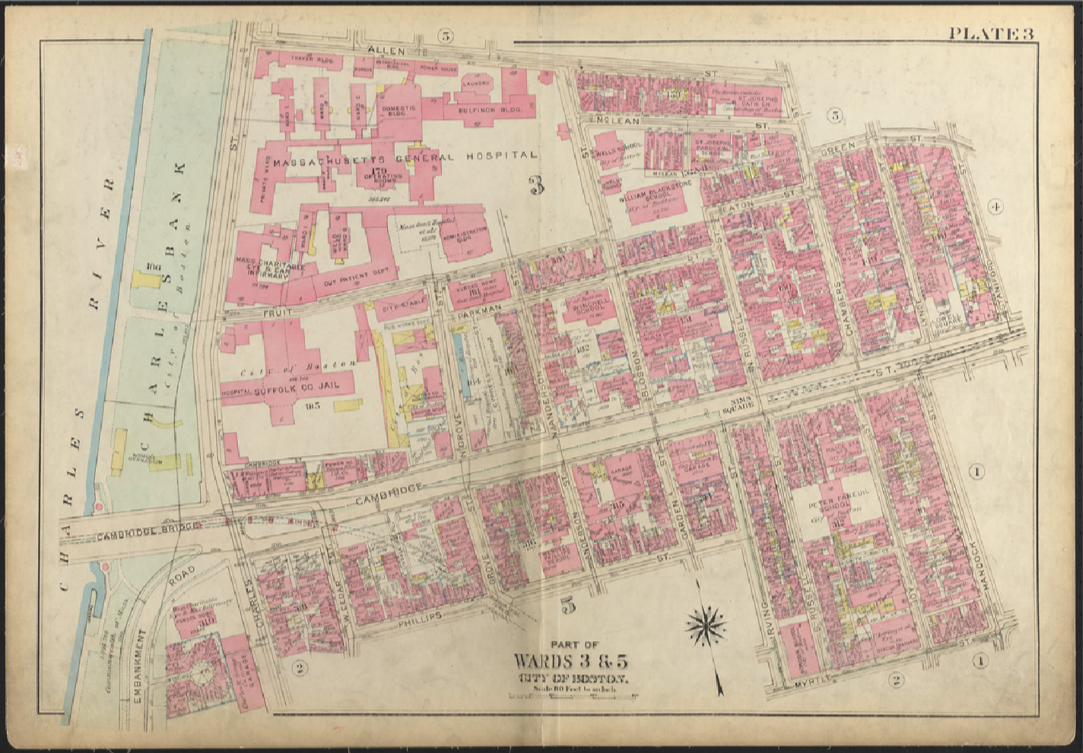
Specifically, this one, from the 1928 print of the Atlas of the city of Boston, plate 3. This is great!
My character is moving to one of the boarding houses just behind the Synagogue, right here:
My character is moving to one of the boarding houses just behind the Synagogue, right here:
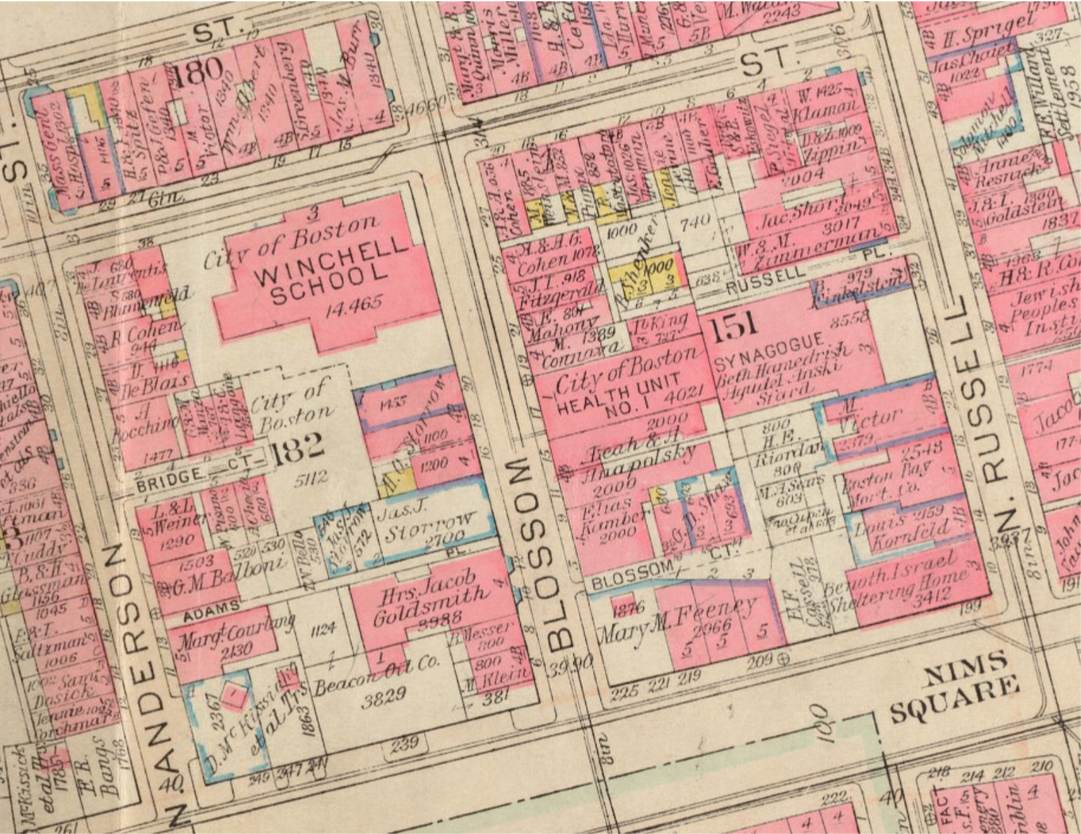
In comparison, this is what the area looks like now:
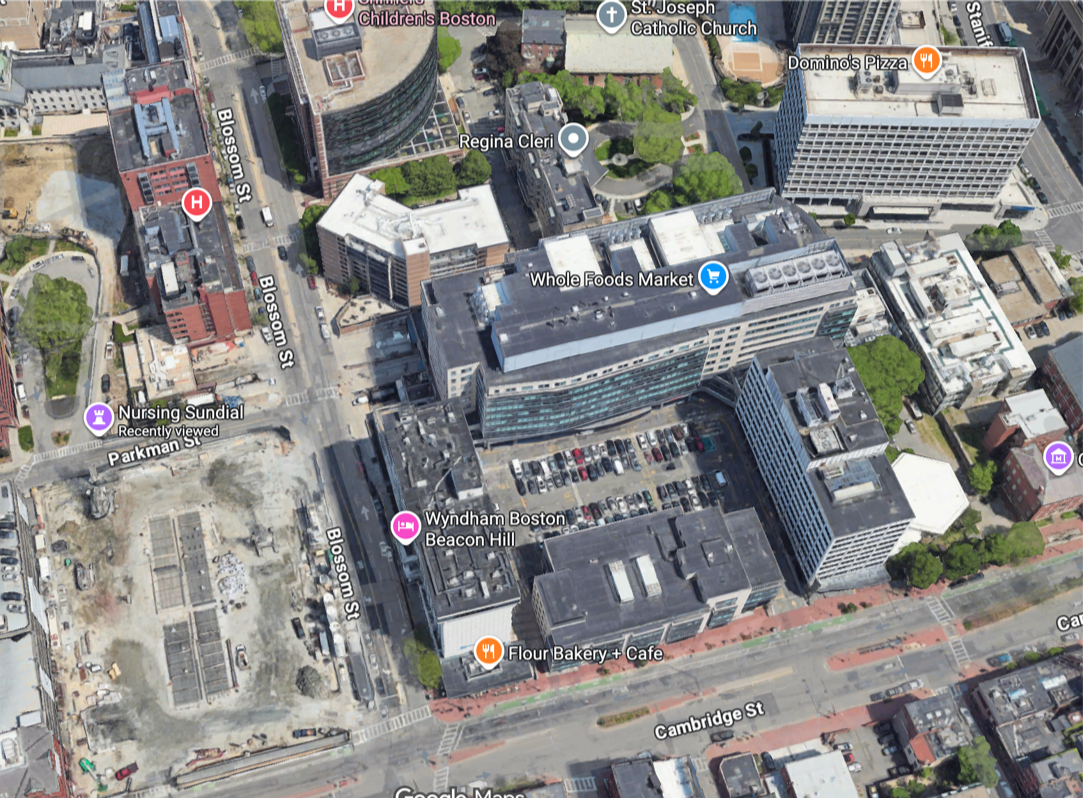
Russell Street is gone, Blossom Street can fit 6 lanes of traffic, and there’s a convenient Whole Foods where the Synagogue, a school and about 1000 people’s worth of accommodation used to be.
The best thing about these old maps is that the owner of the building is written right over the top. This gave me the revolutionary idea of checking to see if there is a census or list of residents from around that time, for character naming ideas.
And wow. Not only is there a detailed list of all residents from almost every year since 1868, but before the 1980s, these publications were broken out into the geographic wards, which means I can open the one specifically for the people who lived in the map above.
And wow. Not only is there a detailed list of all residents from almost every year since 1868, but before the 1980s, these publications were broken out into the geographic wards, which means I can open the one specifically for the people who lived in the map above.
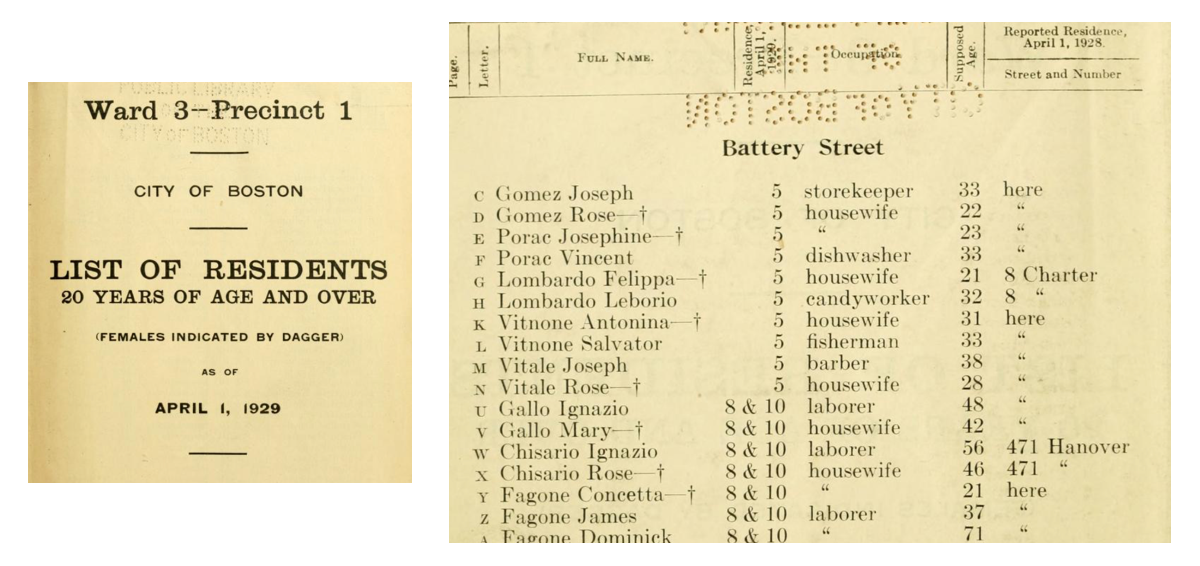
An honest to god treasure trove. Not only does this list everyone’s name, gender (Females Indicated By Dagger!), and age, but it also lists their occupation, street address, and previous address if they moved since the last census a little over a year before.
Fantastic, I said to myself, glancing up at the clock and noticing that it’s now eleven at night on a Friday. I can go to bed now, secure in the knowledge that tomorrow I can pick some names and get on with actually writing.
But, said the part of my brain that minored in statistics in college, you can’t just pick at random. What if you pick the only name that only appears once? Or you pick the most common name and give it to an unusual character? You’ll look like a chump!
Fine, I said to my brain, I bet we can compute this super easily and quickly, and then I’ll go to bed.
And so it began.
But, said the part of my brain that minored in statistics in college, you can’t just pick at random. What if you pick the only name that only appears once? Or you pick the most common name and give it to an unusual character? You’ll look like a chump!
Fine, I said to my brain, I bet we can compute this super easily and quickly, and then I’ll go to bed.
And so it began.
Eleven Thirty: The First Hurdle
Eleven Thirty: The First Hurdle
So the List of Residents is beautifully presented by the archive. The PDF is even searchable, and has that cool page flipping animation. It’s the other file types I had issue with.
The core problem was that whatever OCR had been used to read this book was not very good at tables. Some pages had all the names, followed by all the street addresses, then occupations, then ages, then previous addresses. Some pages had them in rows. Some pages had the list of names and then a seemingly random selection of information from the other columns, occasionally in order.
The core problem was that whatever OCR had been used to read this book was not very good at tables. Some pages had all the names, followed by all the street addresses, then occupations, then ages, then previous addresses. Some pages had them in rows. Some pages had the list of names and then a seemingly random selection of information from the other columns, occasionally in order.
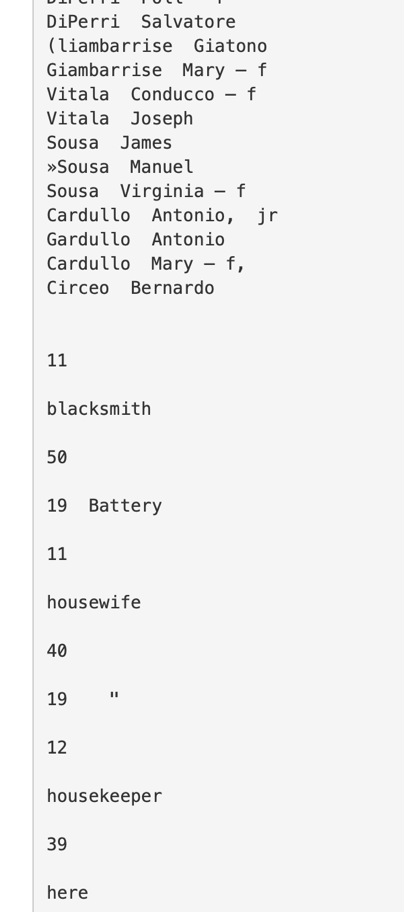
It’s also littered with interesting little artefacts, like “(“ in place of a “G”, “U” in place of an “li” and bursts of terrifying punctuation
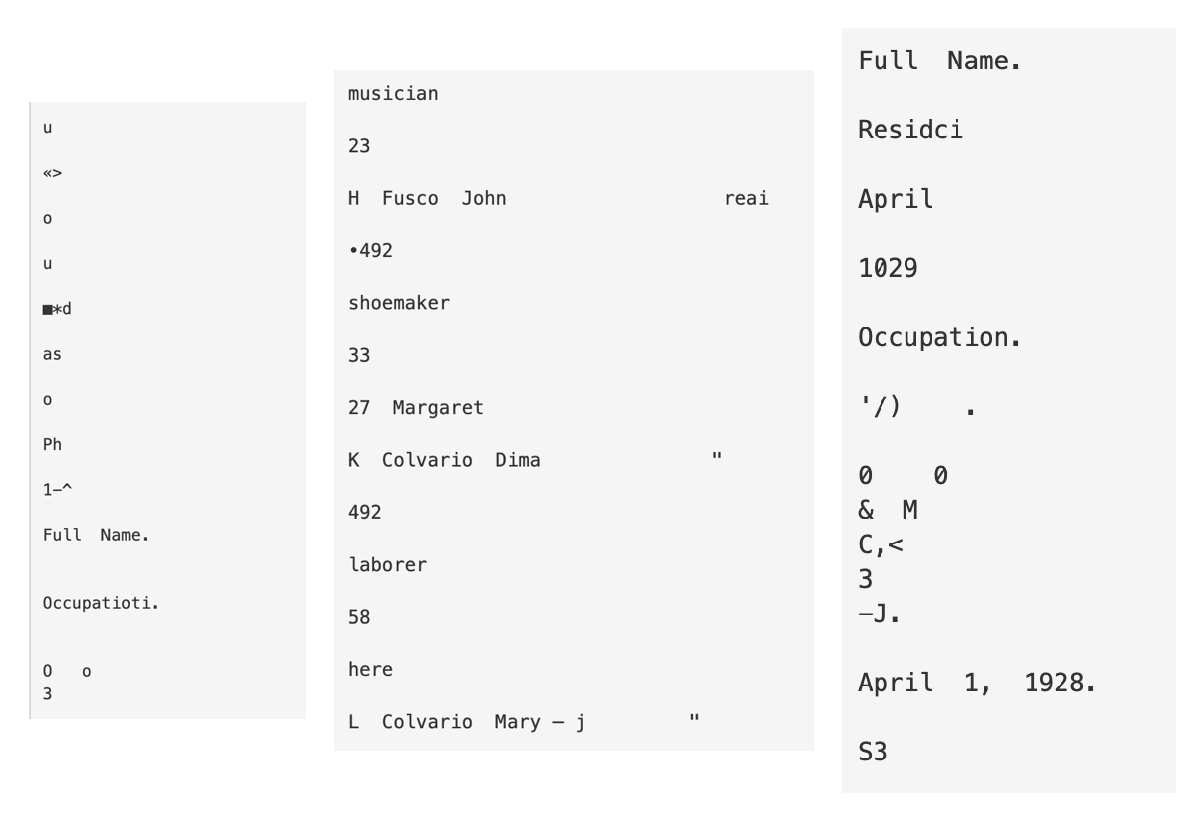
I tried. I did a bunch of programmatic cleaning to start off with, but there were just too many variables. My dreams of dumping a text file into a notebook and making a WordCloud were dead in the water. I went to close my laptop.
But wait, said my brain, you’ve already sunk an hour into this, you can’t just stop!
It’s almost midnight, I said to my brain, and this is not a good way to spend a night.
You’re going to do it though, right? asked my brain, pouting.
And so, we soldiered on.
But wait, said my brain, you’ve already sunk an hour into this, you can’t just stop!
It’s almost midnight, I said to my brain, and this is not a good way to spend a night.
You’re going to do it though, right? asked my brain, pouting.
And so, we soldiered on.
Four Forty Five: A Data Set
Four Forty Five: A Data Set
By the time the sun was starting to rise and my dog had given up on staring at me and was snoring like a 1920s elevated train, I had a dataset.
It wasn’t great. There was still a lot of random stuff, and I’d eventually persuaded myself to give up half way through the 382,558 line file.
But I had a relatively clean .rtf, with all the occupations and about half the names. I was finally ready to start doing data stuff, rather than preparing to do it.
There was still some cleaning to do. I needed to separate out names from occupations, and finally murder a bunch of floating characters and white spaces. Luckily for me, the only constant in the entire text was that names were capitalized and occupations were not.
It wasn’t great. There was still a lot of random stuff, and I’d eventually persuaded myself to give up half way through the 382,558 line file.
But I had a relatively clean .rtf, with all the occupations and about half the names. I was finally ready to start doing data stuff, rather than preparing to do it.
There was still some cleaning to do. I needed to separate out names from occupations, and finally murder a bunch of floating characters and white spaces. Luckily for me, the only constant in the entire text was that names were capitalized and occupations were not.
Six Thirty: Analysis
Six Thirty: Analysis
And now, almost seven hours later, we get to actually being able to look at the names. I feel that I might have been better served by sleeping, but we’re too far into this now.
Names
Names
Let’s start with first names first.
Sweet, lots of options here! Let’s split them by gender and compare to the wider USA’s top 100 for 1929, just to make sure I didn’t totally waste a night of sleep just to find that Boston’s West End is exactly like the rest of the country.
Get the top 50 boys names and top 50 girls names using the NameGender Classifier
Grab the top 50 for each gender across the country
Create WordClouds for each, with Boston data on the left and USA data on the right
Thank goodness. I’m seeing some pretty significant differences in naming conventions, even just in the top 50 per gender. For boys, names like Dominic, Arthur, Pasquale and Salvatore appear in Boston but not in the USA as a whole. For girls, it looks like Mary is always a safe bet, but I’d steer clearer of Betty, Dorothy and Virginia for this area.
Now let’s look at last names:
Now let’s look at last names:
Lots of great options for my cast of characters here!
Occupations
Occupations
Looks like our top jobs in this part of town are housewife (likely a default even if she’s doing work like taking in laundry etc.) and laborer, which seem like somewhat sweeping ideas for occupations. Drilling down a little, we get occupations such as clerk, cook, salesman, tailor, chauffeur and painter as our next most common choices. Important for Boston is the 20th most common job: candy making. If you want to see something crazy, you should look up the Great Molasses Flood of 1919, where a storage tank exploded and flooded the North End with a tsunami of molasses.
Let’s have a quick look at the top 10:
It’s interesting that so many people fall into the first two occupations, and how quickly it drops into specialization after that.
Eight Twenty Five: Output
Eight Twenty Five: Output
The sun has risen. The dog has woken up and is even more confused than before. And my data analysis is done. Now I can create a little cast of characters. I could make a whole thing with gender differentiation, and I could fiddle with weightings so you could pick if you wanted a common or unusual name, and I could separate out names by ethnic origin so we don’t get incongruent first and last names, but I have been doing this for 10 hours and I would like to go to bed.
So I present you with my random character generator for 1929 West End Boston!
Eight Thirty: Good Night
Eight Thirty: Good Night
Thank you for staying with me through this mini statistics adventure. I hope you have a wonderful day, and that you do not allow your brain to commit to pursuits on your behalf.
EDIT: Sunday Night
EDIT: Sunday Night
Wait, said my brain, at 11.30 on Sunday night. You spent the whole of Friday night doing this thing, and I BET there was a better way to do it. How about you spend tonight forcing the data to work?
.......
Fine.
The full, un-edited, un-manually-fiddled-with dataset:
.......
Fine.
The full, un-edited, un-manually-fiddled-with dataset:
First some easy cleaning. Kill excessive white space, punctuation and numbers:
So, we know from my horrifying manual cleaning that there are lots of lines in the file which have multiple occupations on them, but also lots of occupations which are 2 word phrases, like “real estate”, so we can’t just split the lines one per word. Luckily, I figured out a somewhat straightforward way to find the 2 word phrases that exist on lines with 1 word phrases:
We want to protect them, so let’s give them an underscore so they don’t get separated when we split the lines:
Now we can split the file into lines, and each occupation + random other weird stuff should be on their own lines:
Now we know from that occupations are always lower case, so just taking the lines without uppercase letters should give us a list of occupations. Unfortunately, we also know that many of these lines have all kinds of gross artifacts, like having “ii” at the start of the line, or “PR” at the end. So, let’s do a bunch of string cleaning.
◼
remove 2-letter codes at the start
◼
remove 1-letter codes at the start
◼
remove 2-letter codes at the end
◼
remove 1-letter codes at the end
◼
Strip any leading or trailing whitespace left over after the replacements
Then, using these strings, we just start throwing things away. Any lines that are very short, any lines that contain any upper case letters, any lines with more than 2 words (like “this book is a list of things”). And then we ensure that each line is forced to have only letters and spaces, with no random extra characters floating around. We also decide that we’re not going to explode lines that have 2+ words, so we can keep real estate in tact still.
So now we have a long list of potential occupations. Unfortunately, as referenced a couple of times, the OCR was pretty terrible for this PDF. We have an infinite number of spellings for pretty much every occupation. We have some doubled up. We have some random strings of letters. I bring your attention to candjworker, candyniaker, housnvife and housewoiker:
We’re going to do a couple of things here. Let’s start with spellings. The easiest way to correct this kind of mess is using EditDistance. We need to use correct spellings to get our list of real words, and then we can correct the badly spelled ones. I went for the top 200 most common words in the list, and then went through and added a couple more for luck:
We grab the counts for all the current words in the list, and then, for example, variants[“housewife”] will scan all the strings and return ones within the threshold distance of the target. So it should change “hoosewife”, “houseAife” etc. to “housewife” because they’re only 1-2 characters away.
Then we build a bunch of replacement rules, apply those rules to every string in the list to replace it with a canonicalSpellings form, and then do counts again to get our list.
We love a fuzzy match.
Then, there are a bunch of strings which have multiple occupations in them. But we don’t want to go down to 1 word. We want to make sure we’re not splitting “real estate” into “real”, “estate”.
So we can say that anything that’s been logged more than 5 times is probably a real occupation, rather than an several occupations on the same line:
Then (because I’ve already looked), I also know that there are a few that still need to be split up after this cleaning job:
So now we have a nice little function where we split the string if it needs to be split, and we don’t if we know it’s a real job:
Then we do the things, and we do all our spell checking and our line splitting all in one go:
But then... we have a lot of professions which are very similar but use different words. So let’s put some people into boxes:
Then we can just replace individual occupations with the category:
And boom. Suddenly, and with much less manual labor, we have a list of occupations.
Hilariously, it’s only about 6k more than I managed in a significantly more manual way. But it’s definitely cleaner and more accurate.
Now we get a slightly compressed version that’s all clean and nice.
I tried. But if you get this line, it’s almost impossible to not also get:
So this is what we’re doing I think!
The names are SIGNIFICATNLY harder, because so many of them are misspelled, often with punctuation instead of letters. Maybe I’ll come back to it another day, but now it’s 4am on Monday morning and I’ve spent all the hours I should have been asleep this weekend doing this instead :)
I’ve attached the whole txt file direct from the OCR, so feel free to do me one better!
I’ve attached the whole txt file direct from the OCR, so feel free to do me one better!
Updated Name/Occupation Generator
Updated Name/Occupation Generator
And now we can do a better name generator, because there’s still time before I start my actual job not doing this at Wolfram in 4 hours.
Let’s get our data looking pretty:
Let’s get our data looking pretty:
It would be nice to be able to pick if the character has a common/uncommon name and occupation, so we’ll split the datasets into 4. We’d also like to pick a gender:
So now we just put it all together into a cute little function:
And now a little form page:
And deploy:
Amazing. I’ve had a truly excellent weekend, how about you?
CITE THIS NOTEBOOK
CITE THIS NOTEBOOK
A data adventure in Boston, 1929: historical census corpus analysis
by Rory Foulger
Wolfram Community, STAFF PICKS, April 12, 2026
https://community.wolfram.com/groups/-/m/t/3682277
by Rory Foulger
Wolfram Community, STAFF PICKS, April 12, 2026
https://community.wolfram.com/groups/-/m/t/3682277