Submitted to Wolfram Computational Art Contest 2022
3D polygon with roll signs (+++–––)^3, roll angle 90°, turn angles 90° and 151.6° (alternating), square beam, and miter joints
Video: https://youtu.be/bE7Sh0wOMdA

Out[]=
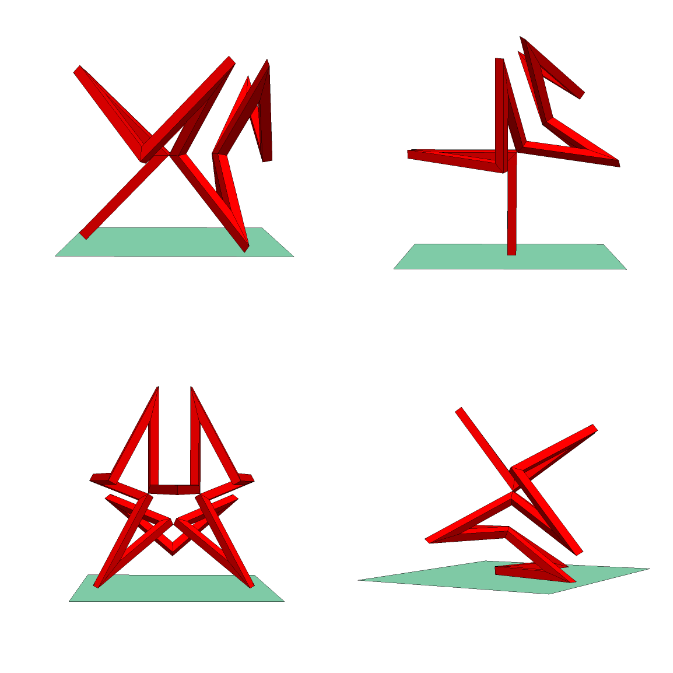
The design of this sculpture is based on the article “Pretty 3D Polygons: Explorations and Proofs” by Melissa van Veenendaal and Tom Verhoeff, which was presented at the Bridges Conference about Mathematics & Arts in 2021. The derivation of the relevant formulas is presented in the blog post “Deriving Formulas for Pretty 3D Polygons” and archived notebook by the same title.
This design exploits Mathematica’s capabilities to do symbolic computations, numeric computations, graph plotting, 3D graphics, and interactive manipulations.
Main Idea behind the Design
Main Idea behind the Design
The design starts from the decision to attempt to construct a 3D polygon, where (1) all 18 segments have the same length, (2) the joint angles alternate between two fixed angles, viz. 90° and some yet to be determined angle, (3) all torsion angles (see below) have the same absolute value, viz. 90°, and (4) the roll angle signs follow the pattern (+++–––)^3. In a pretty 3D polygon, as defined in the article referred to above, all the joint angles are the same, but here they alternate between two values.
The roll angle of a segment in a (closed) polygon is the dihedral angle between the planes spanned by that segment and each of its two adjacent segments. We construct the segments from beams with a square cross section. These beams are beveled at each end at half the joint angle at that vertex, to facilitate miter joints (see my Wolfram Demonstrations Project “Miter Joint and Fold Joint”). Thus, all 18 beam segments are congruent, and they come in 9 pairs of mirror images. This greatly simplifies physical construction.
Computing the Turn Angle
Computing the Turn Angle
To compute the desired turn angle φ, we define a 3D turtle program (see my Wolfram Demonstrations Project “3D Flying Pipe-Laying Turtle”) parameterized by φ that starts midway in a turn over φ and ends after three segments with the same positive roll sign midway in the 90° turn:
In[]:=
prog3[φ_]:=RightCompositionturn,move[1],roll,turn,move[1],roll,turn[φ],move[1],roll,turn
φ
2
π
2
π
2
π
2
π
2
π
4
where the turtle commands are defined as state transformers by
In[]:=
(*movetheturtleforwardalongitsheadingvectorbydistanced*)move[d_][{position_,heading_,normal_}]:={position+dheading,heading,normal}(*turntheturtleaboutitsnormalvectorbyanglephi*)turn[phi_][{position_,heading_,normal_}]:={position,Cos[phi]heading+Sin[phi]Cross[normal,heading],normal}(*rolltheturtleaboutitsheadingvectorbyanglepsi*)roll[psi_][{position_,heading_,normal_}]:={position,heading,Cos[psi]normal-Sin[psi]Cross[normal,heading]}
The state of the 3D turtle is captured by its position, heading, and normal vector. Its default initial state is
In[]:=
(*Defaultinitialposition(origin),heading(positiveX-axis),andnormalvector(positiveZ-axis)*)istate={{0,0,0},{1,0,0},{0,0,1}};
The complete design is obtained by (1) mirroring the path generated from prog[φ] in the plane perpendicular to its final heading, and (2) gluing together three copies of such mirror pairs. The desired turn angle φ must be such that this design closes properly. That is, the angle θ between the plane whose normal is the initial heading and the plane whose normal is the final heading after prog[φ] must equal 360°/6 = 60°. The formula for θ is then
In[]:=
θ[φ_]:=ArcCos[Dot[istate[[2]],prog3[φ][istate][[2]]]//TrigReduce]
In[]:=
θ[φ]
Out[]=
ArcCos3-
1
4
2
Cosφ
2
2
Cos3φ
2
Here is a plot of θ[φ]:
In[]:=
Plot[{θ[φ°],2π/6},{φ,0,180}]
Out[]=
And these are the solutions:
In[]:=
NSolve[θ[φ°]==2π/6,φ,Reals]//Simplify
Out[]=
φ,φ
Thus, the desired turn angle equals
In[]:=
φ3=151.56829417944772`(*namedφ3becauseitestablishesthedesiredorder-3symmetry*)
Out[]=
151.568
which corresponds to a joint angle of
In[]:=
180-φ3
Out[]=
28.4317
The final state after those first three segments is
Thus, the direction of the axis of rotational symmetry is (when adjusting for the discontinuity at φ = 90°)
Visualizing the Design
Visualizing the Design
The 18 vertices are generated by the turtle program prog18[φ] obtained from prog3 by mirroring and repeating three times:
When using ComposeList to compose these functions, there will be duplicate positions, which we want to suppress. This is accomplished by
The 18 vertices now are
Visualized with a tube, rotated to align the axis of rotational symmetry with the Z-axis:
Let’s add the two mirror planes at both ends of the first three segments together with their normal vectors (the turtle headings there), and show the angle θ[φ] between these two planes, which needs to equal 60° to ensure proper closure with order-3 rotational symmetry and reflection symmetry. The actual turn angle φ can be manipulated interactively (at φ = 0, we appear to run into a Mathematica bug, when doing Rotate[g, {{0, -1, 0}, {0, 0, 1}]).
Constructing the Sculpture
Constructing the Sculpture
We still need to dress the (infinitely thin) 3D polygon in a square beam, connected at the vertices by miter joints. To that end, we determine the bisector planes at the joints and project the square cross section onto them, to get all the vertices for the side faces of the beams.
First, the square cross section parameterized by width, for the first segment:
Function project projects a list pts of points in direction v onto the plane through point r, with normal u, and function project3 gets three successive points on the 3D polygon and projects in the direction of the first segment onto the bisector plane.
Next, we project the cross section onto the bisector planes captured by the cut’s center point and its normal vector to obtain the list of all cut faces:
Finally, we compute the beam faces from the cut faces and put them in a graphics complex (to avoid duplicating vertex information fourfold):
The Final Result
The Final Result
The following Manipulate let’s you select a beam width, a posture, and whether or not see the bounding box or a ground plane. The original posture is the one that the turtle program prog18 generates.
Original posture
Original posture
Pegasus posture (rotation axis pointing up)
Pegasus posture (rotation axis pointing up)
Flamingo posture
Flamingo posture
Freestanding posture
Freestanding posture
© 2022, Tom Verhoeff
(End of Notebook)
(End of Notebook)