

Analyzing physical constants
Analyzing physical constants
PeterBurbery
Abstract
Section
Section
XXXX
XXXX:
In[]:=
XXXX
Out[]=
XXXX
◼
XXXX
◼
XXXX
Physical Constants
Physical Constants
I am interesting in analyzing the magnitudes of the different physical constants. I will first open the data.
In[]:=
physicalConstantsEntityClass=EntityClass["PhysicalConstant",All]
Out[]=

In[]:=
physicalConstants=EntityList[physicalConstantsEntityClass]
Get the values:
QuantityQ will delete any missing data:
In[]:=
PhysicalConstantValues=Select[QuantityQ][EntityValue[physicalConstants,"Value"]]//Quiet
Store the physical constants with no missing values:
In[]:=
PhysicalConstantsWithoutMissingConstantValues=Select[QuantityQ[EntityValue[#,"Value"]]&][physicalConstants]//Quiet
Get the magnitudes:
In[]:=
PhysicalConstantMagnitudes=QuantityMagnitude[PhysicalConstantValues]
Get the exponents:
In[]:=
physicalConstantBase10Exponents=RealExponent[PhysicalConstantMagnitudes]
I will analyze this data with statistics:
Get the mean:
In[]:=
Mean[physicalConstantBase10Exponents]
Out[]=
1.12992
That makes sense. This corresponds to about 13.4872 which seems reasonable.
In[]:=
Mean[physicalConstantBase10Exponents]
10
Out[]=
13.4872
In[]:=
Median[physicalConstantBase10Exponents]
Out[]=
0.
In[]:=
Commonest[physicalConstantBase10Exponents]
Out[]=
{0.}
I will use floor to analyze the exponents.
In[]:=
Median[Floor[physicalConstantBase10Exponents]]
Out[]=
0
In[]:=
Commonest[Floor[physicalConstantBase10Exponents]]
Out[]=
{-27}
That's interesting. What are these values?
In[]:=
ReverseSortBy[Length][GroupBy[PhysicalConstantsWithoutMissingConstantValues,Floor[RealExponent[QuantityMagnitude[EntityValue[#,"Value"]]]]&]]
Use ceiling instead to prevent bias:
In[]:=
ReverseSortBy[Length][GroupBy[PhysicalConstantsWithoutMissingConstantValues,Ceiling[RealExponent[QuantityMagnitude[EntityValue[#,"Value"]]]]&]]
Count the data:
In[]:=
ReverseSort[CountsBy[PhysicalConstantsWithoutMissingConstantValues,Ceiling[RealExponent[QuantityMagnitude[EntityValue[#,"Value"]]]]&]]
Out[]=
-2614,712,310,58,28,-98,-47,-157,806,-76,-106,05,85,275,-175,-255,-235,65,-15,94,114,-84,-274,44,214,14,-144,-334,-34,124,-64,813,303,313,-183,393,-113,-213,103,-283,-23,542,-342,-122,-132,282,152,182,522,442,-242,402,192,142,-222,-392,551,991,161,-321,371,-1041,-431,331,971,-691,431,-201,-51,261,361,791,-951,411,421,201,-301,-291,-421,251,-381,531,-511,321,241,-161,171,-641,-401,-521,221,131,291
Check if the floor output contains the ceiling output exactly:
In[]:=
ContainsExactly[Values[ReverseSort[CountsBy[PhysicalConstantsWithoutMissingConstantValues,Floor[RealExponent[QuantityMagnitude[EntityValue[#,"Value"]]]]&]]],Values[ReverseSort[CountsBy[PhysicalConstantsWithoutMissingConstantValues,Ceiling[RealExponent[QuantityMagnitude[EntityValue[#,"Value"]]]]&]]]]
Out[]=
True
This means it doesn't impact my analysis if I choose to use floor or ceiling, which is good to know. I'll stick with floor.
I can also use GatherBy:
In[]:=
GatherBy[PhysicalConstantsWithoutMissingConstantValues,Ceiling[RealExponent[QuantityMagnitude[EntityValue[#,"Value"]]]]&]
Get the min and max
In[]:=
MinMax[Floor[physicalConstantBase10Exponents]]
Out[]=
{-105,98}
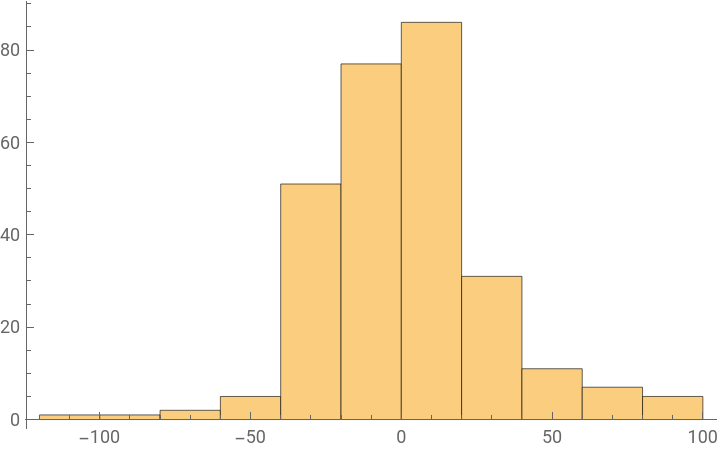
Visualize the data:
In[]:=
Histogram[Floor[physicalConstantBase10Exponents]]
Out[]=
Make a smooth histogram:
In[]:=
SmoothHistogram[Floor[physicalConstantBase10Exponents]]
Out[]=
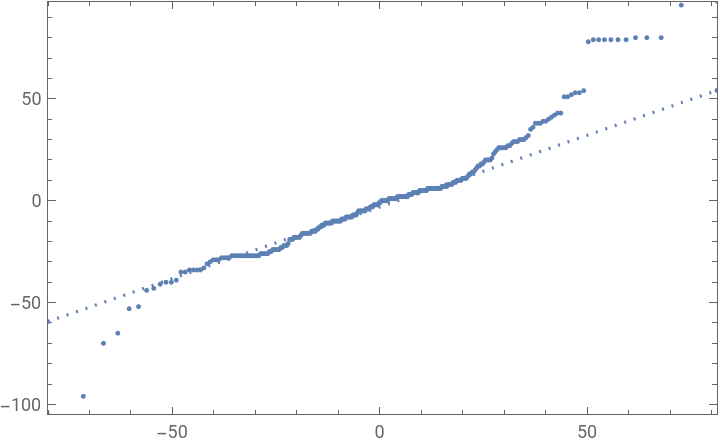
Make a Quantile Plot:
In[]:=
QuantilePlot[Floor[physicalConstantBase10Exponents]]
Out[]=
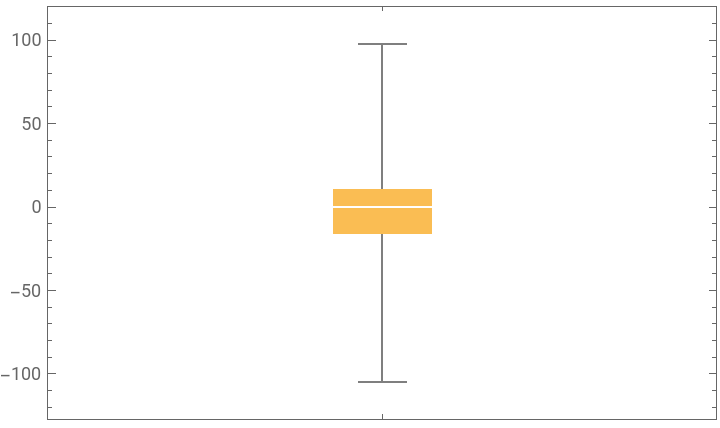
Make a box whisker chart:
In[]:=
BoxWhiskerChart[Floor[physicalConstantBase10Exponents]]
Out[]=
Make a more accurate distribution chart:
Make a discrete plot of the CDF:
I will now analyze quantities I'm interested in. I don't know what several of them are so I will exclude these.
I will analyze the really big quantities first:
For example I can look at the equivalent forms for each large quantity:
I will now apply this to other large quantities:
I can now make a table:
Look at very small values:
Look at less extreme but still large values:
There seems to be a bug here:
Small constants:
I created a relation graph with physical constants that have the compatible units: