CITE THIS NOTEBOOK: Team location and local time board by Hannah Clemens. Wolfram Community OCT 25 2022.
Working with a mostly remote team and having trouble keeping track of everyone’s location? Here’s one solution.
Working with a mostly remote team and having trouble keeping track of everyone’s location? Here’s one solution.
When I started working at Wolfram, my team was scattered across the globe, and it was difficult to keep track of everybody’s local time. I created this team location board to track everyone’s time and location, so even when people are traveling, you’ll know what time it is for them.
Setting up the board
Setting up the board
The first thing you have to do is create the team board itself. This can be done by calling the CreateTeamBoardApp function, which takes one argument of what name to call the directory it’ll be housed in.
board=CreateTeamBoardApp["teamboardExample"]
Out[]=
Next you’ll want to add team members to the board. For example:
In[]:=
AddTeamMemberboard,"jonahb@wolfram.com",
In[]:=
AddTeamMemberboard,"revaa@wolfram.com",
In[]:=
AddTeamMemberboard,"angelov@wolfram.com",
After you’ve added team members, you’ll want to share the URL generated above so everyone on your team can use it. Here’s what the board looks like with some members added:
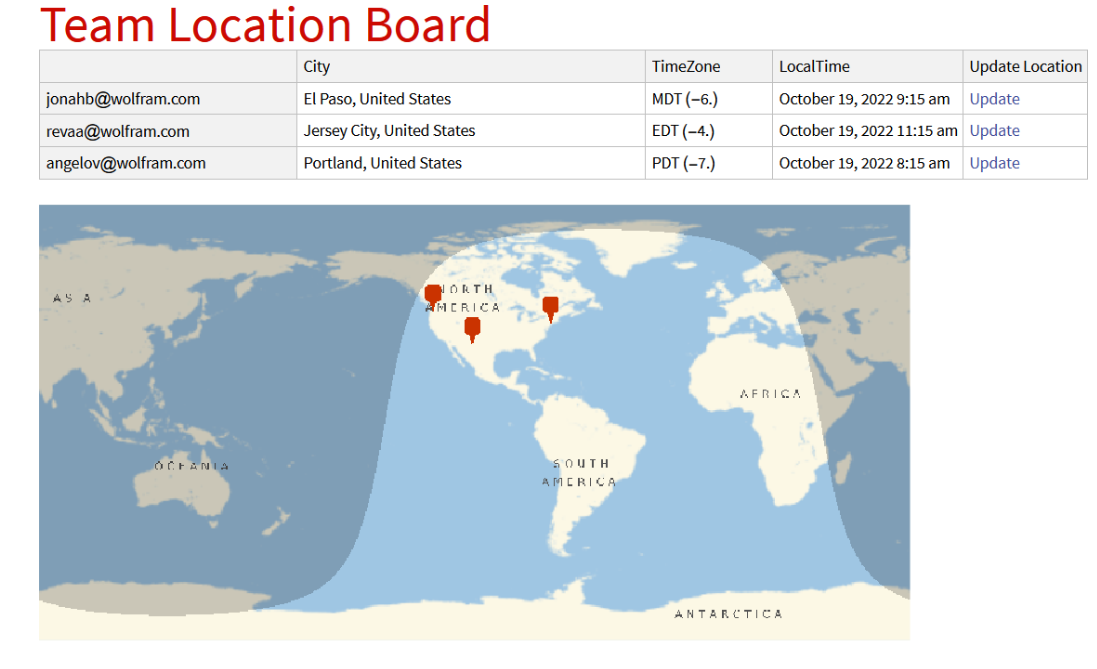
The underlying structure of the board is called the model. The model is where all of the information about each team member is stored, and it’s what we use to compute new information we might need. It’s an association, or a data structure in which each entry is a pair that has both a key and a value. By calling LoadModel, you can view the model’s current state.
LoadModel[board]
Out[]=
jonahb@wolfram.comEmailjonahb@wolfram.com,City,TimeZone,TimeZoneCaptured,revaa@wolfram.comEmailrevaa@wolfram.com,City,TimeZone,TimeZoneCaptured,angelov@wolfram.comEmailangelov@wolfram.com,City,TimeZone,TimeZoneCaptured
When to use it
When to use it
◼
If a team member who normally works in one city goes across the country for a few weeks, you could check the team board to see if they’re home.
◼
If a team member is working from abroad, you can make sure it’s a good time before you send them a chat or an email.
How to update location
How to update location
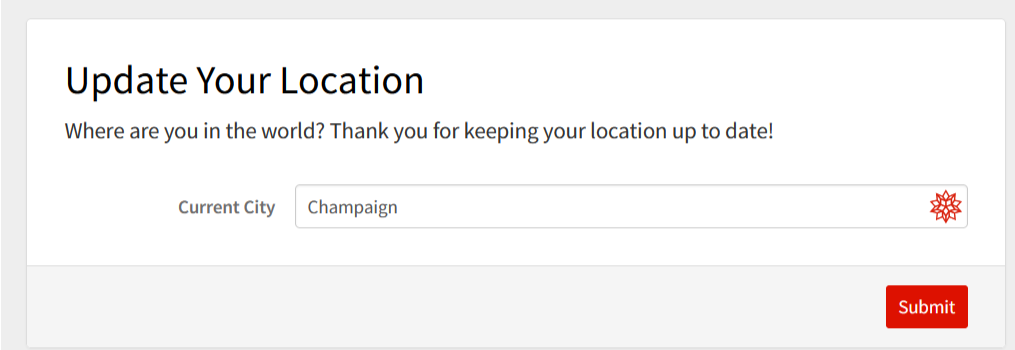
To update their location, all a team member has to do is click the “Update” link connected to their name on the board. The link will take them to a new page with a form where they fill in the name of their current city. Once they type it in and click submit, they’ve successfully updated their location.
Core code
Core code
(*Createsthecloudobjectwheretheboardis*)CreateTeamBoardApp[name_]:=Module[{board},board=Quiet[CreateDirectory[CloudObject[name]]];CloudPut[<||>,CloudObject["teamboard.wl",board]];MakeLocationForm[board];CreateTeamBoard[board];board](*Deploystheboard*)CreateTeamBoard[board_]:=Module[{map},map=MakeMap[board];CloudDeploy[Delayed[Column[{Style["Team Location Board","Title"],ViewTeamBoard[LoadModel[board]],map}],"NB"],CloudObject["index.nb",board],Permissions"Public"]](*Loadstheboard*)LoadModel[board_]:=CloudGet[CloudObject["teamboard.wl",board]](*Savestheboard*)SaveModel[board_]:=CloudPut[CloudObject["teamboard.wl",board]](*Deletestheboard*)DeleteBoard[board_]:=DeleteObject[board](*Showstheboard*)ViewTeamBoard[model_]:=If[model===<||>,"Please add team members to view the team board.",Dataset[Map[MemberViewData,model]]](*Returnsalistofteammemberscurrentlyincludedontheboard*)ListTeamMembers[board_]:=Keys[LoadModel[board]](*Returnsalistoflocationscurrentlyincludedontheboard*)ListLocationCities[board_]:=Module[{teamInfo,size,cities},teamInfo=LoadModel[board];size=Length[teamInfo];cities=Map[Key["City"],Values[teamInfo]];cities=Flatten[cities];cities=DeleteDuplicates[cities]](*Addsateammembertotheboard*)AddTeamMember[board_,member_,location_]:=Module[{teamInfoInitial,teamInfo,time},teamInfoInitial=CloudGet[CloudObject["teamboard.wl",board]];teamInfo=Append[teamInfoInitial,member<|"Email"member,"City"location,"TimeZone"LocalTimeZone[location],"TimeZoneCaptured"Now|>];CloudPut[teamInfo,CloudObject["teamboard.wl",board]];CreateTeamBoard[board];board;](*Removesateammemberfromtheboard*)RemoveTeamMember[board_,member_]:=Module[{teamInfoInitial,teamInfo},teamInfoInitial=LoadModel[board];teamInfo=KeyDrop[teamInfoInitial,member];CloudPut[teamInfo,CloudObject["teamboard.wl",board]];CreateTeamBoard[board];board](*Rearrangesthedatatobemorereadablebytheuser*)MemberViewData[data_]:=Module[{rowData=<||>,member,city,requester,offset},city=data["City"]["Name"];rowData["City"]=city<>", "<>CityData[data["City"],"Country"]["Name"];offset=TimeZoneOffset@data["TimeZone"];rowData["TimeZone"]=data["TimeZone"]["ShortName"]<>" ("<>ToString@offset<>")";rowData["LocalTime"]=DateObject[TimeZoneoffset];member=data["Email"];requester=$RequesterCloudUserID;If[requester===member||requester===$CloudUserID,rowData["Update Location"]=AskLocation[member]];rowData](*Updatesauser'slocation*)UpdateLocation[board_,member_,location_]:=Module[{teamInfoInitial,teamInfo},teamInfoInitial=CloudGet[CloudObject["teamboard.wl",board]];(*checkthattheloadworked*)teamInfo=teamInfoInitial;teamInfo[member]["City"]=location;teamInfo[member]["TimeZone"]=LocalTimeZone[location];teamInfo[member]["TimeZoneCaptured"]=Now;CloudPut[teamInfo,CloudObject["teamboard.wl",board]];CreateTeamBoard[board];HTTPRedirect[CloudObject["index.nb",board]]](*Buildsaurltoaskamember'snewlocation*)AskLocation[email_]:=Module[{url},url=URLBuild[api,<|"member"email|>];Hyperlink["Update",url]](*Makesaformtogetauser'snewlocation*)MakeLocationForm[board_]:=api=CloudDeploy[APIFunction[{"member""String"},Module[{member=#member,locationguess},locationguess=GeoNearest["City",$GeoLocation,1];FormFunction[{"location"<|"Label""Current City","Input"Replace[locationguess,{{e_Entity,___}e["Name"],_"Your city here"}],"Interpreter""City"|>},UpdateLocation[CloudObject[board],member,#location]&,AppearanceRules<|"Title""Update Your Location","Description""Where are you in the world? Thank you for keeping your location up to date!"|>]]&],CloudObject["updatelocation.api",board],Permissions"Public"](*Createsthemapthatshow'severyone'slocation*)MakeMap[board_]:=Module[{center,cities},cities=ListLocationCities[board];center=If[cities==={},Automatic,SpatialMedian[GeoPosition/@cities]];GeoGraphics[{NightHemisphere[],Map[GeoMarker,cities]},ImageSize750,GeoCentercenter]]
Ideas for Improvement
Ideas for Improvement
◼
Label the pins on the map with names, or maybe even use images that team members choose
◼
Add a management page for the admin to add and remove team members from a web page
◼
Add history to see where the team has been over time
◼
Instead of an update column with a link, add an edit icon next to a name
◼
Add office or headquarters pins on the map to show permanent physical locations
◼
Cluster team members in similar locations onto smaller maps