Introduction
Introduction
Human activity is often defined by the burning of carbon based fossil fuels, which releases carbon dioxide and carbon monoxide, among other greenhouse gases like nitrogen dioxide, sulfur dioxide, and pollutants in the form of aerosols. In response to the SARS - CoV - 2 pandemic, many governments have heavily restricted or shut down industrial activities to decrease human contact and slow viral infection rates. Currently, there are few models that show emissions in the context of several years; this model aims to show potential effects of lockdown on emissions, and it' s magnitude with respect to past data.
Importing data
Importing data
Data is imported from the NASA Earthdata repository. Using the API written by Christopher Wolfram, the XML file in NASA's Earthdata repository is loaded into our program.
Load in the data from NASA:
Cases[rawXML[[2,3,4,3]],XMLElement["Layer",_,_]][[100,3]];layers=Module{rawLayers,layers},;
Gathering the image data
Gathering the image data
We can find an entire list of by displaying the list of data layers. The exact name of the data layer corresponding to the repository on the Internet is necessary for later code to pull the specified data.
Display the dataset:
Visualize = Dataset[layers];
Using the API, we can pull a specific layer that we would like to examine. We also need to specify a date of the measurement of emissions. We then need to choose a projection of equal area, such that the emission data is proportional to the area over which it was emitted.
Using the API, we can pull a specific layer that we would like to examine. We also need to specify a date of the measurement of emissions. We then need to choose a projection of equal area, such that the emission data is proportional to the area over which it was emitted.
General code for pulling image:
image=GeoImage[GeoRangecountryEntity,GeoServerlayerGeoServer[link,DateObject[date]],GeoProjection"CylindricalEqualArea"]
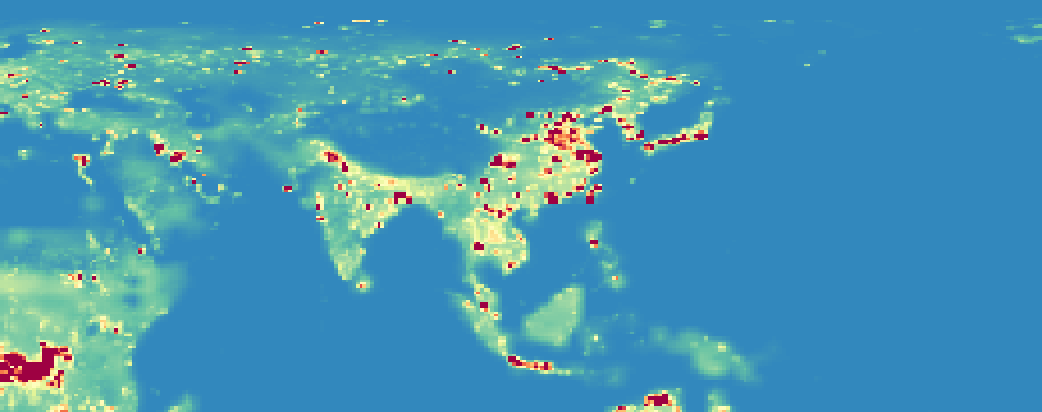
For instance, if we specify countryEntity to be Asia, the link to be "MERRA2_Carbon _Monoxide _Emission _Monthly", and the date to be {2020, 5, 1}, we will obtain the following image. Note that red represents higher rates of carbon monoxide emission, and blue represents less. Also notice how there is higher emission rates in metropolitan/industrial areas, such as Eastern China, the Greater Tokyo Area, Northern India, and several other regions.
For instance, if we specify countryEntity to be Asia, the link to be "MERRA2_Carbon _Monoxide _Emission _Monthly", and the date to be {2020, 5, 1}, we will obtain the following image. Note that red represents higher rates of carbon monoxide emission, and blue represents less. Also notice how there is higher emission rates in metropolitan/industrial areas, such as Eastern China, the Greater Tokyo Area, Northern India, and several other regions.
Display the GeoImage:
i=GeoImageGeoRange,GeoServerlayerGeoServer["MERRA2_Carbon_Monoxide_Emission_Monthly",DateObject[{2020,5,1}]],GeoProjection"CylindricalEqualArea"
Interpreting image legend
Interpreting image legend
We now need to find the legend of the colors to find the approximate rate of emission corresponding to each color. Legendfunc (part of the API written by Christopher Wolfram) will return the numerator of an RGB value; when divided by 255, we obtain the proper color values for each legend association.
Pull the legend from the link and create association:
legendfunc[link_String]:=AssociationMap[Reverse,Association@Cases[Import[StringJoin["https://gibs.earthdata.nasa.gov/colormaps/v1.3/",StringJoin[ToString[link],".xml"]]],XMLElement["LegendEntry",{"rgb"color_,"tooltip"name_,"id"_},{}]ToExpression/@StringSplit[color,","]name,Infinity]];colorScheme=RGBColor/@(legendfunc[link]/255)
We then need to remove the Alpha channel to convert into a pure RGB format. This is followed by converting the RGB values to decimal (as opposed to fractions over 255). Since the image data has RGB value in decimal form, we must make these two formats match up.
We then need to remove the Alpha channel to convert into a pure RGB format. This is followed by converting the RGB values to decimal (as opposed to fractions over 255). Since the image data has RGB value in decimal form, we must make these two formats match up.
Convert to RGB with decimal value:
rgbImage=RemoveAlphaChannel[image];decLeg=convertToDec[pullRGB[colorScheme]];
We now need to find the mean of the values in the key. In the association, scientific notation is presented as "4.32e-1", for instance. Using StringSplit, we can extract the decimal between 1 and 10, as well as what power of ten to multiply that decimal by. There are multiple tests in the limitTest function, since values at the edge of the legend (very large or very small) are generalized into "< 0.00" or ">" than some arbitrary value. The code will simply force the small values to be 0, because they were assumed to be so small that they would have negligible difference even if ignored. We can also note how the colors representing zero concentration of pollutants constitutes the vast majority of maps, and is overlaid on remote regions such as the ocean or deserts. This leads us to further presume that ignoring those values won't affect overall fluctuations in pollution.
We now need to find the mean of the values in the key. In the association, scientific notation is presented as "4.32e-1", for instance. Using StringSplit, we can extract the decimal between 1 and 10, as well as what power of ten to multiply that decimal by. There are multiple tests in the limitTest function, since values at the edge of the legend (very large or very small) are generalized into "< 0.00" or ">" than some arbitrary value. The code will simply force the small values to be 0, because they were assumed to be so small that they would have negligible difference even if ignored. We can also note how the colors representing zero concentration of pollutants constitutes the vast majority of maps, and is overlaid on remote regions such as the ocean or deserts. This leads us to further presume that ignoring those values won't affect overall fluctuations in pollution.
Translate keys from string to numerical value:
ToDecimal[x_String]:=(Module[{splice},splice=StringSplit[x,"e"];ToExpression[splice[[1]]]*10^ToExpression[splice[[2]]]])(*averageofvaluesifscientificvalue*)limitTestScientific[f_String]:=(Module[{split},split=StringSplit[f];(*Wewanttoreturnthesecondvalueofthekeysowesimplysetbounds.*)If[split[[1]]"<",Return[split[[2]]],If[split[[1]]"≥",Return[ToDecimal[ToString[split[[2]]]]],If[split[[2]]"-",Return[Mean[{ToDecimal[split[[1]]],ToDecimal[split[[3]]]}]],If[f"No Data","No Data",ToDecimal[f]]]]]])
Using this properly formatted legend, we can remap the colors to the values in the legend to a flattened array (originally, each row of pixels was a list, but that information isn't necessary).
Using this properly formatted legend, we can remap the colors to the values in the legend to a flattened array (originally, each row of pixels was a list, but that information isn't necessary).
Flatten array and map key values:
flatArray=Flatten[ImageData[rgbImage],1];pollutantValues=Map[PositionIndex[averageKey][RGBColor[#]]&,flatArray];
We have to delete some missing values, because some colors on the map are not present in the legend. This should produce a negligible effect, because using the length of the list of missing data, we found that only 0.08% of the data was missing, so this should produce a negligible result.
We have to delete some missing values, because some colors on the map are not present in the legend. This should produce a negligible effect, because using the length of the list of missing data, we found that only 0.08% of the data was missing, so this should produce a negligible result.
Delete cells with Missing[]:
completeValue=DeleteCases[pollutantValues,_Missing];
Now, just return the total emission rate (over a specified region) and the mean in a list, which is nested within another list.
Now, just return the total emission rate (over a specified region) and the mean in a list, which is nested within another list.
{Total[Flatten[completeValue]],Mean[Flatten[completeValue]]}
Combining all the previous steps, we obtain a large function that specified country entity, the link specifying the data layer to read in, and the date of the layer we want to extract.
Combining all the previous steps, we obtain a large function that specified country entity, the link specifying the data layer to read in, and the date of the layer we want to extract.
All the operations combined into one function:
TotalAndMeanPollutantValuesScientific[x_Entity,link_String,date_List]:=Module[{image=GeoImage[GeoRangex,GeoServerlayerGeoServer[link,DateObject[date]],GeoProjection"CylindricalEqualArea"],rgbImage,colorScheme=RGBColor/@(legendfunc[link]/255),decLeg,averageKey,fullLegend,flatArray,pollutantValues,completeValue},rgbImage=RemoveAlphaChannel[image];decLeg=convertToDec[pullRGB[colorScheme]];averageKey=KeyMap[limitTestScientific[#]&][decLeg];flatArray=Flatten[ImageData[rgbImage],1];pollutantValues=Map[PositionIndex[averageKey][RGBColor[#]]&,flatArray];completeValue=DeleteCases[pollutantValues,_Missing];{Total[Flatten[completeValue]],Mean[Flatten[completeValue]]}]
Using the Table function, we can loop through many years of emission data using a monthly increment.
Using the Table function, we can loop through many years of emission data using a monthly increment.
Analyze all of the data for the past ten years:
Table[TotalAndMeanPollutantValuesScientific[countryEntity,"MERRA2_Carbon_Monoxide_Emission_Monthly",range],{range,DateRange[{2010,1,1},{2020,5,1},{1,"Month"}]}]
Then, we can separate the values into two separate lists.
Then, we can separate the values into two separate lists.
Returns the list:
TotalEmission=Map[#[[1]]&,COtenYear]MeanEmission=Map[#[[2]]&,COtenYear]
Graphing the image data and method of analysis
Graphing the image data and method of analysis
We first attempted to model the data using a sine wave. This was done by first using Manipulate, which helps someone guess the constants in the sine wave fit by adjusting the sliders and finding a wave that best fits the data. Then, the guessed values are placed into the NonlinearModelfit
We first attempted to model the data using a sine wave. This was done by first using Manipulate, which helps someone guess the constants in the sine wave fit by adjusting the sliders and finding a wave that best fits the data. Then, the guessed values are placed into the NonlinearModelfit
Create an input that will help users guess values with visual model:
Manipulate[Show[ListPlot[TotalEmi,PlotStyleRed],Plot[aSin[kx+ϕ]+c,{x,1,115}]],{a,,},{k,.1,2},{ϕ,0,2π},{c,4*,8*}]
-6
10
-5
10
-6
10
-6
10
ThenNow, we just need to plot the nonlinear fit, along with the gussed values (which we obtain by moving the sliders in the Manipulate cell and finding constants that create a sine wave that best matches the given data.
ThenNow, we just need to plot the nonlinear fit, along with the gussed values (which we obtain by moving the sliders in the Manipulate cell and finding constants that create a sine wave that best matches the given data.
Plot the data and the sine wave fitted to it:
wave=NonlinearModelFit[TotalEmi,a*Sin[k*x+ϕ]+c,{{a,3.2*10^-6},{k,0.516},{ϕ,4.9},{c,6.176*10^-6}},x];Show[Plot[wave[x],{x,0,Length[TotalEmi]}],ListPlot[TotalEmi,PlotStyleRed]]
We first use Thread to pair data points with respective DateObject.
Create the TimeSeries:
We then want to compare a prediction using TimeSeries with the actual data. If we only use data from pre-lockdown to generate a forecast, then compare with the actual data for emissions post-lockdown, we will see whether lockdown caused a change in emissions.
We first remove the data from lockdown using Drop. Then, we use Thread to pair the data with dates, and create a model using TimeSeriesModelFit; the Wolfram language automatically chooses the SARIMA model for us. Note that this model is only created using data up till 2019, i.e. before lockdown.
We then want to compare a prediction using TimeSeries with the actual data. If we only use data from pre-lockdown to generate a forecast, then compare with the actual data for emissions post-lockdown, we will see whether lockdown caused a change in emissions.
We first remove the data from lockdown using Drop. Then, we use Thread to pair the data with dates, and create a model using TimeSeriesModelFit; the Wolfram language automatically chooses the SARIMA model for us. Note that this model is only created using data up till 2019, i.e. before lockdown.
Model the data before lockdown:
Using DateListPlot, we can overlay the data pre-lockdown with the prediction of data post-lockdown.
Using DateListPlot, we can overlay the data pre-lockdown with the prediction of data post-lockdown.
Display the model:
We notice an anomaly near the 2020 tick, so we will zoom in.
Delete data that will not be displayed and plot the remaining points.
In addition to analyzing carbon monoxide, data for the amount of aerosols in the atmosphere was analyzed as well, because burning fossil fuels produces soot, which causes the atmosphere to reflect and absorb light differently than if there were no aerosols.
Results
Results
Comparing the prediction (the orange line) with the actual post-lockdown data (blue line) , we find that some predictions were higher than the actual data, while some predictions were the same/lower than the actual data.
SARIMA data for carbon monoxide emissions:
Both Europe and Asia, with Asia in particular, demonstrate a strong response to the lockdown, as Europe has a gradual decrease in emissions starting in March, with emissions dipping below expected outcomes (based on past data) by April. Asia shows a sharp decrease in April, as the rate of change of emissions goes negative. North American countries seem to have a weaker response to the lockdown, since the emissions fall in line with predictions, suggesting negligible decrease in industrial activities that burn fossil-fuels.
For aerosols, the following graphs were produced reflecting the aerosol optical depth in the atmosphere as a function of time. In the figures on the right, the blue line represents the post lockdown data, while the orange line represents predictions.
SARIMA data for aerosol optical depth:
The prediction for Europe doesn't follow the pattern for the past data well likely because the SARIMA forecasting model couldn't discern a regular pattern. For North America, we notice that the amount of aerosols does not change in a similar fashion to the predicted model, suggesting that there was an insufficient response to shutting down industrial activity. Because the models are only rough approximations, we can only make conclusions about the general shape of the graphs, as opposed to their absolute values. For Asia, by April, there is indeed a sharp decrease in emissions in April, which differs from the prediction that emissions should remain constant during that time.
Conclusion
Conclusion
In this project, I have provided a clear visualization of the drop in emissions. Ultimately, this shows that even with a significant reduction in activity and alteration of daily life, large sources of carbon are still active. Given that the purpose of lockdown was not to stop climate change, the change in emissions we have shown are likely temporary and will be reversed as countries resume activity. The data we provide serves a representation of the fundamental, structural changes in industrial activity that will be required to produce a remarkable effect on reversing climate change.
Future Endeavours
Future Endeavours
In the future, I would like to implement a better function that is faster. Currently, the step converting the image data (the 2D array of pixels) to pollutant values (the keys in the association) takes a while. As my mentor suggested, some function could be created that doesn’t need to create another array of pollutant values. Since we only need to calculate the total rate of emission (or the mean, which can be derived from the total), an association describing the number of pixels of a certain color is sufficient. Another possible path is creating a code that can handle other data in the NASA repository. For instance, some datasets only have small bands of measurement (likely due to how the satellite sweeps over the Earth, and can’t capture all of the surface).
Acknowledgements
Acknowledgements
I would like to thank Wolfram Summer Camp 2020, and all the people who answered questions I had about code on the help channels. I would also like to thank my peers in my mentor group for being a friendly, supportive, engaging, and fun group to work with. Lastly, I would like to thank my mentor Stephen Schroeder, who helped make the project possible by being so patient and providing crucial support during the coding process.
Keywords
Keywords
◼
XML
◼
TimeSeries
◼
SARIMA
◼
GeoImage
◼
Manipulate