Introduction:
Introduction:
The linear Lorentz transformation of Special relativity can evaluate the coordinates of an event in a moving frame of reference from the corresponding coordinates in the stationary frame of reference. In this project, I have used the Poincare transformation, which generalises the Lorentz transformation to any possible initial configuration. However, applying the Poincare transformation to a complex object is not sufficient to simulate relativistic transformations. Simulating a relativistic transformation should give the ‘apparent’ position/shape of the object, as would be seen by a stationary observer, whereas a Poincare’ transformation gives the actual position/shape of the object. Distinguishing between the ‘apparent’ and ‘actual’ position of the object requires taking into account the ‘time delay’ of light, which is explained below.
The Problem for a Point - Time Delay:
The Problem for a Point - Time Delay:
Simulating how objects look like when moving near the speed of light has been a controversial problem over the past century. To understand the source of confusion, imagine a point moving past you at 0.9c (90 percent of the speed of light). At time t = 0s on your watch, both you and the point are at x = 0. After time t = 10s on your watch, the actual position of the point will be at 9c metres away from you whereas the apparent position of the point will be somewhere in between 0 and 9c metres. This is simply because light must have been emitted by the point at an earlier time to ultimately reach your eyes at time t = 10s on your watch. And since the speed of the point is very close to the speed of light, the light from the object must have been emitted at about halfway. Therefore, solving this problem not only requires Poincare transformations but also the so called 'time delay ' of light, which allows us to distinguish between the 'apparent' and 'actual' positions of the object.
The Problem for an Object - Parameterization:
The Problem for an Object - Parameterization:
Assuming that we have evaluated the required transformation law for a point, which gives us the 'apparent' position of a point at a time 't' on the observer's watch, the question of extending the same to a 3-D object still remains. A straightforward approach would be to first divide the object into points, evaluate the transformation for every point, and then join the points together to form the apparent view of the object. However, the issue with this computation is its slow runtime, large memory usage, and lack of precision. Since reproducing the object with 100 percent accuracy requires , there will be a trade off between high precision and low runtime as both runtime and precision increase as increases. On inspection, we can determine that parametrization of a 3-D shape by 2 variables (surfaces in 3-D Euclidean space are parametrized by 2 variables) can help achieve the desired result with 100 percent accuracy and a faster runtime! To understand why, let's parameterize a sphere with spherical polar coordinates and plot it using Mathematica's ParametricPlot3D function:
n
n=∞
n
In[]:=
Manipulate[Show[Graphics3D[{{Red,PointSize[0.02],Point[{{0,0,0}}]}},AxesTrue,PlotRange{{-r+x-1,r+x+1},{-r+y-1,r+y+1},{-r-z-1,r+z+1}}],ParametricPlot3D[{x+(r*Sin[θ]*Sin[ϕ]),y+(r*Sin[θ]*Cos[ϕ]),z+(r*Cos[θ])},{θ,0,π},{ϕ,0,2π}]],{r,1,10},{x,0,5},{y,0,5},{z,0,5},SaveDefinitionsTrue]
Out[]=


Here ranges from 0 to , ϕ ranges from 0 to 2, and are the coordinates of the center of the sphere. There are 2 reasons why this plot may be the ideal way to transform every single point on the sphere to create the new apparent shape:
θ
π
π
x,y,z
◼
Since any coordinate on the surface of a sphere can be written as { + (. Sin[θ]. Sin[ϕ] ), + ( . Sin[θ]. Cos[ϕ] ), z + (.Cos[θ] ) } , we can easily find the resulting coordinate by just substituting { + (. Sin[θ]. Sin[ϕ] ), + ( . Sin[θ]. Cos[ϕ] ), z + (. Cos[θ] ) } into the relevant function for a point:
x
r
y
r
r
x
r
y
r
r
PointTransform[ {+ (. Sin[θ]. Sin[ϕ] ), + ( . Sin[θ]. Cos[ϕ] ), z + (.Cos[θ] ) } ] { (x,θ,ϕ), (y,θ,ϕ), (z,θ,ϕ) } where (x,θ,ϕ), (y,θ,ϕ), (z,θ,ϕ) are arbitrary functions which can be determined once we find PointTransform[] (we will evaluate this function in section 1.1).
x
r
y
r
r
f
x
f
y
f
z
f
x
f
y
f
z
◼
At this point, the reader might argue that parameterization of the surface is unnecessary since we can just evaluate point transform on the coordinate , where in this case, without parameterization. This reason is valid except that the domain of this non-parameterized plot will vary for different situations such as different speeds of the object, different directions of movement, etc. To understand this statement better, let’s think about the parameters PointTransform might depend on (other than the coordinate of the point itself). It will certainly depend on the speed of the object, the time at which the point is seen (the time according to the stationary observer’s watch), and the direction of velocity. Therefore, it is reasonable to conclude that because PointTransform[{] will vary for different situations, the domain of the function will also vary. This still might seem confusing, so let's look at plots of spheres travelling at 0.9 times the speed of light in the -direction, one at time and the other at on the observer's watch (we will generate these shapes in 'The Final Interface' section) :
{x,y,F(x,y)}
F(x,y)=+-
0.5
--
2
r
2
x
2
y
x,y,F(x,y)}
F(x,y)
x
t=0s
t=10s
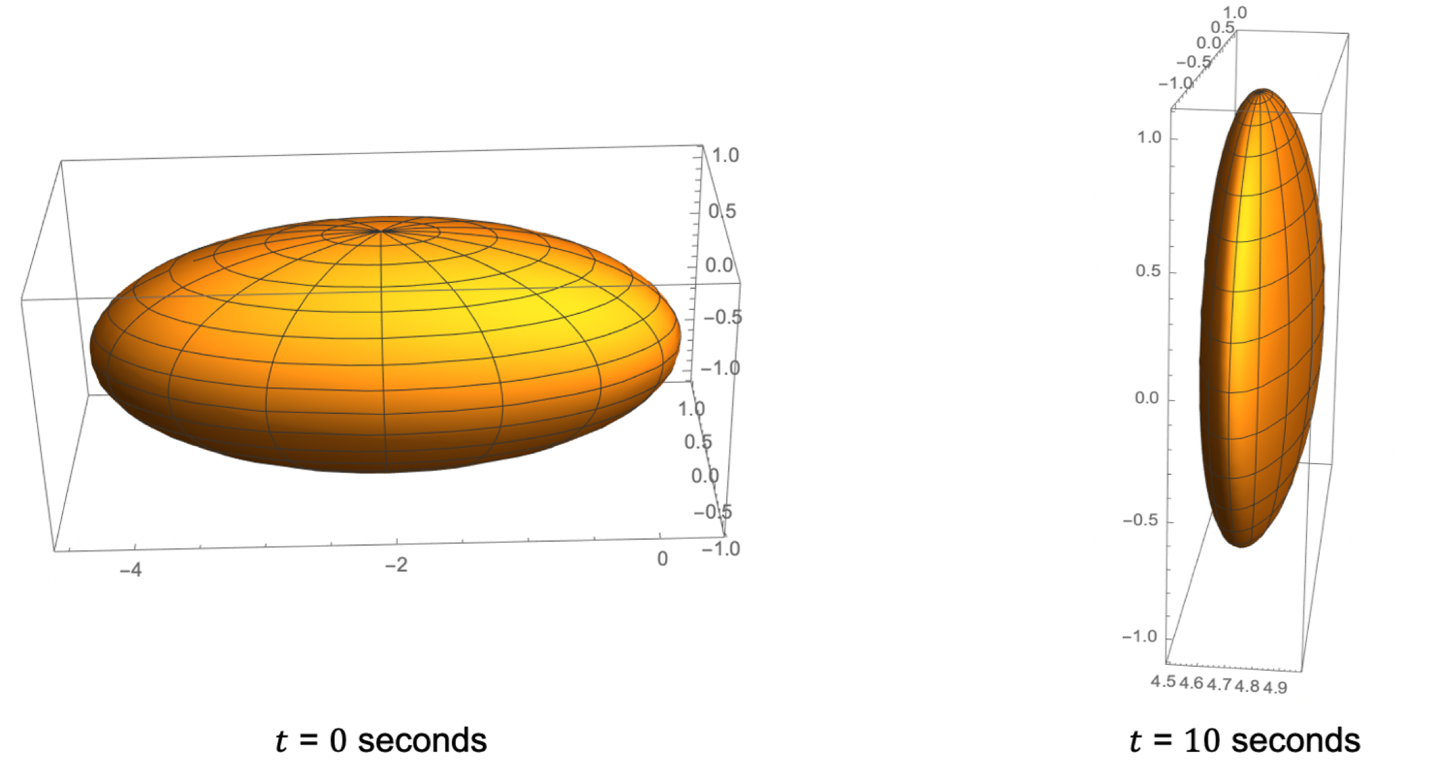
As we can see, the domain of both of these spheres are different - for the first sphere, the coordinate ranges from about -4 to 10 while for the second sphere, the coordinate ranges from about 4.5 to 4.9. So, if we use the non-parameterized version, we will first compute the exact domain for each specific situation followed by using Plot3D to plot the sphere. On the other hand, we do not have to worry about domains for parametrized plots. In this case, for instance, the domain of and ϕ will remain the same i.e. [0, ] and [0, 2] respectively. The plot of the sphere after performing PointTransform[]:
x
x
θ
π
π
ParametricPlot3D[{(x,θ,ϕ),(y,θ,ϕ),(z,θ,ϕ)},{θ,0,π},{ϕ,0,2π}]
f
x
f
y
f
z
The PointTransform[ ] function:
The PointTransform[ ] function:
We will now look at a brief overview of the mathematical equations taking into account time delay. Our goal is to find a function that will determine the 'apparent coordinate' of a point at a time on the observer's watch. Assume that there are 2 reference frames and , and moves with a velocity = , /c,/c} with respect to . Assume that at time on both clocks, the origin of is at a displacement of from the origin of , i.e. the initial displacement four-vector is (0, ). Note that is not a four velocity - it's just the ordinary velocity scaled down by a factor of (the speed of light). Assume that a particle is moving with respect to the frame and its world line parametrized by the time on the observer's clock () is {, , ,. Note that =. For the observer to see the particle at time i.e. at time , the following relation must be satisfied:
t
S
S'
S'
β
{/c
v
x
v
y
v
z
S
t=0s
S'
A
S
a
A
β
c
P
S
0
x
p
0
x
p
1
x
p
0
x
p
2
x
p
0
x
p
3
x
p
0
x
p
0
x
p
0
ct
p
t
obs
0
x
obs
2
-
0
x
0
x
obs
2
i
x
i
x
obs
So is the time light must have been emitted according to the observer's clock and is the time light reached the observer according to the observer's clock. It is now obvious that these two events will have lightlike separation (the event of the emission of light from the point lies on the backward light cone of the observer) , which also explains the equation above. To make use of the Poincare' transformation, we must incorporate the moving frame of reference into the picture. To do so, let's assume that the point particle is moving with a velocity alongside . Mathematically, this means that the position of point with respect to remains constant, as both of them move side by side. If the position vector joining the origin of to point P is , then forms the frame of reference of . For now, however, let's assume that the Point is at a position from the origin of S'. Also, we will assume that the observer is at the position with respect to the origin of .
0
x
0
x
obs
β
S'
P
S'
S'
0
S'
P
P
x
x
obs
S
Now, we can use the Poincare' transformation to calculate - the time light must have been emitted according to the moving frame's clock to reach the observer at according to the observer's clock. It is not hard to see that if we substitute the Poincare' transformation (which is essentially the Lorentz transformation + the initial displacement four-vector ) in the equation above, we will get a quadratic equation. To see this using Mathematica, we will use Symbolize[ ] to explicitly see vectors in our equations:
'0
x
0
x
obs
a
In[]:=
Needs["Notation`"]Off[Symbolize::bsymbexs]Symbolize;Symbolize;Symbolize;Symbolize;Symbolize;Symbolize;avec=;betavec=;xobservertime=;gamma=γ;xobserverpos=;xprimevec=;
a
β
0
x
obs
x
obs
x
To tell Mathematica that xobserverpos, betavec, avec, xprimevec are vectors, we use Assumptions:
In[]:=
$Assumptions=(avec|xprimevec|xobserverpos|betavec)∈Vectors[3]
Out[]=
∈Vectors[3,]
a
x
x
obs
β
We will now use the results from the paper Visual appearance of wireframe objects in special relativity by Thomas Muller and Sebastian Boblest which solves the aforementioned quadratic equation. We can solve the equation in Mathematica as well, but since the computation is fairly straightforward, we will borrow the results from the paper and use Mathematica for more complex computations afterwards. We define the quantity ρ as:
In[]:=
ρ = gamma*(betavec.xprimevec)-xobservertime;TensorExpand[ρ]
Out[]=
-+γ.
0
x
obs
x
β
We have used the TensorExpand[] function in Mathematica to simplify the expressions. We now define a couple more variables to use in our calculations:
In[]:=
ρ = gamma*(betavec.xprimevec)-xobservertime;η = xprimevec+(gamma^2/(gamma+1))(betavec.xprimevec)*betavec + avec-xobserverpos;ωsquare=gamma^2((betavec.η - ρ)^2) - ρ^2 + η.η;TensorExpand[η]TensorExpand[ωsquare]
Tests for our model:
Tests for our model:
Test 1 - The Doppler Effect:
Test 1 - The Doppler Effect:
Evaluating the PointTransform for the above parameters, we obtain:
Test 2 - The classical limit:
Test 2 - The classical limit:
As can be seen from the above equation, if the speed of the object is taken to be 0, then the apparent position of the point is the same as the actual position of the point (recall that 'avector' is the initial separation of the two reference frames and 'xprimevec' is the position of the point with respect to the moving frame of reference. Also, since the speed of the point is 0, the time at which the point is measured is irrelevant.
Test 3 - Intuition:
Test 3 - Intuition:
In the first section, we estimated that the apparent position of a point travelling at 0.9c after 10 seconds in the x-direction will be at about halfway between 0 and 9c metres. Let's use PointTransform[] to get the exact value:
As we can see from the above result, the apparent position of the point is at 4.74684 c metres, which verifies out intuitive result.
Apparent shape for Complex Objects - The Final Interface:
Apparent shape for Complex Objects - The Final Interface:
The final code for the transformation:
The explanations of the code above and other interesting observations are given in the following sections:
Apparent shape of a fast moving Sphere:
Apparent shape of a fast moving Sphere:
Having evaluated the transformation for a single point, we can now use Parameterization to evaluate the transformation for a sphere. Recall the equations:
Another interesting result we obtain for a different direction of movement:
Guess the direction of movement from the above image!
Apparent shape of a fast moving Line:
Apparent shape of a fast moving Line:
To evaluate the transformation for a line, I split up the line into 20 points and then evaluated the transformation for every point on the line, and then joined all the points together to form the new line. Parameterization of the line would have been much easier, but just out of curiosity, I wanted to see the degree of accuracy when I split the line into a number of points. And surprisingly, the line was pretty accurate! I used the subdivide function to split the line into 20 points, and then I evaluated the transformation for each point followed by joining the points together. The function I used:
This function is similar to the GetSphereCoordinates, and it uses the same method of determining the direction of velocity.
Apparent shape of a fast moving Cube:
Apparent shape of a fast moving Cube:
For a cube, I used a straightforward approach. I used MeshCoordinates to get the coordinates of 8 vertices and then constructed 12 lines representing each of the edges of the cube. By using my function LineCoordinates, I found the new shape of the 12 edges and then joined them together to form the new Cube. The function I used:
Then, to get the coordinates of each line, I used:
line1 = LineCoordinates[GetCubeCoordinates[size, x, y, z, yrotate, zrotate, 1], GetCubeCoordinates[size, x, y, z, yrotate, zrotate, 2], speed, θ, ϕ, {0, 0, 0}, {0, 0, 0}, time]
The user can also rotate the cube and get the expected results.
Apparent shape of a fast moving Arbitrary Function :
Apparent shape of a fast moving Arbitrary Function :
g[x_, y_] := (f[5*(x + ((initialx + finalx)/10) ), 5*(y + ((initialy + finaly)/10) )])/5
One interesting shape is the apparent view of an incredibly fast moving snake (sine wave):
The user can enter any function and get the desired shape!
Conclusion and Future Goals:
Conclusion and Future Goals:
This project was quite challenging and provided me with new insights about Special Relativity. Although the Lorentz transformation is pretty straightforward, the Poincare' transformation for a generalised version allowed me to create complex relativistic transformations for every possible configuration. Incorporating time delay and transforming arbitrary functions were difficult mathematical tasks, but they paved the way to create some beautiful visualisations.
My future goal is to incorporate red-shift and blue-shift into the project, followed by using differential geometry to study the mathematical behaviour of curves created in these objects. As an extension of this problem, I would like to simulate relativistic transformations for complex objects near a black hole in curvilinear coordinates. This would involve taking geodesic paths of light and taking into account tidal forces of a gravitational field!
Acknowledgements:
Acknowledgements:
I would like to thank my mentor Maegan Jennings for her extensive support in this project. I would also like to thank the Wolfram High School Summer Camp for this amazing opportunity!