Programmed by Claude (Anthropic) using wolfram script minimal guidance by me. github.com/mthiel74/AstronomyImages
Abstract
Abstract
Amateur and professional astronomy data are wildly more accessible than they were 20 years ago. Ten minutes of browsing the NASA SkyView Virtual Observatory will put half a century of photographic sky surveys, three near-infrared bands from 2MASS, four mid-infrared bands from WISE, and a pile of X-ray and radio surveys on your desktop, all for free, all in FITS, and — for the surveys NASA operates directly — all in the public domain. The friction is entirely in the tooling.
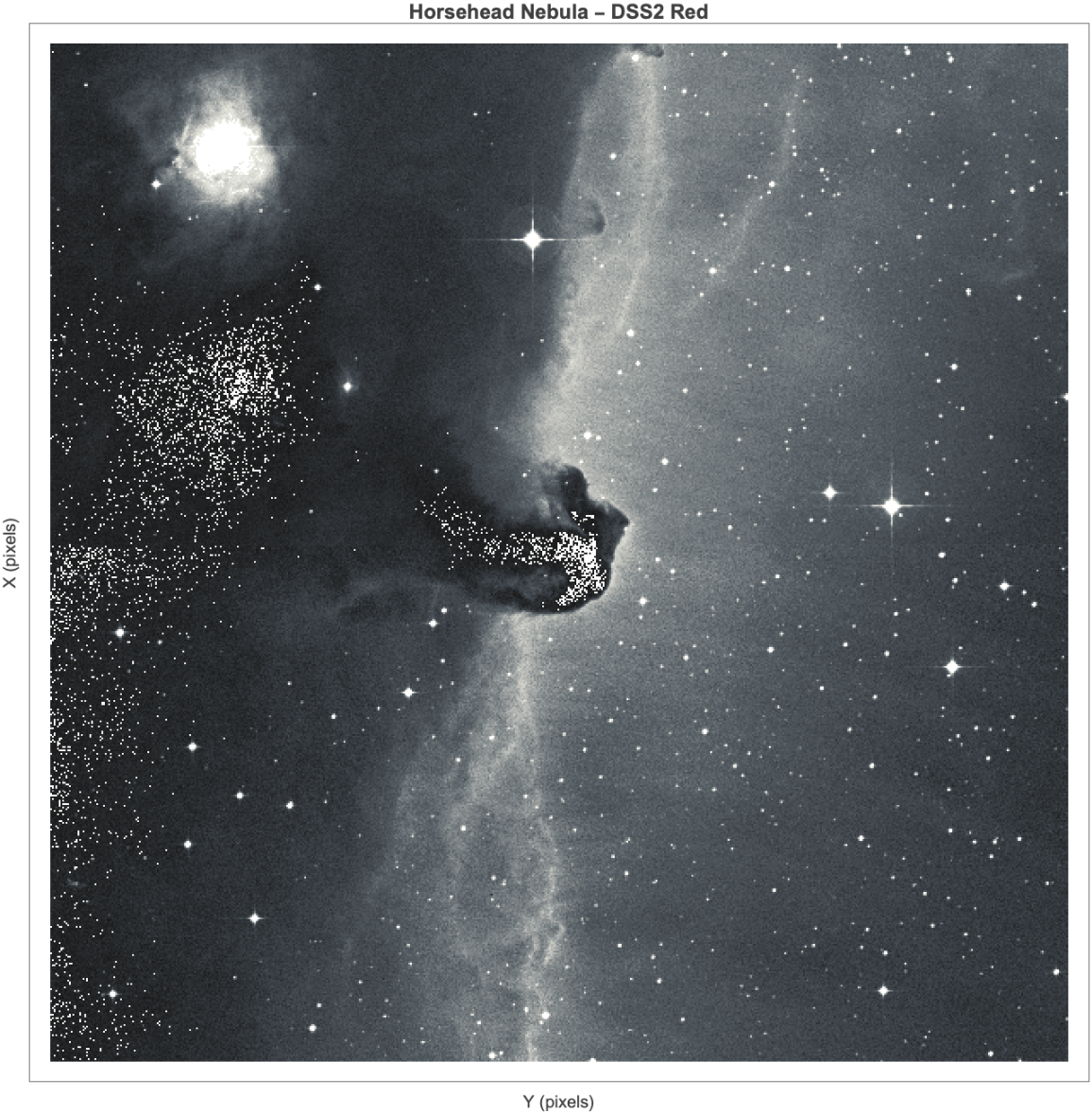
This notebook shows how little Wolfram Language code that friction actually needs. One URLRead fetches a FITS cutout; one Import decodes it; one ArrayPlot renders it; one DynamicModule wraps the lot into a live multi-survey explorer. Along the way we pull a 0.5° DSS2 Red cutout of the Horsehead Nebula, build a 2MASS J/H/K false-colour composite with an asinh stretch, tour six Messier targets (M1, M16, M31, M42, M45, M51) across multiple colour maps, and expose a catalog-driven downloader that lets you aim the pipeline at any RA/Dec on the sky.
The notebook is self-contained: a single initialisation cell at the top downloads the FITS data it needs directly from NASA SkyView on first run, caches it next to the notebook, and every subsequent open is offline. No other files to attach.
The most useful part might be Section 6.3 which contains a diagram of the sky. By clicking the user can select an area and download the image for that region.
The most useful part might be Section 6.3 which contains a diagram of the sky. By clicking the user can select an area and download the image for that region.
The code also ships as .wl packages in the Wolfram/ folder of the AstronomyImages repository (MIT-licensed); a parallel Python implementation lives at the repository root for readers who prefer that stack.
Initialisation
Initialisation
The cell below is the only thing you have to evaluate before the rest of the post runs. It defines the shared helpers (skyViewURL, skyViewBytes, loadFITSArray) and, the first time you evaluate it, downloads a bundle of FITS cutouts (~18 MB total) from NASA SkyView into an images/ folder next to this notebook. Subsequent opens reuse the cached files, so the notebook then runs fully offline. The cell is flagged as an InitializationCell, so Wolfram will offer to evaluate it automatically when the notebook is first opened.
imagesDir=FileNameJoin[{NotebookDirectory[],"images"}];If[!DirectoryQ[imagesDir],CreateDirectory[imagesDir]];skyViewURL[ra_,dec_,survey_,fov_,pixels_]:="https://skyview.gsfc.nasa.gov/cgi-bin/images?"<>URLQueryEncode;skyViewBytes[ra_,dec_,survey_,fov_:0.5,pixels_:600]:=Module[{resp=URLRead[HTTPRequest[skyViewURL[ra,dec,survey,fov,pixels]]]},If[resp===$Failed||resp["StatusCode"]=!=200,$Failed,resp["BodyByteArray"]]];loadFITSArray[file_]:=With[{raw=Import[file,{"FITS","Data"}]},Which[AssociationQ[raw],First[Values[raw]],ListQ[raw]&&Depth[raw]>=4,First[raw],True,raw]];cachedFITS[fileName_,ra_,dec_,survey_,fov_:0.5,pixels_:600]:=Module[{path=FileNameJoin[{imagesDir,fileName}],bytes},If[FileExistsQ[path]&&FileByteCount[path]>8000,Return[path]];Print["downloading ",fileName," (",survey,", ",fov,"°)…"];bytes=skyViewBytes[ra,dec,survey,fov,pixels];If[!ByteArrayQ[bytes]||Length[bytes]<8000,Print[" ! failed"];Return[$Failed]];BinaryWrite[path,bytes];Close[path];path];(*Horsehead:fivebands,oneposition*)cachedFITS["horsehead_DSS2_Red.fits",85.2479,-2.4583,"DSS2 Red",0.5,600];cachedFITS["horsehead_2MASS_J.fits",85.2479,-2.4583,"2MASS-J",0.5,600];cachedFITS["horsehead_2MASS_H.fits",85.2479,-2.4583,"2MASS-H",0.5,600];cachedFITS["horsehead_2MASS_K.fits",85.2479,-2.4583,"2MASS-K",0.5,600];cachedFITS["horsehead_WISE_3p4.fits",85.2479,-2.4583,"WISE 3.4",0.5,600];(*SixMessiertargetsinDSS2Red*)cachedFITS["M42_Orion_Nebula_DSS2_Red.fits",83.8213,-5.3903,"DSS2 Red",1.0,600];cachedFITS["M45_Pleiades_DSS2_Red.fits",56.870,24.105,"DSS2 Red",2.5,600];cachedFITS["M31_Andromeda_DSS2_Red.fits",10.685,41.269,"DSS2 Red",3.0,600];cachedFITS["M16_Eagle_Nebula_DSS2_Red.fits",274.700,-13.807,"DSS2 Red",0.5,600];cachedFITS["M51_Whirlpool_DSS2_Red.fits",202.469,47.196,"DSS2 Red",0.2,600];cachedFITS["M1_Crab_Nebula_DSS2_Red.fits",83.633,22.014,"DSS2 Red",0.15,600];(*SimulatedHorsehead(pureWolfram,nonetwork)*)With[{simPath=FileNameJoin[{imagesDir,"horsehead_simulated.mx"}]},If[!FileExistsQ[simPath],Print["generating simulated Horsehead…"];SeedRandom[42];Module[{size=600,xs,X,Y,bg,mask,tau,img,sim},xs=Subdivide[-1.,1.,size-1];X=Table[x,{y,xs},{x,xs}];Y=Table[y,{y,xs},{x,xs}];bg=100.+150.Exp[-(X^2+Y^2)/0.5];Do[bg=bg+RandomReal[{10,30}]Sin[RandomReal[{5,15}](XCos[RandomReal[{0,Pi}]]+YSin[RandomReal[{0,Pi}]])],{5}];mask=Exp[-(((X-0.10)/0.30)^2+((Y+0.20)/0.40)^2)8.]+0.7Exp[-(((X-0.15)/0.15)^2+((Y-0.15)/0.35)^2)6.];tau=3.0mask;img=bgExp[-tau];img=Map[RandomVariate[PoissonDistribution[Max[#,0.]]]&,img,{2}];sim=Clip[img+RandomVariate[NormalDistribution[0.,0.02Mean[Flatten[img]]],{size,size}],{0.,Infinity}];Export[simPath,sim]]]];Print["Initialisation complete. Bundled files:"];FileNames["*.fits"|"*.mx",imagesDir]
1. Downloading a real image from NASA SkyView
1. Downloading a real image from NASA SkyView
Every parameter SkyView needs is packed into the query string: where on the sky (Position, in equatorial degrees), which survey, how many pixels on a side, how big a field (Size, in degrees), and what to return. The cell below builds the URL and fetches the bytes.
skyViewURL[ra_,dec_,survey_,fov_,pixels_]:="https://skyview.gsfc.nasa.gov/cgi-bin/images?"<>URLQueryEncode;skyViewBytes[ra_,dec_,survey_,fov_:0.5,pixels_:600]:=Module[{resp=URLRead[HTTPRequest[skyViewURL[ra,dec,survey,fov,pixels]]]},If[resp===$Failed||resp["StatusCode"]=!=200,$Failed,resp["BodyByteArray"]]];
Heads-up on URLRead vs URLExecute. URLExecute[url, "ByteArray"] looks like it should give you the raw response bytes — it doesn't. The second argument of URLExecute is the Import element name, not the response encoding. When SkyView returns Content-Type: image/fits the call therefore tries to parse the body as a FITS file and extract a field called "ByteArray", which does not exist. The working idiom is URLRead[HTTPRequest[url]]["BodyByteArray"] as above.
The notebook ships with eighteen pre-downloaded cutouts in images/ so every cell below can be re-run offline. The next cell loads the DSS2 Red cutout of the Horsehead and turns it into a numeric matrix. Import[_, {"FITS", "Data"}] returns a one-entry Association (<|1 -> array|>) for primary-HDU files and a longer Association for multi-HDU files; First[Values[..]] grabs the primary HDU either way.
loadFITSArray[file_]:=With[{raw=Import[file,{"FITS","Data"}]},Which[AssociationQ[raw],First[Values[raw]],ListQ[raw]&&Depth[raw]>=4,First[raw],True,raw]];horseheadFile=FileNameJoin[{NotebookDirectory[],"images","horsehead_DSS2_Red.fits"}];data=loadFITSArray[horseheadFile];Dimensions[data]
A quick percentile-clipped rendering with ArrayPlot gives a publication-quality image in one line. Reverse flips the array so the FITS origin (lower-left) ends up where astronomers expect it.
2. One object, four wavelengths
2. One object, four wavelengths
SkyView stitches together data from many surveys, so with one coordinate and five lines of Wolfram you can look at the same patch of sky in completely different wavelengths. The Horsehead makes the point vividly: it is a dark nebula — an opaque column of dust that absorbs the red Hα light of IC 434 behind it — so it jumps out as a silhouette at visible wavelengths. In the near-infrared the same dust is ≈10 times less absorbing; in the mid-infrared the dust is emitting, so the nebula flips from dark feature to bright feature as we slide from 656 nm to 3.4 μm.
The cell below loads four bands from the bundled FITS files and builds the 2×2 panel in one Grid. Every panel is a single ArrayPlot with a per-band colour map and percentile-clipped contrast.
The pre-rendered PNG below is the exact output of that cell, embedded so readers on GitHub or the Community post see the figure without evaluating anything.
3. A 2MASS J/H/K false-colour composite
3. A 2MASS J/H/K false-colour composite
The three 2MASS bands (J at 1.25 μm, H at 1.65, K at 2.17) were taken with the same camera at the same time through a single filter wheel, so they share pixel scale, pointing, and seeing — a rare luxury in astronomy. That makes them the textbook ingredients for a false-colour composite. We map J to blue, H to green, K to red; the colour of a pixel then encodes its spectral shape, with hot dust and reddened objects leaning K and therefore looking red in the final image.
Raw telescope counts span many orders of magnitude — a star can be 10,000× brighter than the sky background it sits on. A linear stretch wastes most of the colour space on a handful of stars. The solution is an asinh (inverse hyperbolic sine) stretch, which is linear near zero and logarithmic at large values: it preserves the shape of faint features while still fitting bright stars into the [0,1] interval.
4. Rudimentary image analysis
4. Rudimentary image analysis
Every tool you need for a first-pass numerical look at a FITS image is in the top-level System` context. No toolbox imports.
4.1 Summary statistics
4.1 Summary statistics
4.2 Intensity histogram
4.2 Intensity histogram
4.3 Dark-nebula segmentation and optical depth
4.3 Dark-nebula segmentation and optical depth
4.4 Smoothing, log scaling, edge detection
4.4 Smoothing, log scaling, edge detection
Wolfram's image-processing operators all take plain 2-D arrays — no conversion needed. GaussianFilter smooths at a given pixel scale; GradientFilter returns |∇ I|, which lights up edges.
5. A Messier gallery
5. A Messier gallery
To convince you the pipeline isn't Horsehead-only, below is a six-target tour through the Messier catalogue, all fetched from NASA SkyView in DSS2 Red at the same resolution, each rendered with a different colour map to show how much the same raw data can change character with a one-line style swap. Every object has its own challenge — M31 is so large it needs 3° on a side, M1 is compact at ~5Â', Pleiades is dominated by a handful of bright B-type stars that saturate the central pixels on the original plates.
The cell below holds the gallery as a catalog, loads each bundled FITS, and arranges the six panels in a 3×2 Grid. Each target gets its own ColorFunction — Rainbow for M42, DeepSeaColors for M45, and so on — so the gallery doubles as a palette sampler.
The PNG below is the same computation baked to disk by make_assets.wls so readers of the static PDF / GitHub render see the figure without having to evaluate anything.
For individual high-resolution plates of each target, see images/gallery_*.png in the notebook directory, or re-run make_assets.wls to regenerate them from scratch.
6. Interactive explorers
6. Interactive explorers
6.1 Offline Manipulate over the bundled surveys
6.1 Offline Manipulate over the bundled surveys
The Manipulate below turns Section 6's analysis into a live tool: scrub through three bundled cutouts, change the colour map, and slide the dark-threshold percentile up or down while the segmentation and histogram update in real time. No network traffic — everything reads from images/.
6.2 Live downloader — any object, any survey
6.2 Live downloader — any object, any survey
The next cell is a small interactive viewer that actually hits the network when you press the button. Pick a target from the catalog (or type in your own RA/Dec), choose a survey and a field of view, and the cell will fetch the FITS from NASA SkyView, decode it, and render it with your chosen colour map. Everything lives inside one DynamicModule — no global state leaks out. The catalog is just an Association so you can extend it to any target you like. The figure below shows what the evaluated cell looks like after a fresh download of M42 in DSS2 Red.
6.3 Click-anywhere sky map
6.3 Click-anywhere sky map
Clicking a Wolfram Graphics object and getting the coordinates out is what EventHandler + MousePosition["Graphics"] are for. Wrap an all-sky Mercator in that handler, stash the click in {selRA, selDec}, and pipe those straight into skyViewBytes when the Download button is pressed. The cell below is about forty lines end-to-end. (Double click the cell bracket to show the code).
A more elaborate version with constellation patches and a save-FITS/PNG button lives in Wolfram/InteractiveSkyMap.wl (InteractiveSkyMap`launchInteractiveSkyMap[]), but the cell above already covers the main pedagogical point: EventHandler + MousePosition["Graphics"] turns any 2-D plot into a coordinate picker.
7. When the network is down: a physics-based simulation
7. When the network is down: a physics-based simulation
8. Acknowledgements
8. Acknowledgements
All images in this post were fetched from the NASA SkyView Virtual Observatory. Please read the acknowledgement carefully. I deeply appreciate NASA for making the data/images available. NASA helps us to see the universe and this is an amazing contribution to humanity. Thanks a lot!
The Digitized Sky Surveys were produced at the Space Telescope Science Institute under U.S. Government grant NAG W-2166. The images of these surveys are based on photographic data obtained using the Oschin Schmidt Telescope on Palomar Mountain and the UK Schmidt Telescope.
This post makes use of data products from the Two Micron All Sky Survey, which is a joint project of the University of Massachusetts and the Infrared Processing and Analysis Center / California Institute of Technology, funded by the National Aeronautics and Space Administration and the National Science Foundation.
WISE data courtesy of NASA / JPL-Caltech / UCLA. Code in this repository is MIT-licensed.
9. Takeaways
9. Takeaways
• URLRead + HTTPRequest + URLQueryEncode pull a SkyView FITS cutout in two lines.
• Import[_, {"FITS", "Data"}] decodes the bytes directly; for a single-HDU file it returns a one-entry Association, so First[Values[..]] is the robust unwrap.
• ArrayPlot, Histogram, GradientFilter and GaussianFilter operate directly on 2-D numeric matrices — no toolbox imports.
• DynamicModule + PopupMenu + Button makes a cross-platform live downloader in thirty lines that works anywhere Wolfram is installed.
• An asinh stretch is the textbook recipe for turning raw telescope counts into a viewable RGB composite; three Reverse[..] channels and a Transpose[_, {3, 1, 2}] produce the final image in one line.
• Images shipped with the notebook come from NASA SkyView; acknowledgements in §8.
• Import[_, {"FITS", "Data"}] decodes the bytes directly; for a single-HDU file it returns a one-entry Association, so First[Values[..]] is the robust unwrap.
• ArrayPlot, Histogram, GradientFilter and GaussianFilter operate directly on 2-D numeric matrices — no toolbox imports.
• DynamicModule + PopupMenu + Button makes a cross-platform live downloader in thirty lines that works anywhere Wolfram is installed.
• An asinh stretch is the textbook recipe for turning raw telescope counts into a viewable RGB composite; three Reverse[..] channels and a Transpose[_, {3, 1, 2}] produce the final image in one line.
• Images shipped with the notebook come from NASA SkyView; acknowledgements in §8.
10. References and further reading
10. References and further reading
• NASA SkyView: skyview.gsfc.nasa.gov
• DSS acknowledgement: archive.stsci.edu/dss/acknowledging.html
• 2MASS: irsa.ipac.caltech.edu/Missions/2mass.html; canonical citation Skrutskie et al. (2006), AJ 131, 1163.
• WISE: wise2.ipac.caltech.edu
• Lupton et al. 2004 (arXiv:astro-ph/0312483) — the asinh-stretch colour-composite recipe used in §3.
• This repository: github.com/mthiel74/AstronomyImages — MIT-licensed code, bundled SkyView imagery.
• DSS acknowledgement: archive.stsci.edu/dss/acknowledging.html
• 2MASS: irsa.ipac.caltech.edu/Missions/2mass.html; canonical citation Skrutskie et al. (2006), AJ 131, 1163.
• WISE: wise2.ipac.caltech.edu
• Lupton et al. 2004 (arXiv:astro-ph/0312483) — the asinh-stretch colour-composite recipe used in §3.
• This repository: github.com/mthiel74/AstronomyImages — MIT-licensed code, bundled SkyView imagery.
CITE THIS NOTEBOOK
CITE THIS NOTEBOOK
Exploring NASA SkyView: live imagery, dark-nebula analysis, & catalogue-driven sky-survey downloader
by Marco Thiel
Wolfram Community, STAFF PICKS, April 23, 2026
https://community.wolfram.com/groups/-/m/t/3701280
by Marco Thiel
Wolfram Community, STAFF PICKS, April 23, 2026
https://community.wolfram.com/groups/-/m/t/3701280