Here I will discuss three fascinating problems related to bicycles, one of which is so counterintuitive that I call it the bicycle paradox. Unlike my recent post [W], bicycles here have round wheels. The first section deals with a famous error made by Sherlock Holmes. The second asks if a bicycle can pretend to be a unicycle. The third section shows that another famous person, the Russian mathematician V. I. Arnold, can blunder when thinking about the subtle mechanics underlying the behavior of a bicycle wheel.
1. The Sherlock Holmes Bicycle Problem
1. The Sherlock Holmes Bicycle Problem
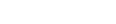
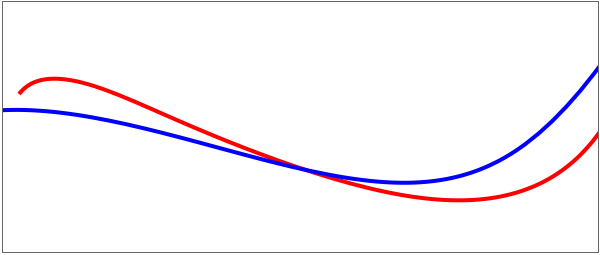
A famous problem of geometry, inspired by an error made by Sherlock Holmes, is to determine from the two tracks made by the wheels of a bicycle the direction of travel [K]. The solution comes from a geometric observation about the tracks: because of how a bicycle works, the tangent to the rear track must strike the front track at a distance equal to the length of the bike. So by looking at various tangents one can determine which track is the rear, which is the front, and the direction of travel. This geometrical observation is also the key to making realistic bike tracks: select a path (t) in the plane to be the rear path, and compute (t)+L(t)to be the front, where is the length of the bike's wheelbase.
b
b
′
b
||(t)||
′
b
L
The demo that follows (taken from [S]) allows the user to create the back track of a bicycle (blue) and see the corresponding front track. The main points of this demo are:
◼
The use of a Bézier curve with high degree to represent the rear track. The user can choose to use a spline curve instead.
◼
Making the locators invisible, but placing numbered circles at the locations instead. The numbers are important to keep track of the control points.
◼
Using to allow the user to add additional points (or subtract points); points can be added by ⌘-clicking or -clicking. Points can be removed by adding the shift-key.
LocatorAutoCreate
◼
Allowing the use of random points; this is done by a button, which is a way of avoiding the problem of having new random points generated when the other controls are changed. We thank Michael Rogers (Emory Univ.) for helping us with this subtle point. The double use of is not essential, but helps prevent crashing variables. The control variables are localized outside the (which means labels are necessary for them) and the auxiliary variables are localized inside.
Module
Manipulate
Manipulate
In[]:=
Module{xmin,xrange,ymin,yrange,locQ,p,tanQ,tantt,met},ManipulateModule{ranPts,t,backTrack,frontTrack},backTrack=Which[met==="Bezier",BezierFunction[p,SplineDegreeLength[p]-1][t],met==="Spline",Interpolation[Transpose[{Range[0,1,1/(Length[p]-1)],p}],Method"Spline"][t]];frontTrack=backTrack+randirbackTrack;Show[ParametricPlot[Evaluate[{frontTrack,backTrack}],{t,0.01,1},PlotStyle{{Thick,Red},{Thick,Blue}},PlotRangeAll],Graphics[{If[locQ,{EdgeForm[Thickness[0.0025]],FaceForm[LightYellow],Disk[#,0.13]&/@p,MapIndexed[Text[Style[#2〚1〛,9],#]&,p]},{}],If[tanQ,{Thickness[0.008],PointSize[0.02],Point[backTrack],Arrow[{backTrack,frontTrack}]}/.tIf[randir1,tantt,1-tantt],{}]}],FrameTrue,FrameTicksFalse,ImagePadding1,AxesFalse,PlotRange{{xmin,xmin+xrange},{ymin,ymin+yrange}},ImageSize300],{{p,{{0,1},{0.6,1.2},{1.2,1.8},{3,.5},{4,.4},{4.5,.42},{5.5,2}}},Locator,LocatorAutoCreateTrue,AppearanceNone},{{randir,1},{-1,1},None},{{locQ,False,"show locators"},{True,False}},{{met,"Bezier","curve drawing method"},{"Bezier","Spline"}},{{xmin,1.06,"xmin"},-3,3,ImageSizeSmall},{{xrange,3.9,"range of x"},1,10,ImageSizeSmall},{{ymin,0.28,"ymin"},-3,3,ImageSizeSmall},{{yrange,1.64,"range of y"},1,10,ImageSizeSmall},RowSpacer[58],Button"use random points",p=SortTable{i,RandomReal[met/.{"Bezier"->{-0,3.},"Spline"{+.6,1.5}}]},i,0,6,,ImageSizeMedium,BaseStyle10,Spacer[10],Button["use random direction",randir=Sign[RandomReal[{-1,1}]],ImageSizeMedium,BaseStyle10],{{tanQ,False,"show the bicycle"},{True,False}},{{tantt,0.5,"bicycle movement parameter"},0.01,0.99,ImageSizeSmall,EnabledtanQ},TrackedSymbolsManipulate,SaveDefinitionsTrue
∂
t
Norm[backTrack]
∂
t
6
9
Out[]=



From a practical point of view, the more relevant problem is the one where one starts with the front path and computes the rear path. If the front path is given by (t), there is an elegant differential equation for the back path, (t). The derivation rests on the basic rear–front relationship
f
b
f b ′ b ′ b |
Now, the speed of the back point is given as
′ b 1 L ′ f f b |
where the sign is the same as in the basic relationship and the dot stands for a dot product (the physical reason for this is that the velocity of the back tire equals the magnitude of the component of the front-tire velocity in the direction of the back-tire motion; mathematically, the second equation can be obtained by differentiating the first one and using the Frenet formulas). Combining the previous two equations yields
′
b
1
2
L
′
f
b
f
b
f
The initial condition should be a point units away from the start of the front path. More information can be found in [D]; see also [T] for a different sort of demonstration based on these ideas.
L
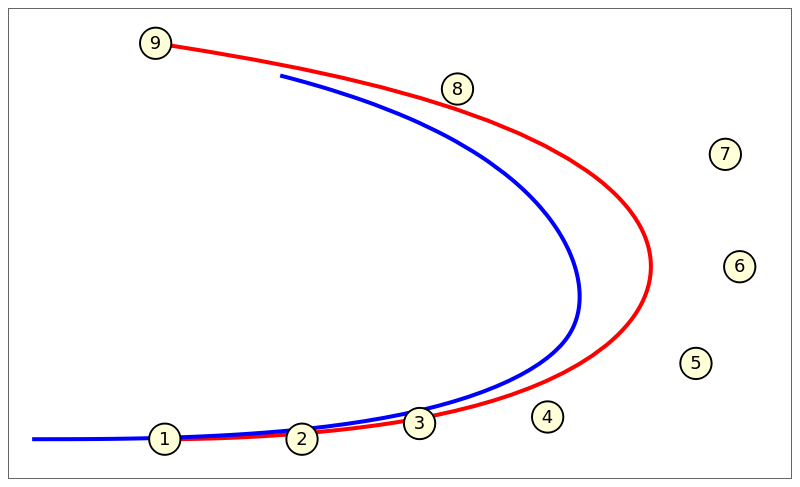
And here is a similar demo where the user controls the front track (red), with the back track determined by the solution of a differential equation. This is the situation that models reality, since a bicyclist steers the front wheels, as does a bus, truck, or car driver. In this example the starting direction is from west to east, which is why the left end of the blue curve is always one unit west of the end of the front curve.
A tricky part of this code is the use of two functions for the front track. The first is , the straightforward Bézier curve based on the points, with no restrictor. This version is used for the derivative needed in . But then is the restricted version of , needed in . The default choice of nine control points illustrate how the rear wheel cuts the corner when the front wheel goes around a curve. More points can be added using the command or keys.
front
frontDer
front1
front
NDSolve
In[]:=
Module{front,front1,frontDer,backSol,locQ,xmin,xrange,ymin,yrange,t,b,p,met},ManipulateL=1;front[t_]:=Evaluate[Which[met==="Bezier",BezierFunction[p,SplineDegreeLength[p]-1][t],met==="Spline",Interpolation[Transpose[{Range[0,1,1/(Length[p]-1)],p}],Method"Spline"][t]]];front1[t_?NumericQ]:=front[t];frontDer[t_?NumericQ]:=Evaluate[D[front[t],t]];backSol=NDSolveValue[t],b[0]{-1,0}+front1[0],b[t],{t,0,1};Show[ParametricPlot[front[t],{t,0,1},PlotStyle{Red,Thick}],ParametricPlot[Evaluate[backSol],{t,0,1},PlotStyle{Blue,Thick}],Graphics[{If[locQ,{EdgeForm[Thickness[0.0025]],FaceForm[LightYellow],Disk[#,0.12]&/@(p),MapIndexed[Text[Style[#2[[1]],9],#]&,p]},{}]}],FrameTrue,FrameTicksNone,PlotRange{{xmin,xmin+xrange},{ymin,ymin+yrange}},ImagePadding0+4,PlotRangePadding{0,0.3},AxesFalse,ImageSize400],{{p,{{1,0},{2.05,0},{2.95,0.12},{3.93,0.17},{5.065,0.58},{5.4,1.32},{5.29,2.18},{3.24,2.68},{0.93,3.03}}},Locator,LocatorAutoCreateTrue,AppearanceNone},{{locQ,True,"show locators"},{True,False}},{{met,"Bezier","curve drawing method"},{"Bezier","Spline"}},{{xmin,-0.2,"xmin"},-3,3,ImageSizeSmall},{{xrange,6,"xrange"},1,10,ImageSizeSmall},{{ymin,0,"ymin"},-3,3,ImageSizeSmall},{{yrange,3,"yrange"},1,10,ImageSizeSmall},TrackedSymbolsManipulate,SaveDefinitionsTrue,ControlPlacementLeft
′
b
frontDer[t].(b[t]-front1[t])(b[t]-front1[t])
2
L
Out[]=
2. Bicycle or Unicycle?
2. Bicycle or Unicycle?
The preceding section shows one way that a world-class detective can be fooled by bicycle tracks. Here is another way. Suppose there is just a single tire track whose width matches that of a bike tire. Was the track necessarily made by a unicycle? Or could it have been made by a bicycle, whose route was carefully chosen such that the rear wheel always followed exactly the track made by the front wheel? Of course, this is possible for a bike going in a perfectly straight line. Is there any other way? The answer, discovered by David Finn [F, V], is YES.
In[]:=
Manipulate[Module[{j},nmax=5;xmin=-0.13;xmax=nmax+0.13;ymin=-2.4;ymax=2.6;cols={Red,Blue,Green,Yellow,Cyan,Orange};j=Round[1+t998];Graphics[{{GrayLevel[.4],Rectangle[{xmin,ymin},{xmax,ymax}]},AbsoluteThickness[2],Table[{cols[[i]],Line[ptsLeveled[[i]]]},{i,5}],{Black,AbsolutePointSize[7],Point[{#,0}]&/@Range[0,5]},White,Line[{pts[[j]],pts[[j+1000]]}],AbsolutePointSize[7],Point[{pts[[j]],pts[[j+1000]]}]},FrameTrue,PlotRange{{xmin,xmax},{ymin,ymax}},FrameTicks{Range[0,nmax],Range[-4,4],None,None},ImageSize500,BaseStyleFontFamily"Times"]],{{t,0,"time"},0,4,Appearance"Labeled"},TrackedSymbols{t},SaveDefinitionsTrue]
Given a front track, there is a simple differential equation to get the back track. Using this idea one can work backwards, solving the equation numerically. This process appears to give a perfectly good unicycle-bicycle track that is infinite in both directions, but It is an open question to prove that the process to the left can be carried out indefinitely. This issue is discussed in detail in [V].
3. The Bicycle Paradox
3. The Bicycle Paradox
Stand on the ground beside a bicycle that faces right and has its pedal at the 6 o’clock position. Push the pedal left (clockwise). Which way will the bike move? Most people answer that the bike moves forward as the pedal moves clockwise toward 7 o’clock. But, in fact, the bike moves backward and the pedal moves counterclockwise toward 5 o’clock, despite the fact that you are pushing it towards 7 o’clock. This is very counterintuitive!
The first image below is from a book by V. I. Arnold [A, L]. The lowest arrow indicates the direction of push (toward 7 o'clock). The arrow on the chain indicates clockwise motion and the arrow at the top indicates that the bike will move forward. However, somewhat surprisingly, Arnold's analysis of the situation is completely wrong.
What actually happens is very different. In the image below the red bike is the initial position and force is applied as indicated by the red arrow. But the pedal moves toward the 5 o’clock position and the bike moves backward. It is very easy to set this up yourself, so I highly recommend you find a bicycle and try it.
The usual explanation [N] uses torque and other concepts of physics. Indeed, that is how I first explained the subject in classes, and that is also the approach I took in my article [W]. But the purely geometric ideas in George Hart’s excellent explanatory video [H] show that the paradox, and several variants, can be explained by just simple geometry. A first simplification is to use a unicycle, with wheel of radius 1 and no gears (i.e., a gear ratio of 1). The gear ratio can be brought into play once we understand the simpler case.
References
References
[A] V. I. Arnold, Mathematical Understanding of Nature: Essays on Amazing Physical Phenomena and Their Understanding by Mathematicians, Amer. Math. Soc., Providence RI, 2014, 〈https://bookstore.ams.org/mbk-85〉.
[D] S. R. Dunbar, R. J. C. Bosman, and S. E. M. Nooij, The track of a bicycle back tire, Math. Mag. 74 (2001) 273–287.
[F] D. Finn, Can a bicycle create a unicycle track?, College Math. J., 33(4), 2002 283–292.
[H] G. Hart, Mathematical impressions: The bicycle pulling puzzle,
https://www.simonsfoundation.org/2014/03/20/mathematical-impressions-the-bicycle-pulling-puzzle.
https://www.simonsfoundation.org/2014/03/20/mathematical-impressions-the-bicycle-pulling-puzzle.
[K] J. Konhauser, D. Velleman, and S. Wagon, Which Way Did the Bicycle Go?...and Other Intriguing Mathematical Mysteries, Dolciani Mathematical Expositions, vol. 18, MAA Press—Amer. Math. Soc., Providence RI, 1996, https://bookstore.ams.org/view?ProductCode=DOL/18.
[L] M. Levi, Review of Mathematical Understanding of Nature: Essays on Physical Phenomena and Their Understanding by Mathematicans, by V. I. Arnold, Mathematical Intelligencer, 42, Spring 2020, 84–85.
[N] J. D. Nightingale, Which way will the bike move? Physics Teacher, 31:4, April 1993, 244–45.
[S] D. Schwalbe, A. Slavik, and S. Wagon, VisualDSolve: Visualizing Differential Equations with Mathematica, Wolfram Research, Inc., 2009 〈http://www.wolfram.com/books/profile.cgi?id=9553〉.
[T], M. Trott, Bicycle rides, The Wolfram Demonstrations Project, http://demonstrations.wolfram.com/BicycleRides/.
[V] D. Velleman and S. Wagon, Bicycle or Unicycle? A Collection of Intriguing Mathematical Puzzles, MAA Press—Amer. Math. Soc., Providence RI, 2020, 〈https://bookstore.ams.org/prb-36〉.
[W] S. Wagon, A rolling square bridge: Reimagining the wheel, Wolfram Community, May 9, 2023, https://community.wolfram.com/groups/-/m/t/2917199.
CITE THIS NOTEBOOK
CITE THIS NOTEBOOK
Three bicycle problems: from Sherlock Holmes to unicycle illusion to pedal paradox
by Stan Wagon
Wolfram Community, STAFF PICKS, July 28, 2023
https://community.wolfram.com/groups/-/m/t/2978606
by Stan Wagon
Wolfram Community, STAFF PICKS, July 28, 2023
https://community.wolfram.com/groups/-/m/t/2978606