COVID19 - MEXICO - ANALYSIS
I started this Notebook because I haven’t found a useful database on the coronavirus situation in Mexico. The Mexican government has a PDF document with all confirmed cases on its website (link in the Notebook). The purpose of this notebook is to use this PDF and to complement it with the JHU database which is available by Wolfram Data Resources.
To update you only need to download the daily PDF report from the link provided below (data section).
To update you only need to download the daily PDF report from the link provided below (data section).
Data
Data
In[]:=
(*CLEARALL*)Clear["Global`*"];
Datos del gobierno Mexicano // Data from the Mexican government
Datos del gobierno Mexicano // Data from the Mexican government
Fuente de información // Information source
Fuente de información // Information source
La fuente principal de información para este reporte es el gobierno de Mexico. En el link* se puede encontrar un documento PDF con los casos confirmados.
The main information source is the Mexican government. In the link* a PDF document containing a list of the confirmed cases is found.
Una información muy importante que falta es sobre la mortalidad/letalidad. Sin embargo, Mathematica ofrece una gran solución utilizando su función Resource object. Su fuente de información es la Universidad Johns Hopkins**.
Information of deaths is not available in this document. Nevertheless, Mathematica’s ResourceObject provide this information. It gets the information from Johns Hopkins University**.
* https://www.gob.mx/salud/documentos/coronavirus-covid-19-comunicado-tecnico-diario-238449
** https://www.wolframcloud.com/obj/acc4c422-cab3-4eab-8f48-c734b2b1d55e
The main information source is the Mexican government. In the link* a PDF document containing a list of the confirmed cases is found.
Una información muy importante que falta es sobre la mortalidad/letalidad. Sin embargo, Mathematica ofrece una gran solución utilizando su función Resource object. Su fuente de información es la Universidad Johns Hopkins**.
Information of deaths is not available in this document. Nevertheless, Mathematica’s ResourceObject provide this information. It gets the information from Johns Hopkins University**.
* https://www.gob.mx/salud/documentos/coronavirus-covid-19-comunicado-tecnico-diario-238449
** https://www.wolframcloud.com/obj/acc4c422-cab3-4eab-8f48-c734b2b1d55e
Importar información // Import Information
Importar información // Import Information
In[]:=
SetDirectory[NotebookDirectory[]]
Out[]=
/Users/ivan/Desktop/SemestreSabatico/covid19
In[]:=
l=Import["covidMx.pdf","Plaintext"];
In[]:=
l2=Import["suspectsMx.pdf","Plaintext"];
Cambiar nombres de estados /. Change state names
Cambiar nombres de estados /. Change state names
Algunos estados tienen dos palabras. Para facilitar la manipulación de los datos se cambian a su abreviación.
Some states have two names. To facilitate data manipulation, let' s change it to one word.
Some states have two names. To facilitate data manipulation, let' s change it to one word.
In[]:=
l=StringReplace[l,"BAJA CALIFORNIA""BC"];l2=StringReplace[l2,"BAJA CALIFORNIA""BC"];l=StringReplace[l,"BAJA CALIFORNIA SUR""BCS"];l2=StringReplace[l2,"SUR"""];l=StringReplace[l,"BC SUR""BCS"];l2=StringReplace[l2,"BC SUR""BCS"];l=StringReplace[l,"DISTRITO FEDERAL""CDMX"];l=StringReplace[l,"CIUDAD DE MÉXICO""CDMX"];l2=StringReplace[l2,"DISTRITO FEDERAL""CDMX"];l2=StringReplace[l2,"CIUDAD DE MÉXICO""CDMX"];l=StringReplace[l,"NUEVO LEON""NL"];l2=StringReplace[l2,"NUEVO LEON""NL"];l=StringReplace[l,"NUEVO LEÓN""NL"];l2=StringReplace[l2,"NUEVO LEÓN""NL"];l=StringReplace[l,"QUINTANA ROO""QR"];l2=StringReplace[l2,"QUINTANA ROO""QR"];l=StringReplace[l,"SAN LUIS POTOSI""SLP"];l2=StringReplace[l2,"SAN LUIS POTOSI""SLP"];l=StringReplace[l,"SAN LUIS POTOSÍ""SLP"];l2=StringReplace[l2,"SAN LUIS POTOSÍ""SLP"];l=StringReplace[l,"ESTADO DE MEXICO""EDOMEX"];l2=StringReplace[l2,"ESTADO DE MEXICO""EDOMEX"];
Crear lista de casos // Create a List of cases
Crear lista de casos // Create a List of cases
La información aún esta desordenada, hay que separar cada renglón. Para esto, separo la información por palabras utilzando la función StringSplit, posteriormente las agrupo en listas de 6 palabras (número de caso, estado, sexo, edad, fecha de inicio de sintomas, identificación, procedencia).
SpringSplit is used to separate the words into list of 7 words (each list per 1 case) containing the 1) case number, 2) State, 3) Gender, 4) Age, 5) Date of appearance of symptoms , 6) confirmation and 7) The place from which the person contracted the disease.
Se quitan las palabras del encabezado del pdf y las últimas que indican la fuente de la información.
Some words are removed (table heads, etc) .
Some words are removed (table heads, etc) .
In[]:=
WordCount[l]-26-16WordCount[l2]-26-16
Out[]=
20641
Out[]=
60627
In[]:=
splstr=StringSplit[l];(*Separardatosporpalabra//Splittextintowords*)splstr2=StringSplit[l2];
In[]:=
(*checkwhenliststarts!Lookfornumber1*)splstr[[25]]splstr2[[26]]
Out[]=
1
Out[]=
1
In[]:=
(*BUSCARLAPALABRAFUENTE//LOOKFORWORD:'FUENTE',whichiswherethefootnotesstart*)splstr[[-12]]splstr2[[-13]]
Out[]=
Fuente:
Out[]=
Fuente:
In[]:=
lstart=25;lstart2=26;lfinish=12;l2finish=13;
In[]:=
wthoutHead=splstr[[lstart;;]];(*Identificarcomienzodelatabla//Identifythebeginingofdata*)wthoutHead2=splstr2[[lstart2;;]];
In[]:=
tbl=Table[wthoutHead[[i;;i+6]],{i,1,WordCount[l]-lstart-lfinish,6}];susptbl=Table[wthoutHead2[[i;;i+6]],{i,1,WordCount[l2]-lstart2-l2finish,6}];
In[]:=
tbl[[1999]](*Ejemplodecaso//Exampleofcase*)susptbl[[9]]
Out[]=
{1999,MICHOACÁN,MASCULINO,57,18/03/2020,Confirmado,2000}
Out[]=
{9,QR,FEMENINO,48,23/03/2020,Sospechoso,10}
In[]:=
(*TODOSLOSQUEDIGANBCENELLUGARDELNUMEROHAYQUECAMBIAR*)indXhange=Position[susptbl[[All,1]],"BC"];susptbl[[Flatten[indXhange],{1,2}]]=susptbl[[Flatten[indXhange],{2,1}]];
In[]:=
susptbl[[Flatten[indXhange],2]]="BCS";
In[]:=
(*EXITO!*)susptbl[[9]]
Out[]=
{9,QR,FEMENINO,48,23/03/2020,Sospechoso,10}
Dimensiones de la tabla - El primer número indica el número de casos confirmados
Dimension of our data - first number is the number of confirmed cases
Dimension of our data - first number is the number of confirmed cases
In[]:=
Dimensions[tbl]Dimensions[susptbl]splstr[[-6-lfinish]]splstr2[[-6-l2finish]]
Out[]=
{3441,7}
Out[]=
{10105,7}
Out[]=
3441
Out[]=
10105
Manipular información // Manipulate data
Manipular información // Manipulate data
Se requiere cambiar a tipo númerico el número de caso y la edad. Se convierte a fecha .
All data is of the type ‘string’. We need to change it to numeric data (case number and age) and to date data.
All data is of the type ‘string’. We need to change it to numeric data (case number and age) and to date data.
In[]:=
tbl2=ArrayFlatten[tbl];
In[]:=
(*Convertiraentero//CasenumberandagetoInteger*)tbl2[[All,{1,4}]]=ToExpression[tbl2[[All,{1,4}]]];(*Convertirafecha//Converttodate*)tbl2[[All,5]]=DateObject[{#,{"Day","/","Month","/","Year"}},"Day"]&/@tbl2[[All,5]];
Datos Mathematica // Mathematica Data
Datos Mathematica // Mathematica Data
Como se menciona anteriormente, la información se complementa con los datos de Wolfram
As mentioned before, we also use Resource Object from Wolfram in order to complete the information
As mentioned before, we also use Resource Object from Wolfram in order to complete the information
In[]:=
ResourceObject["Epidemic Data for Novel Coronavirus COVID-19"]ResourceData["Epidemic Data for Novel Coronavirus COVID-19"];ResourceData["Epidemic Data for Novel Coronavirus COVID-19"][Max,#ConfirmedCases["LastDate"]&]casesMexico=ResourceData["Epidemic Data for Novel Coronavirus COVID-19"][Select[MemberQ[{Entity["Country","Mexico"]},#Country]&]][All,All];
Out[]=
ResourceObject


Out[]=
Visualization
Visualization
Global
Global
In[]:=
globalMap=GeoRegionValuePlot[Normal@ResourceData["Epidemic Data for Novel Coronavirus COVID-19"][GroupBy["Country"],Total,#ConfirmedCases["LastValue"]&],ImageSize400];
Evolución Temporal // Time Evolution
Evolución Temporal // Time Evolution
In[]:=
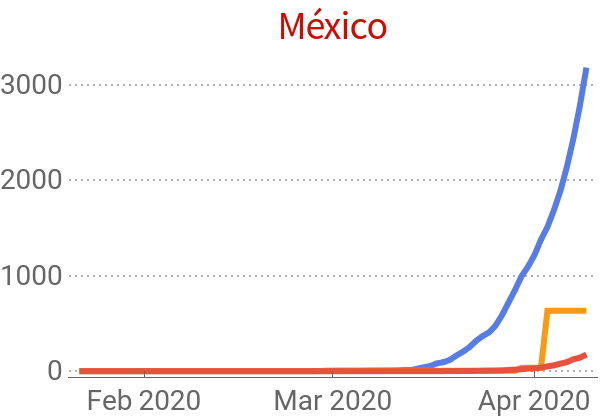
colnames={"Administrative Division","País","Localización geográfica","Confirmados","Recuperaciones","Muertes"};mexPlot=DateListPlot[Table[Legended[#[[i]],colnames[[i]]]&/@casesMexico,{i,4,6}],Sequence[PlotLabelStyle["México","Title",20],ImageSize300,LabelStyle{FontSize14},PlotTheme"Business",PlotRangeFull]]
Out[]=


HOY // TODAY
HOY // TODAY
Gender
Gender
Estados
Estados
Edad
Edad
Analysis
Analysis
Cluster Analysis
Cluster Analysis
Identificar estados con procedencia y edades similares
PLOTS
PLOTS