July 22, 2024 was the hottest day in recorded history, according to provisional data from the European climate service.
Introduction
Introduction
Yesterday, on July 24 2024, the Associated Press reported that this Monday broke the record for the hottest day ever recorded on earth, according to provisional data from the European climate service, Copernicus.
In the article, Sibi Arasu and Seth Borenstein report that “Monday was 0.06 degrees Celsius (0.1 degree Fahrenheit) hotter than Sunday, which was .01 degrees Celsius hotter (0.2 degrees Fahrenheit) than the previous hottest day on record, July 6, 2023.”
The data they cite are from the ECMWF Reanalysis v5 (ERA5) dataset, which provides hourly spatial estimates of many of atmospheric, land and oceanic climate variables, including surface air temperature and sea surface temperature, daily, from 1940 to the present day.
While Copernicus provides free access to these data, the size of raw dataset files (which are large gridded data layer stacks stored in NetCDF format) makes many ad hoc analyses prohibitively expensive. However, and fortunately, Copernicus and the University of Maine’s Climate Change Institute both provide trackers for the average global temperature based on ERA5 data. These are:
◼
Copernicus’ Climate Pulse: https://pulse.climate.copernicus.eu/ (near real time, typically 2 days behind)
◼
The University of Maine’s Climate Reanalyzer: https://climatereanalyzer.org/clim/t2_daily/?dm_id=world (a few more days delay)
How easy would it be to import and study these data in the Wolfram Language? Let’s find out.
Getting Global Mean Surface Temperature Data
Getting Global Mean Surface Temperature Data
Importing and Preprocessing Data from Climate Pulse:
Importing and Preprocessing Data from Climate Pulse:
Climate Pulse conveniently provides a link to download a table of global surface air temperature data from 1940 to the latest data available. Let’s import these data:
In[]:=
surfaceAirTempData=Import["https://sites.ecmwf.int/data/climatepulse/data/series/era5_daily_series_2t_global.csv","Dataset",HeaderLines->19][All,KeyMap[Last[StringSplit[#,"\n"]]&,#]&]//
Out[]=


Neat! The columns key (dropped from the .csv table during the import) defines the columns as:
# Columns:
# 2t: Daily mean absolute temperature based on hourly values from 00 to 23 UTC
# clim_91-20: Daily climatology for 1991-2020
# ano_91-20: Daily anomaly relative to the 1991-2020 daily climatology
# status: Preliminary or final
# Units: deg. C
# Last updated: 25 Jul 2024
# 2t: Daily mean absolute temperature based on hourly values from 00 to 23 UTC
# clim_91-20: Daily climatology for 1991-2020
# ano_91-20: Daily anomaly relative to the 1991-2020 daily climatology
# status: Preliminary or final
# Units: deg. C
# Last updated: 25 Jul 2024
To construct time series from these data, it’ll help to convert the values from the date column into Wolfram Language date objects:
In[]:=
surfaceAirTempData=surfaceAirTempData[All,<|#,"date"->FromDateString[#date,{"Year","-","Month","-","Day"}]|>&]//
Out[]=
Constructing and Plotting Time Series from the Data:
Constructing and Plotting Time Series from the Data:
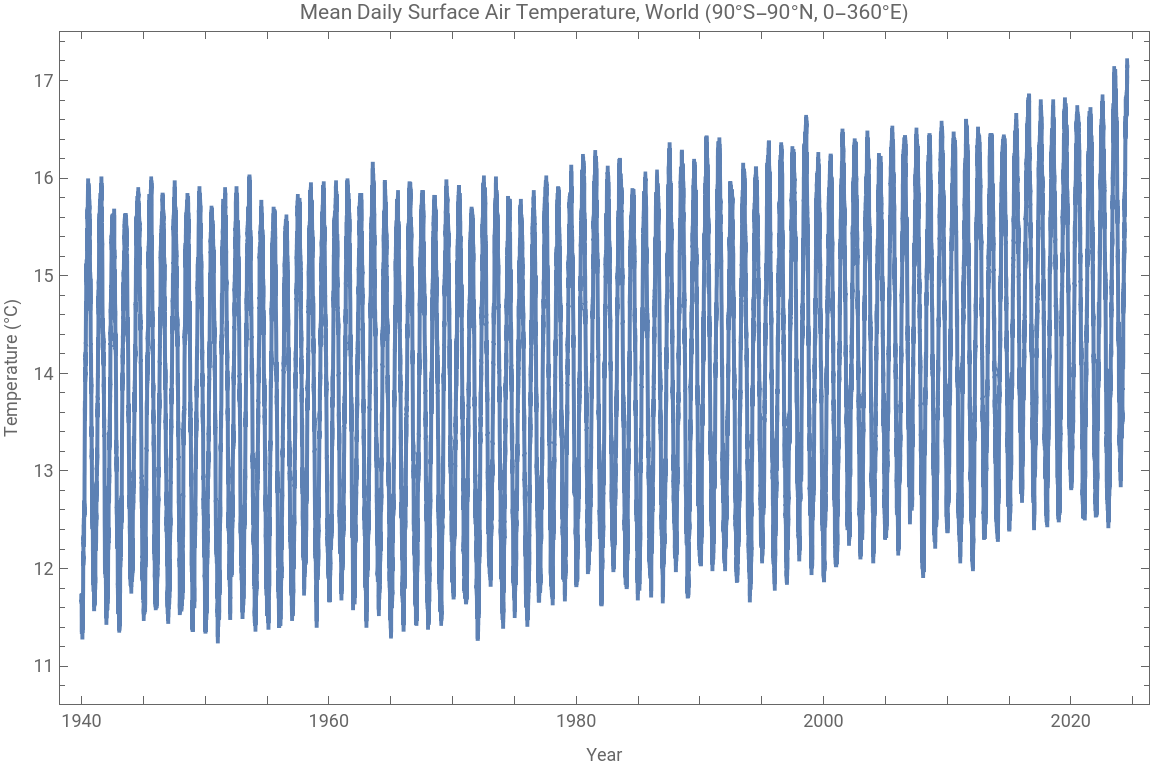
Now that we have the data, we can get a time series of daily mean absolute temperatures like so:
In[]:=
dailyMeanSurfaceAirTempTS=TimeSeries[Normal[surfaceAirTempData[All,{#"date",#"2t"}&]]]
Out[]=
TimeSeries


Plotting it is as easy as:
In[]:=
DateListPlot[dailyMeanSurfaceAirTempTS,PlotLabel->"Mean Daily Surface Air Temperature, World (90°S-90°N, 0-360°E)",FrameLabel->{"Year","Temperature (°C)"},ImageSize->Large]
Out[]=
Verifying the Claims Made by the AP & Others:
Verifying the Claims Made by the AP & Others:
Based on these data, was the hottest day on record really last Monday? Let’s confirm:
In[]:=
MaximalBy[surfaceAirTempData,"2t"]
Out[]=
What were the top 5 hottest recorded days since 1940?
In[]:=
MaximalBy[surfaceAirTempData,"2t",5]
Out[]=
Note that the top three hottest days on record were this month.
Reproducing the Famous Global Mean Surface Temperature Multi-Year Overlay Plot
Reproducing the Famous Global Mean Surface Temperature Multi-Year Overlay Plot
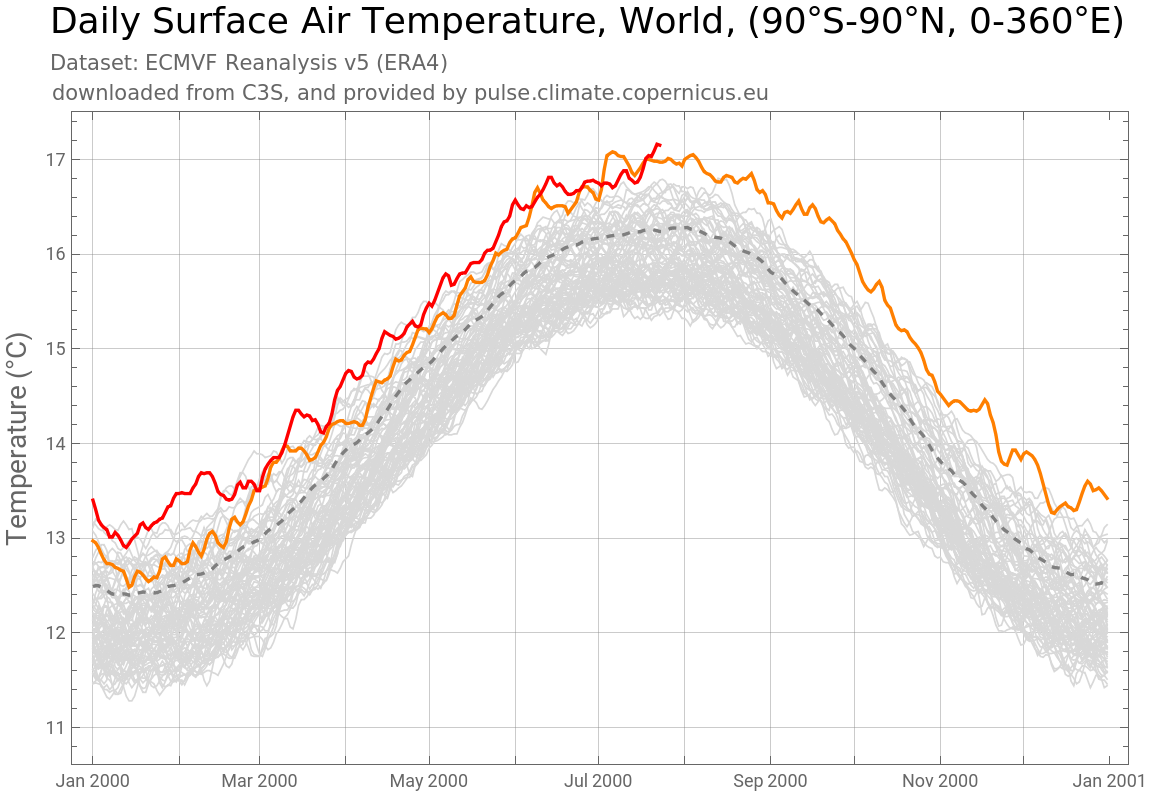
With the data we have collected, we can now reproduce the now famous year over year plot of global mean surface temperatures from Climate Pulse.
Out[]=


Getting These Data for Specific Time Ranges and Regions from Climate Reanalyzer
Getting These Data for Specific Time Ranges and Regions from Climate Reanalyzer
It would be helpful to have a function that automates the process of importing these data for different available regions and time ranges.
This task is quite straightforward using data from Climate Reanalyzer.
This task is quite straightforward using data from Climate Reanalyzer.
Define a function to import time series from Climate Reanalyzer:
The function supports importing data from six regions, specified with the area parameter:
◼
“World” → The whole world, 90°S-90°N, 0-360°E
◼
“NH” → The northern hemisphere, 0-90°N, 0-360°E
◼
“SH” → The southern hemisphere, 0-90°S, 0-360°E
◼
“Arctic” → 66.5-90°N, 0-360°E
◼
“Antarctic” → 66.5-90°S, 0-360°E
◼
“Tropics” → 23.5°S-23.5°N, 0-360°E
And takes an optional second argument specifying the start and end date for the requested data range in a list (from January 1st 1940 to seven days ago).
Consider the following examples:
Request and plot the time series of daily surface temperatures in the Arctic from 1990 to 2000:
Map Animations:
Map Animations:
Climate Pulse hosts recent raster maps of global surface temperatures. Here is the one corresponding to last Monday:
I’d like to take a moment to highlight my RemoteSensing paclet, which presently provides a WL interface to NASA’s GIBS and AρρEEARS APIs for remote sensing data retrieval. While my paclet does not yet support access to Copernicus ERA5 data (look out for future releases), GIBS and AρρEEARS both provide access to similar data products, which we can import and work with directly in the Wolfram Language.
Please feel free to consult the paclet documentation here: https://resources.wolframcloud.com/PacletRepository/resources/PhileasDazeleyGaist/RemoteSensing/
To install the paclet, run the following code:
Load the paclet:
Using GIBSData, list global surface air temperature products:
Animate a map using one of these products:
Conclusion
Conclusion
In this article, we’ve explored how one can readily access and analyze global climate data using the Wolfram Language. We’ve shown how one can pull daily global mean surface air temperature data from specific geographical ranges and plot the data over time, as well as how to import recent raster maps of global surface temperatures from Copernicus’ Climate Pulse. We’ve also highlighted the RemoteSensing paclet, a powerful tool that can interface with NASA’s GIBS and AρρEEARS APIs for convenient remote sensing data retrieval.
With these functionalities, researchers in climate science and related fields are better equipped to analyze and interpret vast amounts of climate data right from within the Wolfram Language.
CITE THIS NOTEBOOK
CITE THIS NOTEBOOK
Earth's hottest day ever recorded - July 22, 2024 - analysed and visualized through climate data
by Phileas Dazeley-Gaist
Wolfram Community, STAFF PICKS, July 25, 2024
https://community.wolfram.com/groups/-/m/t/3234937
by Phileas Dazeley-Gaist
Wolfram Community, STAFF PICKS, July 25, 2024
https://community.wolfram.com/groups/-/m/t/3234937