Making fake Voronoi diagrams
J.M., 1/4/2021
J.M., 1/4/2021
This is a short demo on making fake Voronoi diagrams. Although the images produced only look like Voronoi diagrams, they are still useful for checking an actual implementation, as well as visualization.
Planar case, symmetric distance function
Planar case, symmetric distance function
The trick is adapted after a technique used by Worley to generate his Voronoi-based noise. In particular, using a linear or rational combination of Worley’s “basis functions” (x) (where (x) gives the distance of the nearest point from the original set to the input point ) gives images that strikingly look like Voronoi diagrams. This is easily done through the built-in function .
d
k
d
k
k
th
x
Let’s generate some points:
(*somepoints*)BlockRandom[SeedRandom[42,Method"MersenneTwister"];pts=RandomReal[{-1,1},{18,2}]];
Here’s one way to use to fake a Voronoi diagram:
p0=With[{nodeFun=Nearest[pts"Distance",DistanceFunctionEuclideanDistance]},DensityPlot[(Last[#]-First[#])&@Take[nodeFun[{x,y},2],2],{x,-1,1},{y,-1,1},AspectRatioAutomatic,ColorFunctionGrayLevel,PlotPoints150,PlotRangeAll]]
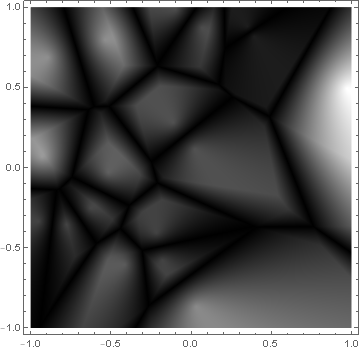
You can see the outlines of the Voronoi cells, but the image is a little dark. A way to get a fake with slightly better contrast is to apply the bias function of Schlick, as implemented in ["BiasedRescale"]:
p1=With[{nodeFun=Nearest[pts"Distance",DistanceFunctionEuclideanDistance]},DensityPlot[ResourceFunction["BiasedRescale"][0.99,Last[#]-First[#]]&@Take[nodeFun[{x,y},2],2],{x,-1,1},{y,-1,1},AspectRatioAutomatic,ColorFunctionGrayLevel,PlotPoints150,PlotRangeAll]]
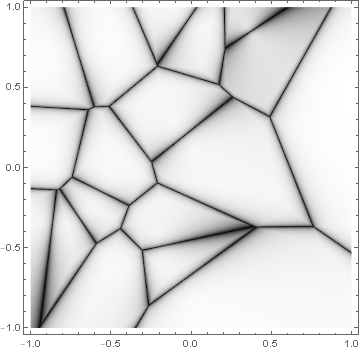
At this point, we can do a comparison with the built-in :
vm=VoronoiMesh[pts,{{-1,1},{-1,1}}];
Show[p1,Graphics[{EdgeForm[Directive[Dashed,Orange]],FaceForm[],MeshPrimitives[vm,2]}]]
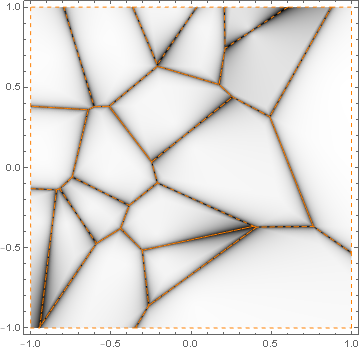
The edges of the fake version are consistent with the real one.
My personal favorite combination of the Worley basis functions is the following, which also visualizes the generator of each Voronoi cell:
fv=With[{nodeFun=Nearest[pts"Distance",DistanceFunctionEuclideanDistance]},DensityPlot[ResourceFunction["BiasedRescale"][0.99,HarmonicMean[#]-First[#]]&@Take[nodeFun[{x,y},2],2],{x,-1,1},{y,-1,1},AspectRatioAutomatic,ColorFunctionGrayLevel,PlotPoints150,PlotRangeAll]]
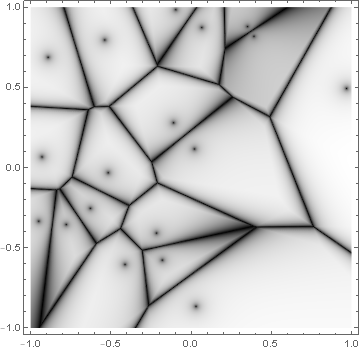
Show[fv,Graphics[{{EdgeForm[Directive[Dashed,Orange]],FaceForm[],MeshPrimitives[vm,2]},{Pink,AbsolutePointSize[4],Point[pts]}}]]
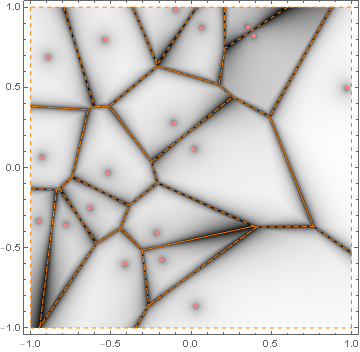
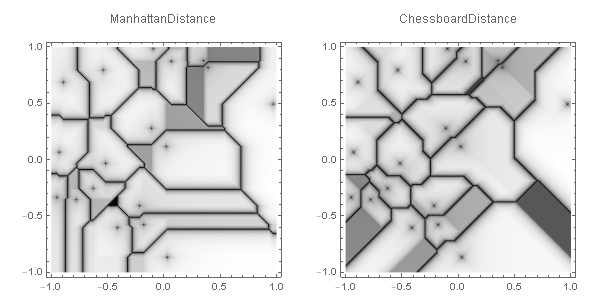
I’ll be using this version in the other examples, which no longer have a built-in counterpart like . It should also be noted that the distance function can be replaced with other metrics like or , leading to respectively and Voronoi diagrams.
1
L
∞
L
Table[With[{nodeFun=Nearest[pts"Distance",DistanceFunctiondist]},DensityPlot[ResourceFunction["BiasedRescale"][0.99,HarmonicMean[#]-First[#]]&@Take[nodeFun[{x,y},2],2],{x,-1,1},{y,-1,1},AspectRatioAutomatic,ColorFunctionGrayLevel,PlotLabeldist,PlotPoints150,PlotRangeAll]],{dist,{ManhattanDistance,ChessboardDistance}}]//GraphicsRow
Planar case, unsymmetric distance function
Planar case, unsymmetric distance function
Here’s how to generate a fake power diagram. We use an unsymmetric distance function where the first argument is the test point, and the second argument is a 3-vector representing the center and radius of a circle, joined together:
The following generates a Voronoi diagram for line segments, using an unsymmetric distance function with the second argument representing the two endpoints of a line segment, joined together:
Diagrams on the sphere
Diagrams on the sphere
Finally, let’s use the same technique for making fake Voronoi diagrams on the (unit) sphere.
For the usual spherical Voronoi diagram, we first define the appropriate metric, which takes latitude-longitude pairs:
Visualize the Voronoi diagram on the sphere:
Mark the generators with tiny spheres:
Generate some spherical circles:
Visualize the power diagram on the sphere:
Here is a function that generates a spherical cap as a NURBS surface (see Piegl and Tiller's paper for more details):
Visualize the power diagram along with the spherical caps:
Alternatively, use spherical circles instead of spherical caps in the visualization (compare the implementations of sphericalCircle and sphericalCap):