In this project, we explored simulating logic gates through the use of fluids, an alternative approach compared to traditional computers. Fluidic logic gates are slightly different compared to traditional gates. We have one gate which has two outputs: one for AND and on for XOR. We also simulated a simple OR gate. Using simplified setup and properties we were able to simulate fluids and their interaction in logic gates.
Background
Background
In the current day and age, electronic computers are ubiquitous, playing a critical role in various aspects of our lives, from everyday tasks to complex scientific computations. These computers are built from basic logic operations like AND, OR, and XOR gates, which together form the foundation of all modern computing systems. However, electronic components have inherent limitations, particularly in extreme environments such as high-temperature settings, where their performance can degrade or they may fail altogether.
This is where fluidic computers present a promising alternative. Fluidic computers, which utilize properties of fluids to perform computations. These systems can be designed using the same fundamental building blocks as electronic computers: logic gates. By leveraging the principles of fluid dynamics, we can create fluidic logic gates that mimic the binary operations essential to computational processes.
When visualizing fluids, the main method is using the Navier Stokes equation which creates highly accurate simulations of fluids. These equations describe how the velocity field of a fluid evolves over time, taking into account factors such as viscosity and pressure. However, solving the Navier-Stokes equations directly can be computationally intensive and complex, especially for large-scale simulations.
An alternative method is the Lattice Boltzmann Methods (LBM), which simplifies fluid dynamics by simulating fluid densities on a discrete lattice. Originating from lattice gas automata (LGA), the LBM does not solve the Navier Stokes equations, but rather simulate fluid densities on a lattice with collisions and streaming. Here, we use a simplified version of the LBM by only considering density and velocity.
Classical logic gates are the building blocks of computers. They perform logical operations based on binary inputs. Using fluids we can emulate these binary operations. In this simulation, we employed techniques similar to Blikstein, where there is one gate that contains both AND and XOR. Additionally, we implement a simple simulated OR gate to expand the range of logical operations our fluidic system can perform.
The goal of this project was to demonstrate the feasibility of fluidic logic gates through a simulation. Through simplified setup and properties we were able to create a working simulation of logic gates and a 3 bit adder.
Fluid Simulation
Fluid Simulation
In our fluid simulation, we tried to emulate liquids through limited properties: mainly density and velocity. Using traditional methods like Navier-Stokes were too convoluted for basic emulation and unscalable to larger applications of logic gates. Each iteration we adjusted the density and velocity of each cell to the eight cardinal directions based on a weighting. Then, we applied conditions like slip velocity and reflections. With these basic methods, we were able to visualize most properties of the fluid, at least in the case of what’s needed in logic gates. Obviously, there are conditions that would be considered in a PDE but are not considered here, such as pressure and cohesion.
Setup
Setup
Parameters
Parameters
We first set our default variables and parameters. There were a total of nine parameters affecting both the velocity and density.
◼
Center weight: The amount of liquid to keep in original cell when spreading liquid out.
◼
Water threshold: Makes cell density zero when lower than the threshold.
◼
Water maximum: Maximum amount of liquid in a cell. (All liquid greater than this value was clipped).
◼
Rebound factor: Reduction/Addition of velocity after rebounding against a wall.
◼
Residual weight: Weight in which the current velocity transfers versus the velocity of where the next cell was relative to the original cell.
◼
Gravity: Just classic gravity. (Value was different as it was optimized during parameter testing) .
◼
Softmax temperature: The temperature hyperparameter for softmax (used when spreading out the liquid).
◼
Softmax threshold: Sets the value to zero and redistributes the values when lower than the threshold.
◼
Slip velocity: The applied velocity when a cell direction crosses a wall.
◼
Slip factor: The percentage of the new velocity that comes from the slip.
Constants used throughout the rest of the code.
In[]:=
GATESIZEN=50;GATESIZEM=39;CONNECTORSIZEN=22;CONNECTORSIZEM=(GATESIZEM-1)*2+1;NORTH={-1,0};NORTHEAST={-1/Sqrt[2],1/Sqrt[2]};EAST={0,1};SOUTHEAST={1/Sqrt[2],1/Sqrt[2]};SOUTH={1,0};SOUTHWEST={1/Sqrt[2],-1/Sqrt[2]};WEST={0,-1};NORTHWEST={-1/Sqrt[2],-1/Sqrt[2]};ALLDIRECTIONS={NORTH,NORTHEAST*Sqrt[2],EAST,SOUTHEAST*Sqrt[2],SOUTH,SOUTHWEST*Sqrt[2],WEST,NORTHWEST*Sqrt[2]};
Parameters used.
In[]:=
CENTERWEIGHT=0.1;WATERTHRESHOLD=0.005;WATERMAX=2.75;REBOUNDFACTOR=0;RESIDUALWEIGHT=1;GRAVITY=0.00025;SOFTMAXTEMP=0.0035;SOFTMAXTHRESHOLD=0.0001;SLIPVELOCITY=1;SLIPFACTOR=0.25;
Changeable global variables.
In[]:=
SIZEN=0;(*notxbutverticalaxis*)SIZEM=0;(*notybuthorizontalaxis*)DEFAULTGRID=ConstantArray[0,{SIZEN,SIZEM}];(*Defaultgridwithwalls*)DEFAULTVELOCITY=ConstantArray[{GRAVITY,0},{SIZEN,SIZEM}];(*Defaultvelocity(includesgravity)*)WALLVELOCITY=ConstantArray[{0,0},{SIZEN,SIZEM}];
Helper Functions
Helper Functions
We have two helper both to check boundaries. One to check for if the cell was on the grid and one if the cell was both on the grid and not a wall.
In[]:=
locationOnGrid[{x_,y_}]:=x>0&&y>0&&x<=SIZEN&&y<=SIZEMlocationNoWall[{x_,y_}]:=locationOnGrid[{x,y}]&&DEFAULTGRID[[x,y]]!=-1
Simulating Liquid
Simulating Liquid
Fluid Directions
Fluid Directions
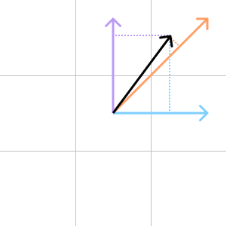
In order to determine which direction a cell will disperse to, we use a combination of the dot product and the softmax algorithm. The dot product is a mathematical operation that combines two vectors by multiplying their corresponding components and then summing those products to produce a single number. It can be thought as the measure of how much one vector extends in the direction of another vector. In this project, when we calculate the dot product, we only need to consider positive value. Therefore, when the dot product was negative we can set it to zero. The softmax algorithm is commonly used in machine learning to normalize the outputs of a neural network. Here, we utilize it to disperse the directions. The reason we use the softmax algorithm was to variate the degree of spread when moving. When the softmax temperature is set high, the spread will be high, but when the softmax temperature is low, the spread will be low to none.
In[]:=
softmax[dir_,t_]:=N[Exp[dir/t]/Total[Exp[dir/t]]]
In[]:=
getDirectionWeight[vel_]:=Module[{northMag,northeastMag,eastMag,southeastMag,southMag,southwestMag,westMag,northwestMag,softmaxed,smallSum},northMag=If[Dot[NORTH,vel]>0,Dot[NORTH,vel],0];northeastMag=If[Dot[NORTHEAST,vel]>0,Dot[NORTHEAST,vel],0];eastMag=If[Dot[EAST,vel]>0,Dot[EAST,vel],0];southeastMag=If[Dot[SOUTHEAST,vel]>0,Dot[SOUTHEAST,vel],0];southMag=If[Dot[SOUTH,vel]>0,Dot[SOUTH,vel],0];southwestMag=If[Dot[SOUTHWEST,vel]>0,Dot[SOUTHWEST,vel],0];westMag=If[Dot[WEST,vel]>0,Dot[WEST,vel],0];northwestMag=If[Dot[NORTHWEST,vel]>0,Dot[NORTHWEST,vel],0];softmaxed=softmax[{northMag,northeastMag,eastMag,southeastMag,southMag,southwestMag,westMag,northwestMag},SOFTMAXTEMP];smallSum=Total[Select[softmaxed,#<SOFTMAXTHRESHOLD&]];Table[If[softmaxed[[i]]<SOFTMAXTHRESHOLD,0,softmaxed[[i]]+smallSum/3],{i,1,8}]]
Example effects of softmax direction weight.
In[]:=
vel={GRAVITY,0};getDirectionWeight[vel]
Out[]=
{0.122285,0.122285,0.122285,0.128619,0.131339,0.128619,0.122285,0.122285}
Remove Water
Remove Water
In order to stop the liquid from dispersing too much and computing too many liquid cells , we remove liquid that was smaller than the liquid threshold. We also clip excess liquid, mainly to have a consistent animation, but also to limit overflow or density. This can sometimes create unintended behaviors like when liquid falls for too long and disappears.
In[]:=
removeWater[g_List,vel_List]:=Module[{newG=g,newVel=vel},Table[newG[[Sequence@@pos]]=0;newVel[[Sequence@@pos]]={0,0};,{pos,Position[g,_?(0<#<WATERTHRESHOLD&)]}];Table[newG[[Sequence@@pos]]=WATERMAX,{pos,Position[g,_?(#>WATERMAX&)]}];{newG,newVel}]
Slip Velocity
Slip Velocity
The slip velocity in this case was the additional velocity when a liquid cell was close to a wall. In many traditional cases, the no-slip condition is used. Similarly, in order to emulate moving liquid through a tube, we chose to implement slip velocity by adding velocity to the liquid when it hit the wall.
In[]:=
applySlipVelocity[curVel_,dirWeight_,pos_,greatestDirectionIdx_]:=Module[{newCurVel=curVel,newDirWeight=dirWeight},If[Not[locationNoWall[pos+ALLDIRECTIONS[[greatestDirectionIdx]]]]&&locationOnGrid[pos+ALLDIRECTIONS[[greatestDirectionIdx]]],newCurVel=newCurVel*(1-SLIPFACTOR)+WALLVELOCITY[[Sequence@@(pos+ALLDIRECTIONS[[greatestDirectionIdx]])]]*SLIPFACTOR;newDirWeight=Map[If[0<#<WATERTHRESHOLD,0,#]&][getDirectionWeight[curVel]];];{newCurVel,newDirWeight}]
Reflections
Reflections
When liquid hits a wall there is a slight reflection with the liquid. However, when fine tuning our parameters we learned that the most optimal value for the reflection value was zero--no reflection when colliding with a wall. The underlying cause of this was likely due to the slow speed of water and exploding nature of adding reflections to every collision.
Updating Positions (Animation Steps)
Updating Positions (Animation Steps)
During each iteration step we update every single cell and its neighbors based on the previously mentioned conditions. We first apply the slip velocity to the given cell and then apply reflects the given cell, both of which only apply when the greatest weighted direction was towards a wall. There are few other parameters that were added here: one was the center weight and one was the residual weight. The center weight was relatively small to make sure the liquid kept moving, and the residual weight was set to zero, therefore keeping the original velocity. Not using the residual weight was likely due to it not being realistic in the direction of spread.
Simulating Animation
Simulating Animation
Boundary Setup
Boundary Setup
Before we explore logic gates, we have to get boundaries setup so they can work properly. The following were the helper functions used to create the boundaries and wall velocities for the logic gates.
Updating the wall velocity based on the start position and direction.
Vertically reflects the inputted grid.
Nicely displays the matrix in a colored grid.
Animation
Animation
We use the following code to animate water using the given parameters.
Example Animation
Example Animation
As an example, we simulated water going down a few ramps.
Generates the grid and wall velocities.
Animating the water.
Logic Gates
Logic Gates
In this study, we only considered combinational logic; that is, where the output is a fully dependent on the input. This means that combinational logic cannot store memory. Combinational logic can be used to create adders, encoders, subtracters, and much more. In the following, we consider true to be anywhere when water consistently flows and false where there was no water.
AND/XOR Gate
AND/XOR Gate
The AND gate is a logic gate that implements the conjunction from math logic: the output is true if and only if the inputs are both true. On the other hand, the XOR gate is true if and only if the inputs are different (aka. exclusive or from math). The following two tables describe the results of both AND and XOR given the inputs A and B.
The AND/XOR gate has three outputs, one for AND and two for XOR. After getting the output we need to combine the two XOR outputs. This gate could also be considered as a half-adder which we will explain later in further detail.
Setting Boundaries and Slip Velocities
Setting Boundaries and Slip Velocities
In order for the gate to work during simulation we need to create correct boundaries and well designed slip velocities to emulate real liquid. The following image was the designed and used logic gate with the two inputs at the top and the two outputs at the bottom. The left was XOR and the right was AND.
Simulated Gate
Simulated Gate
Once we have well designed boundaries and slip velocities, we can simulate all the gates. The following three gifs simulates the inputs of 0/1, 1/1, and 1/0, respectively, where the slash separates the two inputs.
AND/XOR gate for 1:0, 1:1, and 0:1, respectively.
OR Gate
OR Gate
The OR gate is a logic gate where the output is true if one of the inputs is also true. This means that the only time the OR gate returns false is when both inputs are false. The OR gate in fluidic logic gates is simple; all we do is combine the inputted fluids.
Setting Boundaries and Slip Velocities
Setting Boundaries and Slip Velocities
The following code creates the boundaries and slip velocities for the OR gate.
Simulated Gate
Simulated Gate
We simulated the water for all the possibilities of the OR gate except when both inputs are zero.
Simple Number Adder
Simple Number Adder
The simple adder only uses the AND/XOR gate, which represents one half-adder. In a half-adder the XOR output represents the sum and the AND output represents the carry component. Combining multiple of these half-adders we are able to create a fully functional fluidic adder. Though creating a full-adder would likely be more efficient, using half-adders was more efficient to simulate and easier to generate. The top layer was where we input our values, where the left value of each AND/XOR gate was the first number and the right was second number. Each AND/XOR gate was one bit. From left to right the bits are powers of two: 1, 2, 4, 8, etc. The first three outputs contain the sum. The last output on the bottom AND/XOR gate is known as the “carry”, however here we can consider it as an extra bit.
Generating Boundaries
Generating Boundaries
When generating the boundaries for the number adder, we needed to connect multiple AND/XOR gates. To accomplish this, we create a connector of around twice the width of a gate.
Helper function that copies the smaller list to the larger list based on a start x and start y.
Finally, we create the actual adder gate based on the number of bits, the first starting number, and the second starting number.
Simulate Adder
Simulate Adder
The following few videos contain example animations of adding three bit numbers.
Adds the numbers 3 and 2.
Adds the numbers 3 and 3.
Adds the numbers 3 and 5.
Limitations
Limitations
There are a few limitation that come from the corners cut in the approximation. First off, some elements of the physics are incorrectly modeled, such as pressure and cohesion. Furthermore, since we removed liquid that was miniscule, there were some cases that we didn’t have enough water to completely traverse the circuit. This can partially be seen in the animation when adding 3 and 2. The interpretability of each circuit was also arbitrary, meaning that it was can vary based on application.
Conclusion
Conclusion
The purpose of this simulation was to approximate the visualization of fluidic logic gates using basic properties of liquids. We showed that with the simple properties like density and velocity, liquid fluid gates can be simulated to an approximate degree. We created an AND/XOR gate and an OR gate, the most common building blocks of computers. Following creating the fundamental logic gates, we created a full functional simulation of a simple 3-bit adder.
A natural continuation of this project is to implement more logic gates and creating a system of simulating the fluids without the limitations mentioned before. Refining the current setup, properties, incorporating more complex conditions could lead to better performance and faster simulations.
Acknowledgements
Acknowledgements
I would like to thank the WSRP Staff for the opportunity to work on this project. I would also like to thank my mentor Daniele Ceravolo and the TA Tyler Rose for their amazing support throughout this work.
References
References
[1] “Projects and Research: Education - Programmable Water.” Available: http://www.blikstein.com/paulo/projects/project_water.html.
[2] S. Chen and G. D. Doolen, “LATTICE BOLTZMANN METHOD FOR FLUID FLOWS,” Annu. Rev. Fluid Mech., vol. 30, no. 1, pp. 329–364, Jan. 1998, doi: 10.1146/annurev.fluid.30.1.329.
CITE THIS NOTEBOOK
CITE THIS NOTEBOOK
An approximated simulation of fluidic logic gates
by Michael Bao
Wolfram Community, STAFF PICKS, July 12, 2024
https://community.wolfram.com/web/tcmb139
by Michael Bao
Wolfram Community, STAFF PICKS, July 12, 2024
https://community.wolfram.com/web/tcmb139