Introduction
Introduction
Image and video transitions can be seen pretty much everywhere; they are in advertisements, presentations, social media, and more. The basic premise comes from wanting a smooth (or intentionally choppy) way to move from one idea to another. I’m going to go over how to create fade, blur, swipe, fizzle, circle, and masking transitions.
A key idea is that everything will be in regards to time. To create smooth changes, something will have to slightly vary in regards to time - such as the intensity of the effect. This could mean having a smooth trig function that controls this value, or using a preexisting template as a mask.
Transitions
Transitions
Each of the following transitions will build up in terms of difficulty and complexity, but the main concept is fairly consistent. At each time “t” in the transition, a slightly different combination of the two images need to be shown.
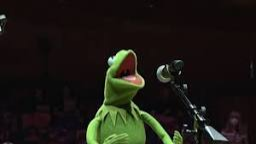
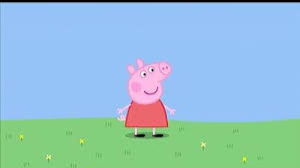
Here are our sample images:
In[]:=
kermit=
;peppa=ImageResize
,ImageDimensions[kermit];
Fade
Fade
The first transition is going to be a fade. If you are familiar with image functionality, you will know that you can do arithmetic on two images as long as they are the same dimensions:
{0.5kermit+0.5peppa,kermit*peppa,kermit/peppa,kermit+ConstantImage[Red,ImageDimensions[kermit]]}
Out[]=

This means that we can use addition to have a fade effect. The equation is shown below. The sum of the equations’ values must equal 1 at every point in time because of the image addition.
Plot[{1-x,x},{x,0,1}]
Out[]=
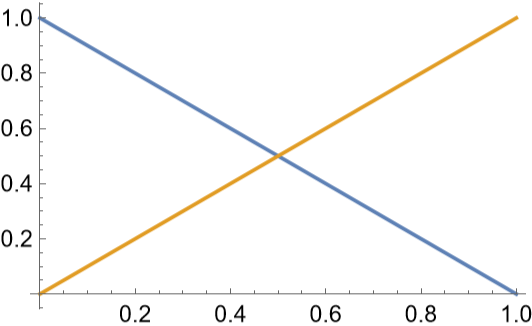
This can then be slightly modified to work for any transition duration:
AnimationVideo[Plot[{(a-x)/a,x/a},{x,0,a}],{a,1,5}]
Out[]=
Finally, it can be put into a single function. You may notice that this returns a function, and that is just so that when I wrap all the transitions together I can keep all the video generation in one place.
In[]:=
fade[img1_,img2_,transitionDuration_]:=Function[{t},(transitionDuration-t)/transitionDuration*img1+t/transitionDuration*img2]
AnimationVideo[fade[kermit,peppa,5][t],{t,0,5}]
Out[]=
Blur
Blur
Blurring is going to be very similar, except we need to add the function Blur around it with the maximum blur radius being in the middle of the transition.
In[]:=
blurFunc[pic1_,pic2_,rad_,transitionDuration_]:=Function[{t},Blur[(transitionDuration-t)/transitionDuration*pic1+(t)/transitionDuration*pic2,rad*(-Abs[t/transitionDuration-0.5]+0.5)]]
AnimationVideo[blurFunc[kermit,peppa,Max[ImageDimensions[kermit]],5][t],{t,0,5}]
Out[]=
Swipe
Swipe
The next one I’m going to do is a swipe. I imagined this as having two images tiled next to each other with the frame of view changing. If you are swiping right, then the columns you are viewing in the tiled images are increasing.
Here is a quick animation to visualize this:
AnimationVideo[ImageCompose[ImageAssemble[{kermit,peppa}],Graphics[{Red,Opacity[0.3],Rectangle[{0,0},{256,144}]}],{x,72}],{x,128,384}]
Out[]=
Changing the frames for each directional swipe (left, right, up, down) is very similar. The different transitions can be condensed into one generalized function:
In[]:=
iSwipe[i1_,i2_,dims_,r_,tr_,c_,tc_,transitionDuration_]:=Module[{tiled},tiled=ImageAssemble[{i1,i2}];Function[{t},ImageTake[tiled,Ceiling[dims[[2]]+r+t/transitionDuration*tr*dims[[2,2]]],Ceiling[dims[[1]]+c+t/transitionDuration*tc*dims[[1,2]]]]]]
After that, the next step is to allow the user to choose which transition they want:
In[]:=
swipe[sImg_,eImg_,type_String:"SwipeRight",transitionDuration_]:=Module[{dims,func},dims=Thread[{0,ImageDimensions[sImg]}];func=Which[type=="SwipeRight",iSwipe[sImg,eImg,dims,0,0,0,1,transitionDuration],type=="SwipeLeft",iSwipe[eImg,sImg,dims,0,0,dims[[2,2]],-1,transitionDuration],type=="SwipeUp",iSwipe[{sImg},{eImg},dims,0,1,0,0,transitionDuration],type=="SwipeDown",iSwipe[{eImg},{sImg},dims,dims[[1,2]],-1,0,0,transitionDuration]]]
AnimationVideo[swipe[kermit,peppa,"SwipeUp",5][t],{t,0,5}]
Out[]=
Fizzle
Fizzle
Think of the fizzle effect as an old television getting lots of static. To achieve this, I’ll use the function ImageTransformation. The pixels will get a random offset from their actual position, which will make the static. As the radius of the offset increases (radius ~ time), some pixels will turn black due to the transformation being out of the bounds of the image. We can take advantage of this to make those pixels transparent, revealing the second image below!
In[]:=
fizzle[i1_,i2_,transitionDuration_]:=Function[{x},ImageCompose[i2,ColorReplace[(transitionDuration-x)/transitionDuration*ImageTransformation[i1,#+Table[RandomReal[{-1.5x/transitionDuration,1.5x/transitionDuration}],2]&],Black,0.001]]]
Masking
Masking
Masking involves having a layer that everything is “glued” to. If you are a digital artist, you may be more familiar with it as a clipping/masking layer. Masking layers can be shown, but typically they consist of a solidly blocked out layer that is completely covered up by other images. If this still seems confusing, you can think of it as a fancy way to crop images or videos.
A great mask is a binarized image, such as this:
Because the pixel values are either 0 or 1, we can simply multiply our image by our binarized mask.
What this all means is that we only need to think about our mask when we have the image transition, which let’s us think more about style and less about pixel manipulation!
Circle masking:
Circle masking:
The first example of this will be a circle transition. For this, we need a circle with increasing radius. You could do this in 2D with Graphics[] and Disk[], but I used Graphics3D[] and Sphere[]. I then changed the ViewAngle to get the same effect.
The final step is to compose the image:
Video masking:
Video masking:
The circle gives a great basic example. But, the real potential of this is to use it with any arbitrary masking video. The clipping layer will be the frame of the masking video at that time point. Other than that, the code is fairly similar.
This is an example of a custom mask that I made. It is fairly simple (only 10x10 pixels) but works well for our purposes:
Now to plug it into videoMask:
Wrapper Function
Wrapper Function
To put these all together, here is a first wrapper function. You may notice that this returns a function and not a video, and that is because I’m going to put image and video transitions together into one function later.
Video transitions
Video transitions
Video transitions require only one extra step than image transitions. Previously, the images were constant. In video transitions, however, each frame during the transition must be recalculated based on the corresponding video frames. One other thing is that you want to be able to watch the video before and after the transition. I used a which statement to output a frame given a list of video and time specifications:
The final step is to wrap everything together.
All examples so far
All examples so far
Let’s take a look at all of the transitions now that we are done!
As a bonus, I realized that I could take any video for VideoMask. By extending the transition duration, I can create fun overlays such as this, which uses the Bad Apple video as the mask:
Conclusion
Conclusion
When I first thought of image and video transitions, I imagined lots of tedious pixel manipulations. However, only one of the transitions that I created utilized that. When using an arbitrary image effect (such as Blur), you are really doing a combination of fade and blur. So, if you wanted to use a different effect (such as ColorNegate), you could do a spinoff of the blurring transition by combining fade and the effect of your choice.
Although those were interesting, I enjoyed the masking transitions the most. The concept was simple - multiply an image over a binarized masking layer and remove the white pixels. As simple as this concept is, masking can be an easy way to make very complex image transitions/overlays.
CITE THIS NOTEBOOK
CITE THIS NOTEBOOK
Unmasking image and video transitions
by Anika Patel
Wolfram Community, STAFF PICKS, August 11, 2023
https://community.wolfram.com/groups/-/m/t/2988527
by Anika Patel
Wolfram Community, STAFF PICKS, August 11, 2023
https://community.wolfram.com/groups/-/m/t/2988527