Leaves may seem similar in appearance at first glance, but there are many different leaf shapes that exist. Plants within similar geographic locations generally seem to have analogous structures. Fractal dimension is a quantification of the change in complexity of patterns based on the scaling of the pattern. This project attempts to predict the location of certain plants based on fractal dimension analysis calculated from images of plant leaves.
Box Counting to Calculate Fractal Dimension
Box Counting to Calculate Fractal Dimension
So, what is fractal dimension? Essentially, it is a measure of how complex a pattern is, and how "rough" it is as you zoom in and observe it on a smaller scale. For example, we know that lines are one dimensional, and that shapes such as squares are two dimensional. However, if we drew a line that did not overlap with itself that filled in the shape of a square, it would appear to be two dimensional, but if you zoomed in close enough, you could see that the "square" is actually a one dimensional line. Fractal dimension is a way to quantify this phenomenon.
Format the image by resizing it and binarizing it:
leaf=ImageResize
,{720,540};leaf2=ImageAdjust[leaf];binLeaf=LocalAdaptiveBinarize[leaf2,200,{0.9,0,0}]

Out[]=
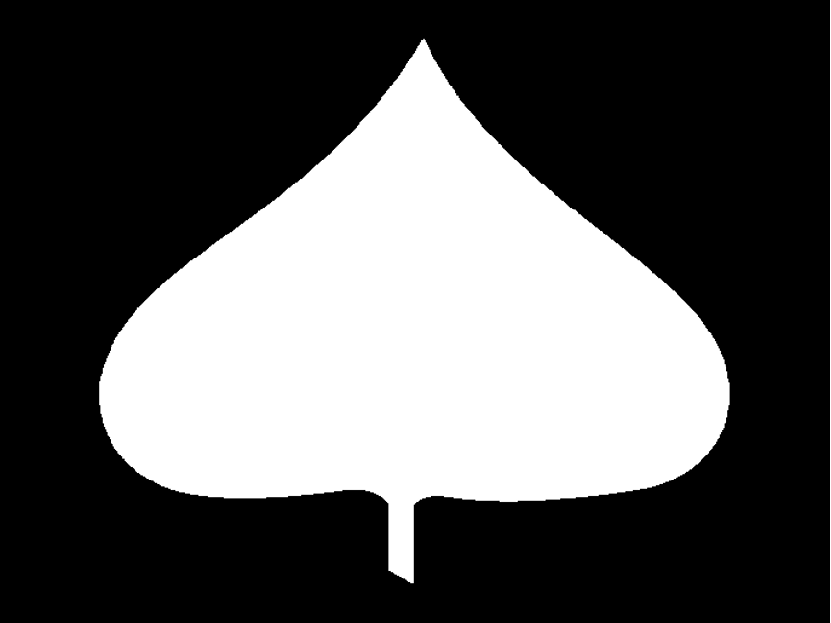
The most common method of calculating fractal dimension is box-counting. First, an image is placed in a grid of squares, and the number of squares the image occupies is recorded. Then, the image is shrunken/enlarged, and the number of squares occupied is calculated again. After plotting how the number of boxes changes with the scaling of the image, the slope of the line of best fit will tell us the fractal dimension of the image.First,
Lets get the image dimensions:
{width,height}=ImageDimensions[leaf]
Out[]=
{720,540}
Now, lets calculate the various box sizes we can use. Because the image needs to be divided into a whole number of boxes, we calculate the similar divisors of the image dimensions:
Calculating the similar divisors:
seq=Reverse[Intersection@@Divisors/@ImageDimensions[leaf]]
Out[]=
{180,90,60,45,36,30,20,18,15,12,10,9,6,5,4,3,2,1}
Now, lets start counting the boxes:
result={width/#,Last[First[Image[BlockMap[Min,ImageData[maple2],{#,#}],"Bit"]]]}&/@seq;//AbsoluteTiming
Out[]=
{1.0625,Null}
Now, lets graph the results! The results is called a power law:
Graphing using logarithmic scales on both axes:
ListLogLogPlot[result]
Out[]=
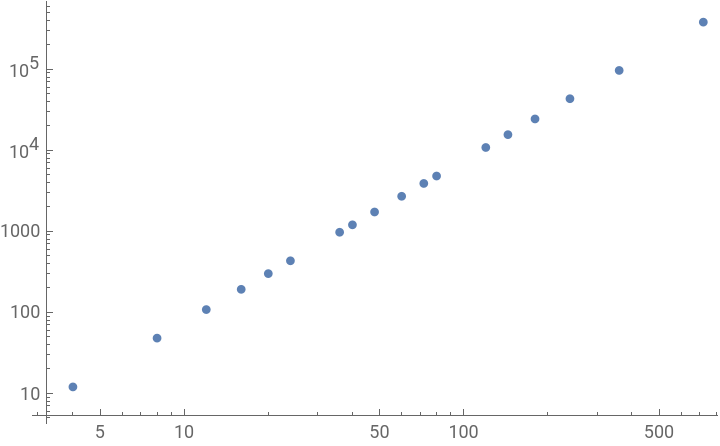
Getting the line of best fit for the graph:
fm=LinearModelFit[Log[result],{1,x},x]
Out[]=
FittedModel
Getting the slope from the equation:
slope=Coefficient[fm[x],x]
Out[]=
1.99768
The slope of the line of best fit is the fractal dimension of the image! In this case, the dimension is nearly 2 (1.99768). Now, let's move on to classifying the fractal dimension.
Gathering Data on Different Leaf Shapes
Gathering Data on Different Leaf Shapes
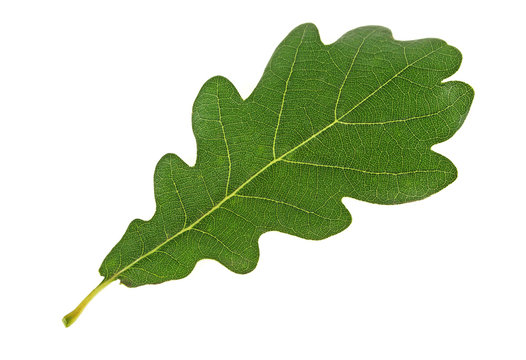
Now, we have to gather data on different leaf types. I tested the fractal dimensions of major leaf shapes, and recorded them.
Gathering the fractal dimension of a few leaves:
leafFractalDimension
leafFractalDimension

Out[]=
1.77687
Out[]=
1.8201
The fractal dimensions of these two leaves are approximately 1.78 and 1.82 respectively. I determined the accuracy of the fractal dimension through testing multiple images of major leaf shapes, and recorded their general ranges in fractal dimension. Generally, all images of similar shapes fell into similar ranges (within 0.0.5 of each other). Now, we must find the different geographic locations of these different types of leaves.
Putting it All Together
Putting it All Together
Now that we have our calculations for fractal dimension, and guidelines for the dimensions of different leaf shapes, we can create the geographic location function. I used GeoRegionValuePlot, which displays a heat-map of a geographic region. To gather my data on what plant families have similar leaf shapes and the locations, I used Britannica.com.
Which statement that selects the Heat-map displayed:
In[]:=
Which1<=slope<=1.7,GeoRegionValuePlot->4,->4,->4,->4,->4,->4,->4,->4,->4,->4,->4,->4,1.7<slope<=1.8,GeoRegionValuePlot->4,->4,->4,->4,->4,->4,->4,1.8<slope<=1.9,GeoRegionValuePlot->4,->4,->4,->4,->4,1.9<slope<=1.95,GeoRegionValuePlot->4,->4,->4,->4,1.95<slope<=2,GeoRegionValuePlot->4,->4,->4

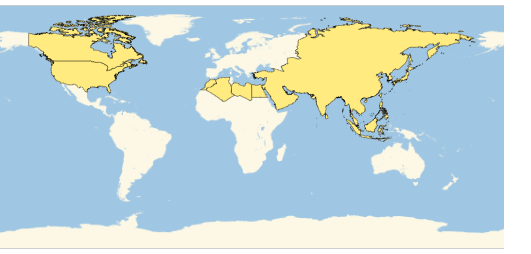
Now, We can test out our final function:
In[]:=
leafLocation

The function correctly recognizes the leaf as a deltoid-shaped leaf, and displays the proper map!
Now, you try! Input an image of a leaf into the function below:
Now, you try! Input an image of a leaf into the function below:
Conclusion
Conclusion
Overall, the function is fairly accurate, and works well on basic front shots of leaves. Fractal dimension analysis may be a promising way to analyze leaf shapes and classify similar unknown plants.
Future Direction
Future Direction
By nature, fractal dimensions of images are difficult to work with because of angles at which the photo is taken, which could cause overlaps in ranges of similar leaf structures. This could be remedied by adding additional variables that are analyzed, such as length to width ratio. In the future, I hope to add these systems to help classify leaves and make the function more accurate. With future reworks, this function could be made more accurate, and more specific geographic data could be used rather than general regions.
Acknowledgements
Acknowledgements
Thank you to my mentor Eryn for helping me switch gears within this project and guiding me throughout! I would also like to thank my mentor group, TA group, as well as the rest of the students and staff at the Wolfram Summer Camp. I had a great time at camp, and learned much about computational thinking.