Mineral formation is driven by chaotic factors that are difficult to directly analyse. This project simulates how fluids such as copper and gold, under a high temperature/pressure environment, flow around obstacles, and models their velocities and movements using the Navier-Stokes equations. It does so through a series of mathematical functions, before plotting visualizations with the returned information. Two such visualizations are provided, a 3D animated box and a 2D interactive interface which allows for more user control. These tools have high potential for use in further investigation into geochemical reactions under the simulated conditions, as such, methods for doing so are discussed.
Associated Package
Associated Package
Importing associated package:
In[]:=
CloudGet@"https://www.wolframcloud.com/obj/ahtsang/WSRP25/MineralPackage.wl"Needs["MineralPackage`"];Names["MineralPackage`*"]
Out[]=
{plotFlow,plotFlow3D}
Introduction
Introduction
Why do gold deposits settle behind rocks in riverbeds, and how can we predict where they form? Mineral deposition is a natural process where minerals carried by fluid flows accumulate in regions of low velocity or recirculation, shaping the distribution of incredibly valuable resources on Earth, such as gold, copper, rhodium, etc. At high temperatures and under extreme pressure, fluid-state minerals exhibit unique flow properties. Specifically, these fluid flows demonstrate turbulent flow, which causes stretching and folding of the fluid, as opposed to regular laminar flow. This is caused by either high kinetic energy or a large Reynolds number, which means that inertial forces are dominant within the fluid. This complex behavior makes it difficult to observe how mineral deposits form. To solve this, we must first understand fluid mechanics and how they are relevant to geology.
von Kárman Streets & Diffusion
von Kárman Streets & Diffusion
When incompressible fluids hit a body (cylinder, rock, bridge pier, etc.) at moderate Reynolds numbers (around 40 ≲ Re ≲ 2 × 10⁵), its wake eventually becomes unstable and gives rise to vortexes and eddies, resulting in a repeating “street” of clockwise and counter-clockwise swirls that continue as they move along their path. This is relevant because the swirling behavior caused by von Kárman streets increases both erosion and deposition of nearby mineral particles, and greatly assists in moving sediment. By default, fluids of different viscosities have trouble mixing. This effect is greater the higher the Reynolds number (Re). The diffusion from von Kárman streets is responsible for lessening this effect.
Big Picture
Big Picture
The programming and research discussed below belongs to the larger problem of simulating geo-chemical reactions in underground fluid flows. Our major heuristic -- splitting of different processes -- is based on the following:
1
.Classical methods of fluid mechanics and chemistry are hard to simultaneously simulate.
2
.We can split the processes into three separate simulation groups:
2
.1
.Fluid flow
2
.2
.Heat distribution
2
.3
.Geo-chemical reactions
3
.We have the following simulation dependencies:
3
.1
.Fluid flow is independent of the others
3
.2
.Heat distribution is based on results of Fluid flow
3
.3
.Geo-chemical reactions depend on Fluid flow and Heat distribution
4
.With sufficiently small space, and time steps, the overall simulation would produce results close enough to the corresponding real processes.
See the section “Transport Equations” for more details of the model splitting and an example of a chemical species being “transported” using a previously defined fluid flow field.
Navier-Stokes Equations
Navier-Stokes Equations
The most critical equations describing fluid movement are the Navier-Stokes equations, which relate velocity and pressure fields to viscosity and inertia. The NS equations cannot be solved analytically, but we can simplify them as shown below:
ρ+v+u+...-μu-μu-μu+-0ρ+u+v+...-μv-μv-μv+-0ρ+v+u+...-μw-μw-μw+-0++=0
∂u
∂t
∂u
∂x
∂u
∂y
2
∂
∂
2
x
2
∂
∂
2
y
2
∂
∂
2
z
∂p
∂x
f
x
∂v
∂t
∂v
∂x
∂v
∂y
2
∂
∂
2
x
2
∂
∂
2
y
2
∂
∂
2
z
∂p
∂y
f
y
∂w
∂t
∂w
∂x
∂w
∂y
2
∂
∂
2
x
2
∂
∂
2
y
2
∂
∂
2
z
∂p
∂z
f
z
∂u
∂x
∂v
∂y
∂w
∂z
To solve the NS equations in Wolfram Language, we use the FluidFlowPDEComponent function. We define variables for u, v, and pressure for the x and y directions. We also include information about the Reynolds number. But first let’s set up some variables.
Define a list of obstacles:
pol1=Polygon[{{0.4,0.2},{0.6,0.3},{.6,.5}}];pol2=Polygon[{{0.1,0.1},{0.2,0.4},{.05,.6}}];pol3=Polygon[{{0.65,0.6},{0.75,0.635},{.7,.85}}];obstacles=RegionUnion[pol1,pol2,pol3];
Flatten the list of rock obstacles to convert to a usable form:
rocks = RegionUnion @@Flatten @ {obstacles};
Define the region for plotting:
fluidRegion=RegionDifference[Rectangle[{0,0},{1,1}],rocks];inletQ[x_,y_]:=y==1&&x<=inletmuch;outletQ[x_,y_]:=x==1&&y<=inletmuch;vIn=Normalize[vDir];
We establish rocks and fluidRegion to allow the NS solver to account for obstacles. RegionDifference creates a Rectangle object and declares that anywhere within this Rectangle that does not overlap with rocks is valid for fluid to flow through. inletQ and outletQ are the entry and exit points of the fluid, respectively. vIn is the transformed direction for the fluid to flow in. These are set up early to provide maximum utility to the plotFlow function. Now that the foundations are created we can begin to solve the NS equations. To setup the FluidFlowPDEComponent:
FluidFlowPDEComponent[{{u[x, y], v[x, y], pres[x, y]}, {x, y}}, <|"ReynoldsNumber" -> reynolds|>];
We will use DirichletCondition alongside FluidFlowPDEComponent. Dirichlet is used when the exact value of a field is known at the boundary lines. At inlets and solid walls we prescribe the velocity (including the no-slip/0 velocity condition), and at the outlet we set the pressure to a reference level, all of which are direct value specifications. In contrast, Neumann or Robin conditions apply when only a derivative or flux is specified, so DirichletConditions is the correct choice here.
Construct three DirichletConditions to use inside NDSolveValue. Specify output as the horizontal and vertical velocities at each point in the fluidRegion:
{uvel, vvel, p} = NDSolveValue[ FluidFlowPDEComponent[{{u[x, y], v[x, y], pres[x, y]}, {x, y}}, <|"ReynoldsNumber" -> reynolds|>] == {0, 0, 0}, DirichletCondition[{u[x, y] == vIn[[1]], v[x, y] == vIn[[2]]}, inletQ[x, y]], DirichletCondition[pres[x, y] == 0, outletQ[x,y]], DirichletCondition[{u[x, y] == 0, v[x, y] == 0}, (x == 0 || y == 0 || y == 1 || x == 1 || RegionMember[rocks, {x, y}]) && !inletQ[x,y] && !outletQ[x, y]] , {u,v, pres[x, y]}, {x, y} ∈ fluidRegion,Method -> {"FiniteElement", "InterpolationOrder" -> {u -> 2, v -> 2, pres -> 1}}];
Let’s look at each DirichletCondition.
In[]:=
DirichletCondition[{u[x,y]==vIn[[1]], v[x,y]==vIn[[2]]}, inletQ[x,y]]DirichletCondition[pres[x, y] == 0, outletQ[x,y]];
The first condition specifies how fluids should enter the simulation box (the inlet). Similarly the second specifies where they should exist (the outlet).
Define a condition where velocity is 0 at borders:
DirichletCondition[{u[x,y]==0, v[x,y]==0}, (x==0 || y==0 || x==1 || y==1 || RegionMember[rocks,{x,y}]) && !inletQ[x,y] && !outletQ[x,y]];
The final condition specifies boundary lines like the walls of the box and the walls of any obstacles added. This is done because this “no-slip” condition attempts to model real-life fluids, which adhere to walls the more viscous they are. Together the three DirichletConditions act as guidelines for fluid flow.
Now, we can put everything inside of a function, and use the returned velocity data to plot simulations. The function plotFlow takes in a list of 2D shapes to use as obstacles, a specified Reynolds number, as well as fractions defining how much of the inlet and outlet boundary are open (essentially how big the openings are). Finally it takes a direction for the fluid to flow. By default many of these variables have their own values. These are set the way they are for simplicity. More complex values occasionally crash FluidFlowPDE.
Now, we can put everything inside of a function, and use the returned velocity data to plot simulations. The function plotFlow takes in a list of 2D shapes to use as obstacles, a specified Reynolds number, as well as fractions defining how much of the inlet and outlet boundary are open (essentially how big the openings are). Finally it takes a direction for the fluid to flow. By default many of these variables have their own values. These are set the way they are for simplicity. More complex values occasionally crash FluidFlowPDE.
Putting together the Navier-Stokes solver with previously written code segments:
In[]:=
plotFlow[obstacles_,reynolds_:100,inletmuch_:0.25,outletmuch_:0.25,vDir:{1,-1}]:=Module[{rocks,fluidRegion,inletQ,outletQ,vIn,uvel,vvel,p},rocks=RegionUnion@@Flatten@{obstacles};fluidRegion=RegionDifference[Rectangle[{0,0},{1,1}],rocks];inletQ[x_,y_]:=y==1&&x<=inletmuch;outletQ[x_,y_]:=x==1&&y<=inletmuch;vIn=Normalize[vDir];{uvel,vvel,p}=NDSolveValue[{FluidFlowPDEComponent[{{u[x,y],v[x,y],pres[x,y]},{x,y}},<|"ReynoldsNumber"->reynolds|>]=={0,0,0},DirichletCondition[{u[x,y]==vIn[[1]],v[x,y]==vIn[[2]]},inletQ[x,y]],DirichletCondition[pres[x,y]==0,outletQ[x,y]],DirichletCondition[{u[x,y]==0,v[x,y]==0},(x==0||y==0||y==1||x==1||RegionMember[rocks,{x,y}])&&!inletQ[x,y]&&!outletQ[x,y]]},{u,v,pres[x,y]},{x,y}∈fluidRegion,Method->{"FiniteElement","InterpolationOrder"->{u->2,v->2,pres->1}}];<|"u"->uvel,"v"->vvel,"region"->fluidRegion|>]
Visualization of workflow:
In[]:=
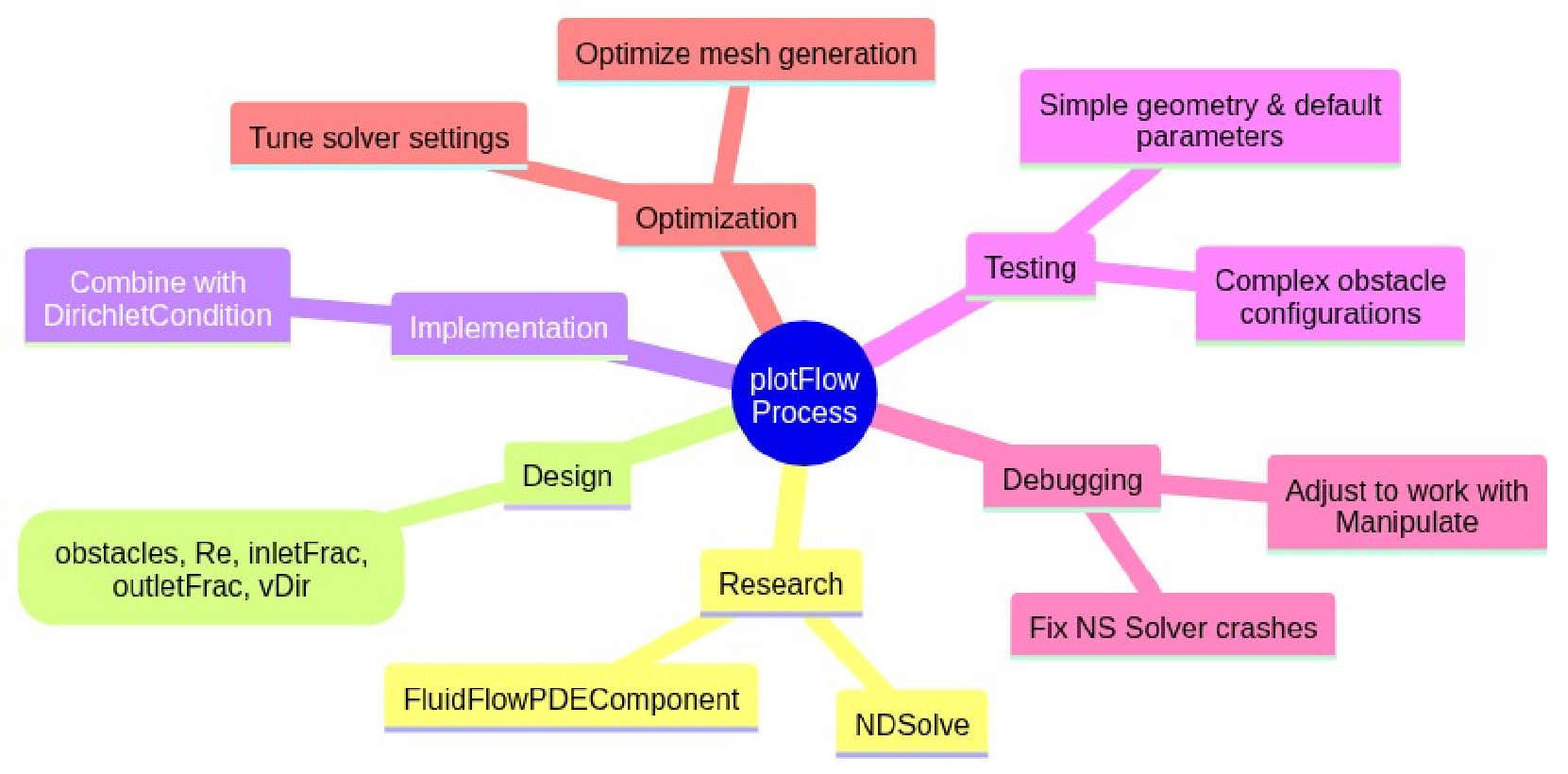
Analysing results of plotFlow
Analysing results of plotFlow
Making plotFlow useful
Making plotFlow useful
In its current state, plotFlow returns information about a fluid’s velocities at a point. To visualize this, we will use Manipulate. The most useful form for the returned information is an interactive GUI. This will allow users to test for different Reynolds numbers, inlet/outlet sizes, and for different obstacles in a convenient manner. Manipulate allows for dynamic function, meaning that the solver is run every time a change is made. In this example, the Module takes two sample groups of obstacles, convexRocks and concaveRocks. Their purpose is intuitive. These lists will be provided for convenience.
Creating five convex polygons and placing them into an association:
Creating three concave polygons and placing them into an association
Setting up the Manipulate is fairly simple. We will create a variable sol to hold the information given by plotFlow about the horizontal and vertical velocities at every point [x,y]. With this sol we can use StreamPlot and functionalities within Manipulate to setup sliders for the Reynolds number and the boundary gaps, and binary checkboxes for each obstacle.
The first interface we will make using Manipulate will support:
1
.Selectors for two sets of premade rocks: convex & concave
2
.Dynamic sliders to control fluids behavior
3
.Fluid flow direction selector
plotFlow is automatically run after each change.
It is worth noting two things: the solver can occasionally crash. This is due to egregiously high Re numbers, or over-complicated geometry. When this occurs the solver will print an error message. The reason for this is again because of how turbulent flow works. The presence of more vortexes or more complicated vectors will crash the visualizer. This can be solved by running a finer mesh, at the cost of a higher runtime.
An earlier iteration of Manipulate failed when there were no obstacles. This is solved with the following two lines:
An earlier iteration of Manipulate failed when there were no obstacles. This is solved with the following two lines:
Create a box containing all selected rocks; if none, create an empty box:
Now that we have a GUI function setup, we can start to visualize fluid flows.
Notable fluid flow simulations
Notable fluid flow simulations
Keeping everything but the Reynolds number constant, we can observe interesting developments as the Re increases. (The following graphs are at Re = 50, 500, 1000 and 1500 respectively.)
Improvements to Fluid Simulation Interface
Improvements to Fluid Simulation Interface
In order for the Manipulate to be a sufficiently useful tool, upgrades to its functionalities were required. Three such upgrades were carried out. Their results are shown below.
Manipulate v2
Manipulate v2
While testing the first Manipulate, we remarked that control over the rock obstacles themselves was limited. To this end, a second page was created within the interface, with the express purpose of creating a more sandbox layout for rocks. The second page contains:
1. Input fields to precisely edit the location and rotation of the selected obstacle
2. A set of buttons which place and remove specific rocks
3. Functionality for freestyle movement of obstacles on the plot via arrow keys
1. Input fields to precisely edit the location and rotation of the selected obstacle
2. A set of buttons which place and remove specific rocks
3. Functionality for freestyle movement of obstacles on the plot via arrow keys
Full-form definition of the Obstacle Control:
The code is intuitive and does not need further elaboration.
Integration of Obstacle Control with Manipulate:
After ensuring that obstacle customization was successfully implemented into the NS solver, the next steps were a series of Quality of Life improvements.
Improved manipulation of center coordinates and rotation:
Granting the “Place Rock” button access to dictionaries of premade rocks as well as the custom obstacle field:
Creation of third interactive column which offers information on the premade rocks:
The final Manipulate is shown below:
Transport Equations
Transport Equations
Following fundamental ideas large scale air pollution modeling, [ZZ1, AA1], we can say that a geo-chemical mineralization transportation model is given by a system of PDE’s:
In this formula:
◼
u,v,w and are fluid velocities
It is often hard to use the mathematical model directly. Hence different methods of splitting are used. For example:
Below we show that the simulations the 2D splitting component with one chemical species:
We can combine these equations with the velocity information given by plotFlow to simulate transport of sediment particles.
Draw information from plotFlow:
Define areas covered by obstacles as having velocity 0:
Solve PDEs for c[t,x,y]:
Out[]=
{644.895, Null}
Remark: The computation takes long time (e.g. 10 min) because of redefinition of u and v to use region membership check.
With this information we can plot in a 3D box for the velocities of the fluid. This is instrumental in giving a real-time visualization of fluid dynamics.
Animate fluids based on horizontal and vertical velocities:
Because the NDSolve computation above is slow here a few screenshots:
Remark: The screenshots above hint at possible (future plans) simulations of steady state sedimentation.
Future Work for 3D simulations
Future Work for 3D simulations
Functionality for a 3D simulation counterpart to plotFlow is under development. The rough code is below. As with the Manipulate above, the 3D code takes a long time to run. Therefore for convenience a screenshot is included.
Conclusion
Conclusion
The goal of this work was to build a flexible GUI that captures how fluids flow (and by extension how minerals deposit) around irregular obstacles. We implemented a 2D finite-element Navier–Stokes solver with tunable Reynolds number, inlet/outlet fractions, and obstacle geometries, then visualized streamlines, vortex shedding, and recirculation zones. This gave us the stagnation points generated by the solver plotFlow, which line up exactly with where particles or minerals would most probably settle. We gain insight into how varying the Re, inlet/outlet fractions, and obstacle configurations influence fluid behavior and potential mineral deposition patterns.
The next phase of this work would be to leverage this tool to computationally investigate heat distribution and geochemical reactions. This would involve finding the steady state for flow, before using the transport equations and thermodynamics to look more closely at the stagnation point behind each rock. Finally the information would be gathered into a 3D simulator.
The next phase of this work would be to leverage this tool to computationally investigate heat distribution and geochemical reactions. This would involve finding the steady state for flow, before using the transport equations and thermodynamics to look more closely at the stagnation point behind each rock. Finally the information would be gathered into a 3D simulator.
References
References
[WRIf1] Wolfram Research (2024), FluidFlowPDEComponent, Wolfram Language function, https://reference.wolfram.com/language/ref/FluidFlowPDEComponent.html (updated 2024).
[WRIf2] Wolfram Research (2014), RegionDifference, Wolfram Language function, https://reference.wolfram.com/language/ref/RegionDifference.html (updated 2017).
[WRIf3] Wolfram Research (2014), DirichletCondition, Wolfram Language function, https://reference.wolfram.com/language/ref/DirichletCondition.html (updated 2022).
[WRIf4] Wolfram Research (2007), Manipulate, Wolfram Language function, https://reference.wolfram.com/language/ref/Manipulate.html (updated 2024).
[WRIf5] Wolfram Research (2008), StreamPlot, Wolfram Language function, https://reference.wolfram.com/language/ref/StreamPlot.html (updated 2022).
[AOvc1] Allison Ord (2025), PowerPoint on von Kárman streets, personal verbal communication.
[SNmo1] Sanay Nesargi (2024), Modeling optimal orientations of objects in laminar fluid flow, Online Technical Discussion Groups—Wolfram Community, https://community.wolfram.com/groups/-/m/t/3214449.
[ZZ1] Zahari Zlatev, Computer Treatment of Large Air Pollution Models, (1995), Springer Dordrecht. ISBN: 978-0-7923-3328-9
[AA1] Anton Antonov, “Galerkin and Control Volume Finite Element Methods for Large Scale Air Pollution Simulations: A Comparison”, (2003), Numerical Methods and Application 2002: 149-157
[WRIf2] Wolfram Research (2014), RegionDifference, Wolfram Language function, https://reference.wolfram.com/language/ref/RegionDifference.html (updated 2017).
[WRIf3] Wolfram Research (2014), DirichletCondition, Wolfram Language function, https://reference.wolfram.com/language/ref/DirichletCondition.html (updated 2022).
[WRIf4] Wolfram Research (2007), Manipulate, Wolfram Language function, https://reference.wolfram.com/language/ref/Manipulate.html (updated 2024).
[WRIf5] Wolfram Research (2008), StreamPlot, Wolfram Language function, https://reference.wolfram.com/language/ref/StreamPlot.html (updated 2022).
[AOvc1] Allison Ord (2025), PowerPoint on von Kárman streets, personal verbal communication.
[SNmo1] Sanay Nesargi (2024), Modeling optimal orientations of objects in laminar fluid flow, Online Technical Discussion Groups—Wolfram Community, https://community.wolfram.com/groups/-/m/t/3214449.
[ZZ1] Zahari Zlatev, Computer Treatment of Large Air Pollution Models, (1995), Springer Dordrecht. ISBN: 978-0-7923-3328-9
[AA1] Anton Antonov, “Galerkin and Control Volume Finite Element Methods for Large Scale Air Pollution Simulations: A Comparison”, (2003), Numerical Methods and Application 2002: 149-157
Acknowledgements
Acknowledgements
I would like to extend gratitude towards the WSRP Directors for making this project environment possible. I also thank my mentor Anton Antonov, my advocate Jason Sonnenberg, and the geologist Allison Ord, who inspired this project.