I have been working with the Wolfram Language for many years. I have been teaching it at undergraduate and postgraduate level. I have used it for academic and industrial research. It is my Swiss Army knife of problem solving. The rich vocabulary (i.e. the incredibly well designed functions), the built in data and knowledge, options of using HPCs, GPUs etc, have made it my number one tool for problem solving.
The Wolfram Language designers react quickly to new technologies and have implemented new functions like LLMSynthesize and LLMFunction to access OpenAI’s latest models, such as GPT-4, GPT-4-vision, DALLE, TTS, Whisper, etc. This has changed how I program and how I use the Wolfram Language.
In fact, I originally started debugging code using GPT, I then got it to write longer and longer pieces of code for me from scratch. I stopped cleaning my data for analysis and got better at making GPT take over.
By now GPT helps me to interpret data, tells me about context that I need to analyse experiments and provides ideas for research directions.
In this post I will introduce a way how you can use Large Language Models for free; they will run locally on your computer and you have full control. But before we do that, I want to show two examples of how LLMs can enhance your workflow.
Here is a very simple example from the GCHQ Christmas Puzzle:
The Wolfram Language designers react quickly to new technologies and have implemented new functions like LLMSynthesize and LLMFunction to access OpenAI’s latest models, such as GPT-4, GPT-4-vision, DALLE, TTS, Whisper, etc. This has changed how I program and how I use the Wolfram Language.
In fact, I originally started debugging code using GPT, I then got it to write longer and longer pieces of code for me from scratch. I stopped cleaning my data for analysis and got better at making GPT take over.
By now GPT helps me to interpret data, tells me about context that I need to analyse experiments and provides ideas for research directions.
In this post I will introduce a way how you can use Large Language Models for free; they will run locally on your computer and you have full control. But before we do that, I want to show two examples of how LLMs can enhance your workflow.
Here is a very simple example from the GCHQ Christmas Puzzle:
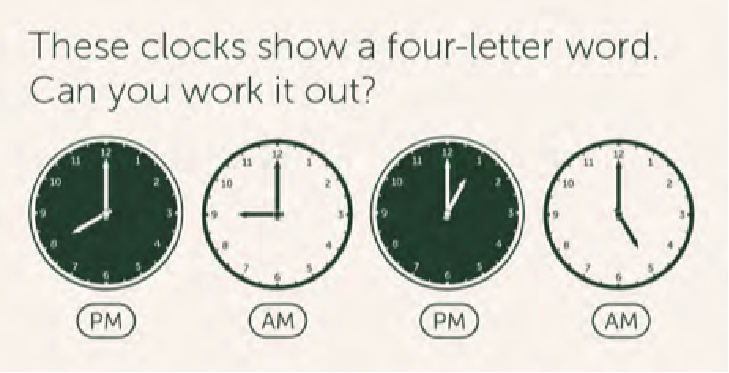
In order to focus this I will not use GPT-vision, but just try to solve the puzzle with GPT-4.
Solution with GPT-4
Solution with GPT-4
Let’s use a simple LLMSynthesize function to try to solve the riddle (there was an additional hint, which is that the word must make sense after “Christmas”):
In[]:=
LLMSynthesize["There are four clocks. The first one shows a time of 8pm, the second shows 9am, the third 1pm and the fourth shows 5am. All hints will be important. We are looking for a four letter word that relates to the times and makes sense after the word Christmas.Suppose the times correspond to letter positiosn in the alphabet. Make sure to consider the difference between AM and PM. Use the tool."]
Out[]=
The times indicated correspond to the positions of letters in the alphabet if you consider the 24-hour clock format. 8pm on a 24-hour clock is 20:00, so it corresponds to the 20th letter of the alphabet which is 'T'. Similarly, 9am is 09.00, the 9th letter is 'I'. For 1pm, we convert it to 13.00 on a 24 hour clock and the corresponding letter is 'M'. Similarly, 5am is 'E'. Therefore, the word is TIME. This fits with Christmas to form "Christmas TIME".
Note that for some of the other of the GCHQ puzzles GPT-4 alone cannot solve them, but in combination with the Wolfram Language it becomes easy to find solutions.
A simple Pong game
A simple Pong game
As I said, I noticed that I program less and less “by hand”. I act more as a programming manager and have GPT do the hard work. Here is a part of a discussion I had with GPT (I cannot link to it directly as it does not support sharing chats with images.).

Creating a Pong game in Wolfram Language (WL) involves several key components: graphics for the game elements (paddles and ball), control logic for the paddles’ movement, and the game loop to update the positions of these elements. Since one paddle will be automatically controlled and the other by user input, we’ll need to incorporate event handlers for the arrow keys.
Here’s a step-by-step approach to create a simple version of Pong in WL:
1. **Initialize Game Elements**: Define the initial positions of the paddles and the ball, along with their sizes.
2. **Paddle Movement Logic**: The user-controlled paddle will respond to arrow key inputs, while the automated paddle will follow the ball’s vertical position.
3. **Ball Movement Logic**: Define how the ball moves and bounces off walls and paddles.
4. **Collision Detection**: Detect collisions between the ball and the paddles or the edges of the playing area.
5. **Game Loop**: Continuously update the game state and redraw the graphics.
6. **Graphics Rendering**: Use `DynamicModule` and `Graphics` to render the game and capture user inputs.
Let’s start coding this in WL:
```wolfram
DynamicModule[{ballPos = {0, 0}, ballVel = {1, 1}, paddle1Pos = 0, paddle2Pos = 0,
paddleSize = {0.2, 1.5}, ballSize = 0.1, gameArea = {-5, 5, -3, 3}},
EventHandler[
Dynamic[Graphics[{
Rectangle[ballPos - ballSize/2, ballPos + ballSize/2],
Rectangle[{gameArea[[1]], paddle1Pos} - paddleSize/2,
{gameArea[[1]] + paddleSize[[1]], paddle1Pos} + paddleSize/2],
Rectangle[{gameArea[[2]], paddle2Pos} - paddleSize/2,
{gameArea[[2]] - paddleSize[[1]], paddle2Pos} + paddleSize/2]
},
PlotRange -> {{gameArea[[1]], gameArea[[2]]}, {gameArea[[3]], gameArea[[4]]}},
ImageSize -> Large
]],
{“LeftArrowKeyDown” :> (paddle1Pos = Max[gameArea[[3]] + paddleSize[[2]]/2,
paddle1Pos - 0.2]),
“RightArrowKeyDown” :> (paddle1Pos = Min[gameArea[[4]] - paddleSize[[2]]/2,
paddle1Pos + 0.2]),
“UpArrowKeyDown” :> (paddle2Pos = Max[gameArea[[3]] + paddleSize[[2]]/2,
paddle2Pos - 0.2]),
“DownArrowKeyDown” :> (paddle2Pos = Min[gameArea[[4]] - paddleSize[[2]]/2,
paddle2Pos + 0.2]),
“FrameTick” :>
Module[{},
(* Update ball position *)
ballPos += ballVel;
(* Collision with top/bottom walls *)
If[Abs[ballPos[[2]]] > gameArea[[4]] - ballSize/2,
ballVel[[2]] *= -1];
(* Collision with paddles *)
If[Abs[ballPos[[1]] - gameArea[[1]]] < paddleSize[[1]]/2 + ballSize/2 &&
Abs[ballPos[[2]] - paddle1Pos] < paddleSize[[2]]/2 + ballSize/2,
ballVel[[1]] *= -1];
If[Abs[ballPos[[1]] - gameArea[[2]]] < paddleSize[[1]]/2 + ballSize/2 &&
Abs[ballPos[[2]] - paddle2Pos] < paddleSize[[2]]/2 + ballSize/2,
ballVel[[1]] *= -1];
(* Auto-move paddle 2 *)
If[ballPos[[2]] > paddle2Pos && ballVel[[1]] > 0, paddle2Pos += 0.1];
If[ballPos[[2]] < paddle2Pos && ballVel[[1]] > 0, paddle2Pos -= 0.1];
]
},
Method -> {“Preemptive” -> True, “FrameRate” -> 60}
]
]
```
In this code:
- The game area is defined with `{x1, x2, y1, y2}` boundaries.
- The `EventHandler` captures arrow key inputs to move the user-controlled paddle (paddle1).
- The automated paddle (paddle2) moves based on the ball’s position.
- Ball movement and collision logic are handled within the
`”FrameTick”` event.
- The `Method` option with `”FrameRate” -> 60` ensures a smooth animation.
This is a basic implementation and can be enhanced with features like scoring, improved AI for the automatic paddle, and more sophisticated collision detection.
Here’s a step-by-step approach to create a simple version of Pong in WL:
1. **Initialize Game Elements**: Define the initial positions of the paddles and the ball, along with their sizes.
2. **Paddle Movement Logic**: The user-controlled paddle will respond to arrow key inputs, while the automated paddle will follow the ball’s vertical position.
3. **Ball Movement Logic**: Define how the ball moves and bounces off walls and paddles.
4. **Collision Detection**: Detect collisions between the ball and the paddles or the edges of the playing area.
5. **Game Loop**: Continuously update the game state and redraw the graphics.
6. **Graphics Rendering**: Use `DynamicModule` and `Graphics` to render the game and capture user inputs.
Let’s start coding this in WL:
```wolfram
DynamicModule[{ballPos = {0, 0}, ballVel = {1, 1}, paddle1Pos = 0, paddle2Pos = 0,
paddleSize = {0.2, 1.5}, ballSize = 0.1, gameArea = {-5, 5, -3, 3}},
EventHandler[
Dynamic[Graphics[{
Rectangle[ballPos - ballSize/2, ballPos + ballSize/2],
Rectangle[{gameArea[[1]], paddle1Pos} - paddleSize/2,
{gameArea[[1]] + paddleSize[[1]], paddle1Pos} + paddleSize/2],
Rectangle[{gameArea[[2]], paddle2Pos} - paddleSize/2,
{gameArea[[2]] - paddleSize[[1]], paddle2Pos} + paddleSize/2]
},
PlotRange -> {{gameArea[[1]], gameArea[[2]]}, {gameArea[[3]], gameArea[[4]]}},
ImageSize -> Large
]],
{“LeftArrowKeyDown” :> (paddle1Pos = Max[gameArea[[3]] + paddleSize[[2]]/2,
paddle1Pos - 0.2]),
“RightArrowKeyDown” :> (paddle1Pos = Min[gameArea[[4]] - paddleSize[[2]]/2,
paddle1Pos + 0.2]),
“UpArrowKeyDown” :> (paddle2Pos = Max[gameArea[[3]] + paddleSize[[2]]/2,
paddle2Pos - 0.2]),
“DownArrowKeyDown” :> (paddle2Pos = Min[gameArea[[4]] - paddleSize[[2]]/2,
paddle2Pos + 0.2]),
“FrameTick” :>
Module[{},
(* Update ball position *)
ballPos += ballVel;
(* Collision with top/bottom walls *)
If[Abs[ballPos[[2]]] > gameArea[[4]] - ballSize/2,
ballVel[[2]] *= -1];
(* Collision with paddles *)
If[Abs[ballPos[[1]] - gameArea[[1]]] < paddleSize[[1]]/2 + ballSize/2 &&
Abs[ballPos[[2]] - paddle1Pos] < paddleSize[[2]]/2 + ballSize/2,
ballVel[[1]] *= -1];
If[Abs[ballPos[[1]] - gameArea[[2]]] < paddleSize[[1]]/2 + ballSize/2 &&
Abs[ballPos[[2]] - paddle2Pos] < paddleSize[[2]]/2 + ballSize/2,
ballVel[[1]] *= -1];
(* Auto-move paddle 2 *)
If[ballPos[[2]] > paddle2Pos && ballVel[[1]] > 0, paddle2Pos += 0.1];
If[ballPos[[2]] < paddle2Pos && ballVel[[1]] > 0, paddle2Pos -= 0.1];
]
},
Method -> {“Preemptive” -> True, “FrameRate” -> 60}
]
]
```
In this code:
- The game area is defined with `{x1, x2, y1, y2}` boundaries.
- The `EventHandler` captures arrow key inputs to move the user-controlled paddle (paddle1).
- The automated paddle (paddle2) moves based on the ball’s position.
- Ball movement and collision logic are handled within the
`”FrameTick”` event.
- The `Method` option with `”FrameRate” -> 60` ensures a smooth animation.
This is a basic implementation and can be enhanced with features like scoring, improved AI for the automatic paddle, and more sophisticated collision detection.
I then basically copy the code into Mathematica and it doesn’t move. Nothing happens. So I try again:

You are correct. The provided code snippet indeed lacks the necessary dynamics to animate the game. Let’s revise the code to properly implement the movement and interaction in the Pong game. In Wolfram Language, we need to use `Dynamic` to ensure that the positions of the paddles and the ball are updated in real-time.
Here’s the revised version:
```wolfram
DynamicModule[{ballPos = {0, 0}, ballVel = {0.1, 0.1}, paddle1Pos = 0, paddle2Pos = 0,
paddleSize = {0.2, 1.5}, ballSize = 0.1, gameArea = {-5, 5, -3, 3},
lastUpdate = AbsoluteTime[]},
(* Function to update the game state *)
step[] := Module[{},
(* Time since last update *)
With[{dt = AbsoluteTime[] - lastUpdate},
lastUpdate = AbsoluteTime[];
(* Update ball position *)
ballPos += ballVel * dt;
(* Collision with top/bottom walls *)
If[Abs[ballPos[[2]]] > gameArea[[4]] - ballSize/2, ballVel[[2]] *= -1];
(* Collision with paddles *)
If[Abs[ballPos[[1]] - gameArea[[1]]] < paddleSize[[1]]/2 + ballSize/2 &&
Abs[ballPos[[2]] - paddle1Pos] < paddleSize[[2]]/2, ballVel[[1]] *= -1];
If[Abs[ballPos[[1]] - gameArea[[2]]] < paddleSize[[1]]/2 + ballSize/2 &&
Abs[ballPos[[2]] - paddle2Pos] < paddleSize[[2]]/2, ballVel[[1]] *= -1];
(* Auto-move paddle 2 *)
If[ballPos[[2]] > paddle2Pos && ballVel[[1]] > 0, paddle2Pos += 0.05 * dt];
If[ballPos[[2]] < paddle2Pos && ballVel[[1]] > 0, paddle2Pos -= 0.05 * dt];
]
],
Initialization :> (
SetOptions[EvaluationNotebook[], NotebookEventActions -> {
“UpArrowKeyDown” :> (paddle1Pos = Min[gameArea[[4]] - paddleSize[[2]]/2, paddle1Pos + 0.2]),
“DownArrowKeyDown” :> (paddle1Pos = Max[gameArea[[3]] + paddleSize[[2]]/2, paddle1Pos - 0.2])
}]
),
Deinitialization :> SetOptions[EvaluationNotebook[], NotebookEventActions -> {}],
Dynamic[step[]; Graphics[{
Rectangle[ballPos - ballSize/2, ballPos + ballSize/2],
Rectangle[{gameArea[[1]], paddle1Pos} - paddleSize/2, {gameArea[[1]] + paddleSize[[1]], paddle1Pos} + paddleSize/2],
Rectangle[{gameArea[[2]], paddle2Pos} - paddleSize/2, {gameArea[[2]] - paddleSize[[1]], paddle2Pos} + paddleSize/2]
},
PlotRange -> {{gameArea[[1]], gameArea[[2]]}, {gameArea[[3]], gameArea[[4]]}},
ImageSize -> Large
], UpdateInterval -> 0.01]
]
```
In this updated version:
- `Dynamic` is now used to continuously update the game state.
- `step[]` is a function that updates the position of the ball and checks for collisions.
- `UpdateInterval -> 0.01` ensures the game updates frequently for smooth motion.
- The game responds to the up and down arrow keys for moving the user-controlled paddle (`paddle1`).
- `Initialization` and `Deinitialization` options are used to add and remove the key event actions from the notebook.
This code should provide a more interactive and dynamic Pong game experience in the Wolfram Language environment.
Here’s the revised version:
```wolfram
DynamicModule[{ballPos = {0, 0}, ballVel = {0.1, 0.1}, paddle1Pos = 0, paddle2Pos = 0,
paddleSize = {0.2, 1.5}, ballSize = 0.1, gameArea = {-5, 5, -3, 3},
lastUpdate = AbsoluteTime[]},
(* Function to update the game state *)
step[] := Module[{},
(* Time since last update *)
With[{dt = AbsoluteTime[] - lastUpdate},
lastUpdate = AbsoluteTime[];
(* Update ball position *)
ballPos += ballVel * dt;
(* Collision with top/bottom walls *)
If[Abs[ballPos[[2]]] > gameArea[[4]] - ballSize/2, ballVel[[2]] *= -1];
(* Collision with paddles *)
If[Abs[ballPos[[1]] - gameArea[[1]]] < paddleSize[[1]]/2 + ballSize/2 &&
Abs[ballPos[[2]] - paddle1Pos] < paddleSize[[2]]/2, ballVel[[1]] *= -1];
If[Abs[ballPos[[1]] - gameArea[[2]]] < paddleSize[[1]]/2 + ballSize/2 &&
Abs[ballPos[[2]] - paddle2Pos] < paddleSize[[2]]/2, ballVel[[1]] *= -1];
(* Auto-move paddle 2 *)
If[ballPos[[2]] > paddle2Pos && ballVel[[1]] > 0, paddle2Pos += 0.05 * dt];
If[ballPos[[2]] < paddle2Pos && ballVel[[1]] > 0, paddle2Pos -= 0.05 * dt];
]
],
Initialization :> (
SetOptions[EvaluationNotebook[], NotebookEventActions -> {
“UpArrowKeyDown” :> (paddle1Pos = Min[gameArea[[4]] - paddleSize[[2]]/2, paddle1Pos + 0.2]),
“DownArrowKeyDown” :> (paddle1Pos = Max[gameArea[[3]] + paddleSize[[2]]/2, paddle1Pos - 0.2])
}]
),
Deinitialization :> SetOptions[EvaluationNotebook[], NotebookEventActions -> {}],
Dynamic[step[]; Graphics[{
Rectangle[ballPos - ballSize/2, ballPos + ballSize/2],
Rectangle[{gameArea[[1]], paddle1Pos} - paddleSize/2, {gameArea[[1]] + paddleSize[[1]], paddle1Pos} + paddleSize/2],
Rectangle[{gameArea[[2]], paddle2Pos} - paddleSize/2, {gameArea[[2]] - paddleSize[[1]], paddle2Pos} + paddleSize/2]
},
PlotRange -> {{gameArea[[1]], gameArea[[2]]}, {gameArea[[3]], gameArea[[4]]}},
ImageSize -> Large
], UpdateInterval -> 0.01]
]
```
In this updated version:
- `Dynamic` is now used to continuously update the game state.
- `step[]` is a function that updates the position of the ball and checks for collisions.
- `UpdateInterval -> 0.01` ensures the game updates frequently for smooth motion.
- The game responds to the up and down arrow keys for moving the user-controlled paddle (`paddle1`).
- `Initialization` and `Deinitialization` options are used to add and remove the key event actions from the notebook.
This code should provide a more interactive and dynamic Pong game experience in the Wolfram Language environment.
Then we iterate a couple of times. I show it some error codes (as screenshots); GPT corrects it. The game works. I tell GPT to make a couple of tweaks and the game works:
DynamicModule[{ballPos={0,0},ballVel={0.05,0.05},paddle1Pos=0,paddle2Pos=0,paddleSize={0.2,1.5},ballSize=0.1,gameArea={-5,5,-3,3}},EventHandler[Dynamic[Refresh[(*Updatetheballposition*)ballPos+=ballVel;(*Reflecttheballonthetopandbottomboundaries*)If[Abs[ballPos[[2]]]>gameArea[[4]]-ballSize/2,ballVel[[2]]=-ballVel[[2]]];(*Reflecttheballonthepaddles*)If[(ballPos[[1]]<gameArea[[1]]+paddleSize[[1]]&&Abs[ballPos[[2]]-paddle1Pos]<paddleSize[[2]]/2+ballSize/2),ballVel[[1]]=-ballVel[[1]]];If[(ballPos[[1]]>gameArea[[2]]-paddleSize[[1]]&&Abs[ballPos[[2]]-paddle2Pos]<paddleSize[[2]]/2+ballSize/2),ballVel[[1]]=-ballVel[[1]]];(*MovetheAIpaddleonlyiftheballisheadingtowardsit*)If[ballVel[[1]]>0&&ballPos[[1]]>0,paddle2Pos+=Sign[ballPos[[2]]-paddle2Pos]*Min[Abs[ballPos[[2]]-paddle2Pos],0.05]];(*Drawthescene*)Graphics[{Rectangle[ballPos-ballSize/2,ballPos+ballSize/2],Rectangle[{gameArea[[1]],paddle1Pos-paddleSize[[2]]/2},{gameArea[[1]]+paddleSize[[1]],paddle1Pos+paddleSize[[2]]/2}],Rectangle[{gameArea[[2]]-paddleSize[[1]],paddle2Pos-paddleSize[[2]]/2},{gameArea[[2]],paddle2Pos+paddleSize[[2]]/2}]},PlotRange->{{gameArea[[1]],gameArea[[2]]},{gameArea[[3]],gameArea[[4]]}},ImageSize->Large],(*Updatethescenelessfrequentlyforaslowergamespeed*)UpdateInterval->0.02]],(*Eventhandlingforuserpaddlecontrol*){"UpArrowKeyDown":>(paddle1Pos=Min[gameArea[[4]]-paddleSize[[2]]/2,paddle1Pos+0.4]),"DownArrowKeyDown":>(paddle1Pos=Max[gameArea[[3]]+paddleSize[[2]]/2,paddle1Pos-0.4])}]]
In[]:=
Import[NotebookDirectory[]<>"/pong.mp4"]
Out[]=
It is obvious that this has made my workflow much more efficient over all. Instead of using standard programming I basically talk GPT through my ideas and GPT codes. If there are errors, a simple screenshot gives GPT often all that is needed to fix the problem.
The price of LLMs
The price of LLMs
At the time of writing this post, you need a paid API account for OpenAI to be able to use the functionality of GPT. I have recently written a number of posts that show how to use other APIs for other LLMs within the Wolfram Language:
Direct API access to new features of GPT-4 (including vision, DALL-E, and TTS
Llama (another Large Language Model) and GPT comparison
Google's Gemini - API access from the Wolfram Language (alternative to GPT-4?)
Mistral AI via the API in the Wolfram Language (competing with GPT-4)
GPT-4: Automated Data Analysis of Uploaded Files
Video analysis with Gemini Pro
and others. Llama, Gemini, Mistral are alternatives to GPT. I think that especially for programming in the Wolfram Language, GPT-4-turbo is the best choice, but the other models are useful and come at different price points. The common point of all of these API based approaches was that you need an account and you need to type in your credit card details and you have to pay for access. For me it is quite worthwhile, because of the increase in productivity, but it is a shame that this type of functionality is not available to each and every Wolfram Language user.
Direct API access to new features of GPT-4 (including vision, DALL-E, and TTS
Llama (another Large Language Model) and GPT comparison
Google's Gemini - API access from the Wolfram Language (alternative to GPT-4?)
Mistral AI via the API in the Wolfram Language (competing with GPT-4)
GPT-4: Automated Data Analysis of Uploaded Files
Video analysis with Gemini Pro
and others. Llama, Gemini, Mistral are alternatives to GPT. I think that especially for programming in the Wolfram Language, GPT-4-turbo is the best choice, but the other models are useful and come at different price points. The common point of all of these API based approaches was that you need an account and you need to type in your credit card details and you have to pay for access. For me it is quite worthwhile, because of the increase in productivity, but it is a shame that this type of functionality is not available to each and every Wolfram Language user.
I have recently come across a website Ollama.ai, which makes it exceedingly easy to locally install a whole bunch of LLMs on your computer. Some might use slightly higher resources and you might need a bit more RAM, but many run fine. The great thing is that the setup is incredibly easy.
You will see that there is a download available for OSX and for Linux. A dedicated Windows download is coming soon. After installing (I am running OSX) you get a little icon like this one:
At this point you might want to look at what LLMs are available. Have a look at this page. At the time of writing this post, there are the following models available:
Out[]=
llama2 | he most popular model for general use. 206.9K Pulls 102 Tags Updated 11 days ago |
mistral | he 7B model released by Mistral AI, updated to version 0.2. 123.7K Pulls 53 Tags Updated 9 days ago |
llava | A novel end-to-end trained large multimodal model that combines a vision encoder and Vicuna for general-purpose visual and language understanding. 8,744 Pulls 33 Tags Updated 10 days ago |
mixtral | high-quality Mixture of Experts (MoE) model with open weights by Mistral AI. 21.9K Pulls 34 Tags Updated 11 days ago |
starling-lm | tarling is a large language model trained by reinforcement learning from AI feedback focused on improving chatbot helpfulness. 4,991 Pulls 18 Tags Updated 5 weeks ago |
neural-chat | fine-tuned model based on Mistral with good coverage of domain and language. 6,142 Pulls 50 Tags Updated 2 weeks ago |
codellama | large language model that can use text prompts to generate and discuss code. 93.5K Pulls 150 Tags Updated 2 months ago |
dolphin-mixtral | n uncensored, fine-tuned model based on the Mixtral mixture of experts model that excels at coding tasks. Created by Eric Hartford. 78.8K Pulls 70 Tags Updated 6 days ago |
llama2-uncensored | ncensored Llama 2 model by George Sung and Jarrad Hope. 45.6K Pulls 34 Tags Updated 2 months ago |
mistral-openorca | istral OpenOrca is a 7 billion parameter model, fine-tuned on top of the Mistral 7B model using the OpenOrca dataset. 41.8K Pulls 17 Tags Updated 2 months ago |
orca-mini | general-purpose model ranging from 3 billion parameters to 70 billion, suitable for entry-level hardware. 34.9K Pulls 119 Tags Updated 2 months ago |
vicuna | eneral use chat model based on Llama and Llama 2 with 2K to 16K context sizes. 23.8K Pulls 111 Tags Updated 2 months ago |
wizard-vicuna-uncensored | izard Vicuna Uncensored is a 7B, 13B, and 30B parameter model based on Llama 2 uncensored by Eric Hartford. 18.8K Pulls 49 Tags Updated 2 months ago |
deepseek-coder | eepSeek Coder is a capable coding model trained on two trillion code and natural language tokens. 14.7K Pulls 102 Tags Updated 11 days ago |
zephyr | ephyr beta is a fine-tuned 7B version of mistral that was trained on on a mix of publicly available, synthetic datasets. 14.0K Pulls 34 Tags Updated 9 days ago |
phind-codellama | ode generation model based on Code Llama. 12.5K Pulls 49 Tags Updated 10 days ago |
wizardcoder | tate-of-the-art code generation model 12.1K Pulls 67 Tags Updated 2 days ago |
dolphin-mistral | he uncensored Dolphin model based on Mistral that excels at coding tasks. Updated to version 2.6. 12.0K Pulls 87 Tags Updated 9 days ago |
llama2-chinese | lama 2 based model fine tuned to improve Chinese dialogue ability. 9,728 Pulls 35 Tags Updated 2 months ago |
nous-hermes | eneral use models based on Llama and Llama 2 from Nous Research. 9,500 Pulls 63 Tags Updated 2 months ago |
wizard-math | odel focused on math and logic problems 9,291 Pulls 64 Tags Updated 2 weeks ago |
phi | hi-2: a 2.7B language model by Microsoft Research that demonstrates outstanding reasoning and language understanding capabilities. 9,254 Pulls 18 Tags Updated yesterday |
orca2 | rca 2 is built by Microsoft research, and are a fine-tuned version of Meta's Llama 2 models. The model is designed to excel particularly in reasoning. 9,015 Pulls 33 Tags Updated 6 weeks ago |
falcon | large language model built by the Technology Innovation Institute (TII) for use in summarization, text generation, and chat bots. 8,453 Pulls 38 Tags Updated 2 months ago |
openhermes | penHermes 2.5 is a 7B model fine-tuned by Teknium on Mistral with fully open datasets. 7,938 Pulls 35 Tags Updated 9 days ago |
codeup | reat code generation model based on Llama2. 6,938 Pulls 19 Tags Updated 2 months ago |
stable-beluga | lama 2 based model fine tuned on an Orca-style dataset. Originally called Free Willy. 6,546 Pulls 49 Tags Updated 2 months ago |
openchat | family of open-source models trained on a wide variety of data, surpassing ChatGPT on various benchmarks. Updated to version 3.5-1210. 6,495 Pulls 34 Tags Updated 11 days ago |
everythinglm | ncensored Llama2 based model with support for a 16K context window. 5,986 Pulls 18 Tags Updated 11 days ago |
medllama2 | ine-tuned Llama 2 model to answer medical questions based on an open source medical dataset. 5,659 Pulls 17 Tags Updated 2 months ago |
wizardlm-uncensored | ncensored version of Wizard LM model 5,521 Pulls 18 Tags Updated 2 months ago |
starcoder | tarCoder is a code generation model trained on 80+ programming languages. 5,263 Pulls 100 Tags Updated 2 months ago |
yi | high-performing, bilingual language model. 4,374 Pulls 78 Tags Updated 10 days ago |
bakllava | akLLaVA is a multimodal model consisting of the Mistral 7B base model augmented with the LLaVA architecture. 3,942 Pulls 17 Tags Updated 3 weeks ago |
wizard-vicuna | izard Vicuna is a 13B parameter model based on Llama 2 trained by MelodysDreamj. 3,903 Pulls 17 Tags Updated 2 months ago |
yarn-mistral | n extension of Mistral to support context windows of 64K or 128K. 3,843 Pulls 33 Tags Updated 11 days ago |
open-orca-platypus2 | erge of the Open Orca OpenChat model and the Garage-bAInd Platypus 2 model. Designed for chat and code generation. 3,318 Pulls 17 Tags Updated 2 months ago |
solar | compact, yet powerful 10.7B large language model designed for single-turn conversation. 3,094 Pulls 32 Tags Updated 2 weeks ago |
samantha-mistral | companion assistant trained in philosophy, psychology, and personal relationships. Based on Mistral. 3,077 Pulls 49 Tags Updated 2 months ago |
sqlcoder | QLCoder is a code completion model fined-tuned on StarCoder for SQL generation tasks 2,990 Pulls 33 Tags Updated 2 months ago |
meditron | pen-source medical large language model adapted from Llama 2 to the medical domain. 2,794 Pulls 22 Tags Updated 4 weeks ago |
stablelm-zephyr | lightweight chat model allowing accurate, and responsive output without requiring high-end hardware. 2,701 Pulls 17 Tags Updated 11 days ago |
dolphin-phi | .7B uncensored Dolphin model by Eric Hartford, based on the Phi language model by Microsoft Research. 2,601 Pulls 15 Tags Updated 2 weeks ago |
tinyllama | he TinyLlama project is an open endeavor to train a compact 1.1B Llama model on 3 trillion tokens. 2,587 Pulls 36 Tags Updated 6 days ago |
yarn-llama2 | n extension of Llama 2 that supports a context of up to 128k tokens. 2,579 Pulls 67 Tags Updated 2 months ago |
deepseek-llm | n advanced language model crafted with 2 trillion bilingual tokens. 2,499 Pulls 64 Tags Updated 3 weeks ago |
magicoder | Magicoder is a family of 7B parameter models trained on 75K synthetic instruction data using OSS-Instruct, a novel approach to enlightening LLMs with open-source code snippets. 2,328 Pulls 18 Tags Updated 4 weeks ago |
codebooga | high-performing code instruct model created by merging two existing code models. 1,987 Pulls 16 Tags Updated 2 months ago |
mistrallite | istralLite is a fine-tuned model based on Mistral with enhanced capabilities of processing long contexts. 1,868 Pulls 17 Tags Updated 2 months ago |
wizardlm | eneral use 70 billion parameter model based on Llama 2. 1,581 Pulls 73 Tags Updated 2 months ago |
goliath | language model created by combining two fine-tuned Llama 2 70B models into one. 1,515 Pulls 16 Tags Updated 7 weeks ago |
nous-hermes2 | he powerful family of models by Nous Research that excels at scientific discussion and coding tasks. 1,511 Pulls 33 Tags Updated 5 days ago |
nexusraven | exus Raven is a 13B instruction tuned model for function calling tasks. 1,424 Pulls 32 Tags Updated 4 weeks ago |
alfred | robust conversational model designed to be used for both chat and instruct use cases. 1,196 Pulls 7 Tags Updated 7 weeks ago |
xwinlm | onversational model based on Llama 2 that performs competitively on various benchmarks. 999 Pulls 80 Tags Updated 2 months ago |
notux | top-performing mixture of experts model, fine-tuned with high-quality data. 906 Pulls 18 Tags Updated 6 days ago |
notus | 7B chat model fine-tuned with high-quality data and based on Zephyr. 511 Pulls 18 Tags Updated 6 days ago |
As you see there is a wide range of models, many of which are specialised. For example codellama helps specifically with coding, llama2-chinese is fine tuned for Chinese dialogue, wizard-maths does maths and logic problems, and medllama2 answers medical questions.
I would suggest you first look at llama2. Here is the documentation page. The one step procedure now is to type
into your terminal. Then the download starts and you can relax. When the download is done you should see something like this:
Once a model is installed the “ollama run llama2” command will just give you this kind of dialogue in the terminal.
After installing a couple of the models you can use this function:
After installing a couple of the models you can use this function:
and then execute:
To see which models you have installed. If your hardware permits you might want to install the Mixtral model, but the larger one requires quite a bit of RAM. You can try to install the ones that I have installed to begin with.
And just like that you have a reasonable number of LLMs installed on your local machine. The requests and all tokens are free; nobody reads the data you analyse or upload.
And just like that you have a reasonable number of LLMs installed on your local machine. The requests and all tokens are free; nobody reads the data you analyse or upload.
Functionality for the Wolfram Language
Functionality for the Wolfram Language
Now that you have the Command Line Interface “CLI” up and running, we will want to use the functionality within the Wolfram Language of course. For that we need the following three functions:
The first one will allow us to produce Base64 strings of images:
The second one is a little helper function to clean up the responses of the LLMs:
Finally, the main function is this one:
This function will allow us to call the various models. We have set the default model to llama2. Let’s have a look at how this works.
Standard request to Llama2
Standard request to Llama2
First, we want to ask a simple question to the Llama2 model:
Let’s check this real quick with the Wolfram Language:
Ok, so far so good. Let’s try something more challenging.
Analysis of a csv file
Analysis of a csv file
We will next use the function to give us a rough understanding of the content of a csv file (see attached to this post).
That is not too bad. Note that the second (optional) argument to the function is the llm model I want to use, and the third optional argument is the file to analyse.
Image analysis with llava
Image analysis with llava
If we use an appropriate model we can also get descriptions of images, i.e. we have multimodal LLMs to work with. In this case I will use llava. First, I produce an example image:
Automated coding
Automated coding
Let’s look at one more example to illustrate that the local models can be useful for coding.
Let’s execute this:
This code is not perfect. For example I would have preferred to see
It would have been nice to colour the graph and the points differently and to adjust the PlotRange:
Overall, the LLM did solve the problem. (I have noticed that not all runs give a correct solution.) The fact that solutions are sometime wrong or not optimal is not necessarily always a big issue. If you can run threads and conversations with multiple questions (which is easy to implement), it is quite possible to give the LLM feedback on its attempts, and guide it to the right solution.
One Liner
One Liner
At the Wolfram Technology Conference there is a One Liner Competition. The challenge is to write a short piece of Wolfram Language code (140 characters or less) to achieve something extraordinary. This combines programming with art and creativity. It will take LLMs a little bit longer to achieve this but here is what codellama:34b suggests:
Let’s run this code:
Not too bad. Let’s try the same with GPT-4.
Conclusion
Conclusion
In this post I have discussed a procedure of how to locally install various LLMs (at the time of writing there are 57 different models available), and to run them at no cost. Then I have developed a function to interact with these models from within Mathematica.
In spite of the advantages that GPT-4 offers when it comes to automated programming in the Wolfram Language, there might be times when you prefer to run models locally and without an internet connection. Advantages of this include the fact that this is free to run, and that there is enhanced privacy as everything runs locally. There is also an abundant choice of fine tuned model with excellent performance.
Whereas GPT-4 is a paid for addition to the Wolfram Language, these free and local models allow everyone to transition from “manual coding” to AI assisted coding (and brainstorming, and summarizing, and translating, and...).
Even novices can produce sophisticated code in the Wolfram Language without the need for manual coding. You just need to explain your project, and then systematically give feedback on error messages and other issues.
In this post I have only introduced the basic functionality for interactions with the local LLMs. It is easy to enhance these function so that back and forth discussions become possible. As I said, I prefer working with GPT-4 in most cases due to its superior coding abilities, but it appears that these open models are catching up and are useful at this point.
In spite of the advantages that GPT-4 offers when it comes to automated programming in the Wolfram Language, there might be times when you prefer to run models locally and without an internet connection. Advantages of this include the fact that this is free to run, and that there is enhanced privacy as everything runs locally. There is also an abundant choice of fine tuned model with excellent performance.
Whereas GPT-4 is a paid for addition to the Wolfram Language, these free and local models allow everyone to transition from “manual coding” to AI assisted coding (and brainstorming, and summarizing, and translating, and...).
Even novices can produce sophisticated code in the Wolfram Language without the need for manual coding. You just need to explain your project, and then systematically give feedback on error messages and other issues.
In this post I have only introduced the basic functionality for interactions with the local LLMs. It is easy to enhance these function so that back and forth discussions become possible. As I said, I prefer working with GPT-4 in most cases due to its superior coding abilities, but it appears that these open models are catching up and are useful at this point.
CITE THIS NOTEBOOK
CITE THIS NOTEBOOK
The new way of programming in the Wolfram Language - with free LLMs locally on your computer
by Marco Thiel
Wolfram Community, STAFF PICKS, January 7, 2024
https://community.wolfram.com/groups/-/m/t/3097299
by Marco Thiel
Wolfram Community, STAFF PICKS, January 7, 2024
https://community.wolfram.com/groups/-/m/t/3097299