Abstract
The formation of craters on the Moon is one of the most important geological processes taking place on its surface. Detecting craters and their number is essentially useful because it helps in indicating the age of that particular area of the Moon (and planetary surfaces in general). The more the number of craters, the older the specified region of the Moon, i.e. the amount of time the surface has been exposed to external factors is directly proportional to the number of craters. This thus gives an insight into the nature of celestial bodies and even the properties and characteristics of their interiors.
The formation of craters on the Moon is one of the most important geological processes taking place on its surface. Detecting craters and their number is essentially useful because it helps in indicating the age of that particular area of the Moon (and planetary surfaces in general). The more the number of craters, the older the specified region of the Moon, i.e. the amount of time the surface has been exposed to external factors is directly proportional to the number of craters. This thus gives an insight into the nature of celestial bodies and even the properties and characteristics of their interiors.
Introduction/Research:
Introduction/Research:
◼
This project works on the principle that craters are close to resembling circular or elliptical objects in shape. Looking for and filtering out these figures in given pictures according to specific conditions will help us identify the craters.
◼
Another important point to take into account is the projection of the image/the angle from which the image is taken from. Since the surface of the Moon is curved, certain projections can make craters appear larger or smaller than they actually are or even fragment their edges which poses a problem in crater detection.
◼
To avoid this, I made use of bird’s eye view images, which are taken from directly above the images, and can also utilize the Mercator GeoProjection in Mathematica. This is done in order to obtain figures which are circular/elliptical in shape and can be worked upon by functions.
◼
Some of the results of the research conducted will be better explained with code in the following sections.
Detecting the Craters:
Detecting the Craters:
The first step is to detect craters using an image processing function which takes an image as an input and essentially identifies circular or elliptical objects to filter out craters in this image. It then returns the image with the highlighted edges of craters.
In[]:=
findcraters[input_Image]:=Module[{morphimage,edgeimage,selectimage,highlightedimage,finalimage},morphimage=MorphologicalBinarize[input];edgeimage=EdgeDetect[Closing[morphimage,DiskMatrix[1]]];selectimage=SelectComponents[edgeimage,#Circularity<1.2||#Eccentricity<0.5&];highlightedimage=HighlightImage[input,selectimage];finalimage=ImageApply[#*0.35&,input,Masking->ColorNegate[selectimage]];{highlightedimage,finalimage}]
Detecting the Edges:
Detecting the Edges:
In[]:=
morphimage=MorphologicalBinarize[testimage1]edgeimage=EdgeDetect[Closing[morphimage,DiskMatrix[1]]];
Out[]=
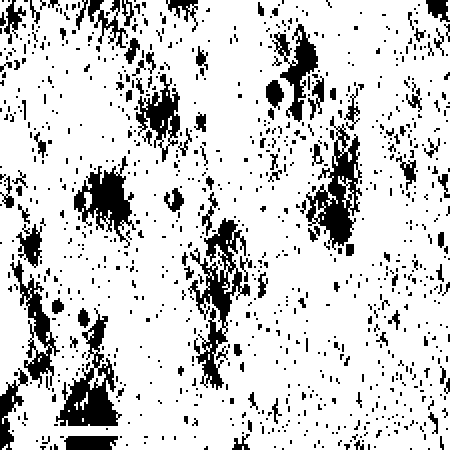
This function starts by taking the image and morphologically binarizing it (produces an image in which every pixel has the value 0 or 1) to be able to easily detect the edges. To avoid detecting small changes in topology of the Moon instead of the required craters, I made use of the Closing function to remove smaller, negligible circles and also to group the edges or circles around a crater into its circumference.
Filtering out the Craters:
Filtering out the Craters:
In[]:=
selectimage=SelectComponents[edgeimage,#Circularity<1.2||#Eccentricity<0.5&]highlightedimage=HighlightImage[testimage1,selectimage]
Out[]=
Out[]=
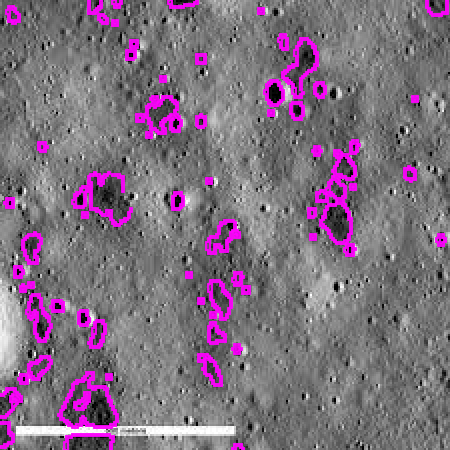
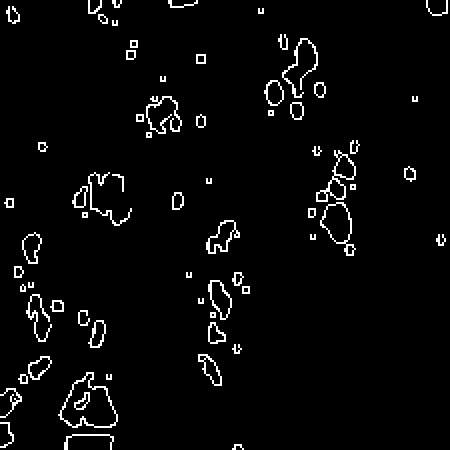
Making use of the fact that craters are mostly elliptical or circular in shape, I applied SelectComponents with specific conditions based on the circularity and eccentricity of objects to filter out crater shapes. From here, there are two methods that can be used to get output. First, HighlightImage is utilized to overlap the selected components over the original image and then highlight the borders to indicate the presence of a crater.
In[]:=
finalimage=ImageApply[#*0.35&,testimage1,Masking->ColorNegate[selectimage]]
Out[]=
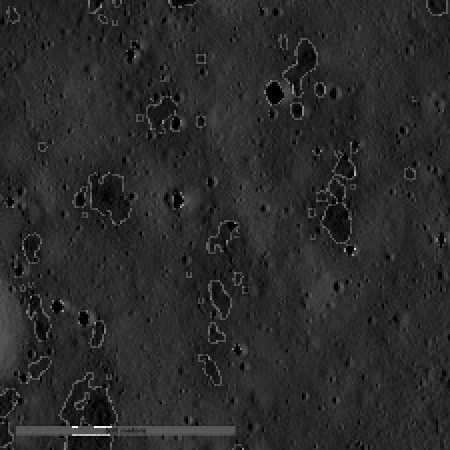
Another route is to use the edges obtained before and apply ImageApply to overlap the the outlines back onto the original image resulting in a second solution. The final result is a list of both the possible outcomes.
In[]:=
findcraters[testimage1]
Out[]=
,
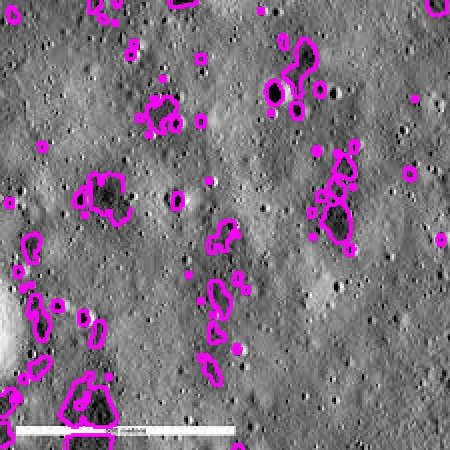
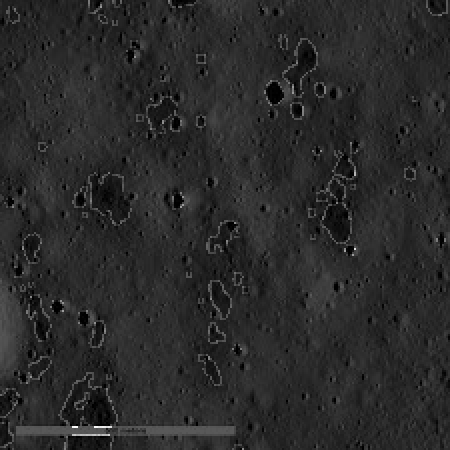
In[]:=
findcraters[testimage2]
Out[]=
,
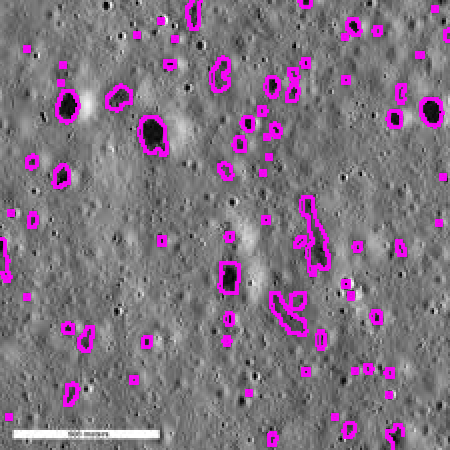
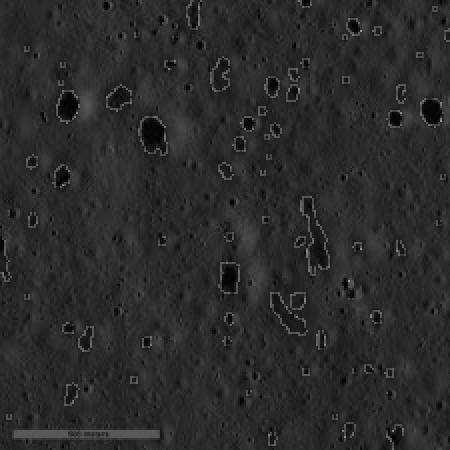
In[]:=
findcraters[testimage3]
Out[]=
,
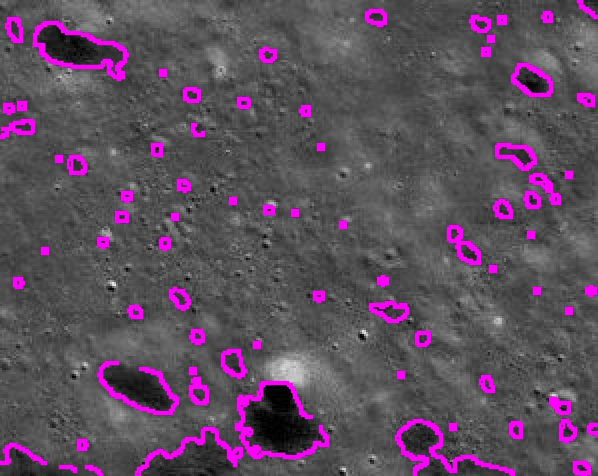
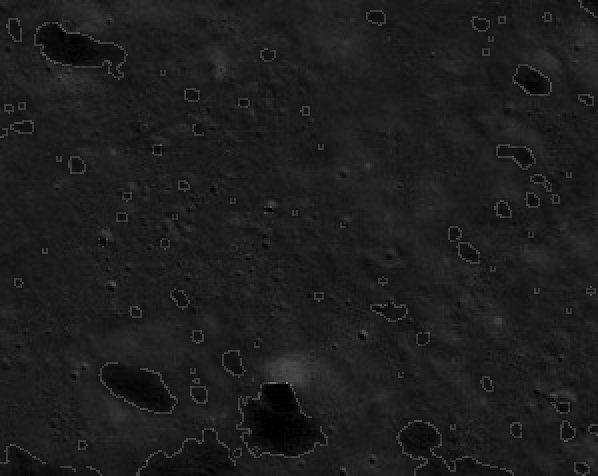
Finding the Number of Craters:
Finding the Number of Craters:
The second step is to count the number of craters using a function that accepts an image for an input and returns an approximate value of the number of craters.
In[]:=
numberofcraters[input2_Image]:=Module[{gaussianimage,outlineimage,associationcomponents,finallist,craternumber},gaussianimage=GaussianFilter[input2,3];outlineimage= EdgeDetect[MorphologicalBinarize[gaussianimage,{0.33,FindThreshold[input2]}]];associationcomponents=Association[ComponentMeasurements[outlineimage,"Area"]];finallist= Select[associationcomponents, #>12&];craternumber=Length[finallist]]
In[]:=
gaussianimage=GaussianFilter[testimage1,3]outlineimage= EdgeDetect[MorphologicalBinarize[gaussianimage,{0.33,FindThreshold[testimage1]}]]
The function starts by applying a Gaussian Filter to smoothen the image and reduce image noise. An outline of the image components is obtained using EdgeDetect and MorphologicalBinarize within a defined threshold, by replacing all values above the upper threshold with 1, also including pixels with intensities above the lower threshold that are connected to the foreground.
I then used ComponentMeasurements to extract the areas of all the ellipse and circle shaped objects defined by their outlines and then converted it into an Association, where the areas were the values of the keys. In order to ensure that only objects of a suitable size were counted as craters and not the changes in the surface of the moon, I filtered out all components with a size greater than a specified value to count as craters.
Finally, I took the length of the refined association and displayed it as the number of craters in the given image.
Distribution of Craters
Distribution of Craters
Using this last function, I created graphical representations of the relative crater areas and perimeters and also displayed their centroids (centre of mass) as points in the original image.
Obtaining a Final List of Craters:
Obtaining a Final List of Craters:
Using similar criteria as mentioned in the previous section, I extracted the component measurements- the area, perimeter and centroids- of only those objects in the image that are big enough to be classified as craters. This is done in order to avoid detecting figures that are too small to pass as craters or are a part of the Moon's uneven surface. This way, I created a final list of craters.
Obtaining the Relative Size Datasets:
Obtaining the Relative Size Datasets:
Using the Min function on both sets of data, the smallest area and perimeter are extracted from both the lists. Since the absolute measurements of the craters are not available, each figure in both lists is then divided by the smallest value of that list to obtain relative areas and perimeters respectively. Using this data, it is possible to plot histograms to obtain a better understanding of the size distribution of craters.
Histogram for the Relative Area of Craters:
Histogram for the Relative Area of Craters:
Histogram for the Relative Perimeter of Craters:
Histogram for the Relative Perimeter of Craters:
Displaying the Centroids of the Craters:
Displaying the Centroids of the Craters:
The centroid list variable displays a list of the 'x' and 'y' co-ordinates of the centroids of the crater masses. Using the Graphics and Point functions, I obtained a graphical representation of these points in the x-y plane. Finally, ImageCompose was used to overlap the points and the original image to output an image of the distribution of centroids of craters.
Conclusion:
Conclusion:
Future Work:
Future Work:
◼
As a future extension, I would like to use the number of craters given to able to detect how old the given surface of the Moon could be.
◼
Another topic that could be explored is whether the far side of the moon has lesser crater impacts and the causes that could have led to this phenomenon.
◼
Finally, it would be interesting to work with various views and projections of images and surfaces to understand how they influence the identification and counting of craters.
Acknowledgements:
Acknowledgements:
I'd like to extend my gratitude to my mentor- Rahul Sharma, the TA’s and the camp directors for their guidance and a wonderful experience at camp.