


ABSTRACT
ABSTRACT
In this presentation we discuss the implementations of different Machine Learning (ML) algorithms in Raku.
The main themes of the presentation are:
The main themes of the presentation are:
◼
ML workflows demonstration
◼
Software engineering perspective on ML implementations
◼
ML algorithms utilization with Raku's unique features
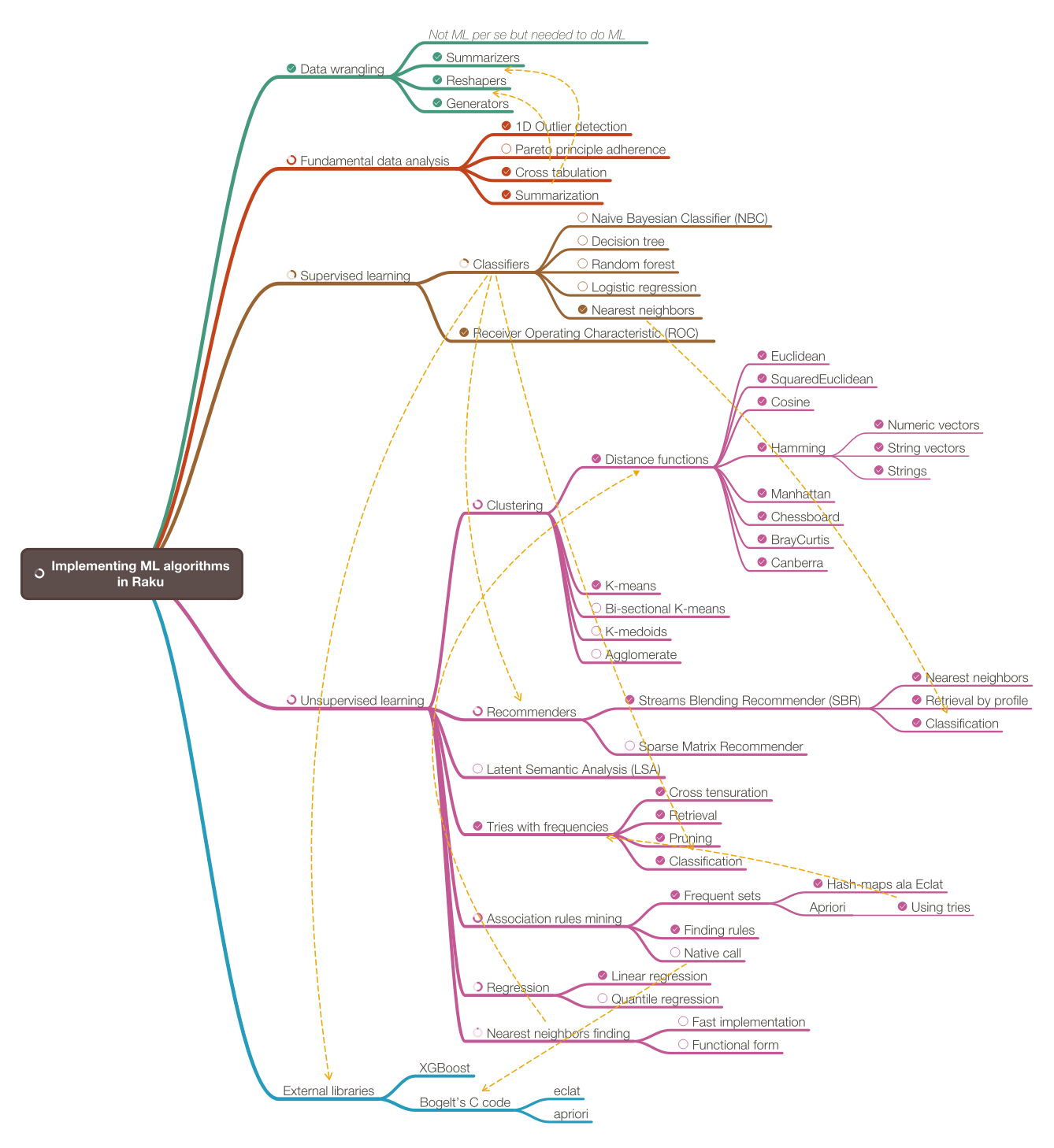
Here is a list of the considered ML algorithms:
ML algorithms considered
ML algorithms considered
Mind-map of ML algorithms
Mind-map of ML algorithms
In this presentation I want to describe my efforts to implement a complete system of ML functionalities in Raku.
Out[]=
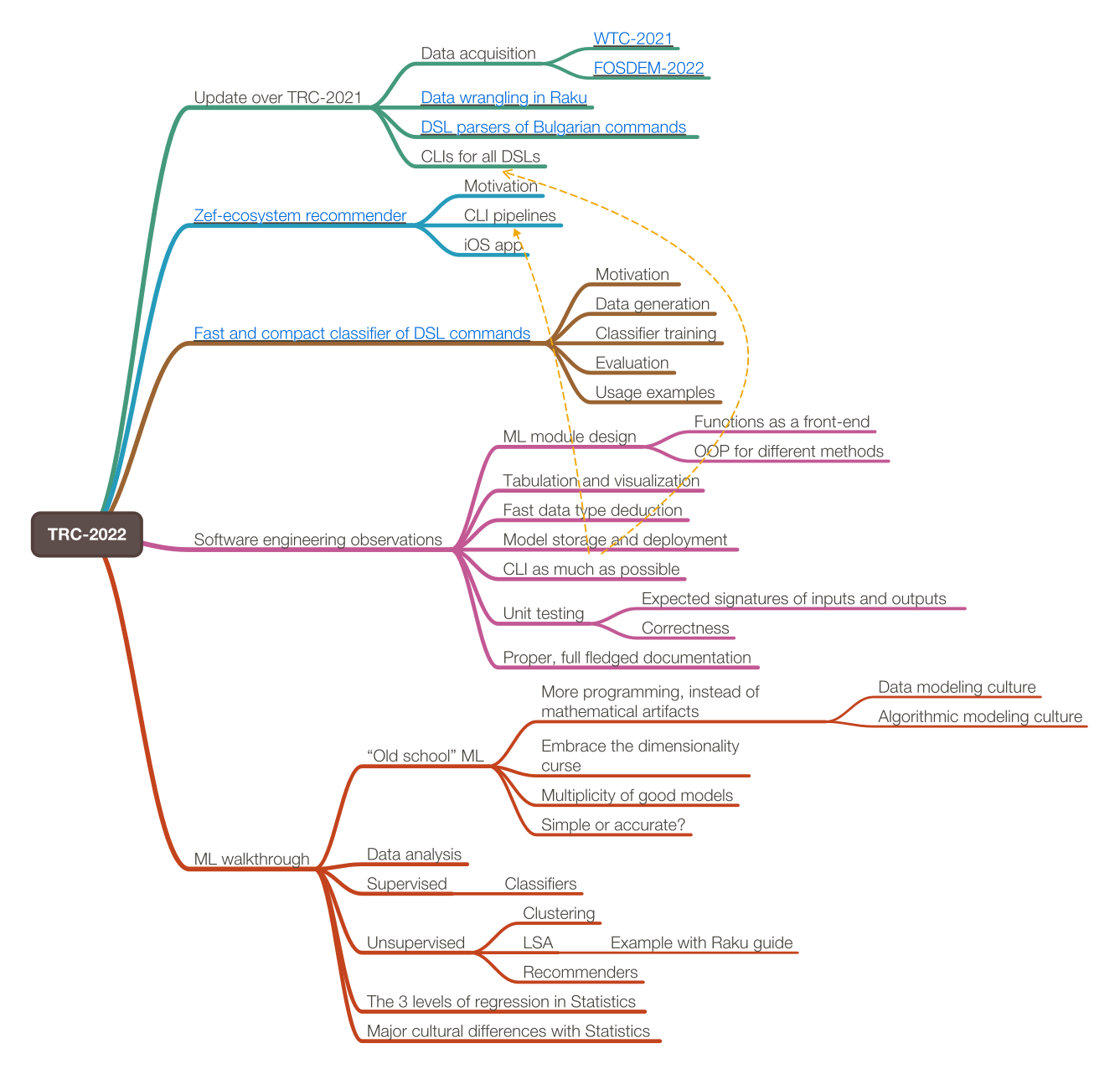
Presentation plan
Presentation plan
Inverted exposition
Inverted exposition
Most interesting examples first
Most interesting examples first
Zef-ecosystem packages recommender
Zef-ecosystem packages recommender
DSL grammars classifiers
DSL grammars classifiers
Audience assumptions
Audience assumptions
Interested in software engineering (85%+)
Not many are interested in ML (<10%)
Know at least some ML (≤40%)
Familiar with ML applications (95%+)
Presentation mind-map
Presentation mind-map
Out[]=
Zef ecosystem recommender
Zef ecosystem recommender
Proper location and environment:
cdMc; cd Scalable-Recommender-Framework-project/Python; conda activate SciPyCentric
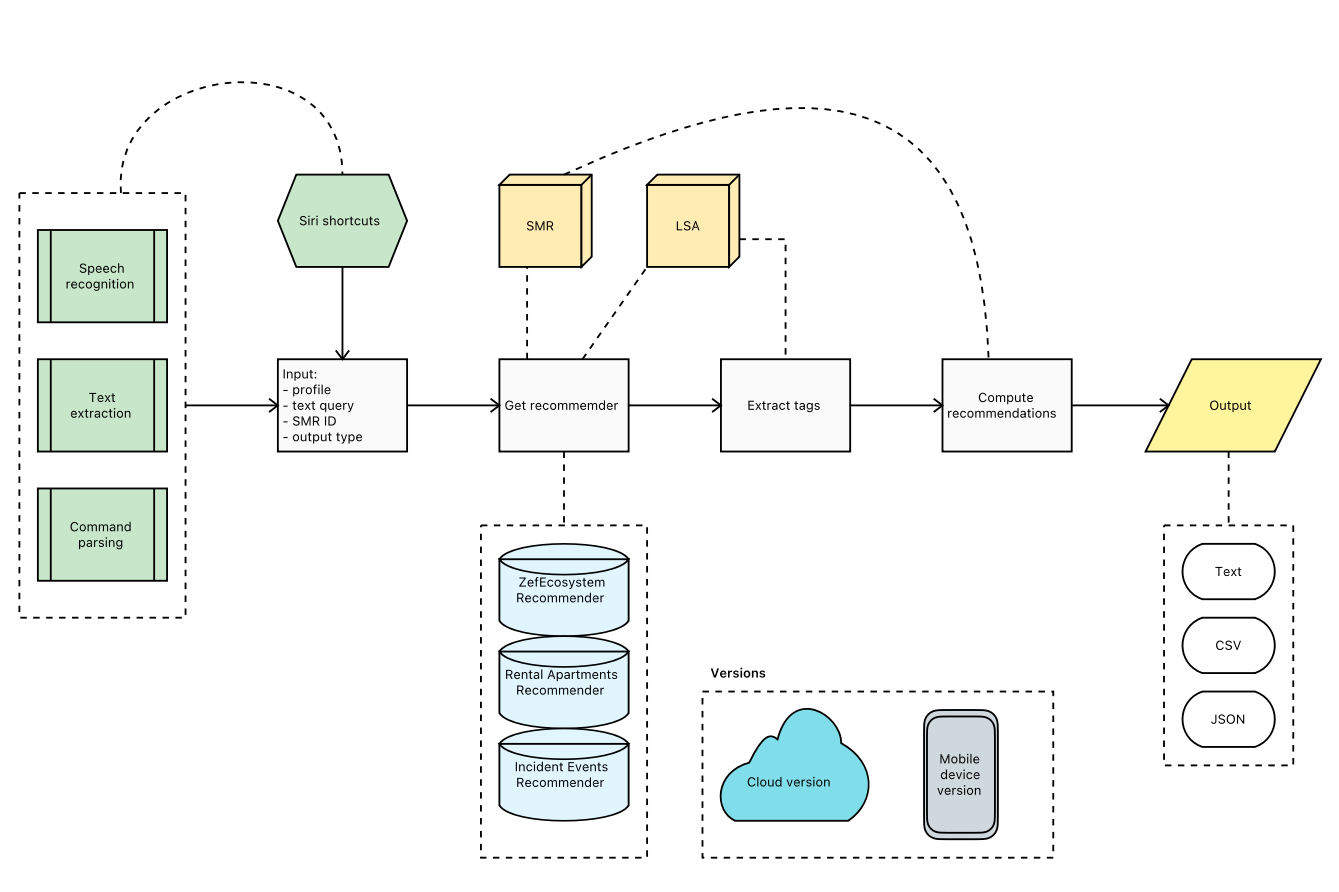
Pipeline with Siri Shortcuts:
shortcuts run "Photo Text Extractor" -o ~/Desktop/Extracted-CLI.md && ./invoke-smr.py --file ~/Desktop/Extracted-CLI.md
Pipeline with Raku DSL interpreter:
ToSearchEngineQueryCode CLI '+"Word:pandas" "Word:data" "Word:science"' | ./invoke-smr.py --pipe
Pipeline flow-chart
Pipeline flow-chart
Out[]=
Scalable recommender system
Scalable recommender system
Out[]=
Fast and compact classifier of DSL commands
Fast and compact classifier of DSL commands
Motivation
Motivation
Note the shell execution timings.
time ToDSLCode Python "
DSL MODULE LatentSemanticAnalysis;
use aDocs;
create document-term matrix;
apply LSI functions IDF, Frequency, and Cosine;
extract 36 topics with the method NNMF and max steps 12;
show topics table
"
DSL MODULE LatentSemanticAnalysis;
use aDocs;
create document-term matrix;
apply LSI functions IDF, Frequency, and Cosine;
extract 36 topics with the method NNMF and max steps 12;
show topics table
"
time ToDSLCode Python "
use aDocs;
create document-term matrix;
apply LSI functions IDF, Frequency, and Cosine;
extract 36 topics with the method NNMF and max steps 12;
show topics table
"
use aDocs;
create document-term matrix;
apply LSI functions IDF, Frequency, and Cosine;
extract 36 topics with the method NNMF and max steps 12;
show topics table
"
Flowchart
Flowchart
Recommender-based classifier
Recommender-based classifier
Trie based classifier
Trie based classifier
Random sentences
Random sentences
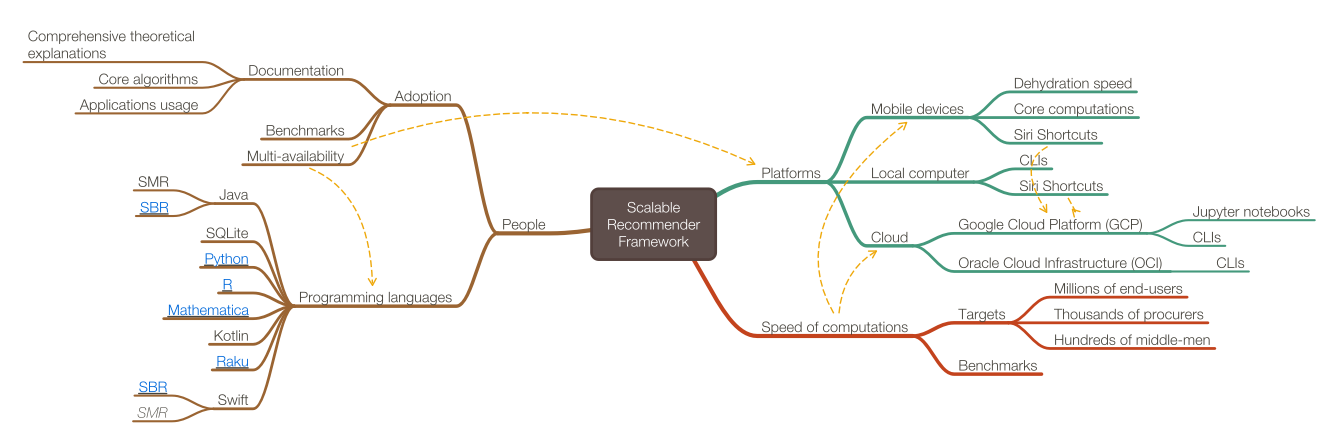
Software engineering observations
Software engineering observations
◼
ML module design
◼
Functions as front-end
◼
OOP for different methods
◼
Facilitation of tabulation and visualization of results
◼
Notebook solutions
◼
Text tables
◼
Text plots
◼
Fast data type deduction facilitation
◼
Model storage and deployment facilitation
◼
Currently Raku is too slow
◼
Unit tests and correctness tests
◼
Proper documentation with worked out examples
◼
CLIs as much as possible
◼
Facilitation with code generation
Data wrangling
Data wrangling
Although data acquisition and data transformations are not formally part ML, most of the time data scientists and ML practitioners do various "data wrangling" tasks.
Explaining Data Science with trucks
Explaining Data Science with trucks
Data wrangling systems (in Raku)
Data wrangling systems (in Raku)
◼
Minimalistic dataset ("Data::Reshapers" et al. by antononcube)
◼
Data-frame object based ("Dan" et al. by p6steve)
◼
Object Relational Mapping ("Red" by FCO)
Minimalistic data wrangling implementation
Minimalistic data wrangling implementation
Minimalistic perspective
Minimalistic perspective
I do not want to make a special type (class) for datasets or data frames – I want to use the standard Raku data structures. (At least at this point of my Raku data wrangling efforts.)
My reasons are:
1
.The data can be picked up and transformed with typical, built-in commands.
◼
Meaning, without the adherence to a certain data transformation methodology or dedicated packages.
2
.Using standard, built-in structures is a type of “user interface” decision.
3
.The “user experience” can be achieved with- or provided by other transformation paradigms and packages.
Data wrangling code generation
Data wrangling code generation
ToDataQueryWorkflowCode Python::pandas "use dfIris; group by Species;show counts"
ToDataQueryWorkflowCode Raku "use dfIris; group by Species; show counts"
ToDataQueryWorkflowCode --language=Bulgarian Raku "използвай таблицата dfIris; групирай с колонита Species; покажи размерите"
ToDataQueryWorkflowCode --language=Bulgarian English "използвай таблицата dfIris; групирай с колонита Species; покажи размерите"
Data wrangling code generation -- implementation state
Data wrangling code generation -- implementation state
Data wrangling examples
Data wrangling examples
All steps shown in the examples below are done often in ML data preparation.
Get dataset
Get dataset

In[]:=
my @dsTitanic = get-titanic-dataset();
records-summary(@dsTitanic);
records-summary(@dsTitanic);
In[]:=
@dsTitanic.head(3)
In[]:=
transpose(@dsTitanic.head(3))
Code generation
Code generation
In[]:=
my $command = '
use @dsTitanic;
group by passengerSex and passengerClass;
show counts'
use @dsTitanic;
group by passengerSex and passengerClass;
show counts'
In[]:=
.say for ToDSLCode($command, defaultTargetsSpec=>'Raku', format=>'code')
In[]:=
ToDSLCode($command, format=>'code'):ast
Grouping and counting
Grouping and counting
In[]:=
my $obj = @dsTitanic ;
$obj = group-by( $obj, ("passengerSex", "passengerClass")) ;
say "counts: ", $obj>>.elems
$obj = group-by( $obj, ("passengerSex", "passengerClass")) ;
say "counts: ", $obj>>.elems
Cross-tabulation
Cross-tabulation
In[]:=
cross-tabulate(@dsTitanic, 'passengerSex', 'passengerClass')==>to-pretty-table
In[]:=
cross-tabulate(@dsTitanic, 'passengerSex', 'passengerClass', 'passengerAge')==>to-pretty-table
Long format data
Long format data
In[]:=
to-long-format(@dsTitanic, <id>).head(12)==>to-pretty-table
Filter
Filter
In[]:=
ToDSLCode('
DSL MODULE DataQuery;
use @dsTitanic;
filter by passengerSex is "male" and passengerClass is "1st" and passengerSurvival is not "survived"
',
defaultTargetsSpec=>'Raku', format=>'code')
DSL MODULE DataQuery;
use @dsTitanic;
filter by passengerSex is "male" and passengerClass is "1st" and passengerSurvival is not "survived"
',
defaultTargetsSpec=>'Raku', format=>'code')
In[]:=
$obj = @dsTitanic ;
$obj = $obj.grep({ $_{"passengerSex"} eq "male" and $_{"passengerClass"} eq "1st" and $_{"passengerSurvival"} !eq "survived" }).Array;
$obj.elems
$obj = $obj.grep({ $_{"passengerSex"} eq "male" and $_{"passengerClass"} eq "1st" and $_{"passengerSurvival"} !eq "survived" }).Array;
$obj.elems
Deduce type
Deduce type
In[]:=
dimensions(@dsTitanic)
In[]:=
deduce-type(@dsTitanic)
In[]:=
my @dsTitanic2 = @dsTitanic.deepmap(*.clone).map({ $_.<passengerAge> = $_<passengerAge>.Numeric; $_});
@dsTitanic2.&dimensions
@dsTitanic2.&dimensions
In[]:=
deduce-type(@dsTitanic2)
Data wrangling orthogonal approaches
Data wrangling orthogonal approaches
Tries with frequencies
Tries with frequencies
Tries (prefix trees) with frequencies can be used for:
◼
Data analysis and study
◼
Ad-hoc, unsupervised learning
◼
Classification (of Bayesian type)
In[]:=
my @words = ['bar' xx 3].append('bark' xx 2).append('car' xx 4).append('custard' xx 2)
In[]:=
@words.&trie-create-by-split.shrink.form
In[]:=
trie-create-by-split @words
to-uml-spec --plot ML::TriesWithFrequencies
Tries with frequencies -- data analysis
Tries with frequencies -- data analysis
I used tries with frequencies to do:
◼
Generalized cross tabulation
◼
Sequence mining
In[]:=
deduce-type(@dsTitanic)
In[]:=
@dsTitanic.map({$_.<passengerSex passengerClass passengerSurvival>})>>.List.&trie-create.form
Tries with frequencies -- classification
Tries with frequencies -- classification
Tries with frequencies provide conditional probabilities and can be used as (more elaborated) Naive Bayesian Classifiers.
In[]:=
my $trTitanic = @dsTitanic2.map({$_.<passengerSex passengerClass passengerSurvival>})>>.List.&trie-create.node-probabilities;
$trTitanic.form
$trTitanic.form
In[]:=
$trTitanic.classify(<male 1st>)
In[]:=
.say for $trTitanic.classify([<male 1st>, <male 2nd>, <female 1st>, <male 2nd>], prop=>'Probabilities')
Classification workflow
Classification workflow
Mind-map
Mind-map
ROC functions
ROC functions
Detailed example in the notebook "Raku-Trie-based-classifier-example.nb".
Here is the obtained ROC-hash table:
In[]:=
to-pretty-table(@rocs)
Here is the corresponding ROC plot:
In[]:=
use Text::Plot;
text-list-plot(roc-functions('FPR')(@rocs), roc-functions('TPR')(@rocs),
width => 70, height => 25,
x-label => 'FPR', y-label => 'TPR' )
text-list-plot(roc-functions('FPR')(@rocs), roc-functions('TPR')(@rocs),
width => 70, height => 25,
x-label => 'FPR', y-label => 'TPR' )
Here is the same ROC plot made with Mathematica:
ROC functions dictionary
ROC functions dictionary
The nomenclature ROC functions is somewhat large, hence dictionaries.
In[]:=
say roc-functions('properties');
In[]:=
roc-functions('FunctionInterpretations')
In[]:=
say roc-functions('FPR');
K-means Clustering
K-means Clustering
Clustering is a fundamental ML, Unsupervised learning, procedure.
Make data points
Make data points
In[]:=
my $pointsPerCluster = 200;
my @data2D5 = [[10,20,4],[20,60,6],[40,10,6],[-30,0,4],[100,100,8]].map({
random-variate(NormalDistribution.new($_[0], $_[2]), $pointsPerCluster) Z random-variate(NormalDistribution.new($_[1], $_[2]), $pointsPerCluster)
}).Array;
@data2D5 = flatten(@data2D5, max-level=>1).pick(*);
@data2D5.elems
my @data2D5 = [[10,20,4],[20,60,6],[40,10,6],[-30,0,4],[100,100,8]].map({
random-variate(NormalDistribution.new($_[0], $_[2]), $pointsPerCluster) Z random-variate(NormalDistribution.new($_[1], $_[2]), $pointsPerCluster)
}).Array;
@data2D5 = flatten(@data2D5, max-level=>1).pick(*);
@data2D5.elems
In[]:=
text-list-plot(@data2D5, width=>80)
Cluster
Cluster
In[]:=
my %clRes = find-clusters(@data2D5, 5, prop=>'All', distance-function=>'euclidean');
%clRes<Clusters>>>.elems
%clRes<Clusters>>>.elems
Visualize
Visualize
In[]:=
text-list-plot([|%clRes<Clusters>, %clRes<MeanPoints>], point-char=><1 2 3 4 5 ●>, width=>100)
K-means clustering - distance functions
K-means clustering - distance functions
Using different distance functions would, generally, produce different results:
In[]:=
<Euclidean Cosine>.map({ say find-clusters(@data2D5, 3, distance-function => $_).&text-list-plot(
title => 'distance function: ' ~ $_, point-char => <* ® o>, width=>80), "\n" });
title => 'distance function: ' ~ $_, point-char => <* ® o>, width=>80), "\n" });
Outlier detection
Outlier detection
Here we generate random, normally distributed points and summarize them:
In[]:=
my @points = random-variate(NormalDistribution.new(mean=>12, sd=>6), 50);
records-summary(@points)
records-summary(@points)
Here we find outliers:
In[]:=
outlier-identifier(@points):values
Here we find the outlier positions for each identifier:
In[]:=
(&hampel-identifier-parameters, &splus-quartile-identifier-parameters, &quartile-identifier-parameters).map({ $_.name => outlier-identifier(@points, identifier=>$_) }).Hash==>encode-to-wl()
Here we plot the sorted data and the outliers:
In[]:=
my @points2D = |(^@points.elems Z @points.sort);
text-list-plot([@points2D, @points2D[|outlier-identifier(@points2D.map(*[1]), identifier=>&quartile-identifier-parameters)]], point-char=><* ®>, width=>80)
text-list-plot([@points2D, @points2D[|outlier-identifier(@points2D.map(*[1]), identifier=>&quartile-identifier-parameters)]], point-char=><* ®>, width=>80)
Remark: Having 1D outlier identifiers is the basis for developing certain (very powerful) nD outlier identifier algorithms.
Latent Semantic Analysis (LSA)
Latent Semantic Analysis (LSA)
◼
Currently it is hard to do LSA with Raku.
◼
Nevertheless, "ML::StreamsBlendingRecommender" uses LSA-made artifacts.
Using a recommender system
Using a recommender system
Association rule learning -- data
Association rule learning -- data
Data
Data
In[]:=
use Text::CSV;
my @dsAdult=csv(in=>"Datasets/adult/dfAdultTest.csv",headers=>'auto');
dimensions(@dsAdult)
my @dsAdult=csv(in=>"Datasets/adult/dfAdultTest.csv",headers=>'auto');
dimensions(@dsAdult)
In[]:=
deduce-type(@dsAdult)
In[]:=
#@dsAdult.map({ $_<age> = $_<age>.Numeric; $_<capital-gain> = $_<capital-gain>.Numeric; $_<capital-loss>=$_<capital-gain>.Numeric; $_<education-num>=$_<education-num>.Numeric; $_<hours-per-week>=$_<hours-per-week>.Numeric})
Summarize the data:
Baskets
Baskets
"Association rule learning" is also known as "Market basket analysis".
Preprocess the transactions into "baskets" with "focus" items :
In[]:=
my @baskets=@dsAdult.map({ $_<education marital-status education-num occupation income>});
dimensions(@baskets)
dimensions(@baskets)
In[]:=
to-pretty-table(@baskets.pick(12))
Association rule learning -- frequent sets
Association rule learning -- frequent sets
Find frequent sets:
In[]:=
my $startTime=now;
my @frSets = frequent-sets(@baskets, 0.05);
my $endTime=now;
"Time to find frequent sets: {$endTime - $startTime}"
my @frSets = frequent-sets(@baskets, 0.05);
my $endTime=now;
"Time to find frequent sets: {$endTime - $startTime}"
Show sample:
In[]:=
.say for @frSets.pick(5)
Pick frequent sets that have more than three elements and contain ">50K.":
In[]:=
my @frSets2 = @frSets.grep({ $_.key.elems ≥ 3 && '>50K.' (elem) $_.key});
.say for @frSets2
.say for @frSets2
Association rule learning -- the rules
Association rule learning -- the rules
Find association rules:
In[]:=
my $startTime=now;
my @dsRules = association-rules(@baskets, 0.02, 0.65, max-number-of-items => Inf);
my $endTime=now;
"Time to find association rules: {$endTime - $startTime}"
my @dsRules = association-rules(@baskets, 0.02, 0.65, max-number-of-items => Inf);
my $endTime=now;
"Time to find association rules: {$endTime - $startTime}"
In[]:=
@dsRules.&dimensions
Show found rules:
In[]:=
my $arfn=<antecedent consequent count support confidence lift leverage conviction>;
@dsRules.sort(-*<confidence>)==>to-pretty-table(field-names=>$arfn, align=>'l')
@dsRules.sort(-*<confidence>)==>to-pretty-table(field-names=>$arfn, align=>'l')
In[]:=
@dsRules.sort(-*<confidence>)==>encode-to-wl
Show sample:
In[]:=
@dsRules.pick(3)==>to-pretty-table(align=>'l')
Pick association rules with consequent that has ">50K.":
In[]:=
my @dsRules2 = @dsRules.grep({ '>50K.' (elem) $_<consequent> });
@dsRules2 ==> encode-to-wl
@dsRules2 ==> encode-to-wl
Check the CLI mate!
Check the CLI mate!
Having CLIs has to be considered fairly early in the design and implementation of the ML functionalities.
Visual aid
Visual aid
Conclusion
Conclusion
Software engineering observations (again)
◼
ML module design
◼
Functions as front-end
◼
OOP for different methods
◼
Facilitation of tabulation and visualization of results
◼
Notebook solutions
◼
Text tables
◼
Text plots
◼
Fast data type deduction facilitation
◼
Model storage and deployment facilitation
◼
Currently Raku is too slow
◼
Unit tests and correctness tests
◼
Proper documentation with worked out examples
◼
CLIs as much as possible
◼
Facilitation with code generation
Future plans / engagement
Future plans / engagement
References
References
Articles
Articles
[AA1] Anton Antonov, "A monad for classification workflows", (2018), MathematicaForPrediction at WordPress.
[AA4] Anton Antonov, "Introduction to data wrangling with Raku", (2021), RakuForPrediction at WordPress.
Packages
Packages
[AAp6] Anton Antonov, DSL::English::DataQueryWorkflows Raku package, (2020-2022), GitHub/antononcube.
[AAp7] Anton Antonov, DSL::Shared::Utilities::ComprehensiveTranslation Raku package, (2020-2022), GitHub/antononcube.
Functions
Functions
[WRI1] Wolfram Research (2014), Dataset, Wolfram Language function.
[WRI2] Wolfram Research (2007), FindClusters, Wolfram Language function.
[WRI3] Wolfram Research (2015), TakeDrop, Wolfram Language function, (updated 2015).
[WRI4] Wolfram Research (2007), Tally, Wolfram Language function.
Code
Code
NLP Template Engine
NLP Template Engine
DSLMode
DSLMode
Serializers
Serializers
SplitWordsByCapitalLetters
SplitWordsByCapitalLetters
SplitWordAndNumber
SplitWordAndNumber
Raku mode
Raku mode
Raku process
Raku process
Load Raku packages
Load Raku packages
In[]:=
use Text::Plot;
use ML::AssociationRuleLearning;
use ML::Clustering;
use ML::StreamsBlendingRecommender;
use ML::ROCFunctions;
use ML::TriesWithFrequencies;
use Statistics::OutlierIdentifiers;
use Data::ExampleDatasets;
use Data::Generators;
use Data::Reshapers;
use Data::Summarizers;
use Mathematica::Serializer;
use UML::Translators;
use DSL::Shared::Utilities::ComprehensiveTranslation;
use ML::AssociationRuleLearning;
use ML::Clustering;
use ML::StreamsBlendingRecommender;
use ML::ROCFunctions;
use ML::TriesWithFrequencies;
use Statistics::OutlierIdentifiers;
use Data::ExampleDatasets;
use Data::Generators;
use Data::Reshapers;
use Data::Summarizers;
use Mathematica::Serializer;
use UML::Translators;
use DSL::Shared::Utilities::ComprehensiveTranslation;
Shell
Shell
source ~/.zshrc
Python
Python
In[]:=
import pandas
from ExampleDatasets import *
from RandomDataGenerators import *
from ExampleDatasets import *
from RandomDataGenerators import *