Quantum research and education require an integrated environment for various computations, including symbolic exact calculations, numeric tasks, integration with other platforms across programming languages, accessible functionalities, and interaction with quantum hardware. Wolfram Mathematica stands out as a unique platform facilitating exploration in quantum computation for researchers, educators, users, and students. Leveraging Mathematica’s functionalities, from AI tools to symbolic computation, Wolfram’s quantum framework offers versatility. It accommodates different quantum computing paradigms, supporting both digital gate-based and analog quantum computing with ease of adoption. In this short computational essay, we quickly showcase some of Wolfram’s unique features on quantum.
Wolfram quantum team: quantum AT wolfram.com
Install the quantum framework
Install the quantum framework
In[]:=
PacletInstall["https://wolfr.am/DevWQCF",ForceVersionInstall->True]<<Wolfram`QuantumFramework`
Out[]=
PacletObject

Paclets are compact, discoverable, installable, and seamlessly integrable units of Wolfram functionality within the Wolfram environment.
After installation, not only new quantum functionalities will be added to the built-in Mathematics’s functions, but also the detailed documentation for each of those functions will be automatically added. For example, one can read the documentation for . Users can also find the documentation on cloud too. Here is the link to the cloud documentation of the quantum circuit operator: https://resources.wolframcloud.com/PacletRepository/resources/Wolfram/QuantumFramework/ref/QuantumCircuitOperator.html
State preparation
State preparation
Wolfram quantum features for quantum states
Wolfram quantum features for quantum states
As an example, we’ll generate a quantum state based on provided probabilities in a desired basis. The goal is to produce a quantum circuit resulting in a desired state.
Create a random list of 8 probabilities:
In[]:=
prob=Normalize[RandomReal[1,],Total]
3
2
Out[]=
{0.147763,0.0566029,0.140067,0.119661,0.0670149,0.0187426,0.111957,0.338192}
Since we are aiming at a 3-qubit state, let’s consider a quantum basis of 3-qubits. We assume that above probabilities are the target ones when qubit-1 is in the computational basis, qubit-2 in the Pauli-X basis, and qubit-3 in the Pauli-Y basis.
Prepare the quantum state in the desired basis, based on a given target probability:
In[]:=
ψ=QuantumState[Sqrt@prob,"IXY"]
Out[]=
QuantumState

Check the probabilities from above quantum state is the same as the target probabilities:s
In[]:=
ψ["ProbabilitiesList"]==prob
Out[]=
True
Check if the state is entangled:
In[]:=
QuantumEntangledQ[ψ]
Out[]=
True
Calculate the quantum entanglement monotone:
In[]:=
QuantumEntanglementMonotone[ψ]
Out[]=
0.392488
Calculate the Bloch vector in -1 dimensional space (one less, due to normalization)
2
()
3
2
In[]:=
ψ["BlochVector"]
Out[]=
{0,0.0887067,0.334823,-0.0496569,0,0,0.00646642,0.665684,0.0599508,0,0,0.197889,-0.264041,-0.00437021,0,0,0,-0.0866867,0.00780691,0,0.138915,0,-0.0585856,-0.00825785,-0.0634137,0,0,0.0243763,0.00462264,-0.300489,0,0,-0.0485261,-0.0619697,0,0,0.0192477,0.0343839,0.170754,0,0,0,0.0232377,-0.00558092,0,0,-0.02458,0.081177,0.0164743,0.187191,0,0,-0.258028,-0.0136456,0,0,0.103973,0,0.182928,-0.0174259,0,0,-0.0725575}
Calculate corresponding single qubit states (i.e. find their Bloch vector) by tracing out other qubits and visualize them:
In[]:=
QuantumPartialTrace[ψ,Complement[Range[3],{#}]]["BlochPlot",PlotLabel->"Reduced state of qubit-"<>ToString[#]]&/@Range[3]
Out[]=
 ,
, ,
,
Plot the corresponding probabilities and their basis:
In[]:=
ψ["ProbabilityPlot",AspectRatio->1/4]
Out[]=
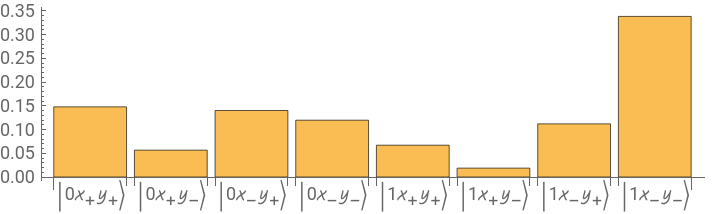
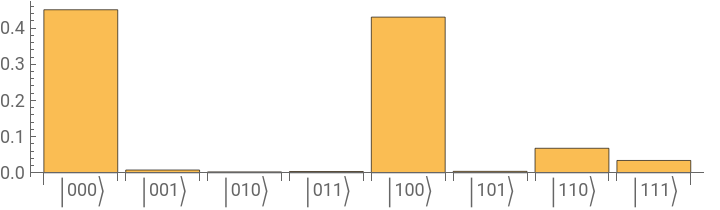
Plot the corresponding probabilities in the computational basis:
In[]:=
ψ["Computational"]["ProbabilityPlot",AspectRatio->1/4]
Out[]=
Plot the corresponding amplitudes in the computational basis :
In[]:=
ψ["Computational"]["AmplitudePlot",AspectRatio->1/4,ChartLegends->True]
Out[]=
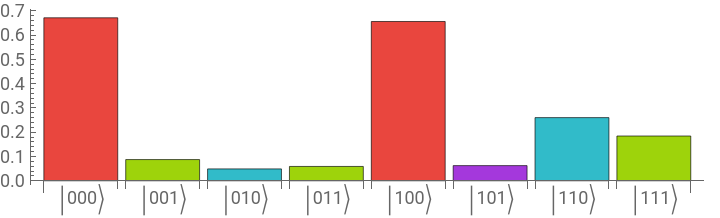
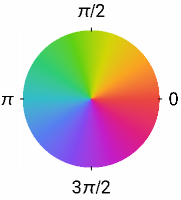
Phase space representation of quantum states
Phase space representation of quantum states
Represent the quasi-probability of the state in the Wootters basis (which is a × matrix):
3
2
3
2
In[]:=
ψ["PrimeQuasiProbability"]
Out[]=
SparseArray

Summation over rows of the quasi-probability reproduces the probabilities in Pauli-X basis (call it the momentum basis)
In[]:=
Total/@ψ["PrimeQuasiProbability"]
Out[]=
{0.138572,0.138572,0.340666,0.340666,0.00649002,0.00649002,0.0142726,0.0142726}
In[]:=
%-QuantumState[ψ,"XXX"]["ProbabilitiesList"]//Chop
Out[]=
{0,0,0,0,0,0,0,0}
Note that QuantumState[ψ,”XXX”] means transforming the state into the new basis of three Pauli-X.
Summation over columns of the quasi-probability reproduces the probabilities in Pauli-Z basis (call it the position basis)
In[]:=
Total@ψ["PrimeQuasiProbability"]
Out[]=
{0.450569,0.00764063,0.00239429,0.00348985,0.430282,0.00390466,0.0676952,0.0340239}
In[]:=
%-ψ["Computational"]["ProbabilitiesList"]//Chop
Out[]=
{0,0,0,0,0,0,0,0}
Generate the state using a quantum circuit
Generate the state using a quantum circuit
In Wolfram quantum framework, one can generate a circuit to prepare a specific quantum state:
In[]:=
prepWL=QuantumCircuitOperator[ψ]
Out[]=
QuantumCircuitOperator

Show circuit diagram:
In[]:=
prepWL["Diagram","ShowGateLabels"->False]
Out[]=

Show list of labels for gates (the first three gates which are initial register states):
In[]:=
QuantumShortcut[prepWL]
Out[]=
,
,
,H{3},H{2},H{1},{C,{R,0.0718739,{Y{3}}},{},{1,2}},{C,{R,-0.785398,{Z{3}}},{},{1,2}},{C,{R,0.0718739,{Y{3}}},{2},{1}},{C,{R,-0.785398,{Z{3}}},{2},{1}},{C,{R,0.0718739,{Y{3}}},{1},{2}},{C,{R,-0.785398,{Z{3}}},{1},{2}},{C,{R,0.0718739,{Y{3}}},{1,2},{}},{C,{R,-0.785398,{Z{3}}},{1,2},{}},{Permutation,Cycles[{{1,3}}]}{1,2,3},{C,{R,-1.34512,{Y{3}}},{},{1,2}},{C,{R,1.5708,{Z{3}}},{},{1,2}},{C,{R,-1.34512,{Y{3}}},{2},{1}},{C,{R,1.5708,{Z{3}}},{2},{1}},{C,{R,-0.669233,{Y{3}}},{1},{2}},{C,{R,3.14159,{Z{3}}},{1},{2}},{C,{R,-0.669233,{Y{3}}},{1,2},{}},{C,{R,3.14159,{Z{3}}},{1,2},{}},{Permutation,Cycles[{{2,3}}]}{1,2,3},{C,{R,-1.31181,{Y{3}}},{},{1,2}},{C,{R,1.5708,{Z{3}}},{},{1,2}},{C,{R,0.187283,{Y{3}}},{2},{1}},{C,{R,-1.5708,{Z{3}}},{2},{1}},{C,{R,-1.38085,{Y{3}}},{1},{2}},{C,{R,-1.5708,{Z{3}}},{1},{2}},{C,{R,-0.337386,{Y{3}}},{1,2},{}},{C,{R,-1.5708,{Z{3}}},{1,2},{}},{GlobalPhase,1.1781+1.11022×}
|0〉 |

|0〉 |
|0〉 |
-16
10
Check the outcome of circuit is the target state:
Integration with other quantum platforms: Classiq
Integration with other quantum platforms: Classiq
Now we will use Classiq’s quantum modeling language which is written in Python. The above circuit in Wolfram generates a target state (i.e., a target amplitude list). In Classiq, if one cares only about probabilities in the computational basis, one can create a circuit matching the given input probabilities within a defined margin.
Generate a circuit to prepare above target probabilities, in a given bound:
Show circuit diagram:
If you run above code, Mathematica will take of installation relevant Python packages needed to run Classiq. Then you will be directed to Classiq platform for authentication. Once done, you will get the result back in Mathematica as a quantum circuit object.
Check the outcome of Classiq’s circuit generates the same probabilities, of course in the computational basis:
Note the state one gets from Classiq is not the same as ψ, because Classiq returns everything is the computational basis, and there are many states in the computational basis, generating the target probability (prob) in the desired basis we picked (IXY)
Those probabilities can be obtained by measuring qubits:
Show Classiq gate labels:s
Find quantum predictions (exactly):
Plot the probability distribution
As one expected, the Classiq’s circuit reproduces the target probabilities, within the bound:
Integration with Qiskit
Integration with Qiskit
Transfer the quantum circuit from Mathematica to Qiskit:
Calculate the outcome of circuit in qiskit (note: the quantum calculation will be done in Qiskit, not Mathematica, and the final outcomes will be transferred to Mathematica as a QuantumMeasurement object):
After evaluating the above code for the first time, Wolfram quantum framework will take care of installing packages and other Python things needed for Qiskit.
Transpile the circuit, using only controlled-Z, Hadamard and Phase gates:
Show the diagram:
Connect to IBM quantum (once running below code, you need to add your IBM quantum credentials):
Transpile the circuit, using only controlled-Z, Hadamard and Phase gates, but only for ibm_osaka QPU:
Show the diagram:
Transpile the circuit for ibm_osaka QPU, without enforcing any specific list of gates:
Show the diagram:
Show the diagram:
Hamiltonian approach (analog quantum computing)
Hamiltonian approach (analog quantum computing)
Local time-independent Hamiltonian
Local time-independent Hamiltonian
Parameters
Solve time evolution, based on parameters, starting from ground state (register state):
The target state vector:
Optimize the Hamiltonian parameters, by setting the final state vector as close as possible to the target one:
Show the optimized parameters:
Using optimized parameters, calculate the the fidelity with respect to state:
Plot final probabilities:
Interacting with a quantum hardware
Interacting with a quantum hardware
In this section, we will interact with quantum processing units (aka, quantum hardware). We will consider IBM quantum. User can also connect with QPUs offered by AWS.
Return QPUs queue from IBM quantum:
If you want to do other local computations while waiting for the submitted job to complete, one method is to use a separate kernel to send the request and handle the response. See the examples here: https://blog.wolfram.com/2024/02/27/reduce-quantum-noise-with-wolfram-language-and-fire-opal/
To enhance the performance of QPUs, incorporating error mitigation techniques is crucial. One of the most effective platforms available for this purpose is FireOpal by Q-CTRL, a quantum partner of Wolfram. After evaluating the provided code, users will be redirected to Q-CTRL’s webpage for authentication.
CITE THIS NOTEBOOK
CITE THIS NOTEBOOK
Quantum research and education: unveiling Mathematica's superiority
by Mads Bahrami
Wolfram Community, STAFF PICKS, May 18, 2024
https://community.wolfram.com/groups/-/m/t/3178293
by Mads Bahrami
Wolfram Community, STAFF PICKS, May 18, 2024
https://community.wolfram.com/groups/-/m/t/3178293