ORIGINAL ARTICLES: Martijn Froeling (2019), QMRTools: a Mathematica toolbox for quantitative MRI analysis. Journal of Open Source Software, 4(38), 1204, https://doi.org/10.21105/joss.01204
Froeling, M., Nederveen, A.J., Heijtel, D.F.R., Lataster, A., Bos, C., Nicolay, K., Maas, M., Drost, M.R. and Strijkers, G.J. (2012), Diffusion-tensor MRI reveals the complex muscle architecture of the human forearm. J. Magn. Reson. Imaging, 36: 237-248. https://doi.org/10.1002/jmri.23608
Froeling, M., Nederveen, A.J., Heijtel, D.F.R., Lataster, A., Bos, C., Nicolay, K., Maas, M., Drost, M.R. and Strijkers, G.J. (2012), Diffusion-tensor MRI reveals the complex muscle architecture of the human forearm. J. Magn. Reson. Imaging, 36: 237-248. https://doi.org/10.1002/jmri.23608
Overview:
◼
Part 1: Why QMRITools`
◼
Part 2: Paclet setup and development
◼
Part 3: Usage of QMRITools`
Part 1: Why QMRITools
Part 1: Why QMRITools
◼
First experience with Mathematica (5.0)
◼
Research topic qMRI of muscle and nerve
In[]:=
SystemOpen["D:\\werk\\workspace\\QMRITools\\QMRI.pptx"]
◼
How did the Paclet start
◼
Code for Master and Phd thesis (2008-2012)
◼
◼
◼
www.qmritools.com and www.muscle-atlas.org/muscle/lowerlimb
PacletInstall["https://github.com/mfroeling/QMRITools/releases/download/3.9.0/QMRITools-3.9.0.paclet"]
Part 2: Paclet setup and development
Part 2: Paclet setup and development
Sep 27 - 2023
Sep 27 - 2023
Not all examples shown in this notebook will work since some need data that cannot be shared.
Those section will be labeled with (*data not available*)
I did preserve the code for those interested.
Those section will be labeled with (*data not available*)
I did preserve the code for those interested.
The paclet
The paclet
In[]:=
(*installingthetoolboxanddemodata*)(*installfromgit*)PacletInstall["https://github.com/mfroeling/QMRITools/releases/download/3.9.0/QMRITools-3.9.0.paclet"](*runtoolboxandextractdemodata*)<<QMRITools`ExtractDemoData[];
Out[]=
PacletObject

Content of the paclet
Content of the paclet
◼
Functions and toolboxes
In[]:=
Grid[Transpose@{{"SubPackages: ","Exposed Functions: ","Exposed Options: "},Length@Flatten[QMRIToolsFunctions[][[All,#]]]&/@{1,2,3}},Alignment->Left]
Out[]=
SubPackages: | 25 |
Exposed Functions: | 495 |
Exposed Options: | 415 |
◼
Listing functions
In[]:=
Column@QMRIToolsPackages[]
In[]:=
QMRIToolsFunctions["All",3]
In[]:=
QMRIToolsFunctions[3]
Paclet Extensions
Paclet Extensions
The paclet comes with:
◼
External executables and libraries that are needed for some functions.
◼
Pretrained neural nets
◼
Resources
◼
Demonstration data
◼
Demonstration notebooks
◼
Example extensions
In[]:=
Grid@pac["Extensions"]
In[]:=
GetAssetLocation["DemoData"]GetAssetLocation["Elastix"]
Release and development
Release and development
Locally can switch between two versions
◼
<<QMRITools`
◼
The installed paclet of the final public release (PacletInstall)
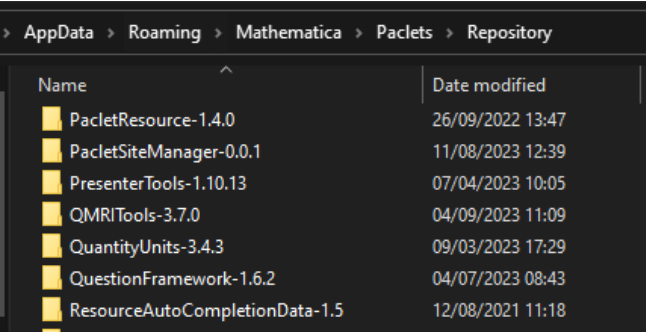
◼
<<QMRIToolsDev`
◼
Development version (Manually installed in $BaseDirectory\Applications)
Git and IDE
Git and IDE
For Git versions control and development:
◼
Currently working in VSCode + Wolfram Language Extension
◼
All files have the same layout
◼
Development in Mathematica *.nb
◼
Once stable move to toolbox *.wl using VSCode not Mathematica
◼
Write documentation / specify options and error messages
Contexts and Loader
Contexts and Loader
◼
QMRITools` Loads all other sub-packages and adds them to the ContextsPath.
◼
Listing context
◼
Toolboxes are aware of each other
◼
Visualizing Toolboxes function dependencies
◼
Main processing function: MuscleBidsProcess
Building and deployment
Building and deployment
◼
Build scripts
Working with numeric data
Working with numeric data
◼
Typical 45 min scan protocol generates ~9000 dicom “Images” or rather 18 dicom datasets.
◼
Balance memory dependency, speed, usability
◼
$HistoryLength = 0
◼
Example Data
◼
Keep most data Packed and Numeric (ToPackedArray@N@...)
Functions that are used a lot
Functions that are used a lot
◼
Block and Manipulate
◼
Compile
◼
Handling non numeric data and zero
◼
SpacreArray; Pick; Unitize; UnitStep;
◼
Favorite custom functions
◼
ImportNii
◼
RotateDimensions
◼
Masking
◼
Cropping
◼
PlotData (PlotData 3D)
Part 3: Usage of QMRITools`
Part 3: Usage of QMRITools`
Demonstration of Toolbox functionality
Demonstration of Toolbox functionality
Data Visualization
Data Visualization
◼
Slice images
◼
3D segmentations
Water Fat Imaging
Water Fat Imaging
◼
MR data is complex valued
◼
Phase Unwrapping
◼
Simulate some data
◼
Best path phase unwrapping
◼
Discrete cosine unwrap
◼
Real data
◼
Dixon reconstruction using iDEAL
◼
Segment data with CNN
Extended phase graph T2 mapping
Extended phase graph T2 mapping
◼
Simulation of RF slice profiles
◼
Bloch equations
◼
RF and slice profile
◼
EPG Fitting
◼
Fitting using dictionary lookup
◼
Making dictionary
◼
Caching results
Diffusion Tensor Imaging
Diffusion Tensor Imaging
◼
Import demo data
◼
Designing the experiment
◼
Processing the data: Denoising
◼
Data preparation
◼
Remove noise from data
◼
Motion Correction
Diffusion Tensor Imaging tractography
Diffusion Tensor Imaging tractography
◼
Importing fully processed data
◼
Muscle fibre tractography
Diffusion Tensor Imaging tractography
Diffusion Tensor Imaging tractography
The following section wont work since the data is not available
◼
Import Data
◼
Evaluate tracts
◼
Making contours
◼
Making tracts
◼
Making Full scene
CITE THIS NOTEBOOK
CITE THIS NOTEBOOK
Wolfram R&D LIVE: QMRITools - Processing Quantitative MRI Data
by Martijn Froeling
Wolfram Community, STAFF PICKS, October 2, 2023
https://community.wolfram.com/groups/-/m/t/3025910
by Martijn Froeling
Wolfram Community, STAFF PICKS, October 2, 2023
https://community.wolfram.com/groups/-/m/t/3025910