The ThermoFAST64 package provides a Mathematica interface to the subroutines of the ThermoFAST64 DLL, as well as some extra functionality. It is used for natural gas, LNG, ammonia and hydrogen with the ability to perform vapour-liquid-solid equilibrium calculations. Homepage of the package: https://www.fenex.org.au/software/thermofast/
Getting started
Getting started
The first step is to load the package into the current session:
In[]:=
SetDirectory[NotebookDirectory[]]
In[]:=
<<ThermoFAST64`
Note: for this to work the package file, ThermoFAST64.wl, and the DLL, ThermoFAST64.dll, should be in the same folder as this notebook, or else in a folder that is in the current path:
In[]:=
$Path
Pressure-Temperature Flash calculation
Pressure-Temperature Flash calculation
Most of the subroutines in the ThermoFAST64 dll are based on the pT-flash calculation, so it is a natural starting point for exploring the package.
In[]:=
?PressureTemperatureFlash
Out[]=
Defining a mixture
Defining a mixture
The first step is to define a mixture:
In[]:=
mixture={"Methane"->0.7,"Benzene"->0.3};
This syntax specifies the fractions of each component, and assumes that both components are “solid-formers”, i.e. they assumed to form a solid phase at suitably low temperatures.
Solid formation can be prevented on a component-by-component basis by adding False to the right-hand side. For example, this would prevent benzene from being able to form a solid phase:
In[]:=
mixture={"Methane"->0.7,"Benzene"->{0.3,False}};
Specifying pressure and temperature
Specifying pressure and temperature
We next define the pressure and temperature. In ThermoFAST64, values may be specified as numbers, in which case they will be interpreted in units of Megapascals (pressure) or Kelvins (temperature).
In[]:=
p=2.;T=200.;
A nice feature of Mathematica is its built-in support for physical quantities, which makes it possible to specify values from other unit systems. Thus, e.g., the following definitions are equivalent to the above:
In[]:=
p=Quantity[2000,"Kilopascals"];T=Quantity[-73.15,"DegreesCelsius"];
Running a flash calculation
Running a flash calculation
We can now call the function:
In[]:=
res=PressureTemperatureFlash[mixture,p,T]
Out[]=

Manipulating the output
Manipulating the output
The output of the above flash calculation is a Dataset containing information about the stable phase(s) for the given inputs. The following examples illustrates how the output can be accessed.
1
.The fractions of each phase present:
In[]:=
res["Phase Fractions"]
Out[]=
2
.The molar fractions of each phase present:
In[]:=
res["Phase Fractions"][All,"Molar Fraction"]
Out[]=
3
.The vapour molar fraction:
In[]:=
res["Phase Fractions"]["Vapour","Molar Fraction"]
Out[]=
0.663203
4
.All molar fractions as a numerical list:
In[]:=
res["Phase Fractions"][All,"Molar Fraction"]//Values//Normal
Out[]=
{0.663203,0.,0.336797,0.,0.,0.}
5
.The composition of the vapour phase:
In[]:=
res["Vapour"]["Components"][All,"Molar Fraction"]
Out[]=
In[]:=
res["Vapour"]["Components"][All,"Molar Fraction"]//Values//Normal
Out[]=
{0.999979,0.0000209306}
Output options for flash calculations
Output options for flash calculations
There are several options which control the amount of information returned by the flash calculation:
1
.If only phase fractions are required, the PhaseFractionsOnly option may be used to obtain a more compact output:
In[]:=
res=PressureTemperatureFlash[mixture,p,T,PhaseFractionsOnly->True]
Out[]=
2
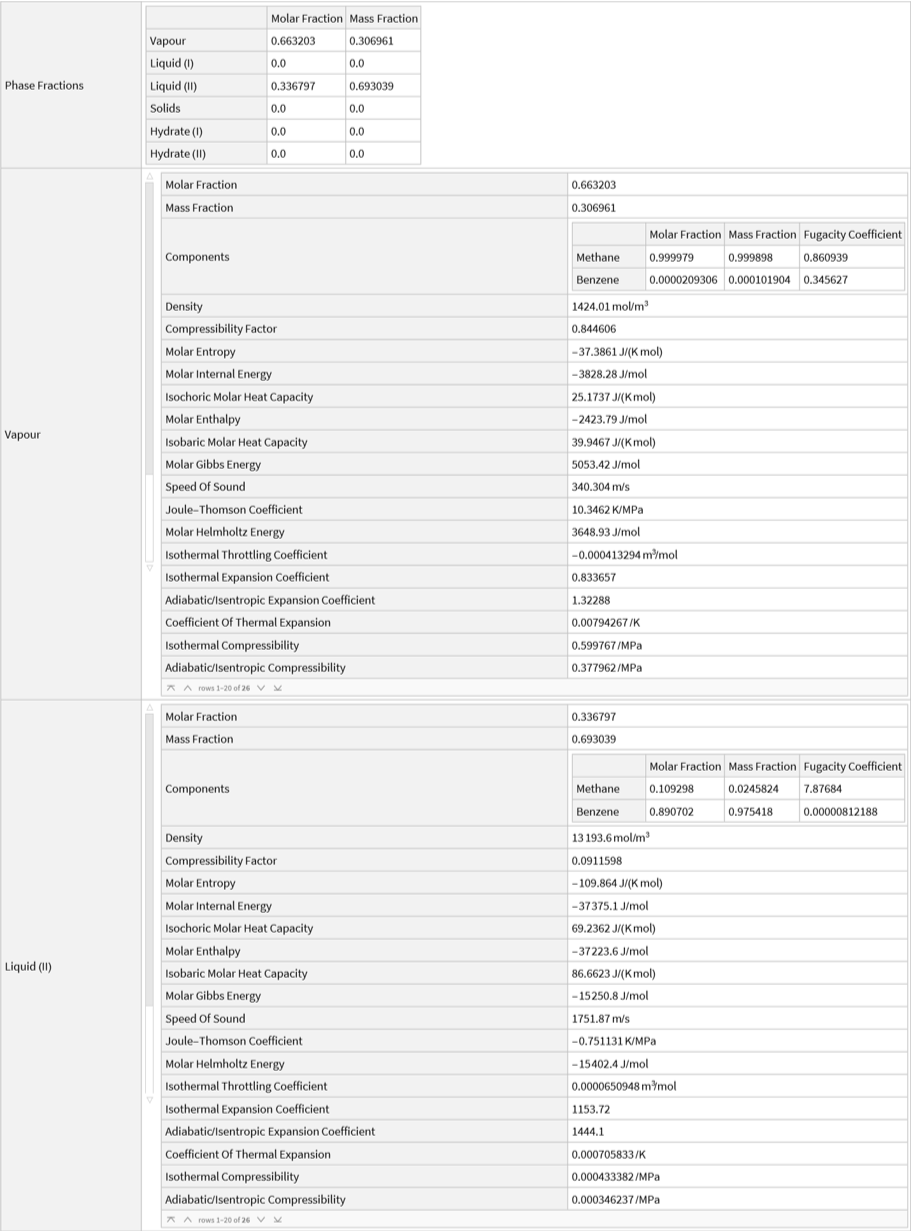
.The IncludePhaseProperties option can be used to obtain a range of physical properties for each phase:
In[]:=
PressureTemperatureFlash[mixture,p,T,IncludePhaseProperties->True]
Out[]=
Other flash calculations
Other flash calculations
While the pT-flash is the main workhorse, a range of other flash calculations are also supported:
Pressure-enthalpy flash
Pressure-enthalpy flash
Note that ThermoFAST’s ph-flash routine currently doesn’t support solid phases.
Dew and bubble points
Dew and bubble points
Solid and hydrate formation
Solid and hydrate formation
ThermoFAST has functions to determine temperatures and pressures corresponding to formation of solid and hydrate phases:
Solid formation
Solid formation
Hydrate formation
Hydrate formation
General phase transitions
General phase transitions
The following functions find all phase transitions occurring within a given range of temperatures or pressures:
Manual control of models and parameters
Manual control of models and parameters
The aim of ThermoFAST is, where possible, to automatically choose suitable model parameters according to the components present in the mixture. For most users and situations this is sufficient, however, occasionally it may be desirable to take a more “hands-on” approach. In such cases, model parameters may be manually specified.
Manually setting a model parameter
Manually setting a model parameter
The first step is to check which options are available:
For each option, the range of available values can be found via a corresponding variable:
The calculation can then be carried with the desired choice of model:
It should be noted that remaining parameters not specified manually will still be automatically chosen where necessary.
Binary interaction parameters
Binary interaction parameters
For mixtures, a collection of pre-tuned binary interaction parameters (BIPs) is used to improve the accuracy of the model predictions. The values of these parameters can be inspected:
Different sets, tuned to VLE and SFE data, are used within ThermoFAST.
It is also possible to specify BIPs manually, which may useful, e.g., when carrying out tuning calculations.
Phase diagrams
Phase diagrams
Although still a work in progress, the ThermoFAST64 package has several functions for generating phase diagrams that can be useful.
PlotPhaseBoundaries
PlotPhaseBoundaries
This function identifies transitions within the given pressure and temperature ranges, linearly sampling points according to the value of the PlotPoints option (default value is 20). It is useful for obtaining a “quick and dirty” visualization of the phase behaviour for a mixture.
ListPlotPhaseBoundaries
ListPlotPhaseBoundaries
This function is similar to PlotPhaseBoundaries but instead of pressure and temperature ranges, it takes explicit lists of values. This allows the resolution to be more carefully attuned to the structure of the phase diagram, avoiding unnecessary computation and making it more useful for generating high resolution phase diagram visualizations.
Other functions in the ThermoFAST64 package
Other functions in the ThermoFAST64 package
The following examples illustrate a number of other functions that may occasionally be useful:
Available components
Available components
All available components:
Specific component sets:
Test if a given component is available:
Component properties
Component properties
Solubility of a particular component
Solubility of a particular component
Equilibrium Hydrogen composition
Equilibrium Hydrogen composition
The ratio of ortho- and parahydrogen spin isomers in equilibrium hydrogen is a function of temperature:
Pure component boiling points
Pure component boiling points
There are specialised functions for computing the boiling point pressure and temperature for pure components. These are occasionally useful, e.g. when evaluating the triple point pressure of a particular fluid equation of state given the triple point temperature (since there will generally be a discrepancy between the calculated value and the experimental one).
CITE THIS NOTEBOOK
CITE THIS NOTEBOOK
ThermoFAST package: a thermodynamic property calculator
by Peter Falloon
Wolfram Community, STAFF PICKS, January 10, 2025
https://community.wolfram.com/groups/-/m/t/3354781
by Peter Falloon
Wolfram Community, STAFF PICKS, January 10, 2025
https://community.wolfram.com/groups/-/m/t/3354781