The Wolfram Emerging Leaders Program is a 4 month long project based program designed for gifted high school students to take a deep dive into a topic of their choice. Students work remotely in small groups to take their project from ideation to completion, with the guidance of Wolfram experts. Wolfram Emerging Leaders Program participants are selected from the Wolfram High School Summer Camp, which is open to talented, STEM oriented students age 17 and under.
Authors
Authors
Introduction
Introduction
Before being invited to participate in the Wolfram Emerging Leaders Program, the three of us met as students at the Wolfram High School Summer Camp (WSC) earlier in 2019. Combined with our own computer science experience and projects, our time at WSC led each of us to an interest in natural language processing. Hence, when we were first placed in a project group together for the Wolfram Emerging Leaders Program, we were eager to solve some sort of NLP problem.
Our original goal was to transform an audio file of a conversation into a flow chart, but we soon realized that identifying speech by audio was time-consuming and frequently inaccurate, and conversations often don’t flow directly from one topic to the next. Thus, we decided to alter our program to instead take an existing text file, track the topic progression, and produce visualizations of the topic progression. Text file inputs may range from a podcast transcript to a novel excerpt to a speech, and our visualizations automatically summarize and analyze documents.
To identify topics, we examined the distributions of “meaningful” words in the text and assumed that words with similar distributions belonged to the same topic. We created three different visualization structures, each with different features, to display the progression of topics: flow chart, timeline chart, and stacked area chart.
Our original goal was to transform an audio file of a conversation into a flow chart, but we soon realized that identifying speech by audio was time-consuming and frequently inaccurate, and conversations often don’t flow directly from one topic to the next. Thus, we decided to alter our program to instead take an existing text file, track the topic progression, and produce visualizations of the topic progression. Text file inputs may range from a podcast transcript to a novel excerpt to a speech, and our visualizations automatically summarize and analyze documents.
To identify topics, we examined the distributions of “meaningful” words in the text and assumed that words with similar distributions belonged to the same topic. We created three different visualization structures, each with different features, to display the progression of topics: flow chart, timeline chart, and stacked area chart.
Method
Method
Choosing Words for Consideration
Choosing Words for Consideration
Description
Description
These initial steps are the least complex; they set the stage for topic identification and visualization later on. In this section, we instantiate hyperparameters that specify our topic identification, and we select words for consideration as part of topics.
Hyperparameters
Hyperparameters
We first set hyperparameters that determine how we identify topics. These hyperparameters allow us to approximate how many words out of the total unique words may belong to a topic, how many topics may exist relative to the number of words, the maximum standard deviation of a single word that we consider, and the maximum topic length. All of the hyperparameters are essentially guesses -- though they do a pretty good job with most documents, the actual values would vary with each text and with the user’s desired granularity of topics.
wordNumFraction is the fraction of words we consider out of the total unique words.
topicNumFraction is the fraction of topics out of the number of considered words.
maxWordSD is the maximum standard deviation of a single word distribution as a fraction of the total number of words.
maxTopicFraction is the maximum topic length as a fraction of the total document length.
topicNumFraction is the fraction of topics out of the number of considered words.
maxWordSD is the maximum standard deviation of a single word distribution as a fraction of the total number of words.
maxTopicFraction is the maximum topic length as a fraction of the total document length.
In[]:=
wordNumFraction=0.083;topicNumFraction=0.21;maxWordSD=0.25;maxTopicFraction=0.3;
Selecting Words for Consideration
Selecting Words for Consideration
Selecting Words for Consideration
First, we import our text file. For this essay, we are using the copy of Alice’s Adventures in Wonderland available through the Wolfram Data Repository.
text is the String containing the content of the novel Alice’s Adventures in Wonderland.
In[]:=
text=ResourceData["Alice in Wonderland"];
We convert the text into a list of word stems. Using word stems allows words such as “study” and “studying” to both be represented as the word stem “studi,” though “studi” and many other word stems are not actually words.
We convert the text into a list of word stems. Using word stems allows words such as “study” and “studying” to both be represented as the word stem “studi,” though “studi” and many other word stems are not actually words.
rawList is the list of words in the text, all lowercase and without punctuation.
initList is the list of word stems representing each word in rawList.
initList is the list of word stems representing each word in rawList.
In[]:=
rawList=StringSplit[StringDelete[ToLowerCase[text],PunctuationCharacter]];initList=WordStem/@rawList;
Using the hyperparameters wordNumFrac and topicNumFrac, we determine the approximate number of unique words and topics that we consider. For Alice’s Adventures in Wonderland, wordNum and topicNum are 109 and 22 respectively, which means that we’ll be looking at the 109 most common words and identifying 22 topics at first.
Using the hyperparameters wordNumFrac and topicNumFrac, we determine the approximate number of unique words and topics that we consider. For Alice’s Adventures in Wonderland, wordNum and topicNum are 109 and 22 respectively, which means that we’ll be looking at the 109 most common words and identifying 22 topics at first.
wordNum is the Integer number of unique words in initList multiplied by wordNumFraction.
topicNum is the Integer number of wordNum multiplied by topicNumFraction.
topicNum is the Integer number of wordNum multiplied by topicNumFraction.
wordNum=IntegerPart[CountDistinct[initList]*wordNumFraction]topicNum=IntegerPart[wordNum*topicNumFraction]
Out[]=
109
Out[]=
22
To make later analysis simpler (and faster), we remove words that appear once and words that appear uniformly throughout the text. We use the hyperparameter maxWordSD to decide whether or not a word appears uniformly. After that, we create wordList, which is the wordNum most common words in the text and which we’ll be using for our topic identification.
From initList, we select only the words which appear more than once to form multipleList.
From multipleList, we select only the words that have standard deviations lesser than the document length multiplied by maxWordSD to form fullList.
wordList is the wordNum most common words in fullList.
From multipleList, we select only the words that have standard deviations lesser than the document length multiplied by maxWordSD to form fullList.
wordList is the wordNum most common words in fullList.
In[]:=
multipleList=Select[initList,Count[initList,#]>1&];fullList=Select[multipleList,StandardDeviation[Position[initList,#]][[1]]<(maxWordSD*Length[initList])&];wordList=Commonest[DeleteStopwords[fullList],wordNum];
Topic Clustering
Topic Clustering
Description
Description
We originally tried to identify topics in a text using the meaning of each word. For instance, we assumed that words such as “read” and “book” might belong to the same topic, and words such as “swim” and “toddler” might not. However, we soon realized that this method could be faulty. In a text, one topic might be about a toddler learning to swim, and, even though “swim” and “toddler” do not have similar meanings, they still belong to the same topic. Hence, we tried a new (and much more successful) approach.
Our current topic identification relies on the assumption that words in the same topic occur with approximately equal means and variances. This means that words in the same topic occur at roughly the same times in a text.
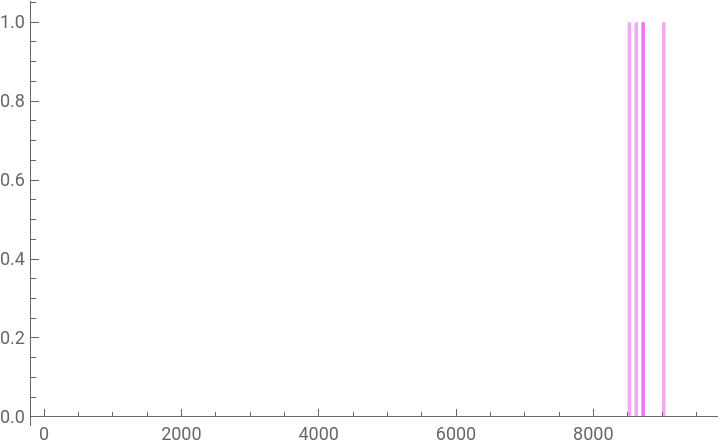
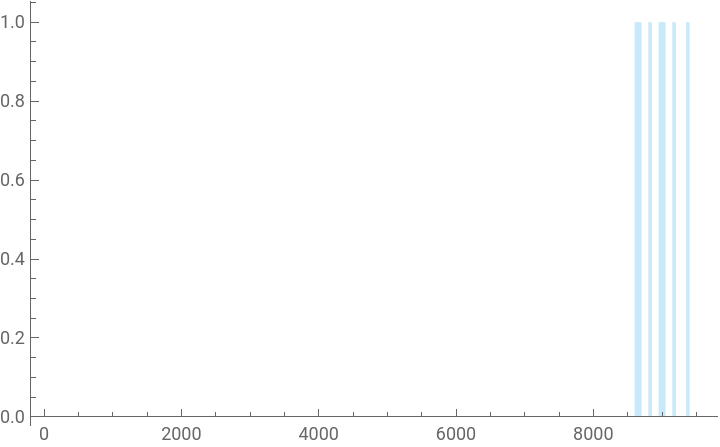
Here are the occurrences of the words “tart” and “court” in Alice’s Adventures in Wonderland. This code isn’t actually necessary to the output of the program, but it illustrates our method and helped us check our topics for accuracy throughout the project.
Our current topic identification relies on the assumption that words in the same topic occur with approximately equal means and variances. This means that words in the same topic occur at roughly the same times in a text.
Here are the occurrences of the words “tart” and “court” in Alice’s Adventures in Wonderland. This code isn’t actually necessary to the output of the program, but it illustrates our method and helped us check our topics for accuracy throughout the project.
testList is the list of Strings “tart” and “court”.
colors is a list of random colors for each word in testList.
hists is a Table of randomly colored histograms of the positions at which each word in testList occurs in initList.
We display both histograms on top of each other.
colors is a list of random colors for each word in testList.
hists is a Table of randomly colored histograms of the positions at which each word in testList occurs in initList.
We display both histograms on top of each other.
testList={"tart","court"};colors=RandomColor[Length[testList]];hists=Table[Histogram[Position[initList,testList[[n]]],{0,initList//Length,50},ChartStylecolors[[n]]],{n,Length[testList]}]Show[hists]
Out[]=
,
Out[]=
As shown above, the words “tart” and “court,” though dissimilar in meaning, seem to appear at roughly the same times and may therefore belong to the same topic.
Using the above ideas, we now proceed to identifying topics using wordlist, the list of words which we consider.
Using the above ideas, we now proceed to identifying topics using wordlist, the list of words which we consider.
Finding Topic Clusters
Finding Topic Clusters
Now that we have wordList, we cluster those words based on their mean and variance in the text. The Wolfram Language makes clustering very easy, which was incredibly helpful as we focused on other aspects of the project.
dists is a Table of the mean and variance for the distribution of each word in wordList.
From dists, we find topicNum clusters to form unfilteredClusters.
From dists, we find topicNum clusters to form unfilteredClusters.
dists=Table[{TrimmedMean[Position[initList,wordList[[n]]],0.1][[1]],TrimmedVariance[Position[initList,wordList[[n]]],0.1][[1]]}wordList[[n]],{n,wordNum}];unfilteredClusters=FindClusters[dists,topicNum]
Out[]=
{{tire,late,hope},{feel,mark},{dark},{anyth,happen,got,thing,cake,eat,grow,wait},{soon,dinah,ala,small,bottl,inde},{dry,pool,pair,kidglov,fan,glove,caus,mous,dodo,parti,prize},{hall,glass,kei,sat},{telescop},{neck,quit,good,deal,question,offend},{right,set,heard},{size,sir,chang,someth,afraid,hous,sure},{best,work,foot,cours,run},{minut,im,iv,know,tell,repli,ask,room,till,togeth},{duchess,near,creatur,ad,stood},{bill,window,caterpillar},{hi,arm,cant,tree,piec,cook},{wood,mushroom},{direct,live,plai,croquet,theyr,hatter,march,hare,dormous},{serpent,pigeon,babi,grin},{gone,sneez},{wit,queen,heart,knave,shout,hedgehog},{king,majesti,evid,tart,court}}
Using the hyperparameter maxTopicFraction, we remove clusters that are too long. These clusters might relate to themes that occur through an entire text (or at least a large portion of it), rather than distinct topics that are relevant to topic progression and summarization.
Using the hyperparameter maxTopicFraction, we remove clusters that are too long. These clusters might relate to themes that occur through an entire text (or at least a large portion of it), rather than distinct topics that are relevant to topic progression and summarization.
We create the function bounds[ ] that returns the 10th and 90th percentile positions of a topic.
From unfilteredClusters, we select only the clusters in which the distance between the 10th and 90th percentile positions is lesser than length of the document multiplied by maxTopicFraction.
From unfilteredClusters, we select only the clusters in which the distance between the 10th and 90th percentile positions is lesser than length of the document multiplied by maxTopicFraction.
bounds[l_]:={Quantile[Flatten[Position[initList,#]&/@l],0.1],Quantile[Flatten[Position[initList,#]&/@l],0.9]}filteredClusters=Select[unfilteredClusters,bounds[#][[2]]-bounds[#][[1]]<Length[initList]*maxTopicFraction&&Length[#]>1&]
Out[]=
{{feel,mark},{dry,pool,pair,kidglov,fan,glove,caus,mous,dodo,parti,prize},{bill,window,caterpillar},{wood,mushroom},{direct,live,plai,croquet,theyr,hatter,march,hare,dormous},{serpent,pigeon,babi,grin},{gone,sneez},{wit,queen,heart,knave,shout,hedgehog},{king,majesti,evid,tart,court}}
Nice! We now have our list of topic clusters. For the purposes of better visualization in later parts of the project, we sort the initial list of clusters by their first “bound,” or the 10th percentile position.
We sort filteredClusters in order of ascending first bound, or 10th percentile position.
clusters=Sort[filteredClusters,bounds[#1][[1]]<bounds[#2][[1]]&]
Out[]=
{{feel,mark},{dry,pool,pair,kidglov,fan,glove,caus,mous,dodo,parti,prize},{bill,window,caterpillar},{wood,mushroom},{serpent,pigeon,babi,grin},{gone,sneez},{direct,live,plai,croquet,theyr,hatter,march,hare,dormous},{wit,queen,heart,knave,shout,hedgehog},{king,majesti,evid,tart,court}}
Labeling Topics
Labeling Topics
At first, we tried using the most common word in a topic to represent the topic as a whole, but we discovered that using a single word often lost much of a topic’s meaning. Instead, we now use the list of words in the topic to serve as labels for each cluster.
We create the function properForm that finds the noun form, if it exists, of a word in the text. properForm makes a table of the words in rawList at each position in initList where a certain word stem appears. If one of those words is a noun, properForm returns that word. Otherwise, properForm returns the first instance of any word with that word stem.
For each cluster, we find properForm of each word stem and store it in labels.
legend holds the String containing all of the words in each list in labels.
For each cluster, we find properForm of each word stem and store it in labels.
legend holds the String containing all of the words in each list in labels.
properForm[s_]:={p=Position[initList,s];l=Table[rawList[[p[[n]]]],{n,Length[p]}];c=TextCases[StringRiffle[l],"Noun"];If[Length[c]>0,c[[1]],l[[1]]]}labels=Table[properForm/@clusters[[n]]//Flatten,{n,Length[clusters]}];legend=StringRiffle[#]&/@labels
Out[]=
{feeling marked,dry pool pair kidgloves fan gloves cause mouse dodo party prizes,bill window caterpillar,wood mushroom,serpent pigeon baby grins,gone sneezing,direction lives play croqueting theyre hatter march hare dormouse,witness queen hearts knave shouted hedgehogs,kings majesty evidence tarts court}
Visualization
Visualization
Description
Description
We spent much time deliberating over what visual output seemed best and experimenting with different styles that display different information. Because each serves a slightly different purpose, we ultimately decided to include all three.
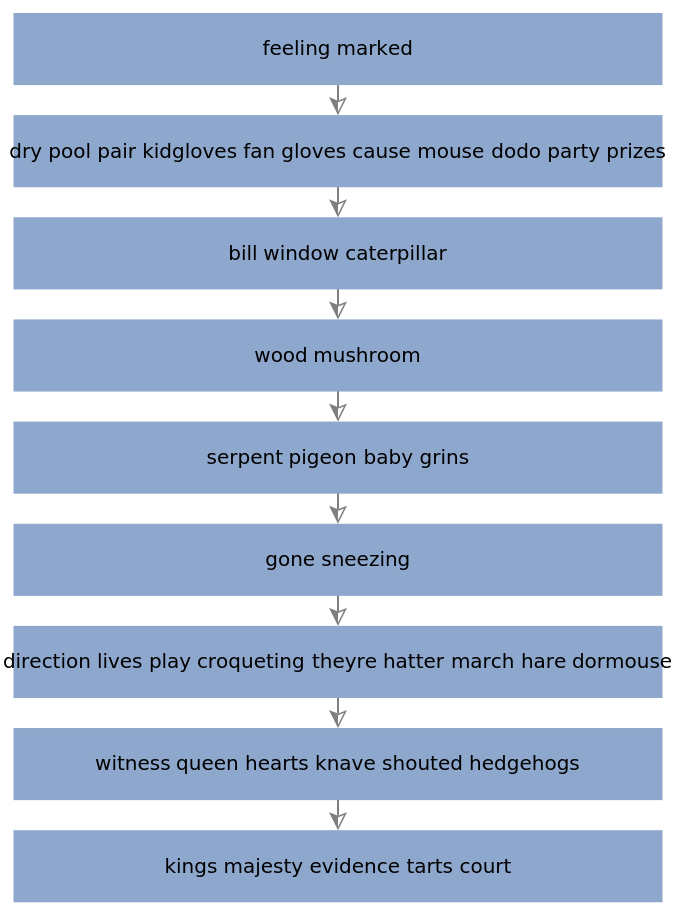
The first of these is a flow chart. This visualization is great for reviewing topics covered in a podcast, novel, or lecture. Though it provides no information on the duration of each topic or frequency with which it is discussed, the flow chart is easily readable and a useful summary to jog one’s memory. The title of each topic (i.e., the words in each block) is the list of key words in the topic in no particular order.
The first of these is a flow chart. This visualization is great for reviewing topics covered in a podcast, novel, or lecture. Though it provides no information on the duration of each topic or frequency with which it is discussed, the flow chart is easily readable and a useful summary to jog one’s memory. The title of each topic (i.e., the words in each block) is the list of key words in the topic in no particular order.
The timeline chart functions as a clean, appealing way to visualize the duration of each topic and provides a rough estimate of how “much” the text discussed different topics. The most major drawback of the timeline chart is that, though it displays the duration of each topic, it neglects how frequently within the duration the topic is actually discussed. For instance, a topic that lasts over much of the document but is actually mentioned infrequently would appear to be discussed more than it actually is.
The histogram chart provides more insight into how the topics are distributed throughout the text. The main issue with the visualization is that it’s not as easy to see the overlap between the topics, because the dominant one blocks out the other ones.
The final visualization, the stacked area chart, is the most complex, most informative, and, in our opinion, the coolest. This chart shows the frequency at which a topic occurs relative to time; essentially, it displays both how much and for how long a topic appears in a text. Because the fit equations are imperfect, the stacked area chart features unfortunate “bubbles” that do not actually correspond to changes in topic progression. Additionally, the RegionPlot function we employ to create the chart is a bit time-consuming for the impatient user.
We will now examine the process of converting the topic clusters and labels into each of the above three visualizations.
Methods
Methods
Flow Chart
Flow Chart
To make our flow chart, we build an association of rules pointing from each topic label to the label of the following topic.
fcAssoc is the association of rules pointing from the String representation of each cluster to that of the following one.
We create a flow chart using LayeredGraphPlot.
We create a flow chart using LayeredGraphPlot.
Timeline Chart
Timeline Chart
In the topic identification section, we wrote a bounds[] function that identified rough bounds that contain most of the topic. The timeline chart builds a NumberLinePlot based on those bounds.
tcIntervals holds the interval for each cluster.
We use NumberLinePlot to create a timeline chart of all the clusters.
We use NumberLinePlot to create a timeline chart of all the clusters.
Histogram Chart
Histogram Chart
To make this chart, we create a histogram for all of the words in each each topic, and assign the topics different colors.
Stacked Area Chart
Stacked Area Chart
While the creations of the flow chart and timeline chart have been fairly simple, the stacked area chart is more complicated. First, we flatten all the lists of topic words into a single list that contains all the word stems that exist in any topic.
allClusterWords is the list containing all of the members of clusters.
We then create a list of all of the words from initList, the list containing word stems of each word in the text, that appear in a topic cluster.
We then create a list of all of the words from initList, the list containing word stems of each word in the text, that appear in a topic cluster.
From initList, all words that are members of allClusterWords become part of initListCluster.
From initListCluster, we create the clusterIDList, the list of indices within allClusterWords at which each initListCluster member appears. Next, we create the clusterAssoc, an association of rules pointing from an index within allClusterWords to the appropriate topic. By applying clusterAssoc to each item in clusterIDList, we form clusterIDs, the list containing the topic of each word in the text that is included in one of our calculated topics.
From initListCluster, we create the clusterIDList, the list of indices within allClusterWords at which each initListCluster member appears. Next, we create the clusterAssoc, an association of rules pointing from an index within allClusterWords to the appropriate topic. By applying clusterAssoc to each item in clusterIDList, we form clusterIDs, the list containing the topic of each word in the text that is included in one of our calculated topics.
clusterIDList is the flattened Table of the position of each word in initListCluster within allClusterWords. clusterAssoc is the Association made from the flattened Table of rules from the position of each word within allClusterWords to the position of the appropriate cluster. clusterIDs is clusterAssoc applied to each item in clusterIDList.
Now that we have the topics of each topic word, we identify the frequency of each topic. For each word that belongs to any topic, we count the number of words out of itself and the following four that belong to a particular topic. After repeating this process for each topic, we add these all together to freqList, which contains the frequency of each topic at each point. From these, we create pointsList, which holds lists of {x,y} points in which x is the index of the word and y is the frequency of the topic at that point. These points will be used for fitting curves to each topic.
Now that we have the topics of each topic word, we identify the frequency of each topic. For each word that belongs to any topic, we count the number of words out of itself and the following four that belong to a particular topic. After repeating this process for each topic, we add these all together to freqList, which contains the frequency of each topic at each point. From these, we create pointsList, which holds lists of {x,y} points in which x is the index of the word and y is the frequency of the topic at that point. These points will be used for fitting curves to each topic.
We set num equal to 5. freqList is the list of frequencies of each topic cluster at each point. pointsList is the list of {x,y} points in which x is the index of the word and y is the frequency of the topic at that point.
We fit an octic curve to the set of points for each topic. Our decision to use octic curves is somewhat arbitrary -- higher power curves take more time to calculate in the final stacked area chart but yield more accurate results. We find octic curves to be a balance between these two criteria.
We fit an octic curve to the set of points for each topic. Our decision to use octic curves is somewhat arbitrary -- higher power curves take more time to calculate in the final stacked area chart but yield more accurate results. We find octic curves to be a balance between these two criteria.
functionList is the list of octic fit functions for the set of points of each topic.
After fitting a curve to each topic, we create finalFunctionList, which is the total so far up to the current equation for each curve. This step allows us to avoid overlapping curves in our final output; each topic curve will lie on top of the previous curve. ineqList is the list of inequalities derived from finalFunctionList that we will use in our stacked area chart.
After fitting a curve to each topic, we create finalFunctionList, which is the total so far up to the current equation for each curve. This step allows us to avoid overlapping curves in our final output; each topic curve will lie on top of the previous curve. ineqList is the list of inequalities derived from finalFunctionList that we will use in our stacked area chart.
finalFunctionList is the flattened list of 0 and the Table of the total of all fit functions in functionList up to the current one for each function in functionList. ineqList is the Table of inequalities in which y is between each pair of consecutive functions in finalFunctionList.
Using RegionPlot, we create our final stacked area chart of the inequalities in ineqList. At any x, the total y should be equal to num, which is five.
Using RegionPlot, we create our final stacked area chart of the inequalities in ineqList. At any x, the total y should be equal to num, which is five.
We use RegionPlot on the inequalities in ineqList with scales of x from 1 to the number of words in initListCluter and y from 0 to num.
Conclusion and Future Work
Conclusion and Future Work
Through this project, we successfully completed topic identification and visualization on a work of text. The program takes a text file and outputs three forms of visualization based on the topic progression: flow chart, timeline chart, and stacked area chart.
In the future, the program could be enhanced with further work on accurate topic identification. Our current program does not allow the same word to be a part of two distinct topics, which hinders our ability to accurately represent all relevant topics. Additional visualization features could also be developed, and the project could be applied to audio clips of conversations or lectures with more effective audio-to-text technology.
In the future, the program could be enhanced with further work on accurate topic identification. Our current program does not allow the same word to be a part of two distinct topics, which hinders our ability to accurately represent all relevant topics. Additional visualization features could also be developed, and the project could be applied to audio clips of conversations or lectures with more effective audio-to-text technology.
Acknowledgements
Acknowledgements
We would like to thank the Wolfram Emerging Leaders Program Coordinator, Rory Foulger, for all of the help and support we received throughout the process. We would also like to thank the Assistant Coordinator, William Goodall, as well the other program participants.