Image processing involves the manipulation of a digitized image. That entails applying filters, transformations, and effects to images. To diversify the variety of fascinating image processing effects that are available, I aim to create a unique way to manipulate an image through my project. Specifically, this project aims to create a visualization that can apply a spiraling effect to an image to unravel it into a line of individual image parts. My motivations for this project were my passions in math and art, so this project was perfect for me, since I had to both create an algorithmic way to animate a spiraling motion as well as produce a unique visualization.
Introduction
Introduction
My project involves creating an algorithm that rearranges square sections of an image in a spiraling motion. After partitioning an image into a number of square parts, I would start from a line of laid-out square parts that are arranged in a specific order. Then, I would create an animation that visualizes the motion of the line of image parts curling up in a spiraling motion to form a complete image.
The first step of the process would be cropping any image into a square. Next, I use a robust algorithm that outputs a specific order of image piece positions for the initial line of image parts that will curl up. Then, I update the positions of each of the elements such that they rearrange in a spiraling motion. Finally, I put everything together using a Manipulate to allow the user to interactively toggle the resolution and tightness of the spiral. There were several pivots I underwent when coding my project, and I included an unused method I attempted.
The first step of the process would be cropping any image into a square. Next, I use a robust algorithm that outputs a specific order of image piece positions for the initial line of image parts that will curl up. Then, I update the positions of each of the elements such that they rearrange in a spiraling motion. Finally, I put everything together using a Manipulate to allow the user to interactively toggle the resolution and tightness of the spiral. There were several pivots I underwent when coding my project, and I included an unused method I attempted.
Preprocessing: Crop any Image into a Square
Preprocessing: Crop any Image into a Square
Firstly, to begin my project, I would need to process images to make it suitable for the image processing task at hand.
Finds the minimum dimensions of an image and crops the image into a respective square:
In[]:=
img=ImageCrop
,MinImageDimensions

,MinImageDimensions

Out[]=

Computing Initial State of Animation
Computing Initial State of Animation
The initial state of the animation is a line of image pieces. These image pieces are generated by partitioning an original image into n by n individual pieces. Then, an order is generated for them such that the image pieces arranged in that order would form a complete image once they curl up along a spiral motion.
This order is computed by tracing the path of a square spiral starting from the center piece. As visualized below, I would need to obtain a list of ordered positions by following a spiral path starting from a center piece, indicated by the arrows. The positions are formatted as (row number, column number) for each individual piece.
This computation will vary depending on the dimensions n by n of the image, specifically, whether n is even or odd.
This order is computed by tracing the path of a square spiral starting from the center piece. As visualized below, I would need to obtain a list of ordered positions by following a spiral path starting from a center piece, indicated by the arrows. The positions are formatted as (row number, column number) for each individual piece.
This computation will vary depending on the dimensions n by n of the image, specifically, whether n is even or odd.
Odd Spirals
Odd Spirals
5 by 5 Grid Visualization:
Out[]=
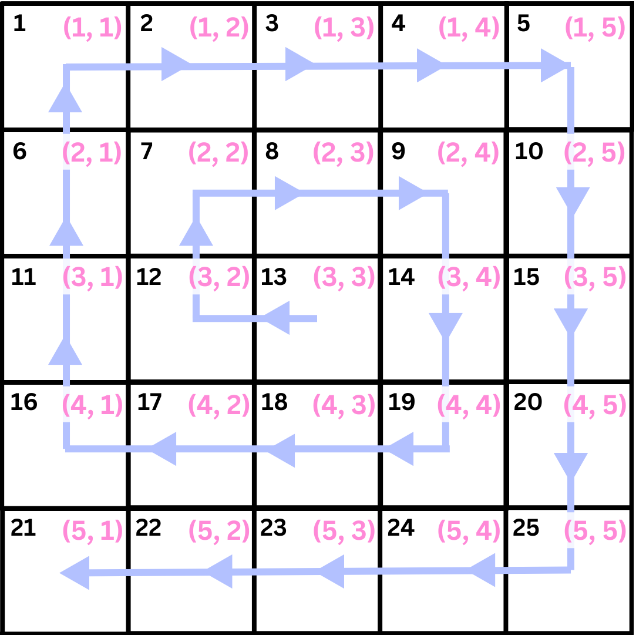
When n is an odd number, I would first need to acquire the operations to add to the x-value of the center piece, which specifies what row number a piece is positioned in and controls whether to translate it up or down. The pattern for the operations consists of alternating sublists of {1, 0} and {-1, 0} repeated in a consecutively increasing number of times.
Acquiring the operations to add the y-value of the center square is similarly calculated, except I would need to remove the very last element of the list of operations, since there needs to be one less translation in order to form a perfect square.
Then, I get a combined list of operations to apply to the center square by riffling the two previous lists. The center point is calculated as the value of n/2 rounded up. Finally, I calculate the positions to order the squares by adding the operations to the center position point.
Acquiring the operations to add the y-value of the center square is similarly calculated, except I would need to remove the very last element of the list of operations, since there needs to be one less translation in order to form a perfect square.
Then, I get a combined list of operations to apply to the center square by riffling the two previous lists. The center point is calculated as the value of n/2 rounded up. Finally, I calculate the positions to order the squares by adding the operations to the center position point.
In[]:=
getOddSqrPositions[n_Integer] := Module[{xVal, yVal, yVal2, operations, center, sqrPositions}, xVal = Table[ConstantArray[{1, 0}, i]*If[OddQ[i], -1, 1], {i, 1, n - 1}];yVal = Table[ConstantArray[{0, 1}, i]*If[OddQ[i], -1, 1], {i, 1, n}];yVal2 = ReplaceAt[yVal, yVal[[Length[yVal]]] -> Most[yVal[[Length[yVal]]]], Length[yVal]];operations = Flatten[Riffle[yVal2, xVal], 1];center = {Ceiling[n/2], Ceiling[n/2]};sqrPositions = FoldList[Plus, center, operations]]
When n = 5, the final output of positions would be:
In[]:=
getOddSqrPositions[5]
Out[]=
{{3,3},{3,2},{2,2},{2,3},{2,4},{3,4},{4,4},{4,3},{4,2},{4,1},{3,1},{2,1},{1,1},{1,2},{1,3},{1,4},{1,5},{2,5},{3,5},{4,5},{5,5},{5,4},{5,3},{5,2},{5,1}}
Even Spirals
Even Spirals
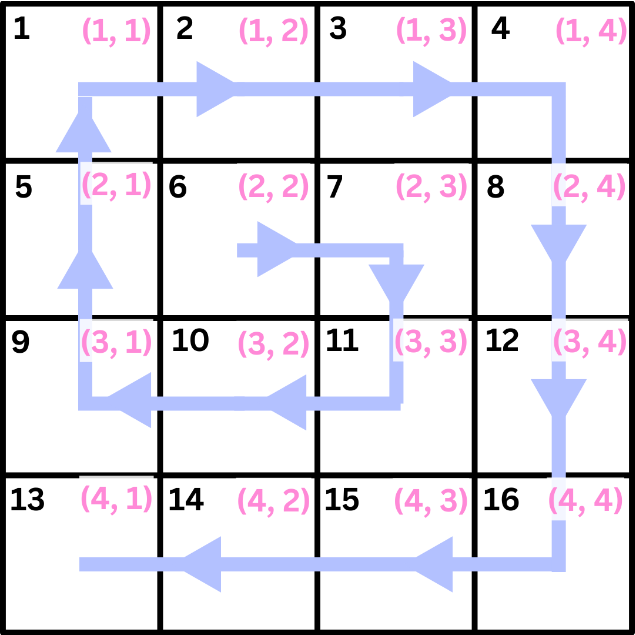
The function to generate image point positions works slightly differently whether n is even or odd. For even n, the center piece is the top left piece of the four central pieces. For odd n, there is always a single center piece. The order of the positions follows slightly different paths for odd and even n, so the code is adjusted slightly to accommodate that.
4 by 4 Grid Visualization:
Out[]=
This is the function to acquire appropriate ordered positions when n is even:
In[]:=
getEvenSqrPositions[n_Integer]:=Module[{xVal,yVal,yVal2,operations,center,sqrPositions},xVal=Table[ConstantArray[{1,0},i]*If[EvenQ[i],-1,1],{i,1,n-1}];yVal=Table[ConstantArray[{0,1},i]*If[EvenQ[i],-1,1],{i,1,n}];yVal2=ReplaceAt[yVal,yVal[[Length[yVal]]]->Most[yVal[[Length[yVal]]]],Length[yVal]];operations=Flatten[Riffle[yVal2,xVal],1];center={n/2,n/2};sqrPositions=FoldList[Plus,center,operations]]
When n = 4, the final output of positions would be:
In[]:=
getEvenSqrPositions[4]
Out[]=
{{2,2},{2,3},{3,3},{3,2},{3,1},{2,1},{1,1},{1,2},{1,3},{1,4},{2,4},{3,4},{4,4},{4,3},{4,2},{4,1}}
This function below tests whether the inputted number is even or odd and runs the appropriate function to get an initial list of positions for images in a particular order.
In[]:=
sqrPositions[x_Integer]:=Reverse[If[EvenQ[x],getEvenSqrPositions[x],getOddSqrPositions[x]]]
Animating the Spiral Motion
Animating the Spiral Motion
Now, I will animate the spiraling motion of a row of image pieces curling up to form a complete square image. This process includes creating a series of points with orientations and positions based on angular rotations, calculating their new positions, and then plotting them, allowing the user to interactively change the angle x and see the updated positions.
Animation Framework
Animation Framework
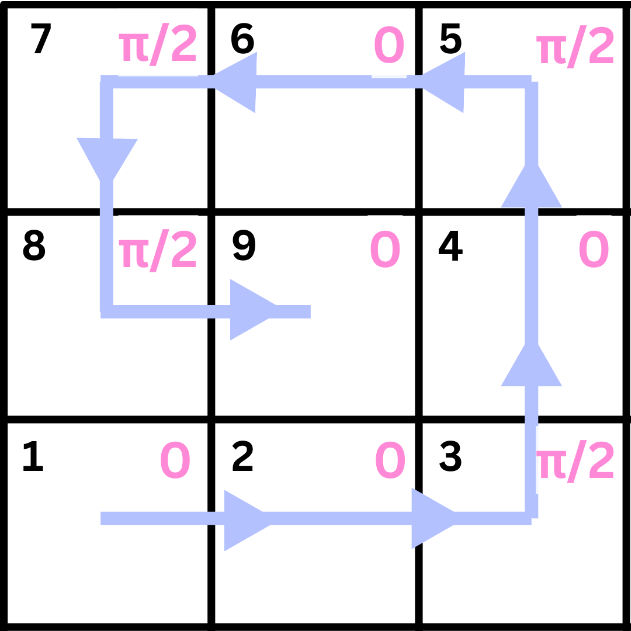
The code below initializes the elements (representing the items to be moved), the joints (representing the cumulative angles for position changes), and the positions (representing the coordinate points for each element). This represents a situation in which n = 3 and there are 9 total elements.
In[]:=
elements={1,2,3,4,5,6,7,8,9};joints=Accumulate[{0,0,π/2,0,π/2,0,π/2,π/2,0}];positions={{0,0},{0,0},{0,0},{0,0},{0,0},{0,0},{0,0},{0,0},{0,0}};
As the line curls up in a spiraling motion, the direction of each element is determined by the angle specified by the joints. When an element’s direction stays the same, its joint is 0, and when it rotates 90 degrees counterclockwise, its joint is Pi/2.
Out[]=
Updating Positions of Elements
Updating Positions of Elements
The function below updates the position of each of the elements. Iterating through all of the elements, it adds the position of the previous element with the position change determined by the joints, which is acquired by finding the cosine and sine of the angles that indicate the direction of the previous element.
The Graphics function below allows us to visualize each of the elements as coordinate points, which move accordingly as their positions update.
With the help of a Manipulate, I would now visualize the spiraling motion of the elements and make it something the user can control. The code below specifies the elements to change positions of and the joints with Pi/2 replaced by x to allow for the positions to be manipulated. Then, the positions are updated in real time as x changes value, with the elements visualized as points. This presents a smooth, continuous spiraling motion of the line of dots curling up into a square, as well as that motion reversed, bringing me one step closer to completing my project.
Making the Joints Robust
Making the Joints Robust
Since the previous code only worked for a 3 by 3 grid, the next step would be finding a robust way to determine the joints, such that any grid of dimensions of n by n would be able to curl up appropriately.
The pattern for the joint angles consists of a series of sublists containing zero and Pi/2. The pattern of zero and Pi/2 goes as follows: the number of zeros repeats twice before consecutively decreasing, starting from n-2 zeros. Also, I prepend one sublist of n-1 zeros followed by Pi/2 and append Pi/2 and 0, for images with any n by n dimensions.
For a 4 by 4 dimensioned image, the list inside of the Accumulate would be:
Then, I would use the Accumulate function to cumulatively add each of the angles and acquire a list of angles that represent the directions for each of the elements.
For a 4 by 4 dimensioned image:
Overlaying Images on Dots
Overlaying Images on Dots
The next step would be to overlay the individual image pieces on the elements in order to allow for the line of image pieces to curl up into a complete image. In order to replace the black dots with image pieces, I would first need to partition an image and order the individual pieces based on the order of positions I determined earlier.
For an image partitioned with 5 by 5 dimensions, the initial starting list of image pieces would be:
The method to compute and regularly update positions is still the same:
Now, since I am using uniquely ordered image pieces rather than black dots as the elements to move around, I would overlay the ordered image pieces on the coordinate points using an Inset function. I have also replaced the code that computed the position changes with a robust version that generates the directions for any n by n partitioned image.
Conclusion
Conclusion
The final result of this project is an animation of an image processing effect in which a user can take a list of image parts ordered in a specific way and curl it up in a spiraling motion, as well as reverse the animation to view the image unraveling into a line. Although I ran into frustrations, I really enjoyed working on my project overall and I think I have gotten to improve my coding skills through the process. Since I have passions for both math and art, I think this project suited me well. I enjoyed working with math to work out the patterns for the initial image positions and joint directions and I am happy that I was able to end up with a visually interesting animation at the end. As for what I didn’t like about the entire project-making process, I had several pivots in how to approach my project. I spent my first few days working on several different approaches, which ended up not even being relevant to my final approach, although I was able to work on my coding skills at least. I also inevitably struggled with debugging code, trying things out to get functions to work appropriately, and making my code robust.
My final Manipulate function only takes values of n from 2 to 5, since increasing the value of n makes the animation increasingly slower. Therefore, for the future, I would like to find a way to increase the scope of n such that the animation would work for a 10 by 10 dimensioned image, for example. It would also be interesting to create a three dimensional version of my animation, such as by taking the center point of the spiral and bringing it up in a way such that the entire shape has depth. I could also find a way to wrap my 3D collection of image parts around a cone or other shape to create a unique visualization.
My final Manipulate function only takes values of n from 2 to 5, since increasing the value of n makes the animation increasingly slower. Therefore, for the future, I would like to find a way to increase the scope of n such that the animation would work for a 10 by 10 dimensioned image, for example. It would also be interesting to create a three dimensional version of my animation, such as by taking the center point of the spiral and bringing it up in a way such that the entire shape has depth. I could also find a way to wrap my 3D collection of image parts around a cone or other shape to create a unique visualization.
Unused Attempts
Unused Attempts
Rearranging Image Parts on Grid in Spiral Motion
Rearranging Image Parts on Grid in Spiral Motion
One of the attempts to approach my project that I didn’t end up using involved using grid and list manipulation to rearrange individual image parts in a grid to replicate the spiraling motion of a line of squares into a cohesive n by n square.
With this approach, I would have to hard-code each of the grid translations frame by frame. Each frame would display a visualization of what the grid would look like as it slowly curls up from a line into a square. Starting from a list of numbers referring to certain squares in a grid in a particular order associated with a spiral pattern, I would partition the list in certain ways to rearrange each of the individual squares on a grid.
With this approach, I would have to hard-code each of the grid translations frame by frame. Each frame would display a visualization of what the grid would look like as it slowly curls up from a line into a square. Starting from a list of numbers referring to certain squares in a grid in a particular order associated with a spiral pattern, I would partition the list in certain ways to rearrange each of the individual squares on a grid.
However, I did not follow through with this approach because the motion of the line curling up in a spiral motion would be discrete (making the animation not smooth) and it would be difficult to make this method robust to fit any grid of dimensions n by n.
FRAME ONE
FRAME ONE
FRAME TWO
FRAME TWO
FRAME THREE
FRAME THREE
FRAME FOUR
FRAME FOUR
References
References
◼
Pin on ʚɞ in 2024: Flower Aesthetic, nothing but flowers, pretty flowers. Pinterest. (2024, June 13). https://www.pinterest.com/pin/710935491221519741/
◼
Image Processing & Analysis-Wolfram Language Documentation. (n.d.). https://reference.wolfram.com/language/guide/ImageProcessing.html
Acknowledgements
Acknowledgements
Thank you to my mentor William for helping me throughout the entire project-making process whether that was helping me when I was stuck, answering my questions, or thinking up some ideas to help out my project. Thank you to TAs Nicolò, Nora and others who have stopped by to help me with helping me when I was stuck, giving me tips, or reviewing my essay with me. Thank you to the directors Megan, Eryn, and Rory for helping look over my project, proposing ideas on how I might approach this process, or just being there to answer my questions. Thank you to the other classmates in my group, Eleanor, Abhi, and Ben. It was fun keeping each other company during project work time and talking to each other during breaks!
CITE THIS NOTEBOOK
CITE THIS NOTEBOOK
Designing spiraling image patterns
by Zoey Ji
Wolfram Community, STAFF PICKS, July 11, 2024
https://community.wolfram.com/groups/-/m/t/3216837
by Zoey Ji
Wolfram Community, STAFF PICKS, July 11, 2024
https://community.wolfram.com/groups/-/m/t/3216837