With the growing amount of data on the web, it is hard to process and understand the information we need in short time. Video summarization process plays an important role in helping us with this problem. Video summarization is a procedure of finding key frames that highlight the most informative and representative parts of a video. In this project we focus on finding the best techniques to pick optimal frames for video summarization.
We explore different feature-based approaches and give a comparison between them using the Wolfram Language. This notebook highlights namely two feature extraction methods i.e. image feature extraction and video feature extraction using pretrained neural network models.
We explore different feature-based approaches and give a comparison between them using the Wolfram Language. This notebook highlights namely two feature extraction methods i.e. image feature extraction and video feature extraction using pretrained neural network models.
Image feature extraction
Video extraction
We use a “Live CEOing Ep 448: Geography Design Review for Wolfram Language 12.3” https://www.youtube.com/watch?v=xVqtBY-sT2w YouTube video in this notebook. We select 1 frame for every 10 seconds from the original video to work on.
In[]:=
video=Video[Import["/Users/jiya/projects/liveceo1.mkv"],RasterSize300,AudioTrackSelection->None]

In[]:=
n=10;dur=QuantityMagnitude[Duration[video],"Seconds"];frames=VideoExtractFrames[video,Range[0,dur,n]];
In[]:=
Length[frames]
Out[]=
418
In[]:=
ImageDimensions[frames[[1]]]
Out[]=
{300,169}
Video frames preprocessing
After getting a total of 418 frames from the video, we use different metrics to remove the similar frames without losing information and compare their performance.
Using ImageDistance
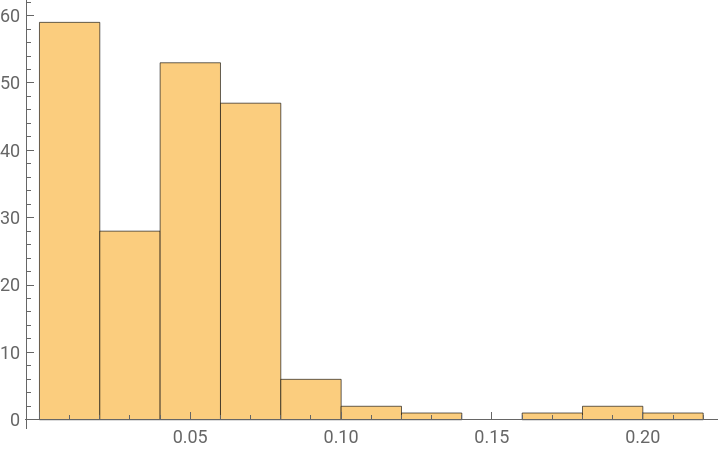
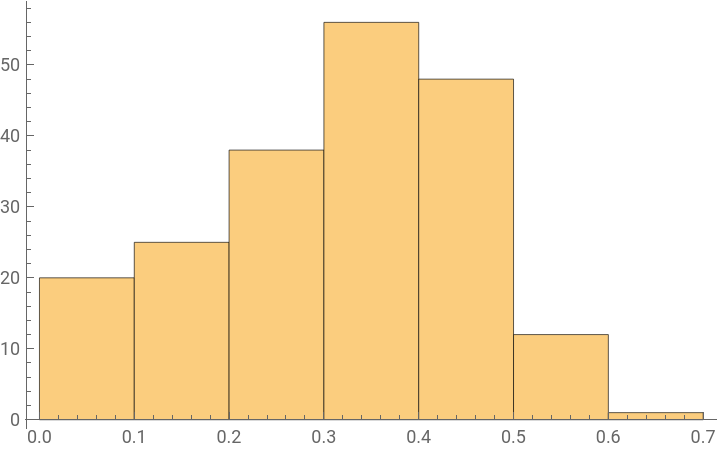
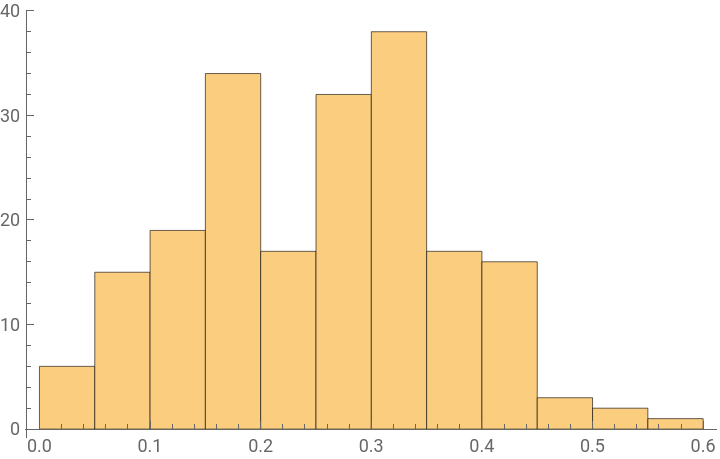
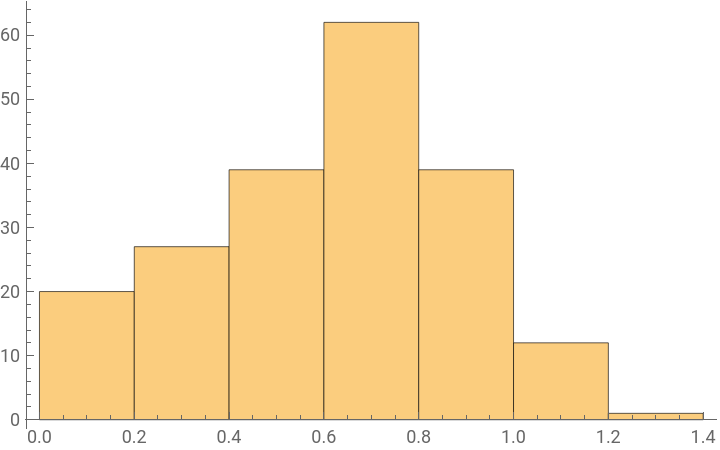
ImageDistance function is a metric used to find distance between two images according to different distance methods. We explore four of these distance methods CosineDistance, NormalizedSquaredEuclideanDistance, RootMeanSquare and CorrelationDistance for reducing the frames by eliminating similar ones.
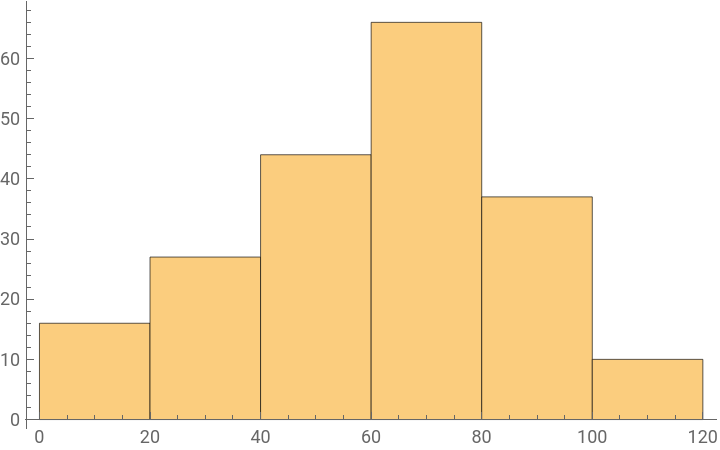
We randomly pick 200 pairs frames from the video to find the heuristics of the above mentioned distance methods to eliminate similar frames. The threshold for each metric is chosen as 25% quantile of the image distances found between the randomly selected pairs of frames.
In[]:=
distFunctions={CosineDistance,NormalizedSquaredEuclideanDistance,RootMeanSquare,CorrelationDistance};
In[]:=
perm=Permutations[frames,{2}];Length@perm
Out[]=
174306
In[]:=
images=RandomChoice[perm,200];
Cosine Distance
In[]:=
cosDist=ImageDistance[Sequence@@#,DistanceFunction->CosineDistance]&/@images;
In[]:=
Histogram[cosDist]
Out[]=
In[]:=
Quantile[NumericalSort[cosDist],1/4]
Out[]=
0.0163821
NormalizedSquaredEuclidean Distance
In[]:=
normSEDist=ImageDistance[Sequence@@#,DistanceFunction->NormalizedSquaredEuclideanDistance]&/@images;
In[]:=
Histogram[normSEDist]
Out[]=
In[]:=
Quantile[NumericalSort[normSEDist],1/4]
Out[]=
0.221483
RootMeanSquare Distance
In[]:=
rmsDist=ImageDistance[Sequence@@#,DistanceFunction->RootMeanSquare]&/@images;
In[]:=
Histogram[rmsDist]
Out[]=
In[]:=
Quantile[NumericalSort[rmsDist],1/4]
Out[]=
0.176038
Correlation distance
In[]:=
corrDist=ImageDistance[Sequence@@#,DistanceFunction->CorrelationDistance]&/@images;
In[]:=
Histogram[corrDist]
Out[]=
In[]:=
Quantile[NumericalSort[corrDist],1/4]
Out[]=
0.436426
Finding reduced frames using different distance functions of ImageDistance
Using the above thresholds, we reduce the previously obtained 418 frames of the video to reduce the number of frames.
In[]:=
reducedCosDist=DeleteDuplicates[frames,ImageDistance[#1,#2,DistanceFunction->CosineDistance]<0.02&];reducedNSE=DeleteDuplicates[frames,ImageDistance[#1,#2,DistanceFunction->NormalizedSquaredEuclideanDistance]<0.2&];reducedRMS=DeleteDuplicates[frames,ImageDistance[#1,#2,DistanceFunction->RootMeanSquare]<0.2&];reducedCorDist=DeleteDuplicates[frames,ImageDistance[#1,#2,DistanceFunction->CorrelationDistance]<0.4&];
In[]:=
Length/@{reducedCosDist,reducedNSE,reducedRMS,reducedCorDist}
Out[]=
{33,21,19,21}
Using ColorDistance
ColorDistance is another metric used for the process of reducing frames on their similarity. This distance function compares the colors distances in the given images. We again use the randomly selected pairs of frames and run the function.
In[]:=
Histogram[Sqrt@Total[ImageData[ColorDistance@@#]^2,2]&/@images]
Out[]=
In[]:=
colDist=Sqrt@Total[ImageData[ColorDistance@@#]^2,2]&/@images;
In[]:=
Quantile[NumericalSort[colDist],1/4]
The following table highlights the performance of above mentioned metrics, i.e. ImageDistance function with four different methods and the ColorDistance function, along with the selected thresholds. These reduced number of frames help in removing the redundancy of similar frames in the video and help in further steps.
Feature Extractor using NN
Using Inception V3 feature extractor on the reduced number of frames to compare different frames
Clustering
Using clustering algorithms without predefined number of clusters
Clustering the reduced frames obtained after applying ImageDistance and ColorDistance functions.
Equally spaced five frames from the original video for comparison with the clustered frames.
The following table gives a summary of the used metrics and their performance in video summarization process. The last column also gives a comparison of our methods with selecting equally spaced frames from the video for this task.
Final Summary by combining above methods
We finally use the frames obtained above after all frame reduction techniques and clustering using GaussianMixture method to give the best representation of the video.
We also use the length of clusters as weights to make a keyframe summary of the video using ImageCollage.
Using clustering algorithms with predefined number of clusters
We apply the same techniques on another video “Live CEOing Ep 446: Discrete Computation Design Review for Wolfram Language 12.3” https://www.youtube.com/watch?v=2v7AGAt0Pw4.
However, this time we use clustering algorithms that require predefined number of clusters as an input which are KMeans and KMedoids clustering algorithms.
However, this time we use clustering algorithms that require predefined number of clusters as an input which are KMeans and KMedoids clustering algorithms.
Selecting 200 random pairs of frames to determine the heuristics for reducing frames using different distance functions.
Finding the reduced frames using different methods and their thresholds
Clustering using KMeans and KMedoids clustering algorithms
Selecting equally spaced frames for getting a video summary
To give a comparison between using above methods and selecting equally spaced frames from the video for video summarization.
The following table gives a summary of our results for different frame reduction techniques and the KMeans and KMedoids clustering algorithms. The last column also gives a comparison of our methods with selecting equally spaced frames from the video for this task.
Using a general video
To see the performance of our model on a general video, we implement our techniques on a YouTube short film and compare our summary with that using equally spaced frames from the video.
Selecting equally spaced 5 frames from the original video for comparison
Summarized Video frames for a general video
The following table gives the video summary for the video where the last column of the table compares our implementation and selecting equally spaced frames for video summarization.
Video feature extraction
Next we implement video feature extraction method using pretrained neural network model to find the important sections of the video. The video feature extractor takes videos as input and give feature vectors for them which we later cluster and use to find the important parts of the video.
Preprocessing video frames
Selecting 1 frame for every 12 seconds from the original video and then creating videos using every 4 sequential frames to feed to the network.
Partitioning the video into 87 small videos to give them as input to the pretrained model.
Feature extraction using pretrained model
Making changes in the pretrained model to use it as a feature extractor for this task.
Extracting feature vectors for the short videos each of 4 frames
Clustering video feature vectors using Gaussian Mixture clustering algorithm
Applying clustering algorithm on the video feature vectors obtained above and selecting a video from each of those clusters.
Since in this notebook we focus of finding optimal frames for video summarization, we select a frame from each of above videos to provide a video summary in form of frames.
We analysed two feature extraction methods, Image feature extraction and Video feature extraction, for the task of video summarization. The tables give comparisons between the performance of different distance functions used for selecting frames by determining the heuristics according to the distances between the frames of a given video. Although a video summary can be different according to the observer, the above mentioned methods can be used for the ask of video summarization on most of the videos.