In another computational essay, I discussed how to transform the HDX Population Density Data into a computable datasets in the Wolfram Language (WL). In a separate research on modeling the spread of COVID19, I noticed how important is the LIVED population density (not the simple population density) to correctly model the spread of a contagious disease. In this short essay, I’ve showed how one can calculate the lived-area (and likewise, lived population density) of any geo-region where about 99.7% of the population lives. The difference for some regions is quite large, e.g., CA’s lived-population density is 1013 ppl/mi^2 compared to the usual value of 237 ppl/mi^2.
Given the raw dataset as an input (list of {lat, lon,population}), generate a population density map for given tile shapes and sizes:
In[]:=
PopulationDensityGridTiles[rawData_,shape_/;MemberQ[{"Hexagon","Rectangle","Triangle"},shape],size_]:=Module[{gh,geo,ppl,dt},{geo,ppl}={rawData〚All,;;2〛,rawData〚All,-1〛};dt=Thread[(GeoPosition/@geo)ppl];gh=GeoHistogram[dt,{shape,size}];Cases[gh,Tooltip[y:Polygon[_?MatrixQ],x_]GeoPosition[GeoGridPosition[y,(GeoProjection/.Options[gh,GeoProjection])]]x,∞]]
Let' s focus on Qatar as a case study.
Qatar, as a case-study:
Qatar, as a case-study:
Get Qatar raw dataset from HDX:
qatar=Import,"population_qat_2019-07-01.csv"2;;;
Return the geo-tiles as keys and population as values:
In[]:=
dataQA=PopulationDensityGridTiles[qatar,"Hexagon",];
Turn dataQA into an association and sort it in descending order:
In[]:=
dtQA=Association@@dataQA//ReverseSort;
Return total population:
In[]:=
popQA=Values[dtQA]//Total
Out[]=
2.45218×
6
10
Return the fraction of population within a tile together with all titles with largest population:
In[]:=
fracQA=Values[dtQA]/popQA//N//Accumulate;
Find the lived-area of 99.7% of the population:
In[]:=
livedAreaQA=Take[dtQA,Length@TakeWhile[fracQA,#<0.9973&]];
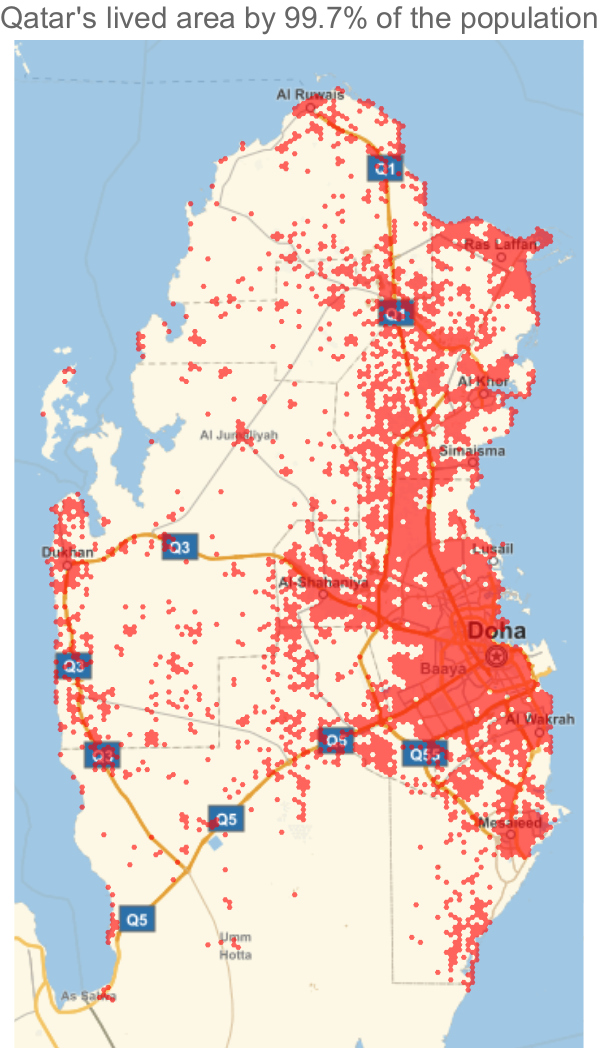
Visualize the previous result:
In[]:=
GeoGraphics[{GeoStyling[Opacity[.6],Red],GeoGroup@Keys[livedAreaQA]},PlotLabel"Qatar's lived area by 99.7% of the population"]
Out[]=
Return area of Qatar where 99.7% of population lives:
In[]:=
GeoArea[Keys[livedAreaQA]]//Total
Out[]=
Return the overall area of Qatar:
In[]:=
GeoArea
Out[]=
Return the usual population density, and the lived population density:
In[]:=
AssociationThread{"PopulationDensity","LivedPopulationDensity"},{%,%%}
Out[]=
PopulationDensity,LivedPopulationDensity
I think for any modeling of a contagious-disease spread, one should use the lived-population density.
Defining lived-area function
Defining lived-area function
The following function takes the raw data from HDX (note to drop the 1st element containing column tags), a region as an entity, and two info about binning/segmentation (size and shape). It returns as association in the form of bin polygon->population per bin, which contains 99.7% of the population. Note it uses PopulationDensityGridTiles function defined at the beginning.
In[]:=
livedArea[dataset_,entity_,{shape_,size_}]:=Module[{region,pnts,data,dt,pop,frac},region=entity["Polygon"]/.Polygon[GeoPosition[x_]]:>Polygon[x];pnts=Pick[dataset,RegionMember[region,dataset〚All,;;2〛]];data=PopulationDensityGridTiles[pnts,shape,size];dt=Association@@data//ReverseSort;pop=Values[dt]//Total;frac=Values[dt]/pop//N//Accumulate;Take[dt,Length[TakeWhile[frac,#<0.9973&]]]]
USA data
USA data
us=Import;
Find the dimensions:
In[]:=
us//Dimensions
Out[]=
{190933058,3}
California
California
Map livedArea into the data, by selecting points in CA, then return geo-histogram for hexagon bins of size 5km:
In[]:=
ca=livedAreaus,,"Hexagon",;//AbsoluteTiming
Out[]=
{1605.78,Null}
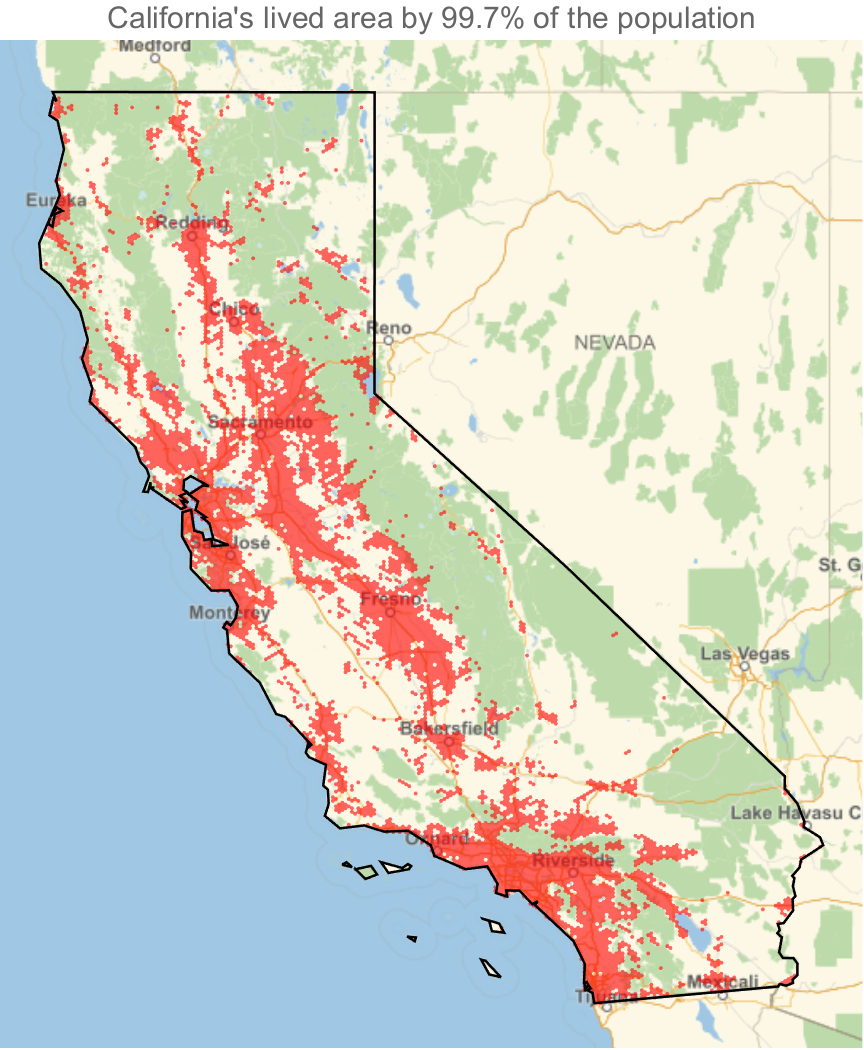
Visualize the previous result:
In[]:=
GeoGraphicsGeoStyling[{Opacity[.6],Red}],GeoGroup@Keys[ca],EdgeForm[Black],FaceForm[],Polygon,PlotLabel"California's lived area by 99.7% of the population"
Out[]=
Return the area (lived-area):
In[]:=
GeoArea[Keys[ca]]//Total
Return the CA area:
Divide CA population by above areas to find PopulationDensity and LivedPopulationDensity:
Los Angeles County, CA, USA
Los Angeles County, CA, USA
Map livedArea into the data, by selecting points in LA county, then return geo-histogram for hexagon bins of size 1km:
Visualize previous data:
Return the area:
Return the area of LA county:
Find corresponding population densities:
Some comments
Some comments
I know the selection process I am using to get geo-locations for a given region is not the best approach (although much faster that using GeoWithinQ). For example, one can transform the raw data from HDX into matrix-like structure and narrow down the selection process using the bounding region.