CITE THIS NOTEBOOK: Play music programmatically from bass tablature by Kotaro Okazaki. Wolfram Community DEC 21 2022.
Tablature(tab for short) is a form of musical notation indicating instrument fingering rather than musical pitches. It is very useful for a beginner like me who cannot understand a staff notation to practice an instrument(electric bass in my case).
The placement of notes in an electric bass is as follows. The four rows represent the first, second, third, and fourth string from the top. The rows represent the fret numbers.

The following is an example of tablature, representing the note "C" on the 3 rd fret of the 3 rd string.
←→

In this post, I would like to play the music in Wolfram Language from a tablature .
Musical Symbols
Musical Symbols
The following is a table of notes, rests, and beats to be used in the arguments of the functions, using Unicode enhanced in Wolfram Language v13.1 .
In[]:=
(*notes*)notenames=;notesimplified=;(*rests*)restnames=;restsimplified=;(*Unicode:MusicalSymbols*)notes=Join[n=CharacterRange[119133,119138],StringJoin[#,"𝅭"]&/@n];rests=Join[r=CharacterRange[119099,119104],StringJoin[#,"𝅭"]&/@r];(*createimages*)tabImg=ImageCrop[Rasterize[Style[𝄙,48]],{60,90}];barlineImg=ImageCrop[Rasterize[Style[𝄀,33]]];fretImg=Thread[(rg=Range[0,20])->(Rasterize[Style[ToString@#,10]]&/@rg)];restImg=Thread[restsimplified->(ImageCrop[Rasterize[Style[#,24]]]&/@rests)];nrImg=Thread[(nr=Join[notesimplified,restsimplified])->(Rasterize[Style[#,20,Gray]]&/@Join[notes,rests])];ghostImg=ImageCrop[Rasterize[Style["x",10]]];spaceImg=Image@Table[{1,1,1},{33},{1}];(*setbeat*)beats=Join[b={4,2,1,1/2,1/4,1/8},3/2*b];
The above Unicode are displayed correctly in my Windows environment . However, they cannot be displayed correctly in my Mac environment . Therefore, I have attached their images for those who have the same problem.
I would appreciate it if you could tell me how to deal with this problem .
I would appreciate it if you could tell me how to deal with this problem .
In[]:=
(*setimages*)tabImg=;restImg=;nrImg=;
;barlineImg=

;fretImg=

The names of the notes and the rests supporting for this time and the simplified name (use as parameters for the functions that follow) are as follows .
Notes:
Out[]=
Symbol | ||||||
name | Whole Note | Half Note | Quarter Note | Eighth Note | Sixteenth Note | Thirty-Second Note |
simplified | NW | NH | NQ | NE | NS | NT |
Beat | 4 | 2 | 1 | 1 2 | 1 4 | 1 8 |


Out[]=
Symbol | ||||||
name | Dotted Whole Note | Dotted Half Note | Dotted Quarter Note | Dotted Eighth Note | Dotted Sixteenth Note | Dotted Thirty-Second Note |
simplified | NWd | NHd | NQd | NEd | NSd | NTd |
Beat | 6 | 3 | 3 2 | 3 4 | 3 8 | 3 16 |


Rests:
Out[]=
Symbol | ||||||
name | Whole Rest | Half Rest | Quarter Rest | Eighth Rest | Sixteenth Rest | Thirty-Second Rest |
simplified | RW | RH | RQ | RE | RS | RT |
Beat | 4 | 2 | 1 | 1 2 | 1 4 | 1 8 |


Out[]=
Symbol | ||||||
name | Dotted Whole Rest | Dotted Half Rest | Dotted Quarter Rest | Dotted Eighth Rest | Dotted Sixteenth Rest | Dotted Thirty-Second Rest |
simplified | RWd | RHd | RQd | REd | RSd | RTd |
Beat | 6 | 3 | 3 2 | 3 4 | 3 8 | 3 16 |


Functions
Functions
Pitches of 4 string electric bass
In[]:=
(*E1ーD#4for4string20fretJazzBass*)pitches={"E1","F1","F#1","G1","G#1","A1","A#1","B1","C2","C#2","D2","D#2","E2","F2","F#2","G2","G#2","A2","A#2","B2","C3","C#3","D3","D#3","E3","F3","F#3","G3","G#3","A3","A#3","B3","C4","C#4","D4","D#4"};stringpitches=Reverse@Partition[pitches,21,5];
Convert from a number of string and fret to pitch
In[]:=
tablature2pitch[string_/;string≥1&&string≤4,fret_/;fret≥0&&fret≤20]:=stringpitches[[string,fret+1]];
Convert strings, frets, notes, rests, and tempo from a tablature to SonudNote[] . The ghost note is represented for “x”, and is substituted for the “C-1” note. We also define a bar line for creating a musical score.
In[]:=
(*duration*)duration=Join[Thread[notesimplified->beats],Thread[restsimplified->beats],{""->0}];(*note*)ClearAll[tablature2soundnote];tablature2soundnote[{string_Integer,fret_Integer,t_},tempo_Integer,style_String:"FretlessBass"]:=SoundNote[tablature2pitch[string,fret],(t/.duration)*(60/tempo),style];(*rest*)tablature2soundnote[{string_,fret_,t_/;MemberQ[restsimplified,t]},tempo_Integer,style_String:"FretlessBass"]:=SoundNote[None,(t/.duration)*(60/tempo),style];(*ghostnote*)tablature2soundnote[{string_,"x",t_},tempo_Integer,style_String:"FretlessBass"]:=SoundNote["C-1",(t/.duration)*(60/tempo),style];(*barline*)barline={"","",""};tablature2soundnote[barline,tempo_Integer,style_String:"FretlessBass"]:=Nothing;
The following function shows a tablature.
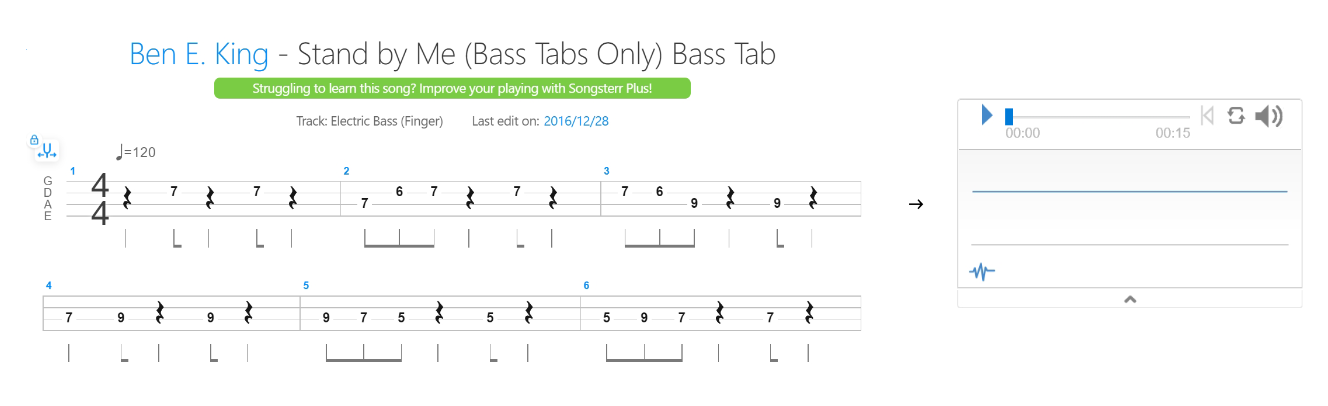
Stand By Me
Stand By Me
Make sure there are no omissions in the sequence . Eight bars, so 4*8 = 32.
It can be played in a different style .
To check if the sequence is correct, you can return to the tablature.
Come On, Come Over
Come On, Come Over
As an example of ghost note, I will use "Come On, Come Over" from the debut solo album of my favorite Jazz bassist, Jaco Pastorius . The first four bars are as follows .
In the future
In the future
What I have implemented this time is part of the basics of tablature . We would like to expand the scope of support in the future . triplet, slur, repeat, ...
Furthermore, I am interested in recognizing directly an image of a tablature .