River deltas are formations that are constructed as eroded sediment is carried from a river to another body of water. The water flowing from the moving river reaches relatively stagnant water, which causes the sediment to slow down and deposit at the bottom of the river. As the sediment piles up, it eventually creates deltas. This project simulates water flow in a fractal landscape using cellular automata. It models how the landscape affects erosion, sediment deposition, river flow, and ultimately the creation of river deltas.
Introduction
Introduction
River deltas are formations sometimes created when rivers empty their sediment and debris into another body of water, such as an ocean, lake, or even another river. The slowing velocity of the river can cause it to form deltas, which vary from case to case, but typically involve a larger river diverging into many smaller tributaries (Evers, 2022). Deltas can be divided into 2 main parts: the lower delta and the upper delta. The lower delta is the part of the delta that is exposed to the air and most affected by waves and tides; the upper delta is the part of the delta that is most influenced by the river’s flow (Evers, 2022). River deltas can be classified as into three main types: river dominated deltas, wave dominated deltas, and tide dominated deltas. The main model of the project is the river dominated deltas. River dominated deltas occur when the river has strong currents and sediment levels while having weaker tides and waves (Seybold et al., 2007).There are not only many types of deltas, but deltas are also one of the most important geological structures in the world because it supports dense populations and provide important natural resources to humans (https://agupubs.onlinelibrary.wiley.com/doi/10.1029/2022WR033003 ). River deltas are not only located close the large populations, but they are also a key area for the important and exports of goods for a country. River deltas are also important ecological habitats, playing host for various plants such as lilies and hibiscus, and also serving as an ecosystem for birds, fish, oyster, insects, and even apex predators like tigers (Evers, 2022). However, river deltas are very unpredictable, as many factors impact their formation, such as tides, type of sediment, erosion/deposition, and waves. Therefore, a better understand and modeling of river deltas can help us protect the delta and the communities within the delta. This project uses cellular automata to model the flow of rivers and the creation of river deltas. Cellular automata is a concept where generations are advanced based on a set of rules. One of the most famous examples of cellular automata is rule 30, which is a 1D version of cellular automata, where the next row is the previous one advanced by 1 generation. Because it is just a set of rules, it is intuitive that the end result of the program would result in either all dead cells, all living cells, or at least some sort of pattern. However, the diagram of rule 30 is actually results in a pattern almost completely random (Weisstein, n.d.). In this project, cellular automata was implemented to the model by imagining that all the water were the “black cells,” and the spots on the landscape without water were “while cells.”
Creating the Fractal Landscape and Water Molecules
Creating the Fractal Landscape and Water Molecules
The creation of the fractal landscapes starts by defining the corners of matrix. The values inside the matrix represent their height at that point, and the goal for the project was to make the water flow downward, so the plane was sloped downward.
Because fractal landscapes involve randomness and detail, it was necessary to gradually diminish the amount of randomness. This was implemented by creating a function that generates a random value based on the amount of detail it should contain:
In[]:=
rReal[n_]:=RandomReal[{-3,3}]/(1.8)^n
The method used is very similar to the Diamond Square Algorithm for generating the diamond square algorithm. The key to creating the fractal landscape is to create cases for how a more detailed version can be constructed, and then continuously implementing a function that makes it more detailed. Imagine square grids with size 2n containing (2n+1)^2 coordinates. The starting landscape starts with n=1, which is a 22 set of coordinates. To form the landscape, it is necessary to keep all the previous landscape’s points, and then add points between those previous points so that the transition is smooth from one to the other, while also being random.
Idealizing the landscape can be done by considering three different cases. The first case is if both coordinates are odd. It can be observed that all coordinates that are odd are actually just mapped on from the previous matrix. Then, consider the case where one coordinate is odd and the other even. Notice that this number is simply in between two odd numbers, which means that it is possible to simply average those two odd numbers and add a scaled random number. Finally, consider the case where both coordinates are odd. The only defined values are diagonally across from it, meaning that in order to get an smooth landscape, the average of all four of those points added to a scaled random number must be used.
In[]:=
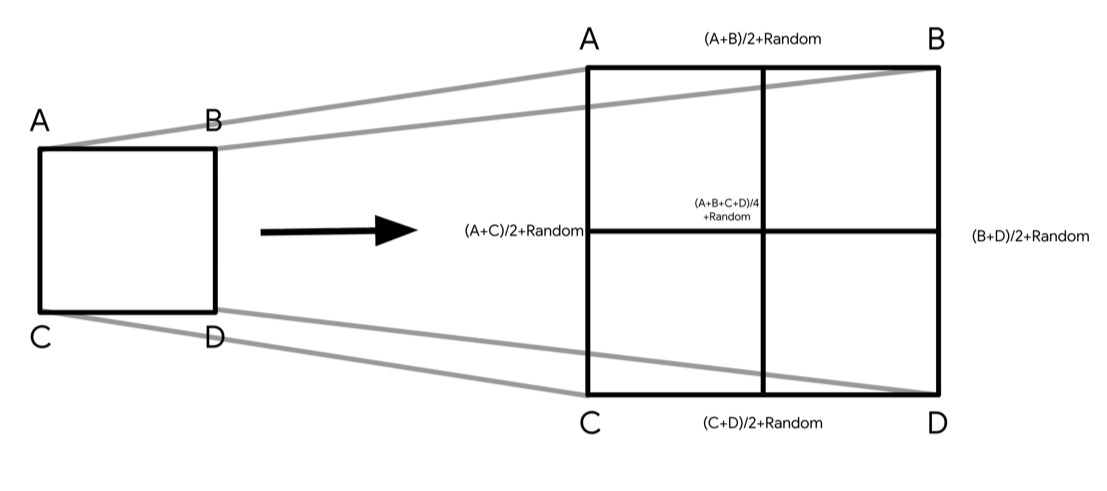
Here is a function that generates details between all the values of the previous matrix and outputs a matrix of size 2n+1:
In[]:=
fractalizeLandscape[lstt_]:= Module[{scale = Log[2,Length[lstt]-1]},Table[Which[OddQ[row] && OddQ[column], lstt[[(column+1)/2,(row+1)/2]],OddQ[row] && EvenQ[column], (lstt[[column/2,(row+1)/2]]+lstt[[(column+2)/2,(row+1)/2]])/2+rReal[scale],EvenQ[row] && OddQ[column], (lstt[[(column+1)/2,row/2]]+lstt[[(column+1)/2,(row+2)/2]])/2+rReal[scale],True, (lstt[[column/2,row/2]]+lstt[[(column+2)/2,row/2]]+lstt[[column/2,(row+2)/2]]+lstt[[(column+2)/2,(row+2)/2]])/4+rReal[scale]],{column,2*Length[lstt]-1},{row,2*Length[lstt]-1}]]
This function uses casework to sort the landscape into cases, and then operates accordingly. As the amount of detail in the landscape increases, it is necessary to smoothen the details out by plugging larger numbers into rReal to make the landscape more smooth and less erratic. The function fractalizeLandscape will always take in a matrix of size n and output a matrix of size 2n-1. This means that in order to create a large fractal landscape multiple applications of fractalizeLandscape had to be nested together. Because the values of the original matrix do not change throughout the function, the original matrix will define the corners of the landscape.
The function fractalizeLandscape can be repeatedly applied with the Nest function:
In[]:=
landscape=Nest[fractalizeLandscape,{{10,1},{1,-10}},6];
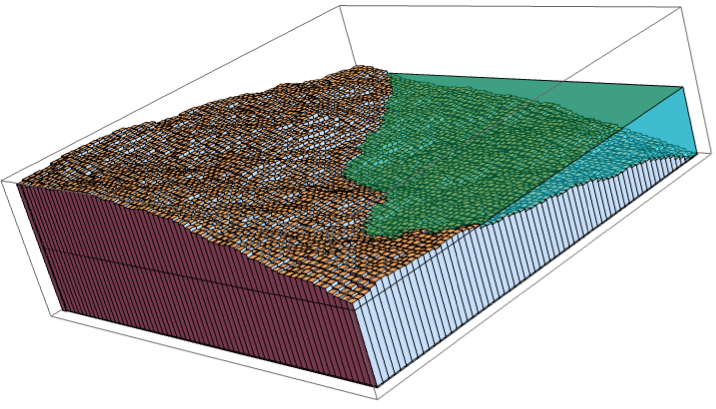
Now that the function was nested 6 times, the landscape is now a matrix of size 65x65. Then, Graphics3D is used to create cuboids of heights corresponding to landscape in order to visualize the landscape, and added a blue opaque box to represent the ocean:
In[]:=
Graphics3D[Join[Table[Cuboid[{i,j,-10},{i+1,j+1,landscape[[i,j]]}],{i,65},{j,65}],{Hue[0.5],Opacity[0.5],Cuboid[{1.1,1.1,-9.9},{65.9,65.9,0}]}]]
Out[]=
Water Particles:
Water Particles:
The variable waterMolecules is used to store all the important data of the flowing water. Each element in waterMolecules represents one cell of water and contains important information about the cell. The first two elements of each cell in waterMolecules represent its X and Y coordinate. Then, the next two elements in each cell represent the speed of the molecule, which is necessary to improve water physics and to implement soil erosion/deposition. The last element in each cell is the amount of soil the water contains.
The list waterAssociation is an association that connects the position of the water molecules to the amount that that coordinate contains. This can be used to determine which direction a certain water cell moves in, as it is necessary to consider other water molecules in the surrounding landscape when determining which way to move. waterAssociation is also used to graph the 3D graphics of the landscape.
Create waterMolecules and waterAssociation:
In[]:=
waterMolecules = {};waterAssociation = <||>;
waterAssociation can be used to create a function that finds the total height of the water cells in that column and the height of the landscape.
Additionally, it would also be helpful to introduce a new function to find the total height of the water and landscape . By comparing this, it is possible to determine which direction the water will move in. This function will use the previously created association and output the value of the association if it exists; if it does not, it will simply output zero.
Assuming that water cells have height 0.25, totalHeight is defined as:
In[]:=
totalHeight[pos1_,pos2_]:=landscape[[pos1,pos2]]+0.25*Lookup[waterAssociation,Key[{pos1,pos2}],0]
Changing Water Particle Speed and Implementing Erosion/Deposition
Changing Water Particle Speed and Implementing Erosion/Deposition
Water Particle Speed
Water Particle Speed
The speed of the water should be determined by the direction in which the particle moves. If the water moves in the same direction as the velocity before it moves, it should gain speed and therefore move further. It is possible to make a function that takes the original speed, as well as the direction that the particle moved in most recently, and output the speed after it moves in that direction. Similarly, the water should lose speed if it moves in a different direction. The water should also lose its speed if it is surrounded by all sides and can’t move.
clampSpeed takes in a 1-dimensional velocity and a direction, and outputs the resulting 1-dimensional speed that results from moving the cell in that direction:
In[]:=
clampSpeed[vel_, dir_] := Which[vel == 2*dir, 2*dir, dir*vel < 1, dir, True, vel + 0.5*dir]
decaySpeed takes also takes in a 1-dimensional velocity, but unlike clampSpeed, there is no direction, and it lowers the speed of the particle:
In[]:=
decaySpeed[vel_] := Which[vel < 0, vel + 0.5, vel > 0, vel - 0.5, True, 0]
speedUpdate puts clampSpeed and decaySpeed together to calculate the 2-dimensional speed after a particle has moved in a certain direction:
In[]:=
speedUpdate[xvel_, yvel_, dir1_, dir2_] := Which[ dir1 != 0, {clampSpeed[xvel, dir1], decaySpeed[yvel]}, dir2 != 0, {decaySpeed[xvel], clampSpeed[yvel, dir2]}, True, {0, 0}]
Implementing Erosion and Deposition
Implementing Erosion and Deposition
Erosion and Deposition was implemented by making a function that decreases the surrounding heights if the water’s speed is fast and deposits the water’s sediment level if it is moving slowly. Therefore, it is possible to make thresholds for when the water erodes and deposits. The threshold used was 2, meaning that if the x or y speed was 2 or -2, it would erode the squares in front of it. This would decrease the height of the landscape, and result in a higher sediment level. If a water cell has velocity 2 for instance, it will subtract sediment from the following cells:
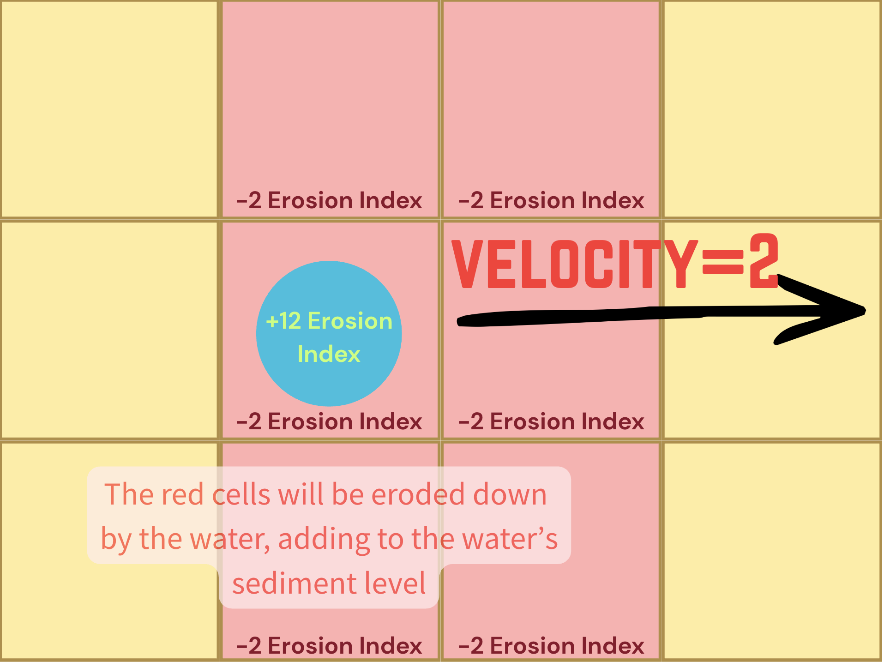
Variables were also implemented to change the settings for the erosion. For this project, the maximum amount of sediment a cell of water can contain was set to 0.25, and the erosionindex was set to 0.001. This means that every time a high speed water cell moves over the plane, it will erode 0.002 from the landscape.
These are variables that express the total amount of soil that can be eroded, as well as how much soil is eroded every time:
In[]:=
sedlevelcap=0.25;erosionindex=0.001;
This function calculates the erosion that happens if the speed along the x axis is 2. xerode also checks if the cell that corresponds to the velocity is lower than the current cell, and if it is it moves the water molecule to that cell:
yerode does the same thing as xerode, but instead of being along the x axis, it is along the y axis:
The previous functions can be used to generalize the code with the function sedimentUpdate, which runs xerode or yerode if the speed is 2, does nothing if the speeds are both 1.5 or on the edges, and deposits sediment in the 9 surrounding squares in any other case:
Simulating the Direction the Water Particle Moves in and Assembling Everything
Simulating the Direction the Water Particle Moves in and Assembling Everything
This function should take in the height that the water is on, then the level that wants to calculate the probability of, followed by the other squares that the water could move to:
chanceFlow outputs a number that represents the probability out of 1 that the cell flows in that direction. This can be iterated for every cell, and remove possible outcomes if it is not chosen in order to prevent order bias. Furthermore, it is also necessary to make sure that edge cases and corner cases only calculate cells in the matrix, as the function will fail if iterated with a term not in the matrix.
To simulate the flow of water, it is necessary to first establish the boundary casework in order to prevent called parts outside of the matrix, which would result in an error. A greedy algorithm can be used to simulate this:
After that the next step of the greedy algorithm was implemented, which was considering all the edges in the fractal landscape:
Finally, a function was created a function that first checks for cells that are in the ocean, checks for corner cases, then checks the edges, and finally iterates the function as if it were in the center, checking all 4 sides:
Assembling a Realistic Water Function and Creating the Simulation
Assembling a Realistic Water Function and Creating the Simulation
Realistic Water Function
Realistic Water Function
Now that all the functions necessary to simulate the river and it’s delta were created, the final step was to combine the functions together and constantly append new water molecules to waterMolecules. The function is defined to take the input as the start of the river, where the water will start and emanate to the delta and ocean. In order to simulate the erratic flow of the river, each iteration will randomly create between 4 and 7 water particles. Additionally, the amount of sediment was set to a random value, as the water doesn’t just start at the initialized cell but rather upstream, where it has already eroded parts of the river and is carrying some sediment.
updateWaterHeight[x,y] generates water molecules at {x,y}, moves the molecules, and changes the landscape:
It is necessary to put the water association inside the mapping for each iteration because otherwise it will result in a bug where all the water going to the same square. After that, update the sediment using the sedimentUpdate function to simulate the formation of the river delta and more accurately visualize the movement of faster water particles. From there, add all the information to list water molecules, which will be used to actually graph the water on the landscape.
3D Simulation
3D Simulation
The simulation can be visualized with a dynamic 3D model, with buttons that can change the location of the water, as well as buttons to alter the landscape. Note that if there is too much water molecules running, the code may not run completely
The first visualization shows the water as it runs down the fractal landscape. The second visualization is a map of the erosion/deposition, where red represents deposition and blue represents erosion.
Note that to run the code properly and display the graphics, it is required to download the notebook and run all the initialization cells.
The first visualization shows the water as it runs down the fractal landscape. The second visualization is a map of the erosion/deposition, where red represents deposition and blue represents erosion.
Note that to run the code properly and display the graphics, it is required to download the notebook and run all the initialization cells.
Here’s another landscape evolution in a random plane:
As demonstrated from the erosion graph on the right, the delta is forming along the coast and up to the coast as it is supposed to. It can also be observed that there is erosion at the start of the graph, scattered with a bit of soil deposition.
Here is an animation of a similar simulation:
As demonstrated, the water molecules are successfully flowing down the landscape and depositing themselves into the ocean, which in turn starts depositing sediment and creating a delta.
Analyzing the Simulation
Analyzing the Simulation
One of the graphs plotted was the relationship between the amount of iterations ran and the total amount of water in the graph.
Different graphs for different cases that plot the relationship between the amount of water (y axis) and the amount of iterations (x axis):
For both cases, although water initially increases at the start almost linearly due to the stream constantly generating water, the derivative of the water quickly decreases at about the 100 to 200 mark. This is because at the start, it has not yet reached the ocean yet, so the water just keeps accumulating. However, once the water reaches the ocean, it is removed at a rate similar to the rate of the water’s generation. The movement of the water results in the uneven creation to dispersion rate, which causes more water in the plane, and actually results in higher runtime. Another reason the water may be increasing is because the middle ground from the source to the ocean is gradually increasing; this is the result of the constant creation of the delta; as the delta causes the water to traverse more terrain, the amount of water increases.
Graph that show the relationship of the exposed sea area (y axis) to the amount of iterations (x axis):
The decline of exposed ocean that occurs after around the 75th iteration shows that the delta is constantly being formed. The average slope of the graphs is about - 0.17, which means that on average, every 6 iterations of the code creates a pixel of delta that is exposed. The derivative of the plot is actually increasing after the first drop because it gets exponentially harder to form deltas as the difference between the surface and the bottom of the ocean increases.
Plain Landscape Data and Analysis
Plain Landscape Data and Analysis
Here are 6 graphs of the plain landscape generation, with the erosion maps:
Valley Landscape Data and Analysis
Valley Landscape Data and Analysis
Here are 6 graphs of a different landscape, alongside their respective erosion maps:
The valley landscape was the most predictable landscape that was generated. This was because the water was mostly bounded by the sides of the valley, so the behavior of the water was predicable. Almost every time this program was run, the outcome would be the same; a long line of erosion followed by a delta that looks like an arcuate. However, with that being said, it is important to note that the shape of the deltas was not identical. For instance, delta numbers 2,3,4,5 were visibly more spread out that deltas 1 and 6. Additionally, some cases, like delta #2, had noticeably more erosion and deposition than that of valley #1.
Hilly Landscape Data and Analysis
Hilly Landscape Data and Analysis
Here are 6 graphs of a landscape with a hill in the center, with the erosion maps:
The hilly landscape is defined as a landscape created with matrix {{7,9,7},{3,5,3},{-2,-7,-2}}. The most prominent feature of this landscape is the hill at the center of the landscape, which is supposed to make water go around it. However, as shown by the graphics, this was not always the case. While some cases, like cases #1, #3, and #6 generally avoided the center, some cases such as cases #2, #4 and #5 seemed to go really close to the center, even though the surface was supposed to be higher. However, the goal of splitting of the river into smaller tributaries seemed to work, as all of these graphs have at least one side tributary alongside the main one. The hilly landscape was also the most erratic out of all the landscapes, and almost every time the river created a delta in a different spot.
It is possible to test the randomness of the hilly landscape even further by setting landscapes to the exact same height, and seeing how different runs affect the river flow:
As observed, the cases were similar, with both cases having one main tributary on the top, a trickle stream in the center, and a small stream at the bottom. The pooling of water is also apparent in both cases, and the erosion map is also similar. That being said, there are still some differences, such as how the top deposition for case 1 was a gradient, while case 2 looked checkered. The difference in the two cases can be explained by the chanceFlow function, as it is then used to generate a random probability. However, because the function is raised the the fifth power, most evaluations still result in the same movement. This shows that even though the flow of water is random, the general flow of the river can still be simulated accurately.
Conclusion
Conclusion
Through this project, it was determined that cellular automata can be used to simulated the flow of water down a surface and the formation of a delta. Different landscapes were explored, such as a plain landscape, a valley landscape, and a hilly one. As stated before, the flow of the river and the formation of the river delta is very hard to predict due to numerous factors, and this project aimed to achieve an accurate mode by taking into account the starting landscape, erosion, and deposition. The model can implement erosion and deposition to a certain extent. However, limitations such as the runtime and the scale inhibit the accuracy of the model. Compared to the existing Delft3D model, my code is less efficient in terms of runtime and not as detailed as Delft3D.
Communities based near deltas are one group that can be positively benefited by this model, as it informs them about the shifts of the deltas in the future. This technology can also help in predicting the erosion of deltas, which can inform humans to take action to preserve the delta’s ecosystem. Deltas are also key spots for trade, so knowing how their elevation and location will change are very important for countries.
Communities based near deltas are one group that can be positively benefited by this model, as it informs them about the shifts of the deltas in the future. This technology can also help in predicting the erosion of deltas, which can inform humans to take action to preserve the delta’s ecosystem. Deltas are also key spots for trade, so knowing how their elevation and location will change are very important for countries.
Future Directions
Future Directions
◼
Optimize runtime efficiency, increase scope of the landscape, and thus make project more accurate
◼
Apply this model to real landscapes instead of synthetic fractal landscapes
◼
Use real fluid dynamics equations to better simulate the flow of the water
◼
Consider other factors that might affect the formation of the river deltas, such as tides and wave, and graph them accordingly
◼
Use a weighted cellular automata model instead of a normal cellular automata model
Acknowledgements
Acknowledgements
Firstly, I would like to acknowledge my mentor, Felipe Amorim, and mentor group for their help on my project; he helped me stay focused, gave me tips on what to do when I was stuck, and I would not have been able to create this project without them. I would also like to thank the TAs and directors of the WSRP camp for facilitating this camp and making it so fun. I would also like to thank Stephen Wolfram for giving me this project which allowed me to explore cellular automata.
References
References
◼
Evers, J. (2022, September 9). Delta | National Geographic Society. Education.Nationalgeographic.Org; National Geographic Society.
https://education.nationalgeographic.org/resource/delta/
https://education.nationalgeographic.org/resource/delta/
◼
Seybold, H., Andrade, J. S., & Herrmann, H. J. (2007). Modeling river delta formation. Proceedings of the National Academy of Sciences, 104(43), 16804–16809.
https://doi.org/10.1073/pnas.0705265104
https://doi.org/10.1073/pnas.0705265104
◼
Weisstein, E. W. (n.d.). Cellular Automaton. Mathworld.Wolfram.Com. Retrieved July 8, 2026,from
https://mathworld.wolfram.com/CellularAutomaton.html
https://mathworld.wolfram.com/CellularAutomaton.html
◼
Wu, G., Wang, K., Liang, B., Wu, X., Wang, H., Li, H., & Shi, B. (2023). Modeling the Morphological Responses of the Yellow River Delta to the Water-Sediment Regulation Scheme: The Role of Impulsive River Floods and Density-Driven Flows. Water Resources Research, 59(7).
https://doi.org/10.1029/2022wr033003
https://doi.org/10.1029/2022wr033003
◼
Fractal Landscapes. (2026). Cornell.Edu.
https://people.ece.cornell.edu/land/courses/ece5760/finalprojects/f2020/keb278_ajh322_nl392/keb278_ajh322_nl392/keb278_ajh322_nl392.html
https://people.ece.cornell.edu/land/courses/ece5760/finalprojects/f2020/keb278_ajh322_nl392/keb278_ajh322_nl392/keb278_ajh322_nl392.html
CITE THIS NOTEBOOK
CITE THIS NOTEBOOK
Modeling formation of river deltas
by Lukas Tsui
Wolfram Community, STAFF PICKS, July 9, 2026
https://community.wolfram.com/groups/-/m/t/3750596
by Lukas Tsui
Wolfram Community, STAFF PICKS, July 9, 2026
https://community.wolfram.com/groups/-/m/t/3750596