EDM (Electronic Dance Music) refers to the broad spectrum of all forms of electronic music -- one of the most popular music in the world today! As the music industry embraces EDM with its vast range of sounds and tones, this form of music becomes increasingly prevalent in the world today. With several components that build up the ambience, one of the most hyped ones in the “drop”, a stage in the music where the rhythm abruptly changes, which usually follows a “build up” section, where the rhythm gradually increases to its climax (aka the drop)! In this essay, we'll identify and analyze the similarity between drops in a track.
Introduction
Introduction
Having existed since the 1970's, the drop is one of the more developed parts that compose the music we listen to today. Drops contain diverse compositions, depending on the sound and instrumentation. Most genres of EDM today contain several drops per track, most of them following a buildup. Despite the variation in drops, in EDM, drops are typically the loudest and most unique song of the music. Certain drops stimulate specific regions of the brain, and repetition of similar drops leads to reinforcement of these stimulation’s, getting a person hooked on to the music. In this essay, we're going to visualize and identify drops, and then analyze the regions around all the drops in the music to see if they have a similar composition. The quantity that we'll be using as a function of time will be the short time energy of the track, which will combine all the acoustics and give us an accurate idea of the "power" that the music emits throughout.
Importing the music & Visualizing
Importing the music & Visualizing
We’ll import an EDM soundtrack, with plenty of drops and preceding build ups, and analyze its spectrogram. The spectrogram is a visual representation of a loudness of an audio signal over time at differing frequencies. Viewing the spectrogram for a music track can help us determine more energetic regions at specific frequencies throughout the track, which would prove useful in figuring out the drops. The drops, which are points where the track has built up to its highest energy, which then rapidly falls, could be seen as the darker outlines on a spectrogram.
Importing the soundtrack and viewing its spectrogram:
edmusic=Import["https://www.wolframcloud.com/obj/69b3a12b-f8d0-425d-8dc1-84602ae92845"];
Spectrogram[edmusic]
Out[]=
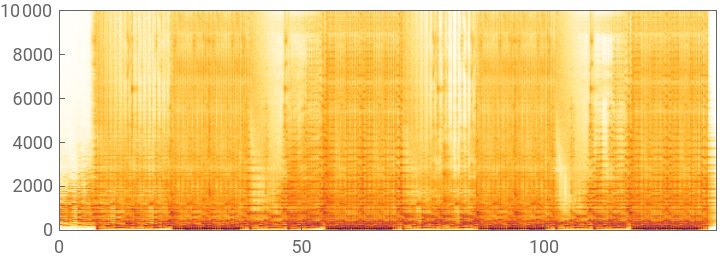
Alternatively, we can view the AudioPlot of the same audio file, which will give us the waveform of the same file. A waveform is a graphical representation of the audio signals present in the file.
Viewing the waveform of the audio track using AudioPlot:
AudioPlot[edmusic]
Out[]=
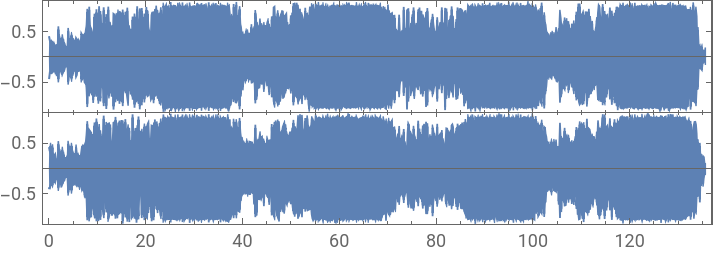
Looking at the AudioPlot and Spectrogram side by side, we can see that the less dense regions on the Spectrogram correspond roughly to the samples in the AudioPlot with a lower marking. Similarly, the more dense regions on the Spectrogram correspond to the higher marked samples on the AudioPlot. We can predict that the drops are more likely to take place in the vaguely defined boundary between these more and less dense regions as opposed to other points in the track.
On a side note, the the two separate plots on the AudioPlot show us that the audio file that we're using contains 2 channels, thus it is a stereo file!
On a side note, the the two separate plots on the AudioPlot show us that the audio file that we're using contains 2 channels, thus it is a stereo file!
Confirming the number of channels in our audio:
AudioChannels[edmusic]
Out[]=
2
Energy in the track
Energy in the track
Sound waves are vibrations that pass through air after being emitted by audio output devices or other items in real life. These vibrations tend to be continuous, as the air particles collide with each other by moving back and forth in order to carry a sound as a disruptive. Because of this property, these waves are known to be analog in nature. Computer however, can't interpret and store analog and continuous data, so the computer converts these waves in an ADC (Analog to Digital Converter), which samples the incoming sounds at a regular interval with the use of electrical signals. The strength of these incoming wave samples changes the magnitude of the electrical signals that measure their characteristics, and store these values on a computer.
Sample Depth is one such characteristic, which measures the total number of bits required to store all the data for a specific sample. The greater the sample depth, the greater the sound quality (even the file size increases though).
One of the more relevant characteristics is the sampling rate, which measures the total number of audio samples being recorded each second. Since we’re going to be looking at drops, we need to see the individual samples.
Sample Depth is one such characteristic, which measures the total number of bits required to store all the data for a specific sample. The greater the sample depth, the greater the sound quality (even the file size increases though).
One of the more relevant characteristics is the sampling rate, which measures the total number of audio samples being recorded each second. Since we’re going to be looking at drops, we need to see the individual samples.
Viewing the sample rate and total number of samples for the audio:
AudioSampleRate[edmusic]
Out[]=
AudioLength[edmusic]
Out[]=
For longer audio clips with high quality sound, the number of samples tend to be a lot, so we’re going to have to find a way to simplify the track to a fewer number of samples before we can apply computations on it.
As we used the Spectrogram earlier, we can get more computable data by using SpectrogramArray, with which we can also reduce the total number of samples by passing in an argument.
As we used the Spectrogram earlier, we can get more computable data by using SpectrogramArray, with which we can also reduce the total number of samples by passing in an argument.
Using SpectrogramArray to get computable data, and reducing the number of samples by a factor of 2^17 = 131072:
eddata=SpectrogramArray[edmusic,131072]
Out[]=
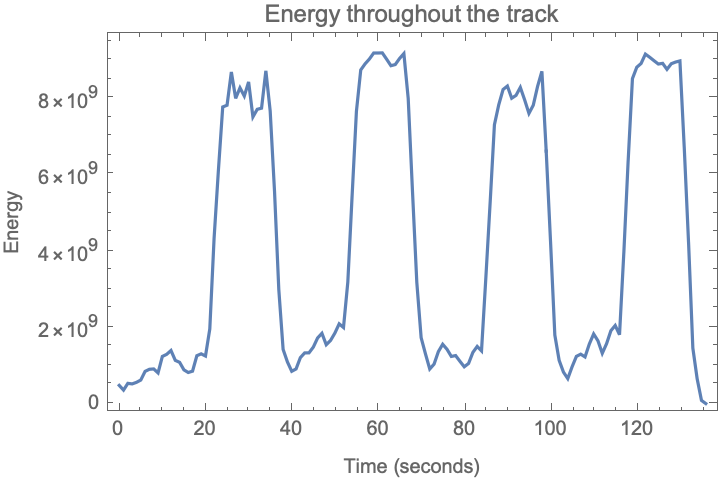
The drop takes place after the climax, a point of maximum energy. The energy we're looking at is short term energy, since it shows us the total energy of the sounds being produced by the track around that point rather than the total energy. To visualize this, we can use the data we got from SpectrogramArray and calculate its energy.
Calculating the energy using the data from the spectrogram:
In[]:=
edenergy=Map[Total[Abs[#]^2]&,eddata];
Now, we can plot this data to get a sense of how the energy of the track varies. For this we'll have to adjust the axis range to match the total duration of the track in seconds to bring it to scale.
Plotting the energy of the track as a function of time (seconds):
ListLinePlotedenergy,
Out[]=
Finding potential drops
Finding potential drops
Now that we have the data on the music energy, we need to define a scale factor, that it used as a comparison to determine if a particular value is a drop. For example, if there exist two adjacent samples and we know the values of their energies, if the preceding is greater than the subsequent one by a multiplicative factor greater than the scale factor, we know that a drop takes place in the middle.
Certain values used in the calculation of the scale factor came from testing to see consistency with a wide range of audios and different types of drops. Since waves tend to be sinusoidal/circular, the value of Pi seemed essential in the calculation, and then experimenting with several values showed that Pi^3 seems to be the best match to cover all drops. Similarly, the use of the Median was because of its property that it is stable at the centre and isn't affected by extreme values, which would be a good indicator of the overall value. Similarly, the use of 1/Pi^3 at the end was to prevent zero division error, since the chosen value is small enough to not affect the end result, while serving as some form of adjustment for minor inaccuracies.
Certain values used in the calculation of the scale factor came from testing to see consistency with a wide range of audios and different types of drops. Since waves tend to be sinusoidal/circular, the value of Pi seemed essential in the calculation, and then experimenting with several values showed that Pi^3 seems to be the best match to cover all drops. Similarly, the use of the Median was because of its property that it is stable at the centre and isn't affected by extreme values, which would be a good indicator of the overall value. Similarly, the use of 1/Pi^3 at the end was to prevent zero division error, since the chosen value is small enough to not affect the end result, while serving as some form of adjustment for minor inaccuracies.
Calculating the scale factor for this audio track:
edscale=(Median[Table[edenergy[[i+1]]/(edenergy[[i]]+1/Pi^3),{i,Length[edenergy]-1}]])^(Pi^3/(Sqrt[Median[Table[edenergy[[i+1]]/(edenergy[[i]]+1/Pi^3),{i,Length[edenergy]-1}]]]))
Out[]=
1.47463
Upon comparison to the plot, we see that the value we obtained for the scale factor seems to be an acceptable one to accurately estimate drops. Now that we have the scale factor, we can use this to determine the potential drops in the audio track by comparison of the ratio of energies to the scale factor. If there is a potential drop, it will replace the value with a True.
Finding sample positions of potential drops:
edscales=Table[edenergy[[i]]>edscale*edenergy[[i+1]],{i,Length[edenergy]-1}];edsampledrops=Position[edscales,True]
Out[]=
{{37},{38},{69},{70},{100},{101},{102},{132},{133},{134},{135},{136}}
We now know the samples at which the drops take place! However, this isn't really useful unless we know the timing at which the drops take place. We can make use of the fact that the samples are evenly spaced to figure out to get an acceptably accurate value of the timings of the potential drops.
Finding the timings of these potential drops:
edtimingdrops=Table[i[[1]]*QuantityMagnitude[UnitConvert[Duration[edmusic],"Seconds"]]/Length[edenergy],{i,edsampledrops}]
Out[]=
{36.6294,37.6194,68.3089,69.2989,98.9984,99.9883,100.978,130.678,131.668,132.658,133.648,134.638}
Oops! Some of these values contain duplicated timings, which belong to the same drop. We'd like to remove these spurious values, since the drop begins at the first such instance. Using a general rule of thumb that drops are almost always more than 3 seconds away from each other, we can eliminate those duplicates and retain the first recorded value for each drop.
Removing the duplicates and retaining the first recorded value for each drop:
edfinaldrops=DeleteAdjacentDuplicates[edtimingdrops,Abs[#1-#2]<3&]
Out[]=
{36.6294,68.3089,98.9984,130.678}
There it is! We have the timings of all the drops in the track (in seconds). Comparing it to our visualization of the audio track, we see that these are placed perfectly! This can be duplicated for several tracks, and the formula for calculating the scale factor can be modified on the basis of the overall energy and power of the track.
Analyzing around the drop
Analyzing around the drop
Now that we can identify the drops in an audio track, we can analyze the regions preceding the drop, where the audio rapidly builds up and the regions after a drop, when the audio recovers. We can take a 5 second radius for each drop and analyze the audio within that radius. However, some of these drops might not have entire 5 second audio around both of their sides, because of their occurrence at the beginning/end of the track. For this, we can first measure the total seconds of missing audio on each side of the drop for each drop.
Measuring missing audio (out of 5 seconds) on each side of the drop:
edmissingdurs=Table[{5-QuantityMagnitude[UnitConvert[Duration[AudioTrim[edmusic,{i-5,i}]],"Seconds"]],5-QuantityMagnitude[UnitConvert[Duration[AudioTrim[edmusic,{i,i+5}]],"Seconds"]]},{i,edfinaldrops}]
Out[]=
{{0.,0.},{0.,0.},{0.,0.},{0.,0.0500907}}
We can see that we're missing audio at the end of the last track. Since we want them to have uniform timing, we need to add that period of silent audio at the end of the track. For this, we can use AudioPad, while simultaneously using AudioTrim to obtain the desired track, to obtain an array consisting of audio surrounding each drop.
Converting all "drop intervals" to uniform duration by padding it:
In[]:=
edclips=Table[AudioPad[AudioTrim[edmusic,{edfinaldrops[[i]]-5,edfinaldrops[[i]]+5}],edmissingdurs[[i]]],{i,Length[edfinaldrops]}];
Now that we have the audio around each drop to a uniform extent, we can get its energy data. For this, we once again utilize SpectrogramArray, however since we're looking at data on a closer scale with lesser audio, we can increase the number of samples to get more data values, increasing our accuracy of analysis. For this new requirement, we have to change the attribute we're supplying SpectrogramArray to 65536.
Obtaining computable data for each "drop interval" using SpectrogramArray:
In[]:=
edclipsdata=Table[SpectrogramArray[i,65536],{i,edclips}];
Now we can crunch numbers with our data to get the short time energy of the track just like we did when we were finding drops.
Obtaining short time energy for each "drop interval":
In[]:=
edclipsenergy=Table[Map[Total[Abs[#]^2]&,i],{i,edclipsdata}];
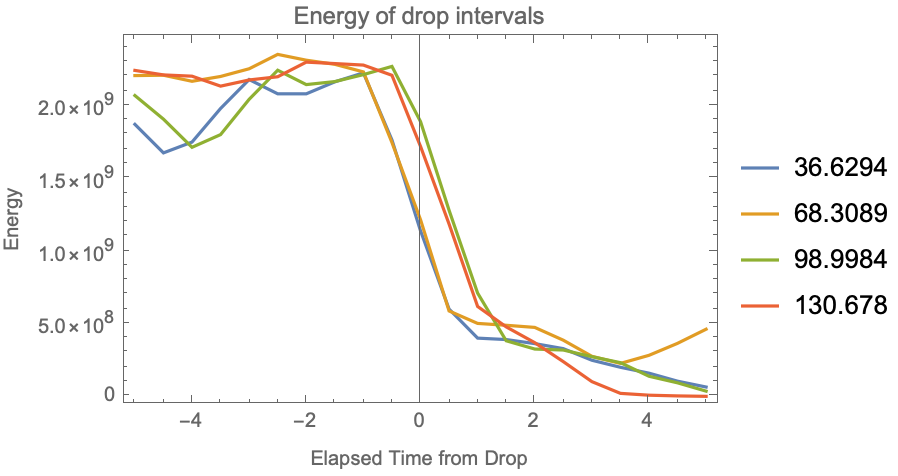
Just like earlier, now that we have our data, we can plot it! However, since we're analyzing the comparison between several drops, we can plot the data for all of the "drop intervals" together in a single plot.
Plotting the energy of all the "drop intervals" together using ListLinePlot:
ListLinePlotedclipsenergy,
Out[]=
Obtaining the cumulative SSR for each "drop interval":
There we go! We see that the last sample has the lowest cumulative SSR. The lowest cumulative SSR means it is the furthest in pattern to the other values, since the other values are greater since they contain the residuals from that "drop interval", while the "drop interval" in itself doesn't contain its own residuals, hence its lower value. Since the last "drop interval" has the lowest cumulative SSR, we know its the furthest to matching the overall pattern established by all the drops. This makes intuitive sense as well, as the audio is nearing the end and needs to be lowered at a faster pace as opposed to the other drops, where it has to continue afterwards. This pattern is also evident in the plot above, where the red line (corresponding to the last drop interval) has a harsher fall compared to the others.
Now, we want to see if the values that our data falls in are the true values. For this, we can generate a 95% confidence interval on means based on the values we're given for each sample. This should give use a pretty accurate representation of the region with acceptable and plausible values given the values for the "drop intervals" that we have. For this, we'll import a module named HypothesisTesting, to use a function MeanCI, that is meant to generate the ends of the 95% confidence interval of the true mean given the data.
Now, we want to see if the values that our data falls in are the true values. For this, we can generate a 95% confidence interval on means based on the values we're given for each sample. This should give use a pretty accurate representation of the region with acceptable and plausible values given the values for the "drop intervals" that we have. For this, we'll import a module named HypothesisTesting, to use a function MeanCI, that is meant to generate the ends of the 95% confidence interval of the true mean given the data.
Obtaining the endpoints of the 95% confidence interval for the recorded data:
For each sample of the "drop intervals", we now contain the endpoints of the 95% confidence interval. We're 95% confident that this range contains the true population mean of all energy samples in such similar drops. We can justify using this, with the input as a sample to predict the population mean, as even though we're using all drops for this piece, it helps show us by how much similar tracks could differ. Now that we have our data, we can plot the interval (shaded) side by side with out collected values.
Plotting the previous values atop the 95% confidence interval:
We can see that all of the recorded values lie within the confidence interval which shows that the values probably agree with each other. One minor detail, however, is that the confidence interval diverges towards the end. This is because of the different behaviour between all the audio clips, in order to continue/end the music after the drop. Overall, this is a pretty good indicator that the drops we found are quite similar throughout the song, and we can conclude almost certainly that other such drops follow a similar pattern. This analysis can be repeated on several pieces of music, and the drops for each piece (or overall) can be analyzed to see if similar and more interesting patterns exist!
Licensing
Licensing
The music was sourced from https://www.free-stock-music.com/liqwyd-happy.html and was used as is without any modifications.
License: Creative Commons Attribution 3.0 Unported License.
License: Creative Commons Attribution 3.0 Unported License.
References
References
Acknowledgements
Acknowledgements
I would like to express my gratitude to my mentor, Eryn, who guided me throughout this project. I would also like to thank the entire camp staff who helped me develop a knack for the language and supported me throughout the duration of camp.