Affiliation
Affiliation
The project was completed by an 12th grade student in Wolfram Lab opened at RAU (Russian-Armenian University, Yerevan, Armenia). Currently, the laboratory teaches courses for undergraduate students (major in programming and physics) and high school students (major in physical and mathematical sciences). Mher Mkrtchyan (mherm@wolfram.com) (Group: Sound & Vision, Manager: Shadi Ashnai) is responsible for the Wolfram Lab at RAU.
Introduction
Introduction
This Wolfram Language (Mathematica) project is designed to analyze a given mathematical function. It provides the following features: - Computes and plots the function and it’s derivative. - Finds and displays the critical points (where the derivative is zero). - Determines and displays the intervals where the function is increasing or decreasing. - Identifies and highlights maxima,minima,and inflection points. - Adds interactive tooltips to the plot for critical points and intervals to provide additional information. - Allows user input for customizing the function and it’s parameters. - Offers a user-friendly interface with adjustable parameters using the ‘Manipulate’ function.
Setting Options
Setting Options
Critical Points
Critical Points
Function to find and return critical points of a given expression.expression
criticalPoints[expr_]:=Module {solutions,points} , solutions=Solve[D[expr,x]0,x]; Ifsolutions=={}, Failure"NoCriticalPoints", <| "MessageTemplate"->"`function` function doesn't have critical points", "MessageParameters"-><|"function"->expr|> |> , points=Values[solutions];(*Extractsolutions*) Style StringDelete[ToString[points,InputForm],{"{","}"}], FontFamily->"Bookman Old Style",FontSize16,RGBColor[0,0,0.5] ;
For example
In[]:=
criticalPoints[+3*x]
2
x
Out[]=
-3/2
or
In[]:=
criticalPoints[x]
Out[]=
Failure
Derivative
Derivative
Function to compute and return the derivative of a given expression.
In[]:=
derivative[expr_]:=Module {res} , res=D[expr,x]; Style[ToString[res,InputForm],FontFamily->"Bookman Old Style",FontSize16,RGBColor[0,0,0.5]];
For example
In[]:=
derivative[+3*x]
2
x
Out[]=
3 + 2*x
Integral
Integral
Function to compute and return the integral of a given expression.
In[]:=
integral[expr_]:=Module {res} , res=Integrate[expr,x]; Style[ToString[res,InputForm],FontFamily->"Bookman Old Style",FontSize16,RGBColor[0,0,0.5]]
For example
In[]:=
integral[+3*x]
2
x
Out[]=
(3*x^2)/2 + x^3/3
Definite Integral
Definite Integral
Function to compute and return the definite integral of a given expression between specified limits.
In[]:=
defIntegral[expr_,{upperLimit_,lowerLimit_}]:=Module {res} , res=Quiet[Integrate[expr,{x,upperLimit,lowerLimit}]]; If!NumberQ[res], Failure "DoesNotConverge", <| "MessageTemplate"->"Integral of given function doesn't converge on {`low`,`up`}", "MessageParameters"-><|"low"->lowerLimit,"up"->upperLimit|> |> , Style[ToString[res,InputForm],FontFamily->"Bookman Old Style",FontSize16,RGBColor[0,0,0.5]]
For example
In[]:=
defIntegral[+3*x,{-1,1}]
2
x
Out[]=
2/3
Tangent Line
Tangent Line
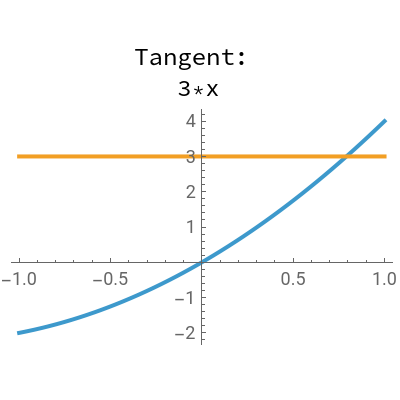
Function to create and display the tangent line of a given expression at a specified point.
In[]:=
tangentLine[expr_,{lBorder_,rBorder_}]:=Module {}, Manipulate Plot expr, Evaluate[Simplify[Quiet[(D[expr,x]/.xx0*(x-x0))+(expr/.xx0)]]] , {x,lBorder,rBorder}, ImageSize{200,200}, PlotLegendsPlaced Column[{"Tangent: ",ToString[Simplify[Quiet[(D[expr,x]/.xx0)*(x-x0)+(expr/.xx0)]],InputForm]},Center], {Top,Top} , {{x0,0},-10,10,1}(*Slidertoadjustthepointoftangency*) ;
For example
In[]:=
tangentLine[+3*x,{-1,1}]
2
x
Out[]=


Usage
Usage
The main GUI
Please use “interface” function for to open Analyzer GUI
CITE THIS NOTEBOOK
CITE THIS NOTEBOOK
Interactive tool for mathematical functions analysis and visualization
by Razmik Tumanyan
Wolfram Community, STAFF PICKS, November 26, 2024
https://community.wolfram.com/groups/-/m/t/3328790
by Razmik Tumanyan
Wolfram Community, STAFF PICKS, November 26, 2024
https://community.wolfram.com/groups/-/m/t/3328790