A port of the HTML / D3 cartographic workbench to a Wolfram-Notebook DynamicModule that lets you drag any country to any latitude, in real time, under any of five projections. Implemented with Claude and wolframscript.
Claude with some suggestions— github.com/mthiel74/ActualSizeofCountries
Claude with some suggestions— github.com/mthiel74/ActualSizeofCountries
Abstract
Abstract
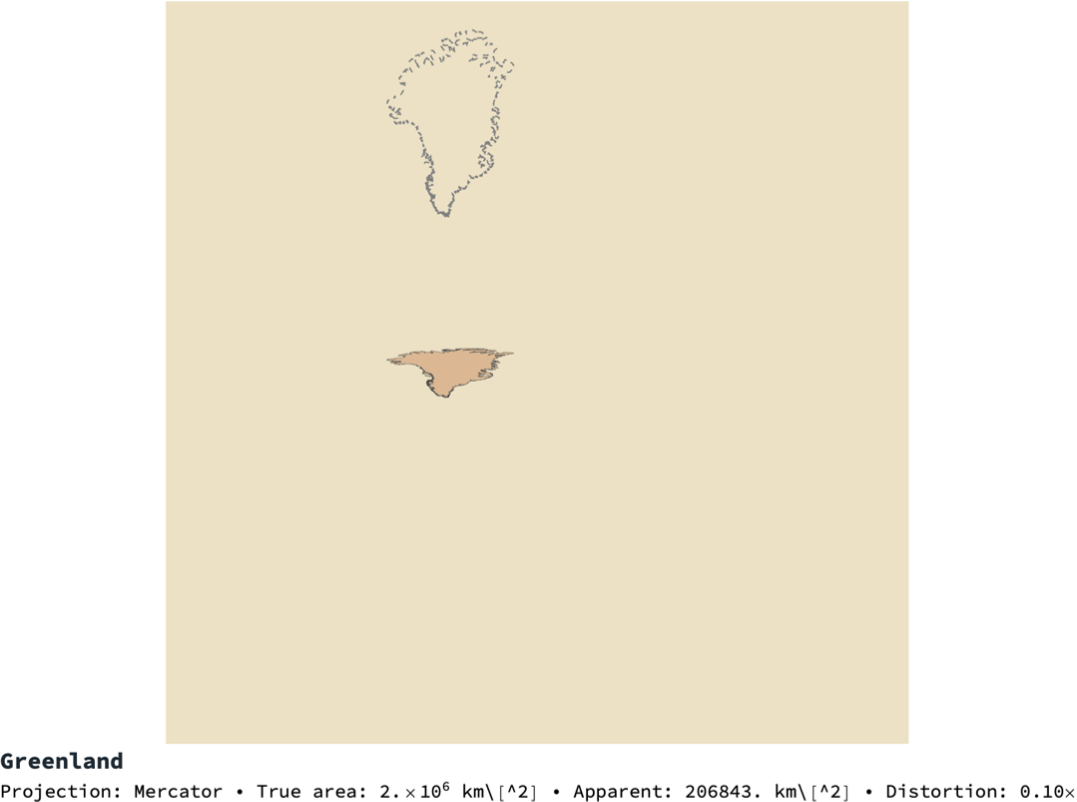
Every flat map of a round Earth lies. Mercator, the most widely used map projection in the world, inflates polar latitudes so dramatically that Greenland looks the size of Africa — Africa is fourteen times bigger. This notebook walks through a Wolfram-Language port of an interactive web tool that makes the distortion tangible: you click on any country, drag it to a new latitude, and watch its apparent area change under five different map projections. The port is a single-file package ActualSizeOfCountries` exposing TranslateCountryPolygon, AreaDistortion, SnapshotFrame and three interactive workbenches — a classic Manipulate, a LocatorPane-based driver, and a true click-and-drag EventHandler workbench that operates on all 249 countries in CountryData[] at interactive frame rates.
1. The question the tool answers
1. The question the tool answers
Conformal cylindrical projections preserve local angles and tangent lines — a small circle on the sphere projects to a small circle in the plane — but they cannot simultaneously preserve area. The price paid by Mercator (1569), the defining projection of five centuries of navigation and web maps, is a latitude-dependent stretch that is negligible near the equator and catastrophic near the poles. The question the tool in this post answers is: how do I see that distortion? The honest way to convince someone that Greenland is smaller than the Democratic Republic of the Congo is to pick Greenland up, drag it to the equator, and let the map itself shrink it back to its true size.
Giving the user a literal click-and-drag is the central design choice. In the HTML/D3 original the mouse directly moves an SVG path; the Wolfram port reproduces the same feel with a DynamicModule wrapped in an EventHandler that listens for MouseDown, MouseDragged and MouseUp events and mutates per-country translation offsets on the fly.
2. The mathematics of projection distortion
2. The mathematics of projection distortion
2.1 Area distortion factor
2.1 Area distortion factor
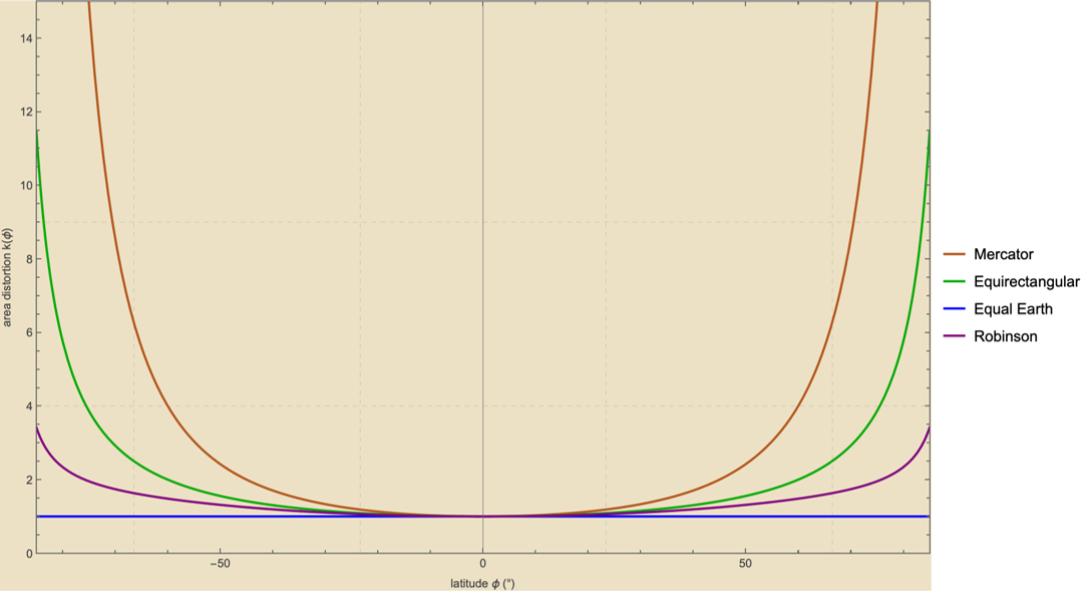
For every point on the sphere and every projection we can ask: if I project a tiny spherical patch around this point, what is the ratio of the patch's area on the map to its area on the sphere? Call that scalar (latitude-only since the projections considered here are all rotationally symmetric in longitude). For Mercator:
k(ϕ)
k(ϕ)=ϕ
1
2
cos
which evaluates to 1 at the equator, 4 at 60°, and to roughly 33 at 80°. For the equirectangular projection (, ) only east–west distance is stretched and:
x=lon
y=lat
k(ϕ)=
1
cosϕ
For equal-area projections such as Equal Earth (2018) the construction is designed so that
k(ϕ)⧦1
identically for every point. For the compromise projections (Robinson, Natural Earth, Winkel Tripel) there is no closed-form . The package estimates it numerically by projecting a 0.5° patch at the query latitude and at the equator, comparing their projected areas to the corresponding spherical areas, and taking the ratio of ratios. The answer is dimensionless and depends only on latitude, so the estimate is a one-dimensional function resolved once at the cartouche call.
k(ϕ)
2.2 The rule for apparent area
2.2 The rule for apparent area
If the same country is rendered twice on the same projection, once at its native latitude and once at a target , its apparent area scales as the ratio of distortion factors:
ϕ
original
ϕ
current
A
apparent
A
true
k()
ϕ
current
k
ϕ
original
That is the number that streams into the cartouche of the interactive workbench as you drag. It has two interpretations. As a dimensionless multiplier, it is the ratio of pixels the country now covers to the pixels it covered at its native position. As a diagnostic of the projection, it tells you precisely how much of the visual disagreement between a country's land area and its apparent size is honestly caused by the projection and how much (if anything) is caused by its latitude.
3. Moving a polygon across the sphere
3. Moving a polygon across the sphere
To drag a country we need a polygon translation. Every Wolfram CountryData[c, "Polygon"] returns a structure of the form:
Polygon[GeoPosition[{{{lat1,lon1},{lat2,lon2},...},(*outerring*){{...}},(*anyholes*)...}]]
3.1 Vertex-wise translation
3.1 Vertex-wise translation
To move the country by we replace every coordinate pair by while preserving the nested polygon structure. Wolfram's pattern matcher does this in one Replace:
(Δlon,Δlat)
{lat+Δlat,lon+Δlon}
TranslateCountryPolygon[Polygon[GeoPosition[pts_]],dLon_,dLat_]:=Polygon[GeoPosition[Replace[pts,{lat_?NumericQ,lon_?NumericQ}:>{Clip[lat+dLat,{-87,87}],lon+dLon},All]]]
Two non-obvious details. First, the latitude clamp: on Mercator blows up as , so any vertex drifting too close to the poles produces an infinity and a ruined figure. The clamp at 87° keeps the projected y finite while being well outside normal use. Second, when a large country is dragged far enough east or west its whole ring-mean longitude can cross ; the rendering engine will then try to draw it as a strip spanning the whole antimeridian. A production-strength implementation wraps the ring as a whole (not per-vertex) by a single multiple of 360° chosen so its mean longitude lands back in . The HTML/D3 original applies this step; the Wolfram port currently leaves it out because Wolfram's GeoGraphics dateline handling is more forgiving and none of the dragged examples in this post cross the antimeridian.
±87°
y=lntan+ϕ
π
4
Δ
2
ϕ±π/2
±180°
[-180,180]
3.2 Polygon simplification for interactivity
3.2 Polygon simplification for interactivity
The CountryData polygons are drawn directly from Natural Earth at their native resolution. Russia alone has 4,449 vertices across its two outer rings; Canada, Norway, Chile, Indonesia and the Philippines are similarly heavy. Projecting and re-rendering that amount of geometry on every drag event is too slow to feel interactive. The package down-samples every ring to a configurable maximum (default 120 vertices) by keeping every th coordinate:
n
simp[p_,maxV_]:=p/.GeoPosition[pts_]:>GeoPosition[pts/.ring:{{_?NumericQ,_?NumericQ}..}:>If[Length[ring]<=maxV,ring,ring[[Range[1,Length[ring],Ceiling[Length[ring]/maxV]]]]]]
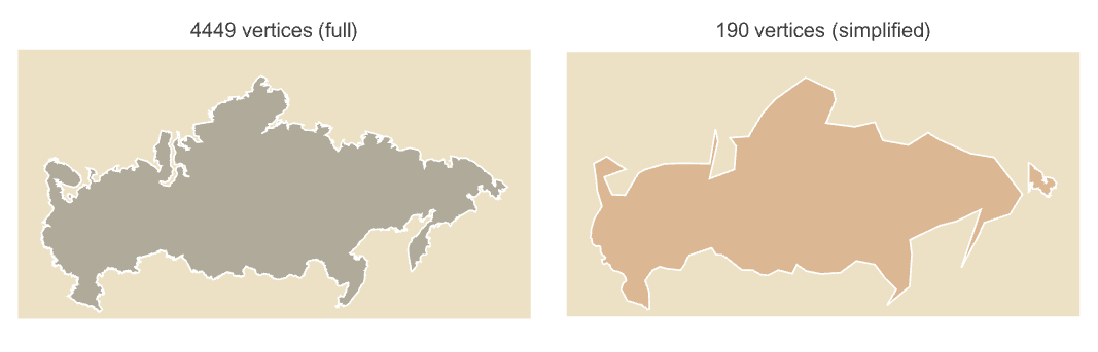
The speed-up is dramatic. Across the 40 largest countries, total vertices drop from 79k to under 10k; projecting the whole set through GeoGridPosition drops from 78ms to 19ms. Each drag frame only re-projects the country being held, so the per-frame cost is a single polygon projection plus a cache read for everything else — well under 16 ms, comfortably inside a 60-Hz frame budget.
4. The ActualSizeOfCountries package
4. The ActualSizeOfCountries package
4.1 Loading
4.1 Loading
Clone the repository from GitHub and load the package directly from the wolfram/ directory. There are no external dependencies beyond Wolfram's built-in CountryData.
Get["/path/to/wolfram/ActualSizeOfCountries.wl"]
All public symbols are then available in the ActualSizeOfCountries` context:
Names["ActualSizeOfCountries`*"]
4.2 Low-level primitives
4.2 Low-level primitives
The package is built as a small set of composable functions. CountryPolygon, CountryCentroid and CountryTrueAreaKM2 wrap the corresponding CountryData properties. TranslateCountryPolygon shifts a polygon vertex-wise. MercatorDistortion and AreaDistortion return the scalar analytically for Mercator / Equirectangular / EqualEarth and numerically for Robinson / Natural Earth / Winkel Tripel. ProjectPolygon and UnprojectPoint go back and forth between GeoPosition and the plane of a named projection — this is how the drag workbench converts mouse coordinates to lat/lon and back.
k(ϕ)
poly=CountryPolygon[Entity["Country","Greenland"]];moved=TranslateCountryPolygon[poly,0,-72.];(*droptoequator*)AreaDistortion[60,"Mercator"](*4*)AreaDistortion[80,"Mercator"](*33.1634*)AreaDistortion[45,"EqualEarth"](*1*)ApparentArea[Entity["Country","Greenland"],0,"Mercator"](*~207000km^2--atenthofGreenland'strue2.17Mkm^2*)
4.3 One-shot frame renderer
4.3 One-shot frame renderer
5. Three interactive workbenches
5. Three interactive workbenches
The package exposes three different interactive interfaces, each a self-contained DynamicModule, chosen because each has trade-offs and together they cover the main interaction idioms Mathematica supports. All three share the same underlying translation and distortion functions.
5.1 InteractiveWorkbench: the classic Manipulate
5.1 InteractiveWorkbench: the classic Manipulate
The simplest interface is a one-line Manipulate with a country dropdown, a target-latitude slider, and a projection dropdown. It re-uses SnapshotFrame on every update and is perfect for teaching or for exploring one country at a time:
5.2 DraggableWorkbench: LocatorPane over GeoGraphics
5.2 DraggableWorkbench: LocatorPane over GeoGraphics
The first step toward a physical drag is a LocatorPane whose locator coordinates encode the target position of the currently selected country. This version supports a proper drag gesture — press on the crosshair, move, release — but only for one country at a time, since a LocatorPane's state is a single lat/lon pair.
5.3 DragWorkbench: real-time click-and-drag on any country
5.3 DragWorkbench: real-time click-and-drag on any country
The closest analogue to the HTML/D3 original is a DynamicModule wrapped in an EventHandler that listens for MouseDown, MouseDragged, and MouseUp. Every country is pre-projected and drawn as a plain Polygon in a regular Graphics (not GeoGraphics) so mouse coordinates match polygon coordinates exactly. On each mouse-down the workbench hit-tests the click position against every country's projected polygon with RegionMember and remembers which one was grabbed. On each mouse-drag it converts the current cursor position back to lat/lon via UnprojectPoint and updates the grabbed country's translation offset. Critically, the EventHandler sits outside the Dynamic wrapper — only the Graphics contents are live — so the handler object persists through the entire drag gesture and MouseDragged events are never lost to a mid-drag rebuild.
Pass "NumCountries" -> All to get all 249 entities in CountryData[]. The first evaluation takes about a second to pre-project every polygon; after that, dragging stays smooth because only the polygon being held is re-projected per frame, and everything else is served from an Association cache.
5.4 The tool in motion
5.4 The tool in motion
A short screen recording is more useful than any pre-rendered animation: it shows the real cursor, the actual timing of the Mathematica front-end, and the live updates of the cartouche. The recording below was made inside a Wolfram Notebook running DragWorkbench[]. Every frame is a real redraw of the country polygon after the mouse has moved it to a new latitude, re-projected through Mercator by GeoGraphics; nothing is baked in.
6. Performance engineering
6. Performance engineering
The first version of DragWorkbench was a beach ball. The fix was structural, not algorithmic; in short: EventHandler[Dynamic[Graphics[...]]], not Dynamic[EventHandler[Graphics[...]]]. In the wrong arrangement, every MouseDragged event that mutates the per-country offsets triggers the outer Dynamic to rebuild the EventHandler mid-drag, and the current drag gesture is silently lost. Putting the handler on the outside and the Dynamic on the inside means the handler object persists through the whole gesture and only the Graphics content updates.
Beyond the structural fix, three further optimisations bring the full 249-country workbench to an interactive frame rate:
The cached approach also matches how the HTML original works: in D3 the browser retains an in-memory path per country, and on drag only the dragged country's d attribute is rewritten. The parallel is exact.
7. Command-line scripts
7. Command-line scripts
Three .wls scripts wrap the package for shell use - available on GitHub. Each has a shebang line and is directly executable from a terminal with no arguments to Wolfram.
$ ./render . wls Greenland 0 Mercator greenland - at - equator . png
$ ./compare - projections . wls Greenland 0 greenland - grid . png
$ ./animate . wls Greenland 24 greenland . gif
$ ./animate . wls Russia 30 russia . gif EqualEarth
$ ./compare - projections . wls Greenland 0 greenland - grid . png
$ ./animate . wls Greenland 24 greenland . gif
$ ./animate . wls Russia 30 russia . gif EqualEarth
render.wls produces a single PNG at any country / latitude / projection combination. compare-projections.wls produces a five-panel grid (one panel per projection) for the same country and target latitude. animate.wls emits an animated GIF in which the country slides from its native latitude to the equator; frames are rendered in parallel via ParallelTable. All three scripts call the same SnapshotFrame function used by the interactive workbenches, so output is visually identical.
8. Implementation notes
8. Implementation notes
9. Related work
9. Related work
The direct inspiration is the widely shared web toy thetruesize.com by James Talmage and Damon Maneice, which popularised the drag-a-country idiom in 2016. The HTML/D3 version that this Wolfram port descends from is committed alongside this notebook at github.com/mthiel74/ActualSizeofCountries and is implemented with D3, TopoJSON, and Natural Earth geometry.
The closest direct precedent on Wolfram Community is Jose Martin-Garcia's Comparison of country sizes in the Mercator projection. That post takes the same starting point as this one — that Mercator is a catastrophically unfair cartographer near the poles — and answers it by re-projecting each country through a Lambert azimuthal equal-area projection centred on the country's own centroid, then re-rendering the equal-area version on top of (or in place of) the Mercator one. It is a static, numerics-first attack on exactly the same problem; this notebook replaces the re-projection with a drag gesture so the viewer can pick any destination latitude and watch the apparent area change continuously. Reading the two posts together gives you both treatments: the true-area answer and the visual-intuition answer.
Daniel Carvalho's Staff-Pick piece Geo-projections as data: exploring visual and computational aspects of cartographic shapes argues that a country polygon under a named projection is a first-class Wolfram data object you can slice, compose, and compare, and walks through the GeoGridPosition / GeoGraphics plumbing that this notebook relies on to invert mouse clicks back to latitude and longitude. It is the conceptual scaffolding behind the drag workbench.
For a more playful visualisation of the same distortion field, Clayton Shonkwiler's [GIF] In Balance slides a family of concentric circles from the equator toward the pole, letting Mercator stretch them into increasingly enormous ovals — a Tissot indicatrix in motion. Its companion [GIF] Map does the same for great-circle arcs. Both are illustrative rather than country-based, but they make the shape-distortion story vivid at a glance.
Finally, two cartogram precedents, included for context: George Varnavides's 2019 Wolfram-Summer-School post Creating a contiguous cartogram for the US, and the one-liner ResourceFunction["Cartogram"]. Both warp the land itself to the statistical data rather than moving countries across the projection; the present notebook and its sister repository github.com/mthiel74/Contiguous-Cartograms (a pure-Wolfram implementation of the Gastner–Newman diffusion algorithm) are the "true-size" and "cartogram" ends of the same visual-honesty spectrum.
10. References
10. References
• G. Mercator, Nova et aucta orbis terrae descriptio ad usum navigantium emendate accommodata (1569). First statement of the projection that still bears his name.
• B. Šavrič, T. Patterson, B. Jenny, The Equal Earth map projection, International Journal of Geographical Information Science, 2019. The equal-area projection introduced in 2018 and used here as the k=1 benchmark.
• Source code (HTML, Wolfram port, and CLI scripts):
github.com/mthiel74/ActualSizeofCountries.
• Relies on Wolfram's CountryData, GeoGraphics, GeoGridPosition, RegionMember, and the DynamicModule / EventHandler interactive layer.
• B. Šavrič, T. Patterson, B. Jenny, The Equal Earth map projection, International Journal of Geographical Information Science, 2019. The equal-area projection introduced in 2018 and used here as the k=1 benchmark.
• Source code (HTML, Wolfram port, and CLI scripts):
github.com/mthiel74/ActualSizeofCountries.
• Relies on Wolfram's CountryData, GeoGraphics, GeoGridPosition, RegionMember, and the DynamicModule / EventHandler interactive layer.
CITE THIS NOTEBOOK
CITE THIS NOTEBOOK
Click-and-drag map projection distortion in The Wolfram Language
by Marco Thiel
Wolfram Community, STAFF PICKS, April 20, 2026
https://community.wolfram.com/groups/-/m/t/3697119
by Marco Thiel
Wolfram Community, STAFF PICKS, April 20, 2026
https://community.wolfram.com/groups/-/m/t/3697119