Abstract
Abstract
In this project, I investigated the structure of the hypergraph that updates according to the rule {x, y, z}, {u, y, v} {w, z, x}, {z, w, u}, {x, y, w} (originating from Stephen Wolfram’s Physics Project). In trying to identify the surface that the graph approached as the number of updates increased, I discovered a pattern that describes how long it takes points on the graph reach their final state. I used that pattern to determine whether regions on the graph had reached its final state, and I could investigate features that wouldn’t change as the graph further evolved. I approximated the Ricci scalar curvature in almost all stabilized regions of the graph to be zero or very near it in all regions of the graph except for 3 areas where there was extreme curvature.
Introduction
Introduction
Spatial Hypergraphs are structures that arise from repeated application of a rule or pattern to an initial condition. From even very simple rules and constraints, both complex and simple structures can be generated. I explored the particular rule {x, y, z}, {u, y, v} {w, z, x}, {z, w, u}, {x, y, w} (depicted below). Here, {x, y, z} represents the connections of vertices (x y) and (y z). The rule means that whenever there are vertices connected by {x, y, z}, {u, y, v}, the graph replaces that set of connections with the new connections {w, z, x}, {z, w, u}, {x, y, w}, allowing it to grow.
wm44586 after updating 1000 times:
wm44586=Graph3D[Rule@@@Flatten[ruleoftwo/@ResourceFunction["WolframModel"][{{x,y,z},{u,y,v}}{{w,z,x},{z,w,u},{x,y,w}},{{0,0,0},{0,0,0}},1000,"FinalState"],1],DirectedEdgesTrue]
Out[]=
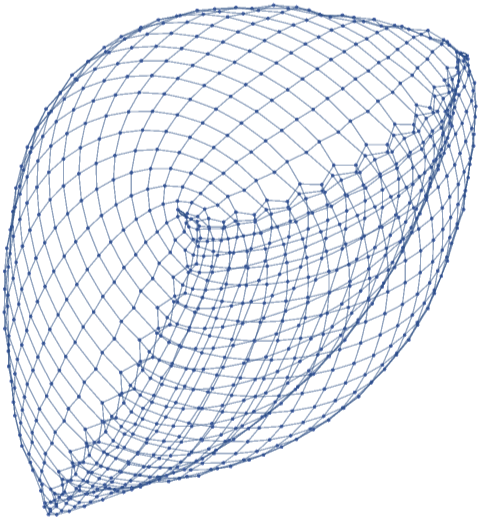
This Hypergraph, wm44586, appears to be a simple surface, but is far more complex than it initially seems. While this graph may not have a simple function to describe it, its structure stays (roughly) the same regardless of how many points are present.
wm44586 with 100, 200, and 500 updates:
Row[Table[GraphPlot3D[Rule@@@Flatten[ruleOfTwo/@ResourceFunction["WolframModel"][{{x,y,z},{u,y,v}}{{w,z,x},{z,w,u},{x,y,w}},{{0,0,0},{0,0,0}},t,"FinalState"],1],DirectedEdgesFalse],{t,{100,200,500}}]]
Out[]=


Because of this preserved structure between updates it is possible to try and identify features of the limiting surface (what the graph approaches as it keeps growing). To identify what this limiting surface is, one of the main tools is investigating curvature of the stable regions. Even though the graph is discrete, there are methods analogous to curvature on continuous graphs that can be used.
Identifying Stable Regions on the Hypergraph
Identifying Stable Regions on the Hypergraph
To try and find a way to only investigate regions that would resemble the limiting surface, I needed to find a way to see if individual nodes or regions stabilized (they had reached a state that they wouldn't further update from). By looking at the graph, I was able to see that individual nodes all appeared to stabilize to a state where their connections would stop updating (they had two edges pointing into them and two edges pointing out).
In[]:=
ruleOfTwo[listOfThree:{_,_,_}]:=Partition[listOfThree,2,1]
In[]:=
nodeTracker[graph_Graph,node_]:=Sort@Select[Rule@@@EdgeList[graph],MemberQ[#,node]&]
In[]:=
nodeTracker[rules_List,node_]:=Sort@Select[Rule@@@Flatten[ruleOfTwo/@rules,1],MemberQ[#,node]&]
In[]:=
nodeConnectionTracker[rules_List,node_]:=nodeTracker[#,node]&/@rules
The nodeTracker function takes in either a graph object or a list of rules, as well as the node that is to be investigated. It outputs a list of rules that represent all the connections a node has at one specific state of the graph. As the functions from the Wolfram Physics Project return the rules representing the state of wm44586 of the form {x,y,z}, the function ruleOfTwo is necessary to turn the rules list into the form {x, y}, {y, z} so that it can be changed to the type Rule. The function nodeConnectionTracker maps nodeTracker across a list of states to show the history of a specified node.
Using the nodeConnectionTracker function I was able to confirm that the nodes all appeared to reach some final state from which they wouldn't evolve further.
Tally[nodeConnectionTracker[ResourceFunction["WolframModel"][{{x,y,z},{u,y,v}}{{w,z,x},{z,w,u},{x,y,w}},{{1,1,1},{1,1,1}},1000,"StatesList"],500]]
Out[]=
{{{},499},{{457500,458500,500457,500499},1},{{457500,458500,500499,501500},66},{{457500,458500,500456,500499,500567,567500},1},{{457500,458500,500567,500568},433},{{457500,458500,500567,500568,566500},1}}
This is taking a tally of how many times each connection state appears in the list of connection states. The state that is counted 433 times is the stable state of the node.
While it does reach a final structure, there was one thing I did not expect. When looking through the lists of connections for many nodes after a node has reached what I consider to be its stable state, sometimes it will add one connection for a single iteration of the graph and then return to its stable state. As these briefly added connections only appear for one iteration of the graph, I considered a node to be stable once it first reached the state it would stay at for the great majority of its state history. To be able to quickly determine whether or not a point had evolved to its final state I looked at the number of iterations of the graph from when a node is introduced to when it first reaches its stabilized "state."
In[]:=
timeToStable[node_]:=timeToStable[node]=With[{x=ResourceFunction["WolframModel"][{{x,y,z},{u,y,v}}{{w,z,x},{z,w,u},{x,y,w}},{{1,1,1},{1,1,1}},Floor[1.5*node+20],"StatesList"]},FirstPosition[DeleteCases[nodeConnectionTracker[x,node],{}],Last[nodeConnectionTracker[x,node]]]]
In[]:=
ListLinePlot[Flatten[Table[timeToStable[n],{n,1,1000,1}]],AxesLabel{"Number of Node","Number of Iterations to Stabilize"}]
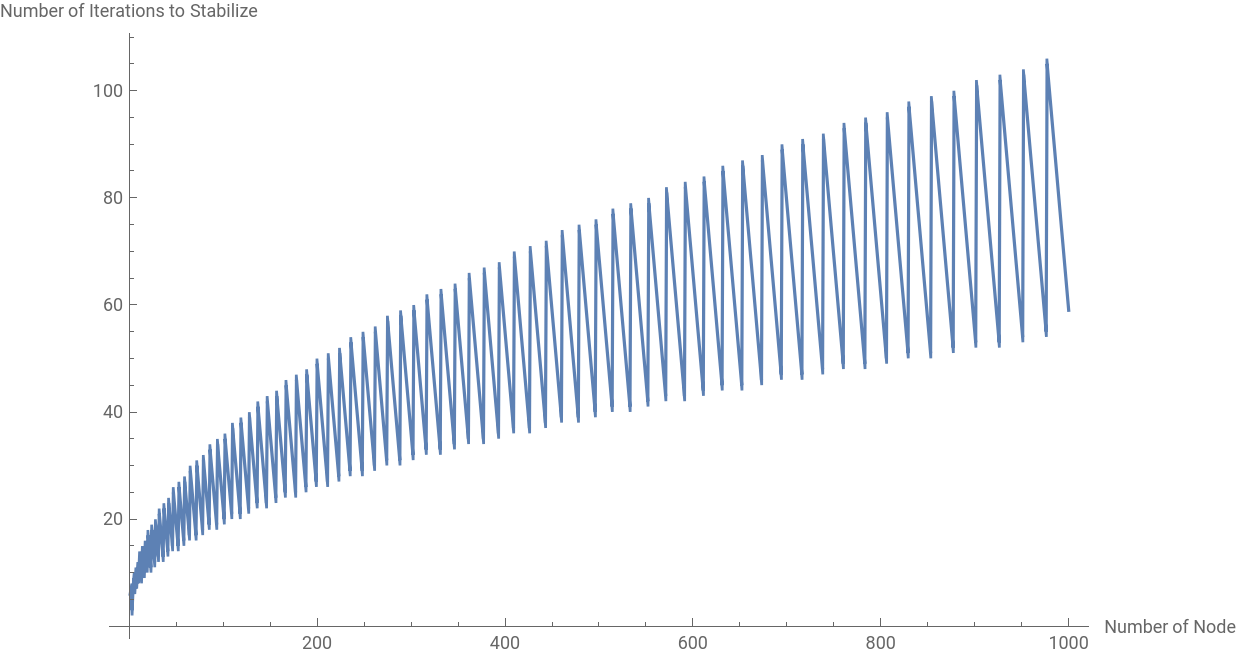
The function time to stable is used to find how long a node takes to stabilize. It is quite messy and makes some assumptions about the hypergraph, but for the case of 1000 iterations of the graph, it is able to measure how long any individual node takes to first reach its stable state from its introduction. Then using the timeToStable function a graph is constructed that shows how long it take a node to stabilize after it appears on the graph.
Once I had discovered the time it takes nodes to stabilize I can know if a region I am looking at is stabilized or not so that I can explore the curvature of the limiting surface.
Investigating Local Dimensionality and Curvature
Investigating Local Dimensionality and Curvature
On hypergraphs measurements analogous to curvature and dimensionality in continuous space can be taken. In his paper on the fundamental physics project, Stephen Wolfram goes into detail on the procedure for approximating these values. These volumes grow by moving to every node they can reach via the connections the previous node has. For the integer dimension cases the volume increases at a rate of where r is the radius of the ball and d is the dimension of the space the ball is growing in. I measured the dimensionality of the graph by measuring the volume of expanding balls on the surface and taking the log differences of the growing volumes. The formula for the effective dimensionality is if there is a change in the effective dimensionality as the radius increases, that suggests that there is curvature in the space (this correction factor is proportional to the . By running the function on stable nodes, I can observe I can observe the curvature and dimensionality of regions of the graph that resemble the limiting surface.
d
r
log()-log()
V
r+1
V
r
log(r+1)-log(r)
undirectedwm44586=Graph3D[Rule@@@Flatten[ruleOfTwo/@ResourceFunction["WolframModel"][{{x,y,z},{u,y,v}}{{w,z,x},{z,w,u},{x,y,w}},{{0,0,0},{0,0,0}},1000,"FinalState"],1],DirectedEdgesFalse];
In[]:=
localHyperGraphDimensionality[graph_Graph,node_,rangeoftest_]:=ResourceFunction["LogDifferences"][Mean/@Transpose[Values[ResourceFunction["GraphNeighborhoodVolumes"][graph,{node}]]]][[;;rangeoftest]]
The graph undirectedwm44586 is the wm44586, but with the directed edges removed so that the expanding ball is permitted to expand in every direction. The function localHyperGraphDimensionality takes in a graph and a node and the range around the node the the dimensionality is measured for.
Next I measured the effective dimensionality around a point which has been stabilized (determined by looking at the stabilization time graph) to assess the curvature.
Grid[Partition[Table[HighlightGraph[test1,Style[NeighborhoodGraph[undirectedwm44586,330,4*t],Thickness[0.005],Red]],{t,1,4}],2]]
Out[]=
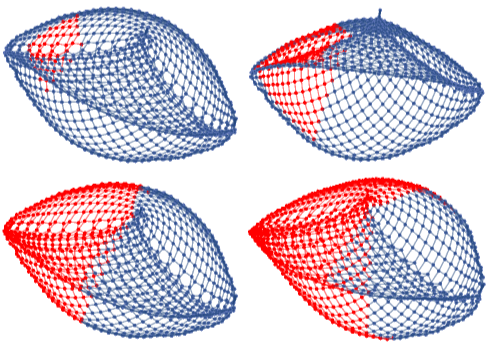
The visual at the top shows the expanding volume around the node up to a radius of 16 increasing the radius by 4 between each image. The graph at the bottom is generated using the localHyperGraphDimensionality function showing the effective dimension of the graph as the range increases.
The graph of the local effective dimension is almost perfectly flat from 5 to 11, suggesting that the region has no local curvature. Notable curvature first appears in the graph around a radius of 12. I thought that this sudden curvature was a result of the radius of the ball reaching the unstable nodes of the graph. I then took an average dimension of a set of stabilized nodes.
The graph is quite flat until the ranges reach the unstable nodes. The graph had to have some global curvature to have the shape it had. After much investigation of the effective dimension of various points on the graph, I was able to locate 3 regions that had quite high amounts of curvature. One of the regions was the starting point of the graph, another was the region where the new points were added, and the third was a region equidistant to the other two.
These figures display the neighborhoods with the high curvature and shows how the curvature goes to 0 as the range increases away from the high curvature areas.
Conclusion
Conclusion
In this project I found a way to determine when a node has stabilized and investigated the curvature of areas on the graph that resembled the limiting surface. I then identified the three sources of curvature on the graph. One of which coming from a stable region, and two coming from unstable regions.
Areas for Future Exploration
Areas for Future Exploration
One area to further explore would be to gain more information about the graph that shows the time it takes a node to reach its stable state (see if it could be defined as a function), and also try to
get a function to predict the evolution of each node. Another area to explore would be to try and find a continuous manifold that has the same structure as the hypergraph using information about its curvature and dimension.
get a function to predict the evolution of each node. Another area to explore would be to try and find a continuous manifold that has the same structure as the hypergraph using information about its curvature and dimension.
Keywords
Keywords
◼
Hypergraph
◼
Curvature