This essay investigates if there is a trend where planes tend to fly over greenspace near airports. We used flight data to generate the flight paths and satellite images, and then processed them to find if there was an observable pattern between the location of green spaces and flight paths. We observed that generally near airports, around 10-15% of total flight paths go over green spaces. Also, we found out that the direction of the runway and the location of the airport creates a significant impact on the final statistics. From our conclusion, we believe that increasing green spaces near airports would significantly reduce the pollution from planes.
Introduction
Introduction
Planes remain one of most polluting means of transportation by polluting the air and also causing noise pollution [1]. With a total of around 100,000 flights per day globally, the effects of pollution from aviation contributes significantly to climate change: the fossil fuel burned from airplanes not only releases emissions, but also has other non- effects due to nitrogen oxides [2]. Especially, if the airport is near the city, noise pollution becomes a glaring issue.
However, by flying over green spaces, planes could potentially reduce its detrimental effects. Though it is nearly impossible to make sure that planes go through green spaces throughout the whole route, it is possible to shift the flight paths so that they go through green spaces at least near airports. The detrimental effects could be complemented with the benefits of greenspace [3]. Green space offers a lot of benefits by improving air and water quality, regulating temperature, reducing water scarcity, and other health benefits [4]. By using data analysis and satellite imagery, we saw which airports are applying this helpful solution of making planes go through green spaces near airports.
CO
2
CO
2
However, by flying over green spaces, planes could potentially reduce its detrimental effects. Though it is nearly impossible to make sure that planes go through green spaces throughout the whole route, it is possible to shift the flight paths so that they go through green spaces at least near airports. The detrimental effects could be complemented with the benefits of greenspace [3]. Green space offers a lot of benefits by improving air and water quality, regulating temperature, reducing water scarcity, and other health benefits [4]. By using data analysis and satellite imagery, we saw which airports are applying this helpful solution of making planes go through green spaces near airports.
Generating the Satellite Image
Generating the Satellite Image
We imported the satellite image of a airport, and set the GeoRange to 15000 ft, a altitude that allows us to distinguish between green spaces and non-green spaces. However, a satellite image from 15000 ft is too zoomed in to see the flights maneuvering its direction. But, the problem of taking a satellite image from higher up is that the bad resolution of the image makes it difficult to identity green spaces and non-green spaces. Therefore, we collaged an image of nine different images taken from 15000 ft with different positions so we can create a large image with good resolution.
Generating coordinates of the nine sub-images of airport:
geoposition=PartitionTableFindGeoLocation[[1]][[1]]+0.086i,FindGeoLocation[[1]][[2]]+0.086j,{i,1,-1,-1},{j,-1,1}//Flatten,2;
Producing high resolution satellite image from a higher altitude:
In[]:=
airportimg1=ImageCollageTableGeoImageGeoPosition[geoposition[[i]]],GeoRangePadding->None,GeoRange,GeoServer"DigitalGlobe",{i,1,9}//Flatten;
Creating a function to get the satellite image with input as the name of the airport:
In[]:=
airportimage[airport2_Entity]:=Module{geoposition2,airportimg2},geoposition2=Partition[Table[{FindGeoLocation[airport2][[1]][[1]]+0.095i,FindGeoLocation[airport2][[1]][[2]]+0.095j},{i,1,-1,-1},{j,-1,1}]//Flatten,2];airportimg2=ImageCollageTableGeoImageGeoPosition[geoposition2[[i]]],GeoRangePadding->None,GeoRange,GeoServer"DigitalGlobe",{i,1,9}//Flatten;airportimg2
In[]:=
airportimage
Out[]=
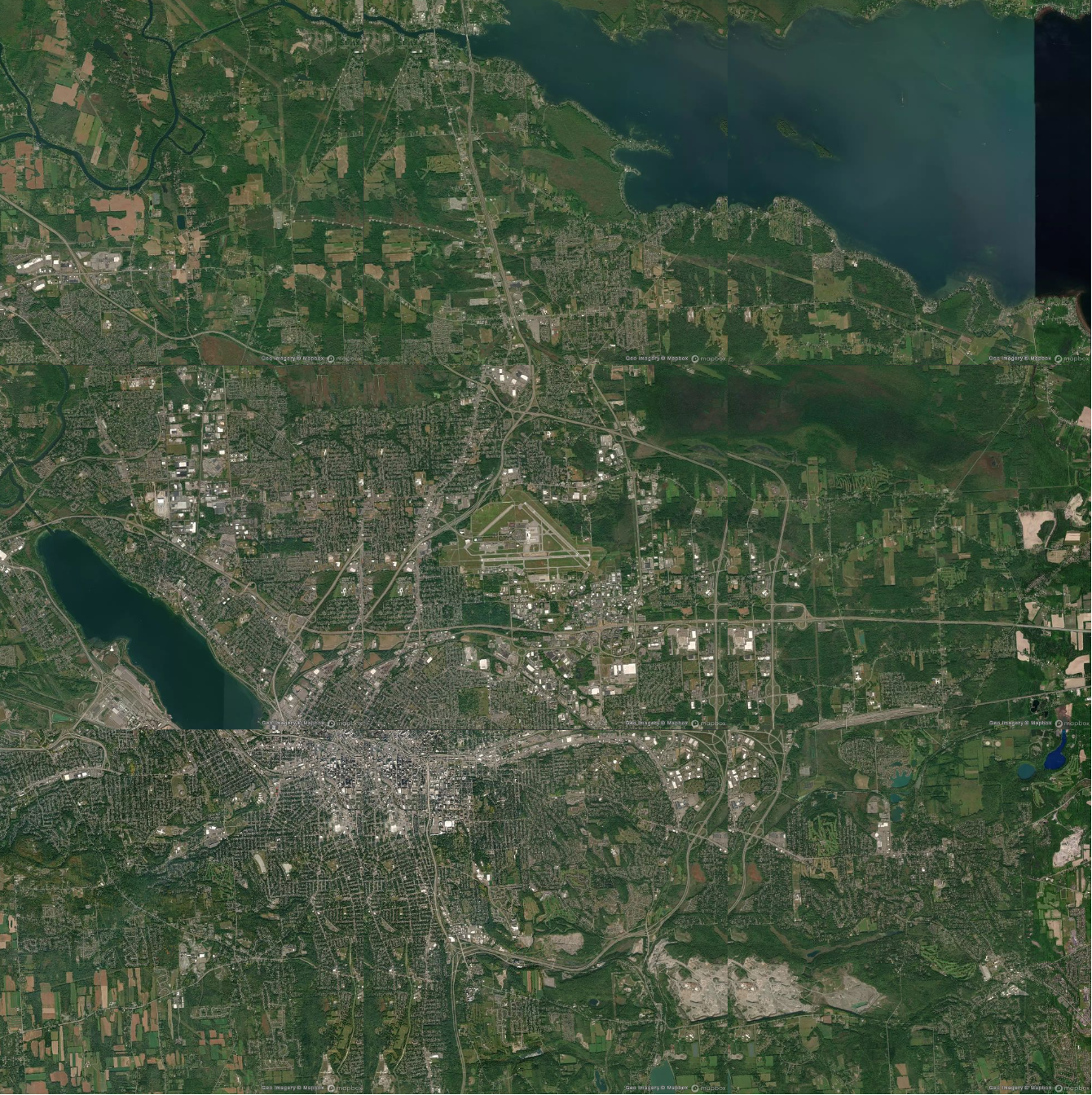
Processing the Satellite Image
Processing the Satellite Image
The goal in processing the satellite image is to distinguish between green spaces and non-green spaces. The darker green and lighter green in the satellite image represent the different tones of green which shows the area that is more "green," but we need to know if the space is either "green" or "not green". So we created a black and white image by identifying areas that contain green and color them black and identifying areas that don't contain green and color them white. Binarizing the image helps us process the image.
Module that produces binarized image which identifies green spaces as black and non-green spaces as white:
In[]:=
greenspaceimg[airportImg_Entity]:=Module[{dominantcolors,colordistance,binarized},dominantcolors=DominantColors[airportimage[airportImg]][[1]];colordistance=ColorDistance[airportimg,dominantcolors];binarized=Binarize[colordistance]]
In[]:=
greenspaceimg
Out[]=
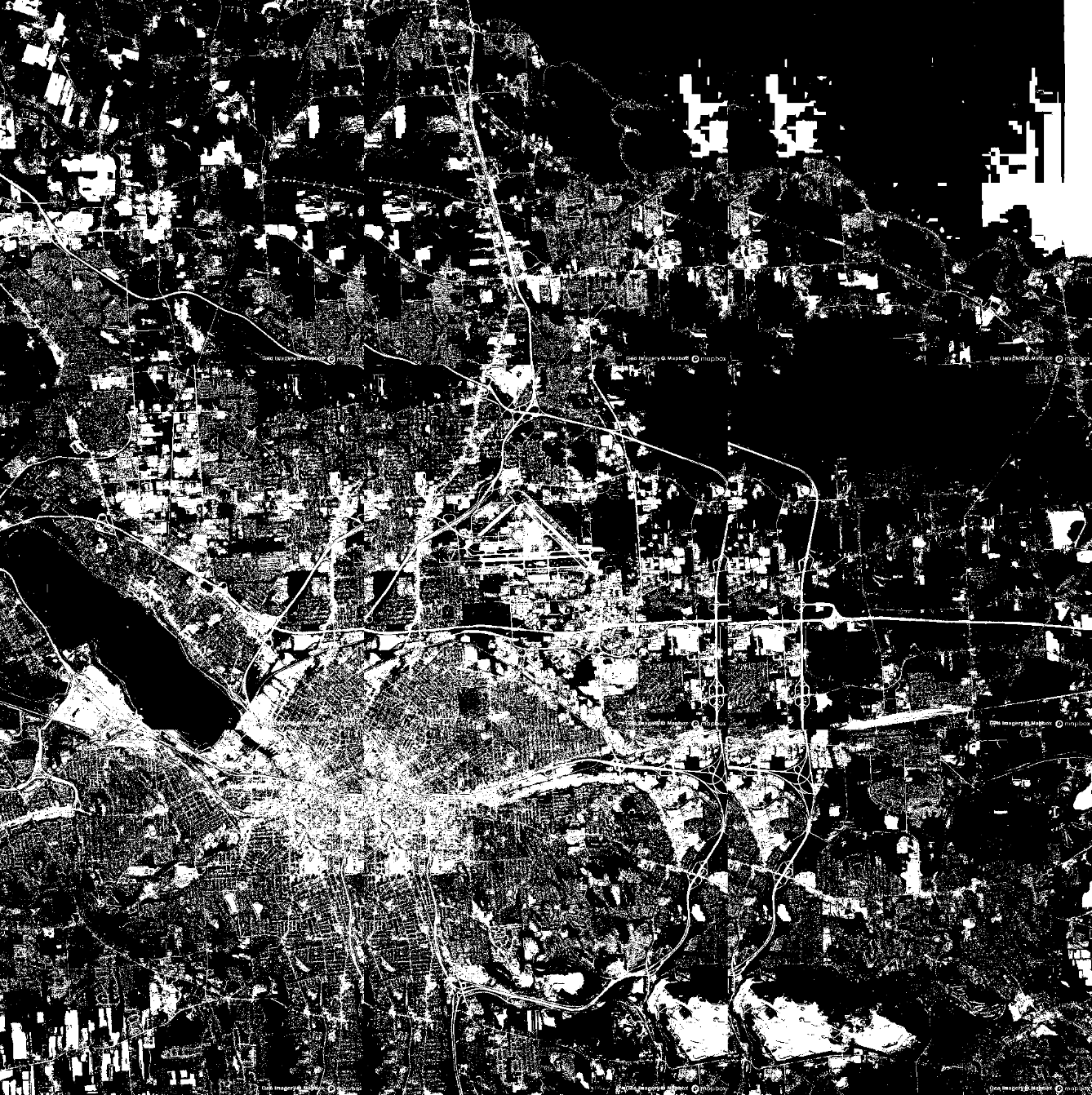
In the above image, there is a mix of black and white, and we see a lot of black and white specks mixed in the middle. Perhaps the smaller portions of the black specks represent someone's backyard or a large tree. Though the water is technically not a greenspace because blue is similar to green, so we were not able to differentiate water from green spaces. So water is depicted with a black color above.
Processing the Flight Data
Processing the Flight Data
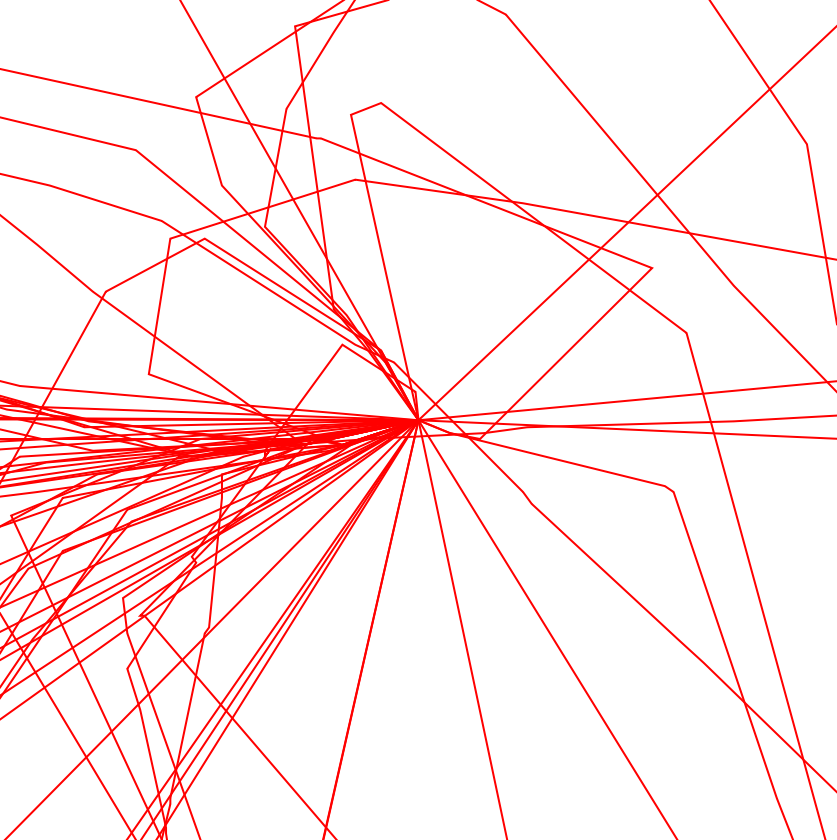
Now that we have a nice, processed satellite image that we can work with, the goal in this section is to process the flight data using FlightData function from the repository. We center the satellite image at the airport and then plot only the flight paths from
x15000 ft without any background. We set the GeoRange to be x15000 ft because we collaged the image and because out image became 3 times as bigger, from a satellite we have to increase the range by . Same as the function above, we input the airport and the data.
3
3
3
Module that produces flight paths:
In[]:=
flightdata[airport_Entity,date_DateObject]:=Module{flights,imgwithpaths},flights=FlightData[airport->All,"FlightPath",date];imgwithpaths=GeoGraphics{Red,Line/@flights},GeoRange,GeoCenterairport,GeoBackgroundNone;imgwithpaths
In[]:=
flightpaths=flightdata,DateObject[{2021,10,1}]
Out[]=
Composing image of flight path with the satellite image:
Analysis (Method 1)
Segmenting the Satellite Image
Segmenting the Satellite Image
The idea in this section is to segment the satellite image into parts so that we can process each tile of the image. Then, we can analyze the percent of greenspace in each tile and the density of the flight paths in that tile.
We partition the image into 16 tiles:
Now that we've generated a image that shows green spaces and non-green spaces, we analyze what percentage of each tile is green. We use a pie chart to represent our result.
Module that gives the percentages of green space in each tile:
Pie Chart representing percentage of greenspace for each tile of the image:
We can see the amount of white and black that is in each tile. The tiles with more percentage of black compared to white corresponds to those having a lot of greenspace.
Segmenting the Flight Paths
Segmenting the Flight Paths
Processing Flight Data
Processing Flight Data
Now that we have found the amount of green spaces for each tile, we apply the similar analysis to find the amount of flight paths in each tile. We start off with a image of the flight data from "Syracuse Airport" without a background. To make the processing easier, we change the red paths into black paths so that we can use ImageLevels function .
Generating a black and white image of flight paths:
Now that we have a black and white image of flights, we can divide the image into tiles and see how dense each tile is with flight paths. We generate pie charts to represent the amount of flight paths in each tile.
Module that gives pie charts to represent the density of flight paths for each tile:
Pie Chart representing percentage of flight paths for each tile of the image:
The density of flight paths in each tile is represented by red color in the above Pie charts.
Complete Function
Complete Function
So far, we've divided a image into tiles and found the amount of greenspace and the density of flights for each tile. Now, we represent the complete data nicely by creating a function which essentially is a compilation of the small bits we wrote before. However, this function will facilitate the process of generating results.
Function that gives result of analysis for Method 1:
Applying Method 1:
Observations and Remarks
Observations and Remarks
◼
The first element of the list is the partitioned image when we overlayed the satellite image and flight paths.
◼
The first pie chart represents the amount of greenspace, the black portion represents the green space.
◼
The second pie chart represents the density of the flights in each of the partitioned images.
◼
Associations between the first and second pie charts were made.
◼
By looking at the data, it is not clear to visualize the correlation between amount of greenspace and the density of flights.
◼
For tiles with more greenspace, there are few tiles with less flights compared to others.
Data from Other Airports
Data from Other Airports
Newark New Jersey Airport
Newark New Jersey Airport
Newark Airport is an example of a airport that is located in the city, which means that there is not much greenspace near the airport. Also, Newark is the 14th busiest airport in the US [5].
Analysis Newark Airport using Method 1:
Observations and Remarks
Observations and Remarks
◼
Flights from Newark has higher flight density than the Syracuse Airport.
◼
Data from Newark seems to have somewhat of a correlation as the tiles with most flights have a lot of greenspace. However, this could be a coincidence.
◼
Though Newark is in the city, there were quite a lot of green space.
Regional Wyoming Airport
Regional Wyoming Airport
We attempted to gather data from a Wyoming Airport, a airport that is considerably less busy than Newark, to see the contrast between a busy airport and non busy airport. Also, we expected the Wyoming Airport to have more green space.
Analyzing Wyoming Airport using Method 1:
Observations & Remarks
Observations & Remarks
◼
The density of flights for the Wyoming airport is considerably less than that for Newark.
◼
The amount of greenspace for the Wyoming airport seems quite similar to that of Newark.
◼
Because many tiles didn't have any planes, from a airport with nearly no flights, it is difficult to make a conclusion.
Analysis (Method 2)
Modifications and Improvements
Modifications and Improvements
After finding results using the first method of dividing the tiles and then finding the amount of greenspace and the amount of flight density, we found a better method that would produce more accurate results by taking the total length of the flight paths in the satellite image and then finding the percentage of the flights that actually go through greenspace. Further, we sought to disregard the smaller green spaces such as someone's backyard because planes cannot change the flight path to go through small patches of green spaces.
Dilating the Satellite Image
Dilating the Satellite Image
We recall the images of the flights and the satellite images of greenspaces:
Dilating the image:
We only select the large patches of green. In this case, we only considered the largest 30 white patches. The image below is cleaned up because we don’t have small specks of white.
Image Processing
Image Processing
Now that we've created a cleaned up version of the satellite image with only significant green spaces, we have to see what percent of total flights go through green spaces. In order to get the percentages of green spaces for flights, we first computed the percentage of total red flight paths in the image and then calculated the percentages of flight paths that actually go through green spaces. Later for each airport, we make a conclusion that for the planes near a certain airport, what percentage of planes go through green spaces.
We use the function SetAlphaChannel to differentiate between the red flight paths that go through the green spaces and those that don’t go through greenspaces and then we binarized it:
Depiction of all flight paths:
Statistical Calculations
Statistical Calculations
Calculating percentage of flight path that goes over green space
Calculating percentage of flight path that goes over green space
The difference between img2 and the blackandwhiteflightsimage is that the flights that go through greenspaces are deleted in img2. Therefore, we use ImageLevels, which shows us what percent of the image is covered with flight paths and find the difference, which gives us the percentage of flights that go through green space.
Percentage of flight paths in the image where the plane goes through non-green spaces:
8.13% of the image consists of the flight paths where the plane goes through non-green spaces.
Percentage of total flight paths in the image:
9.54% of the image consists of the total flight paths.
Therefore, to find the percentages of flights that actually "go through" greenspace, we find the percent of the flight paths that go through greenspace and divide it by the total percent of all flight paths (green and non-green spaces).
Percentage of paths that go through green spaces:
Near Syracuse Airport, 14.8% of the flight path is over green space.
Function that gives result of analysis for Method 2:
Testing Results for Different Airports
Testing Results for Different Airports
Conclusion
Conclusion
◼
The main conclusion from this research is that for many airports, airplanes do not tend to fly over green spaces. In fact, flights for most major airports on average go over 9.41% of green spaces near the airports.
◼
Because the surrounding areas for each airport is different, by finding a method that works for all airports, we are able to make a good statistical conclusion of the percent of airplanes that go through green spaces.
◼
It would be better for there to be more green space near airports, as the results show that many flights don’t go through green spaces.
Future Work
Future Work
◼
In the future, we plan to differentiate between green spaces and water for better analysis of our study.
Acknowledgements
Acknowledgements
I thank my mentor Adiba Shaikh and our group's main TA, Nika Chuzhoy, and my fellow mentor group members, Margaux, Sophie, and Stephen. I also thank our directors, Rory Foulger and Megan Davis for making this great camp happen, and James Choi who helped me along the way for support. Lastly, I thank Dr. Stephen Wolfram for giving me an interesting topic to work on.
References
References