Create a competitive cellular automaton game where players select initial conditions and find a rule to that make the most fair game.
Programming the game
Programming the game
Getting Player Input
Getting Player Input
To get the input for the initial conditions I wanted a grid that players could click on to change a cell from inactive to active and vice versa.
swap helper function:
In[]:=
swap//ClearAllswap[1]=0;swap[0]=1;
label helper function:
In[]:=
label//ClearAlllabel[1]=Black;label[0]=White;
This is the blueprint for the input that I used for the finalized game:
In[]:=
DynamicModule[{p1grid=ConstantArray[0,{7,7}]},Dynamic@Grid[Table[With[{xIndex=i,yIndex=j},Interpretation[Button[label[p1grid[[xIndex,yIndex]]],p1grid[[xIndex,yIndex]]//=swap,Appearance->"None"],p1grid[[xIndex,yIndex]]]],{i,7},{j,7}],Frame->True,Spacings->{0,0},ItemSize->0]]
Out[]=

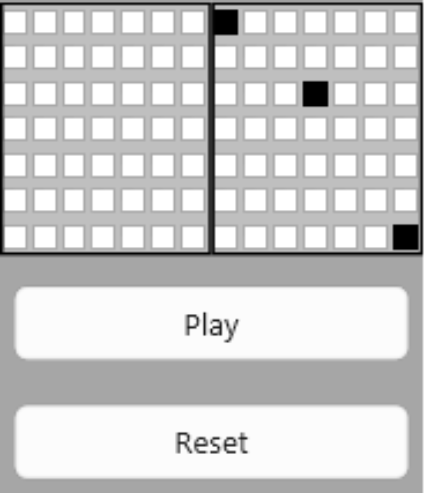
I doubled the input grid so there was one for each player and then I added two buttons, one to play the simulation and determine a winner, and another to reset back to getting player input and empty the input grids.
After finishing up each part of the input I put it all together to get the final game UI, The buttons swap between the two states for the automata. When the play button is clicked the inputs are replaced with animations showing the cellular automata and then showing the winner. Reset changes the display back to the inputs and resets the inputs back to an empty state.
The game UI with initial condition selectors and state buttons:
Running the Simulation
Running the Simulation
I created two functions that determine the quantity of each win condition for a given grid, number of steps, and rule.
Give the first empty grid besides the initial conditions:
SolutionLifetime[grid_,steps_Integer,rule_Integer]:=Block[{PosList(*=Null*),ca,gridSum},ca=CellularAutomaton[{rule,{2,1},{1,1}},ArrayPad[grid,7],{steps}];gridSum=Nest[MapApply[Plus],ca,2];PosList=Position[gridSum[[2;;]],0];If[Length[PosList]>0,PosList[[1,1]],steps+1]]
Add up all the grids to get the total active cells:
SolutionTotalCellCount[grid_,steps_Integer,rule_Integer]:=Block[{ca,gridSum,totalSum},ca=CellularAutomaton[{rule,{2,1},{1,1}},ArrayPad[grid,7],{steps}];gridSum=Nest[MapApply[Plus],ca,2];totalSum=Apply[Plus,gridSum]]
After creating both the functions to determine how far along an input gets, I had to create a function to compare them and then output which one is the winner, and I needed a function for both win conditions. After getting the winner I wanted to animate the cellular automata so that the players can watch their automata in action and then have it show the winner. I had trouble figuring out how to show the winner until after the animations finish and finally landed on the idea of adding the winner message as an image at the end of the animation, so the animation stops on that message after having been played.
Images used to tell the winner:
Out[]=

The final function that determines who the winner is and generates the animation for the lifetime win condition:
PlayLifetime//ClearAllPlayLifetime[p1grid_,p2grid_,rule_Integer,anim_]:=Block{p1Images,p2Images,p1Sol=SolutionLifetime[p1grid,400,rule],p2Sol=SolutionLifetime[p2grid,400,rule],loser=401,p1ca,p2ca,p1catoimg,p2catoimg},If[p1Sol!=p2Sol,If[p1Sol>p2Sol,loser=p2Sol,loser=p1Sol],p1Sol];Ifanim,p1ca=CellularAutomaton[{rule,{2,1},{1,1}},ArrayPad[p1grid,7],loser];p1catoimg=Map[ColorNegate,Map[Image,p1ca]];p1Images=Map[ImageResize[#,Scaled[14]]&,p1catoimg];p2ca=CellularAutomaton[{rule,{2,1},{1,1}},ArrayPad[p2grid,7],loser];p2catoimg=Map[ColorNegate,Map[Image,p2ca]];p2Images=Map[ImageResize[#,Scaled[14]]&,p2catoimg];If[p1Sol!=p2Sol,If[p1Sol>p2Sol,AppendTo[p1Images,solutionMessage[[1]]],AppendTo[p1Images,solutionMessage[[2]]]],AppendTo[p1Images,solutionMessage[[4]]]];If[p1Sol!=p2Sol,AppendTo[p2Images,solutionMessage[[3]]],AppendTo[p2Images,solutionMessage[[4]]]];RowWith{imagesP1=p1Images},Manipulatep1state,{p1state,imagesP1[[1]],"Player 1"},imagesP1,,,With{imagesP2=p2Images},Manipulatep2state,{p2state,imagesP2[[1]],"Player 2"},imagesP2,,;
The final function that determines who the winner is and generates the animation for the cell count win condition:
PlayCellCount//ClearAllPlayCellCount[p1grid_,p2grid_,rule_Integer,anim_]:=Block{p1Images,p2Images,p1Sol=SolutionTotalCellCount[p1grid,400,rule],p2Sol=SolutionTotalCellCount[p2grid,400,rule],p1ca,p2ca,p1catoimg,p2catoimg},Ifanim,p1ca=CellularAutomaton[{rule,{2,1},{1,1}},ArrayPad[p1grid,7],400];p1catoimg=Map[ColorNegate,Map[Image,p1ca]];p1Images=Map[ImageResize[#,Scaled[14]]&,p1catoimg];p2ca=CellularAutomaton[{rule,{2,1},{1,1}},ArrayPad[p2grid,7],400];p2catoimg=Map[ColorNegate,Map[Image,p2ca]];p2Images=Map[ImageResize[#,Scaled[14]]&,p2catoimg];If[p1Sol!=p2Sol,If[p1Sol>p2Sol,AppendTo[p1Images,solutionMessage[[1]]],AppendTo[p1Images,solutionMessage[[2]]]],AppendTo[p1Images,solutionMessage[[4]]]];If[p1Sol!=p2Sol,AppendTo[p2Images,solutionMessage[[3]]],AppendTo[p2Images,solutionMessage[[4]]]];RowWith{imagesP1=p1Images},Manipulatep1state,{p1state,imagesP1[[1]],"Player 1"},imagesP1,,,With{imagesP2=p2Images},Manipulatep2state,{p2state,imagesP2[[1]],"Player 2"},imagesP2,,;
Finding a “Fit” Cellular Automata
Finding a “Fit” Cellular Automata
Defining “Fitness”
Defining “Fitness”
To make the game more fair I needed to come up with a cellular automata that is the most fit for the game, what I eventually decided was to quantify the complexity of an input and to then find a cellular automata where the more complex an input is the larger the generated win condition is.
Complexity of Input
Complexity of Input
To determine the complexity of a input I used two measures, the number of cells filled and the number of basic shapes that can be found within the input. For the scale I had it go from 0-1 where 0 is the least complex and 1 is the most complex
For the number of cells filled I used a quadratic function that had the complexity equal to one when about half the squares are filled and to drop off when the input is more of one color than the other
Function used to determine complexity based on cell count:
For the number of simple shapes I first created my own dataset of basic shapes that includes lines and squares/circles. There are two datasets, one where it finds white shapes on a black background and one where it finds black shapes on a white background.
Database of shapes:
Example Shapes From Database:
After creating the database of shapes I created a function that matches each to a given input and returns the number of shapes that were found
Determines which dataset to use based on which color has a majority and matches that dataset to the input to count the basic shapes:
Once I had a way to calculate the number of shapes in an input I did 100,000 trials of a random input grid and got the counts for each.
The generation I used:
Mean and Standard Deviation:
Histogram of the data:
I used this data to create a bell curve of the probability of shape counts which I then modified into a function to get the complexity by inverting it and scaling it from 0 to 1.
Function to generate discrete plot of the shape count to complexity function I used from 0 to 30:
Function used for game:
After getting both parts I multiplied the results together to get the final complexity for an input.
Multiply complexities together:
Win Condition
Win Condition
For the wagering game I had come up with two possible win conditions, the lifetime of a cellular automata and the total active cell count of the simulation.
I found the lifetime by searching for the first empty frame (a frame that has no active cells) that is not the initial input for the cellular automata.
Find the lifetime of a given initial input, it checks within the given steps, if no empty frame is found it returns steps+1 (Defined in Running the Simulation):
I found the cell count by just adding all the lines of each grid together and then adding those together, this works because the cellular automata is stored as a grid of 1s and 0s, with 1s being active and 0s being inactive, Thus it finds the total number of active cells.
Find the total cell count of a given initial input (Defined in Running the Simulation):
I had considered one other possible win condition which would be the cell count at the final step, but this felt much more arbitrary than the other win conditions so I did no further testing with it.
Simulating Random Inputs
Simulating Random Inputs
Once I decide on the complexity and win conditions I ran simulations to determine the fitness of each cellular automaton.
I at first decided to simulate 2000 random grids for each automaton rule of the 1024 given numbers by Wolfram. The first time I did this I had messed up the function for dealing with the total cell count win condition and had to redo it, which I then messed up again. I ended up having 2000 random grids for each automaton for the lifetime win condition, and only 600 grids for each automaton for the cell count win condition because I had to reduce the number of trials due to time constraints (running the 2000 random girds per automata takes about 10-12 hours).
For the ideal line for the lifetime win condition I had it be a line that runs through (0.2,0) and (1,400), this is because the least complex grids are around 0.2 and the most complex grids are around 1, so this line approximated the most fit spread for a cellular automaton.
For the ideal line for the cell count win condition I had it be a line that runs through (0.2,Minimum Cell Count) and (1, Maximum Cell Count), this will cause the least complex grids to generate less total cells than the more complex grids which is ideal for the game.
For each automata I found three measures of distance between the ideal line and the actual fit line of the data, EuclideanDistance, CosineDistance, and CorrelationDistance. For the rerunning of the tests I dropped the Correlation Distance because it was not useful for finding a fit cellular automaton.
Code to simulate each automaton (DO NOT RUN: Long Evaluation):
Deciding the most Fit Cellular Automaton
Deciding the most Fit Cellular Automaton
After collecting the dataset on the fitness of each cellular automaton I sorted the data to find the ones with the top three least distances for the two distance categories.
Simulation Results:
Minimum Three of the categories:
After finding the top three fittest of each category I made graphs of each one and picked the one that looked the most fit
Top 3 Euclidean Distance for Lifetime:
Top 3 Cosine Distance for Lifetime:
Interestingly the graphs with a low Cosine Difference all had simulations that ended way earlier than the given amount of steps, causing the ideal line to either hardly show or not show at all, 560 has a lot of outliers that skew the fit line to not show.
Top 3 Euclidean Distance for Cell Count:
Top 3 Cosine Distance for Cell Count:
None of the automaton look to be very fitting, but one needs to be used for the game, so I have decided to go with 175 with the Lifetime win condition.
Rule plot of chosen automata:
Play the Game
Play the Game
Code for the game :
Concluding Remarks
Concluding Remarks
I’m happy with the way the game UI a looks and plays but I wish I had more time/more computer power to run more simulations on cellular automaton and find a more fitting cellular automata.
Acknowledgements
Acknowledgements
Thank you to Stephen Wolfram for suggesting the idea for this project and thank you to my mentor Faizon Zaman for helping me with all my code.
AI Disclosure
AI Disclosure
No generative AI tools were used in this project.
CITE THIS NOTEBOOK
CITE THIS NOTEBOOK
Cellular Automaton Wagering
by James Nee
Wolfram Community, STAFF PICKS, July 16, 2026
https://community.wolfram.com/groups/-/m/t/3762386
by James Nee
Wolfram Community, STAFF PICKS, July 16, 2026
https://community.wolfram.com/groups/-/m/t/3762386