Automatic generation of FFT signal-flow graphs
I have recently been learning a bit about Mathematica evaluation and operators like HoldForm ...
I wanted to find a fun idea to make use of this new knowledge.
So, why not try generating FFT signal-flow graphs since we will need to parse an expression and prevent Mathematica from evaluating its parts.
I wanted to find a fun idea to make use of this new knowledge.
So, why not try generating FFT signal-flow graphs since we will need to parse an expression and prevent Mathematica from evaluating its parts.
Graph construction
Graph construction
It is done by the mkg function. The only difficulty is that an expression may contain several copies of the same sub-expression. They should not be taken into account several times in the graph. So, we must track so sub-expressions. It is done with the argument seen of the function.
Also, since I am focusing on FFT, I'll parse only linear expressions and with the simplifying assumption that in factor a F, a is a constant and F is the expression.
It is hardcoded in the parser so if you write an expression in a different way it will not work.
Let's try the graph construction on a simple example to begin:
Also, since I am focusing on FFT, I'll parse only linear expressions and with the simplifying assumption that in factor a F, a is a constant and F is the expression.
It is hardcoded in the parser so if you write an expression in a different way it will not work.
Let's try the graph construction on a simple example to begin:
In[]:=
eq={HoldForm[o=2(x+z+x)+3(x+(z+3y+7x)+x)],HoldForm[p=4x+z]};
In[]:=
g=Graph[mkg[eq],VertexLabels"Name",EdgeLabels"EdgeTag",PlotTheme"Web"]
Out[]=
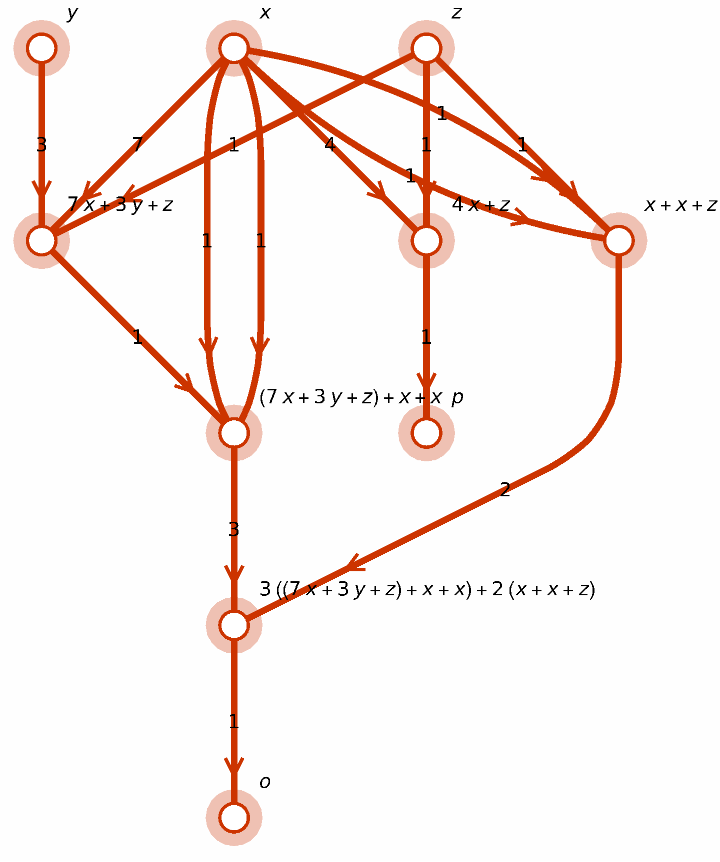
Now, to check that the graph is correct, we may want to rebuild the expression from the graph. Since we are just focusing on the symbolic expression for this check, the structure do not need to be preserved and Mathematica can evaluate and simplify the expression while it is being built.
In[]:=
rebuildExpr[g]
Out[]=
HoldForm[=31x+9y+5z,=4x+z]
n
o
n
p
It is the original expression. I am renaming the output variable by adding a n exponent.
It will be used later when we use it to check the FFT graph. It will allow us to automatically compare the rebuilt expression with the original one.
It will be used later when we use it to check the FFT graph. It will allow us to automatically compare the rebuilt expression with the original one.
The FFT algorithm
The FFT algorithm
Now, we need to build the expression for the FFT. But, we don’t want Mathematica to simplify the expression. We’d like to keep as much of the structure of the expression so that the graph is really reflecting the multiplies and adds we are using in the algorithm.
But we do want some simplification : The product of exponentials must be replaced by an exponential. The parser we built before is only working with linear expressions.
But we do want some simplification : The product of exponentials must be replaced by an exponential. The parser we built before is only working with linear expressions.
We are replacing the Plus operator with a myplus while we build the expression. And at the end, when the expression is in a HoldForm we replace back myplus with Plus.
Let' s focus on a FFT of length 8
In[]:=
n=8;
In[]:=
expr=fft[n]
Out[]=
=((+)+(+))+((+)+(+)),=((+)+(+))+((+)+(+)),=((+)-(+))+((+)-(+)),=((+)-(+))+((+)-(+)),=(-)+(-)+w(-)+(-),=(-)+(-)+w(-)+(-),=(-)-(-)+w(-)-(-),=(-)-(-)+w(-)-(-)
S
0
s
0
s
4
s
2
s
6
s
1
s
5
s
3
s
7
S
4
s
0
s
4
s
2
s
6
4
w
s
1
s
5
s
3
s
7
S
2
s
0
s
4
s
2
s
6
2
w
s
1
s
5
s
3
s
7
S
6
s
0
s
4
s
2
s
6
6
w
s
1
s
5
s
3
s
7
S
1
s
0
s
4
2
w
s
2
s
6
s
1
s
5
3
w
s
3
s
7
S
5
s
0
s
4
2
w
s
2
s
6
4
w
s
1
s
5
3
w
s
3
s
7
S
3
s
0
s
4
2
w
s
2
s
6
2
w
s
1
s
5
3
w
s
3
s
7
S
7
s
0
s
4
2
w
s
2
s
6
6
w
s
1
s
5
3
w
s
3
s
7
s is the input signal and S the FFT . As you can see the S is not in order.The output of the algorithm are bit-reversed. So for instance, the second output is S4. The 4th value of the FFT.
w is representing the unit root for this FFT length.
w is representing the unit root for this FFT length.
To display the graph, we don’t want to display 1 on edges. And we only want to display input and output variables on the vertices. We package all of the styling in a new function:
In[]:=
g=displayGraph[n,expr]
Out[]=
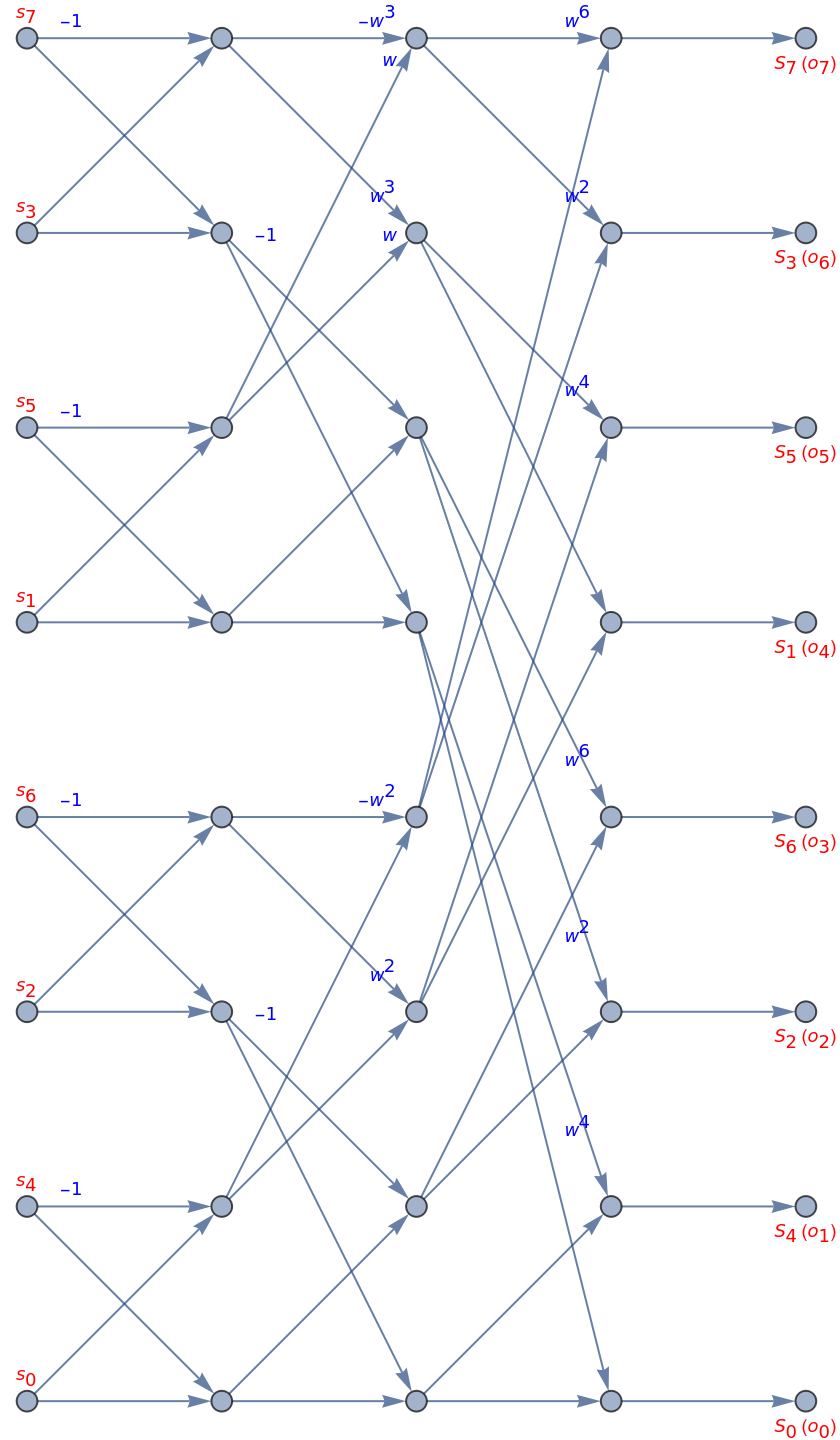
If you look carefully at this graph, you’ll remark that it is not like the graphs you can find in the literature.
Mathematica is displaying the input in the wrong order : I’d like them to be displayed in order from s0 , s1, s2 ...
I have not been able to do it. If someone has an idea ? I have tested with VertexCoordinates or the Ordering setting in GraphLayout.
The output of the graph is showing the FFT samples (S) and the outputs of the algorithm (o). So we see that the ordered output (o0,o1 ...) is corresponding to a bit reversed FFT.
Mathematica is displaying the input in the wrong order : I’d like them to be displayed in order from s0 , s1, s2 ...
I have not been able to do it. If someone has an idea ? I have tested with VertexCoordinates or the Ordering setting in GraphLayout.
The output of the graph is showing the FFT samples (S) and the outputs of the algorithm (o). So we see that the ordered output (o0,o1 ...) is corresponding to a bit reversed FFT.
How do we check it is correct ?
Checking it is correct
Checking it is correct
We have function to regenerate the expressions from the graph. We’d like to compare the reference formula for a FFT to the expressions regenerated from the graph. It will check that using our Cooley-Tukey algorithm -> graph -> expression is equivalent to the original formula which is a nice test to do.
In[]:=
check[n,g]
Out[]=
{0,0,0,0,0,0,0,0}
So, there are no errors !
Interactivity
Interactivity
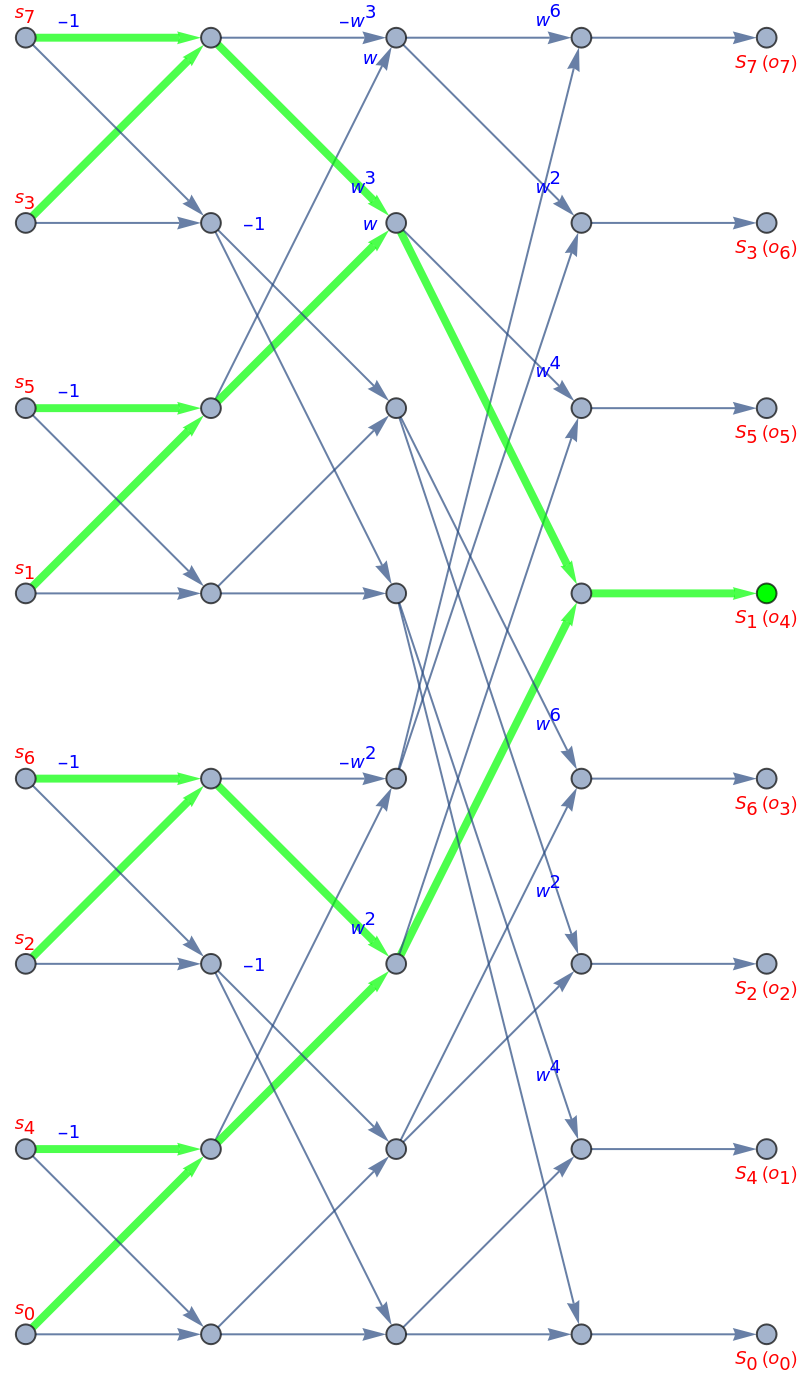
Let' s add some interactivity . I’d like to be able to click on a button for an output and see how this output is dependent on all of the inputs by highlighting some edges in the graph !
In[]:=
With[{sig=HoldForm/@Table[Subscript[s,i],{i,0,n-1}],out=bitReverse[n,Table[SubscriptBox[o,i],{i,0,n-1}]]},With[{edges=mkg[expr]},With[{sortedInVertices=Join[sig,Complement[DeleteDuplicates[(edges/.DirectedEdge[a_,_,_]a)],sig]]},gi=Graph[sortedInVertices,edges,EdgeLabels{_?isTwiddle->Placed["EdgeTag",{0.9,{1.0,-0.1}}],_?isMinusOne->Placed["EdgeTag",{0.1,{-0.6,-0.1}}]},GraphLayout{"VertexLayout"{"LayeredDigraphEmbedding","Rotation"90Degree}},EdgeStyleDirective[Arrowheads[Medium]],EdgeLabelStyleDirective[Blue,9],VertexLabelStyleDirective[Red,9],ImageSizeLarge];]];Do[AnnotationValue[{gi,v},VertexLabels]=setLabel[gi,sig,v],{v,VertexList[gi]}];Dynamic[gi]]
Out[]=
gi
Now let' s create an animation by selecting all the output samples. It is nearly the same as the previous functions but packaged differently in an anim function.
In[]:=
anim[1,n,mkg[expr]]
Out[]=
Now we can create an animation:
An export it as a gif:
Let' s finish with a length 16 FFT:
Initializations
Initializations
No attempts were made to clean this code or make it elegant. I am doing those experiments for fun and I don’t want to spend too much time on them.
Following function is creating a graph from a list of expressions. Each expression being contained in a HoldForm. Only applies to linear expressions and with some constraints on the products (constant * expression).
Get the inputs and outputs vertex of a given vertex in the graph.
Rebuild a list of expressions from a graph using a depth first scan.
FFT algorithm. Cooley-Tukey for power of 2 FFT length and using a radix-2 decomposition. The output will be in bit-reversed order.
myplus is used to disable Mathematica simplification of the additions while keeping other rules (for products).
myplus is used to disable Mathematica simplification of the additions while keeping other rules (for products).
Bit reversing function. It will be needed to compare with a standard implementation of the FFT where the output is in the right order.
FFT algorithm. It is using the previous function to connect each expression to an output variable.
Functions used to format the graph.
Function to convert the FFT expressions into a graph .
Check the FFT reference with the formula regenerated from the graph.
Utility functions to generate buttons in the graph and highlight some paths.
Animation :