Introduction
Introduction
Abstract
Abstract
A viewshed is an area that is visible from a specific location. Viewshed analyses use the elevation value of each cell of the digital elevation model (DEM) to determine visibility to or from a particular cell. By simulating a light on the 3D geo-elevation plot of a region, we can calculate what parts of the region is visible/hidden, and visualize results by plotting important geographic entities on a map.
Motivation
Motivation
When I went to New York a couple years back, I vividly remember running up to the observation deck of the Empire State Building and being awed by the vast skyline. My dad pointed out some prominent buildings to me, but the vast majority were unrecognizable or hidden by taller buildings in front. Going into this camp, I wanted to make something that I could use in real-life, and I finished camp with a project that can plot prominent geographic entities on any specified region and categorize them as either "visible" or "hidden". Now, if I were to teleport to the top floor of the Empire State Building, I can use this my program to point out hundreds of times more buildings than my dad did a few years ago - take that, dad!
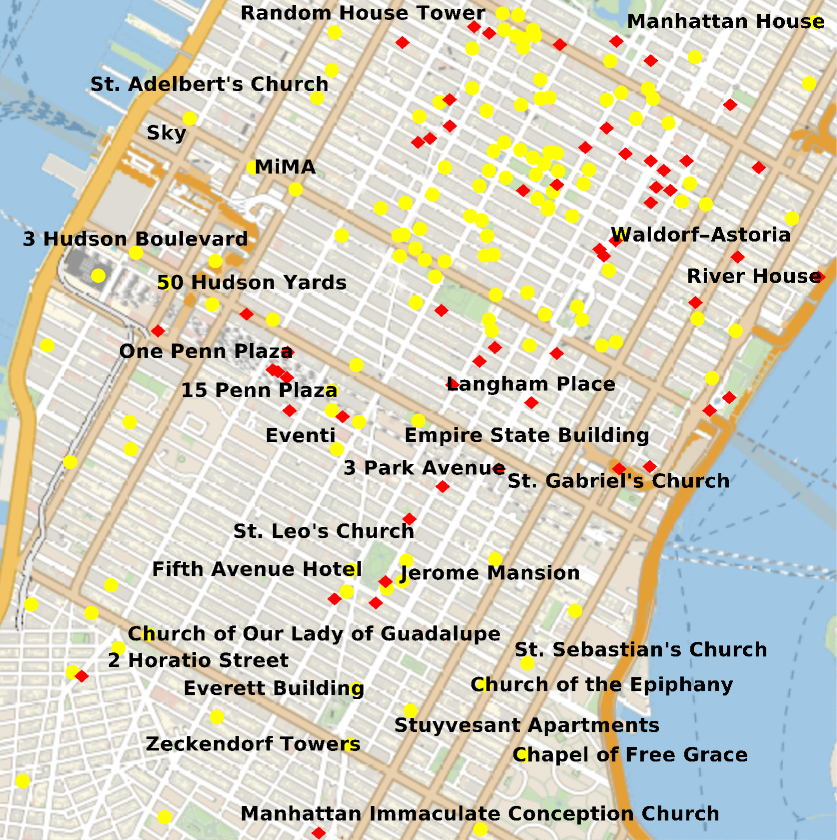
Visible and Hidden Buildings from the Empire State Building:
Out[]=


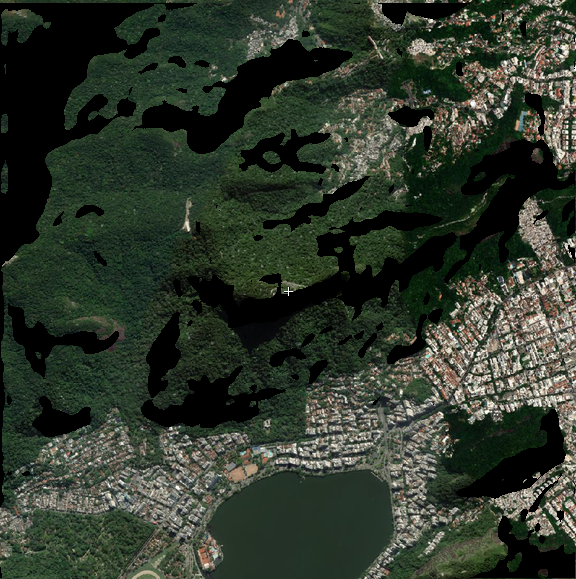
Viewshed from the top of the Christ the Redeemer statue (blacked out areas = hidden):
Plot significant entities in a region (run initialization cells first):
SetOptions[WolframAlpha,TimeConstraint60];makeGUI[]
Generate Binarized Vision Plot
Generate Binarized Vision Plot
My original plan was to calculate the slopes between the elevation of any two points, but it required lots of computation and was not as elegant of a solution as I liked. Instead, I use the built-in Lighting option on a 3D geo-elevation plot, which shines a light from a specific location and elevation. By binarizing the resulting plot, I can conclude that any black pixel in the binarized image is hidden and any white pixel is visible. I also give the option of specifying binarizeThreshold - a value of zero means you're as blind as a bat, and a value of one means you're basically Superman.
I find the bottom-left and top-right coordinates for the region I’m interested in:
In[]:=
bottomLeft:=GeoDestination[GeoDestination[GeoPosition[location["Coordinates"]],{range,180}],{range,270}];topRight:=GeoDestination[GeoDestination[GeoPosition[location["Coordinates"]],{range,0}],{range,90}];
I get the elevation data for the region I just calculated:
Side note: I spent a day trying to figure out why my buildings were being plotted on the river - I realized I just needed to reverse the geo-elevation data.
Side note: I spent a day trying to figure out why my buildings were being plotted on the river - I realized I just needed to reverse the geo-elevation data.
In[]:=
elevationData:=Reverse[GeoElevationData[{bottomLeft,topRight},GeoRangerange,GeoRangePaddingNone,GeoArraySize{elevationPlotSize,elevationPlotSize},GeoProjection->"Mercator",UnitSystem"Metric",GeoZoomLevel12]];
I plot the elevation data:
elevationPlot:=ListPlot3D[elevationData,PlotRangePaddingNone,ImageSizeLarge];

I plot the elevation data with a light shining in the center::
elevationPlotLight:=ListPlot3D[elevationData,Lighting{{"Point",White,{elevationPlotSize/2,elevationPlotSize/2,elevation}}},ImageSizeLarge,PlotRangePaddingNone,MeshNone,AxesFalse];

I get a bird's-eye view from the plot above:
elevationPlotLight:=ListPlot3D[elevationData,Lighting{{"Point",White,{elevationPlotSize/2,elevationPlotSize/2,elevation}}},ViewPointTop,ViewProjection"Orthographic",ImageSizeLarge,PlotRangePaddingNone,MeshNone,AxesFalse];

I binarize what the elevation plot looks like from a bird's-eye view:
Full binarizedVisionPlot Code
Generating Viewshed
Generating Viewshed
I take the binarized plot we just generated, make every white pixel transparent, and overlay it on a satellite image of the region. This produces a viewshed of the region with hidden areas blacked out.
Generate satellite image above a region:
Make white pixels in the binarized plot transparent:
Overlay the satellite image and transparent plot, and mark the center:
Viewshed from the top of the Christ the Redeemer statue (blacked out areas = hidden):
Full overlayBinarizedAndGeoPlots Code:
Find Overlap between Vision Plot and Entities
Find Overlap between Vision Plot and Entities
I can find all geographic entities in the region and plot them on the binarized plot. However, the entities have units of latitude and longitude, while I need their corresponding row and column on the binarized plot. So, I had to pull out my Algebra I textbook and plug each latitude/longitude into a linear equation to find their corresponding row and column index.
Given the slope and intercept, I plug the latitude into y=mx+b to find its row on the binarized plot:
Same thing but with longitude and columns:
Using the two functions above, check if the pixel of the entity on the binarized plot is white or black, and respectively, visible or hidden:
I calculate the latitude/longitude slope and intercept by using the two known points: the bottom-left and top-right corners of the region:
I find all geographic entities in the region and sort them into two lists: visibleEntities or hiddenEntities:
Full visibleAndHiddenEntitiesList Code:
Plot Entities on a Map
Plot Entities on a Map
Now that I have each entity categorized as visible or hidden, I can plot and label them on a map of the region. I created two functions: one using DynamicGeoGraphics and one using GeoListPlot. DynamicGeoGraphics lets you pan the map around, but GeoListPlot has labels. I chose to use GeoListPlot.
GeoListPlot:
DynamicGeoGraphics:
Visible and Hidden Buildings from the Empire State Building:
GUI Creation
GUI Creation
Since there are a lot of input variables for my program, I decided to make a GUI.
I initialize a list of locations that I found to be good for showcasing:
I initialize a list of entity types (although "Building" works best by far):
I create text boxes and drop-down menus to allow the user to customize input variables:
To run the program, the user clicks a button that takes the values they chose and calls plotVisibleEntitiesListPlot, which plots visible and hidden entities on a map:
Full makeGUI Code:
Conclusion
Conclusion
◼
Through this project, I created a program that takes a location and elevation and successfully generates a viewshed of the region and plots the visible/hidden entities in the region.
◼
Small Improvements
◼
Although my program is accurate at smaller regions, when giving a large range and high elevation, my program runs under the assumption that the Earth is flat - which, contrary to popular belief, is not true. I hope to fix this by using GeoVisibleRegion[], which takes into account the curvature of the Earth.
◼
When inputting the elevation, units are not specified. I would like to make elevation have units of "meters".
◼
My Next Step
◼
Create a program that takes your location, elevation, and a picture of your surroundings, and labels significant entities in that picture.
◼
I expect to import images from the Wolfram database and train my program to recognize those images using machine learning.
◼
I had this in mind since before camp, and I am excited to continue my project and incorporate machine learning into my project, after camp finishes.
◼
Acknowledgements
◼
I'd like to thank my mentor, Stephen Schroeder, for guiding me through this entire process and patiently answering all my questions. I am also very thankful for all the staff and fellow campers that made this camp a great experience!
Keywords
Keywords
◼
Viewshed
◼
Geographic Information System
◼
Geo-elevation
◼
GUI
◼
Lighting