Introduction
Introduction
The following document will be the first one on a series to try to replicate the model used by GLEAMviz , reducing the scope to the 48 contiguous US states (US). The focus will be in this region as data for the US is more readily available than in other geographies.
This model uses socio-demographic and mobility data to simulate the spread of epidemics across a given geography. We’ll explore the spatio-temporal pattern of an epidemic spreading by seeding the starting locus at the different main points of entry.
This model
Model
Model
The model is composed of three different data layers: the population layer, the mobility layer and the disease layer. To build these layers, let’s proceed to capture the available data from the different sources.
The population layer
The population layer
Our population layer will be built upon the University of Columbia’s “Gridded Population of the World” dataset. One of the available datasets is the “population count v4.11”. We’ll download the population data for 2020 at a 30 arc minute resolution (approximately 55km x 55 km). https://sedac.ciesin.columbia.edu/data/set/gpw-v4-population-count-rev11/data-download. The population layer will be constituted by a voronoi-like tesellation of the US around the main airports across the country, which we’ll be worked on in the next section. Each subpopulation will be assigned to a cell associated to the closest airport.
Let’s set up a structure to store our work as we move along the project. This structure will be made available in either github or the wolfram data repository. Link will be provided later.
data=AssociationMap[<||>&,{"sources","rawData","temp","results"}]
Out[]=
sources,rawData,temp,results
In[]:=
data["sources","populationData"]=Hyperlink["https://sedac.ciesin.columbia.edu/data/set/gpw-v4-population-count-rev11/data-download"];
Data has been saved in the local drive. We’ll proceed to read the data.
In[]:=
data["sources","populationFiles"]=FileNames["*min.asc",FileNameJoin[{NotebookDirectory[],"datasets","population","data"}]];
In[]:=
data["rawData","population"]=Import[First@data["sources","populationFiles"],"Data"];
Let’s review the data structure of the read file. We can observe that it is a matrix of 720 columns and 360 rows, each cell representing a 0.5x0.5 angular degree sector.
data["rawData","population"][[;;6]]
Out[]=
{ncols 720,nrows 360,xllcorner -180,yllcorner -90,cellsize 0.5,NODATA_value -9999}
Processing the data.
In[]:=
data["temp","population"]=Association[];data["temp","population","lines"]=StringReplace[#,{" "",","e"" 10^","-9999""0."}]&/@data["rawData","population"][[7;;]];data["temp","population","numbers"]=ToExpression@StringSplit[#,","]&/@data["temp","population","lines"];
MatrixPlot[data["temp","population","numbers"][[50;;150,;;300]],AspectRatio1/GoldenRatio,ImageSizeLarge]
Out[]=
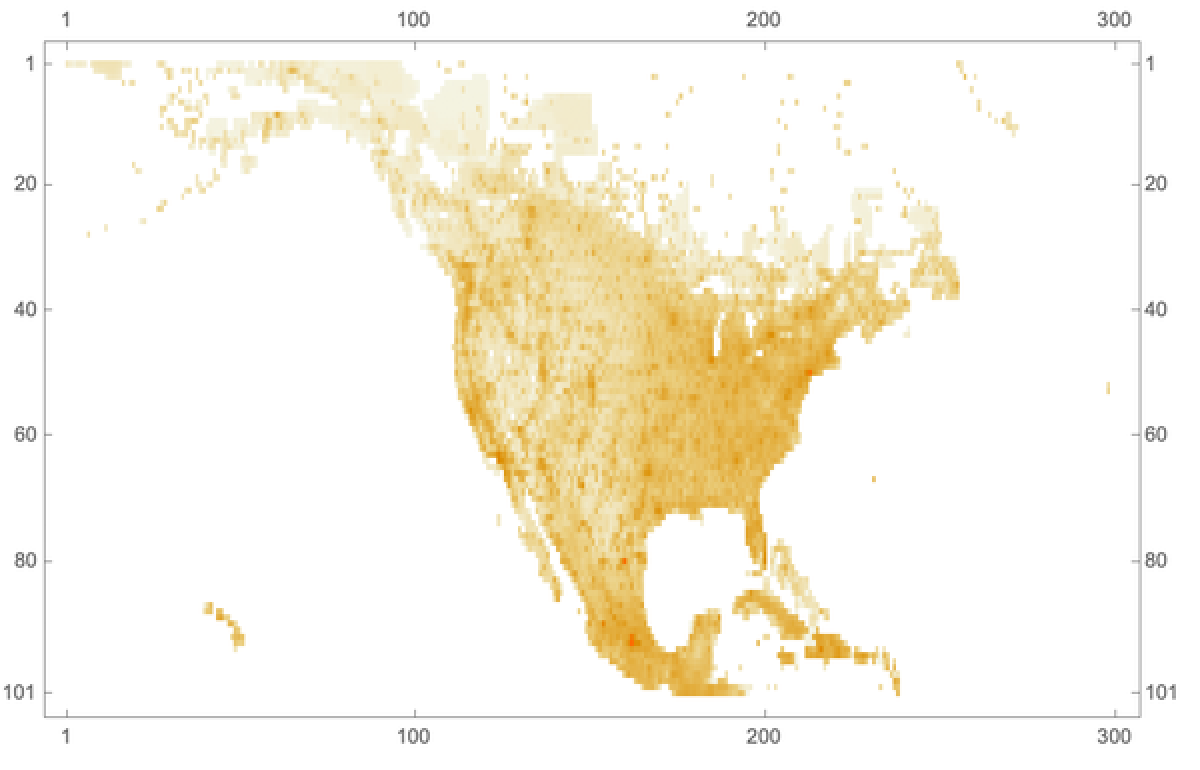
Let’s extract the population data for the US.
GeoBoundingBox

Out[]=
{GeoPosition[{24.5455,-124.733}],GeoPosition[{49.3844,-66.9499}]}
The following equations convert the grid to latitude and longitude.
In[]:=
lon[n_]:=.25-180+(n-1)30/60lat[n_]:=-.25+90-(n-1)30/60
{n/.Solve[lon[n]-124.7329849,n,Reals],n/.Solve[lon[n]-66.9499,n,Reals],n/.Solve[lat[n]25.5455,n,Reals],n/.Solve[lat[n]49.3844,n,Reals]}
Out[]=
{{111.034},{226.6},{129.409},{81.7312}}
Now that we now the limits in the grid let’s proceed to extract the data of interest.
In[]:=
data["temp","population","assocGeoPosition"]=Association[DeleteCases[Flatten[Table[GeoPosition[{lat[i],lon[j]}]data["temp","population","numbers"]〚i,j〛,{i,82,129},{j,111,227}],1],Alternatives[Rule[_,0.],Rule[_,0]]]];
We must remove the points outside the US polygon/
In[]:=
poly=["Polygon"]/.GeoPositionSequence;
points=Keys@data["temp","population","assocGeoPosition"];validPoints=Fold[Or,False,#]&/@(Transpose[Table[With[{values=points/.GeoPositionSequence},RegionMember[poly[[n]],values]],{n,Length@poly}]]);Length@validPoints
Out[]=
4231
In[]:=
data["temp","population","assocGeoPosition"]=Association[Extract[Normal[data["temp","population","assocGeoPosition"]],Position[validPoints,True]]];
In[]:=
Clear[points,validPoints]
GeoGraphicsPolygon,PointSize[0.0001],Point[Keys@data["temp","population","assocGeoPosition"]]
Out[]=
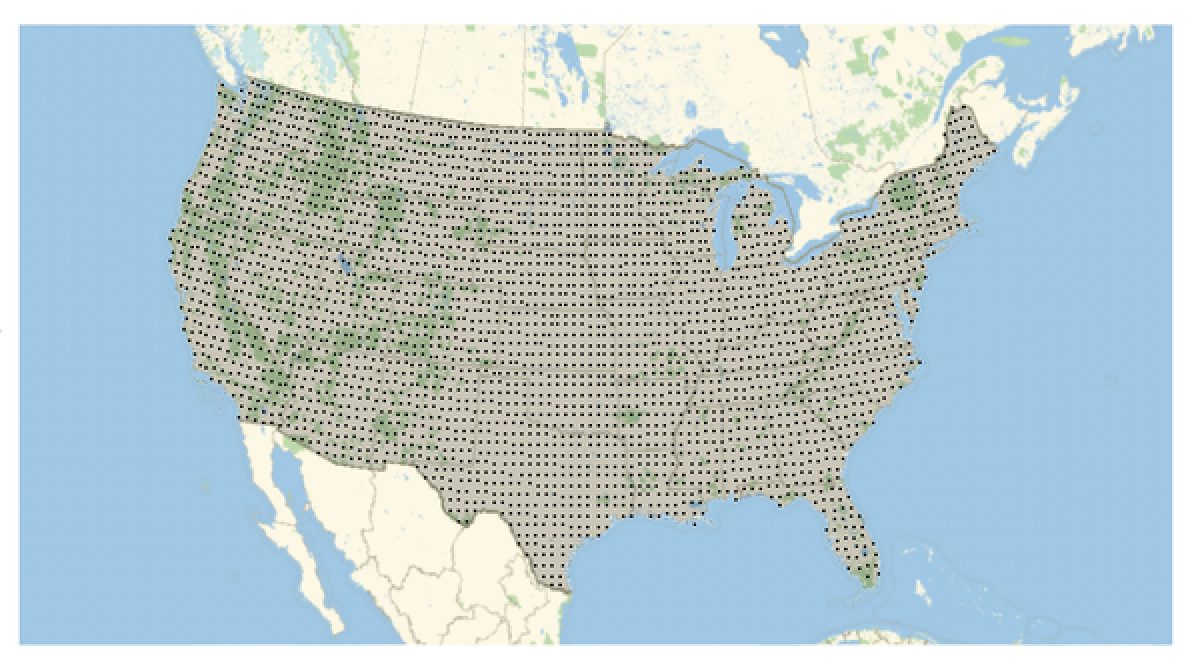
data["temp","population","assocGeoPosition"][[;;3]]
Out[]=
GeoPosition[{48.75,-122.25}]187237.,GeoPosition[{48.75,-121.75}]5404,GeoPosition[{48.75,-121.25}]730.653
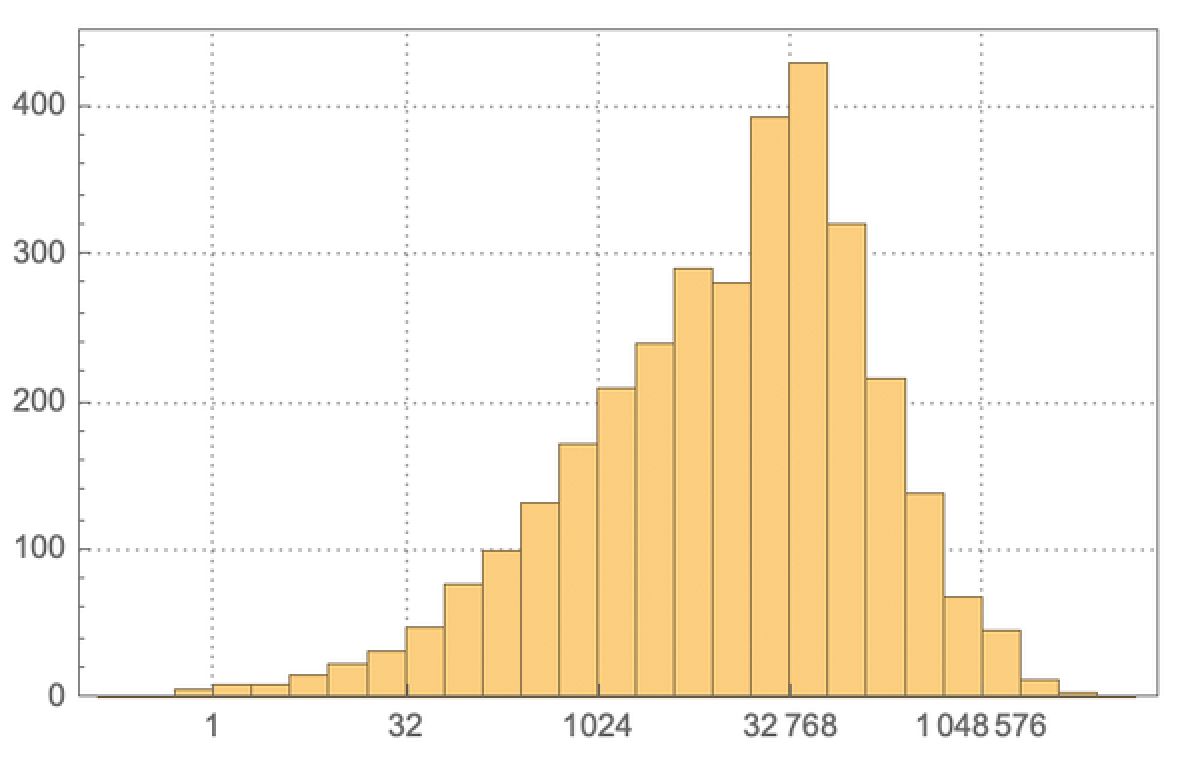
As a side note, we can observe the distribution of the population across the different cells of the grid.
Histogram[Log[2,Values[data["temp","population","assocGeoPosition"]]],PlotTheme"Detailed",FrameTicks{{Automatic,None},{{#,2^#}&/@Range[0,20,5],None}}]
Out[]=
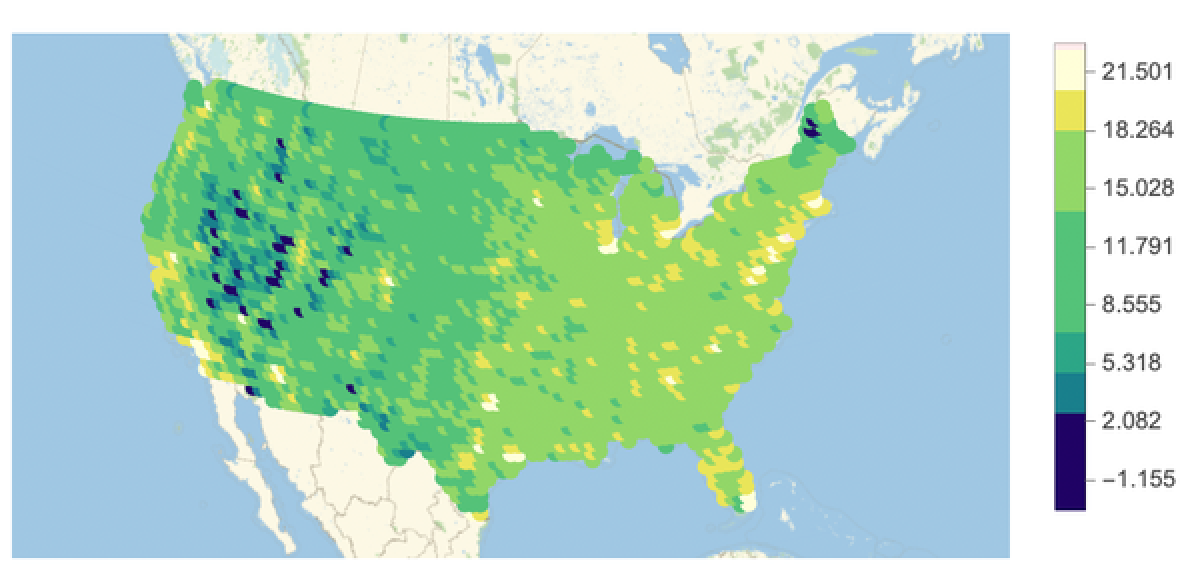
GeoRegionValuePlotLog[2,data["temp","population","assocGeoPosition"]],ColorFunctionScalingFalse,ColorFunctionWhich#≤2,,#≤4,,#≤6,,#≤12,,#≤16,,#≤18,,#≤20,LightYellow,True,LightPink&


Out[]=
The mobility layers
The mobility layers
The tessellation procedure will divide the US surface in a metapopulation structure, each with its own subpopulations. The spatio-temporal patterns of disease spreading will be linked to the mobility flows of people between the different subpopulations. These flows will be represented by two different mobility networks.
Air Traffic Network
Air Traffic Network
First step is always to take a look at the data. There is always some issue that can be found. In the following steps we’ll proceed to clean up data.
Example, remove flights with no passengers.
Example, remove flights with no passengers.
Remove Flights to and from the same airport and last field.
Obtain the list of airports.
Filter only to airports within the 48 contiguous states and listed in the air traffic database.
Airports within the USA.
Filter out the airports with the 48 lower states.
Filter out the airports with the 48 lower states.
We can observe that there are several airports that service a big metropolitan area.
We need to take into account that big urban areas are serviced by multiple airports. We’ll aggregate airports that are within a distance of 100 km of each other. The following formula allows to quickly calculate distances between locations.
Test function
Calculate Distance matrix
Filter airports that are more than 100km apart.
Proceed to group airports
Map the airport hubs
We will now aggregate all traffic data to the corresponding airport hubs. Let’s work with IATA codes instead of entities.
The following association points to the associated airport hub for each airport
Replace airports for hubs in the dataset. Let’s first leave only the airports that we have identified.
Checking that the air traffic mobility network looks correct.
Commuting Networks
Commuting Networks
Setting up the population layer
Setting up the population layer
The population of the United States will be divided into subdivisions applying a voronoi tessellation with the airport hubs as point p such as each point within the voronoi cell is closer to point p than to any other airport hub. All the results of our calculation will be set up under data[“temp”,”voronoi”]
The voronoi mesh will be created using the airport hubs as the center of each voronoi cells
We can extract the cells now. Let’s graph and understand the numbering system. The first seems to be located in the northwest. We remember that the first airport is Atlanta. Cell numbers are different that the airport numbers.
We need to determine then which airport hub is assigned to each voronoi cell. The following variable allows to map the airport hub to its coordinate.
Review airport assignments to each mesh cell. Using the region member, we determine if the airport coordinates is within the cell or not. We can then determine which airport owns the cell.
Back to the population layer. We should assign the population quantity to each mesh cell . The following formula will help total the amounts that we have obtained from the University of Columbia population data. The next calculation will assign a grid value to each of the voronoi cells.
We are now able to aggregate and total the population numbers for each cell.
As we saw before the mesh cell number is different to the airport record number. Recalculate air traffic matrix corresponding to each route between mesh cells.
We need to replace the airport index by the mesh cell index in the air-traffic matrix. The following piece of code replaces the indexes as needed.
Let’s graph how we done so far with the tessellation procedure
Let’s break the mesh to the territory of the US per se.
We can intersect the voronoi mesh with the US mesh.
Final results.
We have finalized the mesh. the mes contains information on the coordinates of the airport hubs, the subpopulation of the mesh, and the routes between airports and traffics in each direction.
Mobility component for the population layer
Mobility component for the population layer
As mentioned in reference 5, we’ll use the following expression (gravity law) to establish the number of commuters between two nearby voronoi cells
Generate list of neighbors
Check
Measure distances to neighboring cells (Airports).
Check to see what is the population under the voronoi cell 1.
Our synthetic commuter weights will be calculated based on the formulas and parameters shown above. Parameter c is still undetermined as the paper does not list the value it takes. Will have to further investigate what the proportionality constant value is in a further part of this series.
We can now build the commuting weight matrix:
Further steps
Further steps
With the mobility and population layers established within the voronoi cells, we can now start working in the epidemiological model layer. This will be performed in a later document. The data above will be posted in a github repository that will be listed as a reply to this notebook in the community website.
References
References