CITE THIS NOTEBOOK: The Brown measure of the free multiplicative Brownian motion by Brian Hall. Wolfram Community OCT 12 2022.
ORIGINAL ARTICLE: Driver, B.K., Hall, B. & Kemp, T. The Brown measure of the free multiplicative Brownian motion. Probability Theory and Related Fields (2022). https://doi.org/10.1007/s00440-022-01142-z.
ORIGINAL ARTICLE: Driver, B.K., Hall, B. & Kemp, T. The Brown measure of the free multiplicative Brownian motion. Probability Theory and Related Fields (2022). https://doi.org/10.1007/s00440-022-01142-z.
Article abstract: The free multiplicative Brownian motion is the large-N limit of the Brownian motion on in the sense of ∗-distributions. The natural candidate for the large-N limit of the empirical distribution of eigenvalues is thus the Brown measure of . In previous work, the second and third authors showed that this Brown measure is supported in the closure of a region that appeared in the work of Biane. In the present paper, we compute the Brown measure completely. It has a continuous density on , which is strictly positive and real analytic on . This density has a simple form in polar coordinates: (r,θ)(θ),where is an analytic function determined by the geometry of the region . We show also that the spectral measure of free unitary Brownian motion is a “shadow” of the Brown measure of , precisely mirroring the relationship between the circular and semicircular laws. We develop several new methods, based on stochastic differential equations and PDE, to prove these results.
b
t
GL(N;C),
b
t
Σ
t
W
t
Σ
t
Σ
t
W
t
1
2
r
w
t
w
t
Σ
t
u
t
b
t
This notebook contains the Mathematica code for all the plots and simulations in the paper. No attempt here is made to explain the notation; for that, please see the paper, available on https://doi.org/10.1007/s00440-022-01142-z.
The following command will not work until after the simulations below have been executed. But after you run the simulations the first time--and execute the “Export” command at the end of the block of simulations--then the next time you open the file, you can just import the lists of eigenvalues without rerunning the simulations. That way, you can edit the plots without having to run all the simulations each time.
{a200,a350,a4,a410,a7}=Import["eigenvalues.mx"];
Defining some basic functions
Defining some basic functions
Now we define the functions and and that are used in various places.
f
t
T
h
In[]:=
Clear[t]Clear[a]Clear[b]Clear[z]f[t_,z_]:=z*Exp[(t/2)(1+z)/(1-z)]f[t,z]T[a_,b_]:=((a-1)^2+b^2)*Log[a^2+b^2]/(a^2+b^2-1)T[a,b]Clear[h]h[r_]:=r*Log[r^2]/(r^2-1)h[r]
Out[]=
t(1+z)
2(1-z)
Out[]=
(+)Log[+]
2
(-1+a)
2
b
2
a
2
b
-1++
2
a
2
b
Out[]=
rLog[]
2
r
-1+
2
r
Simulations
Simulations
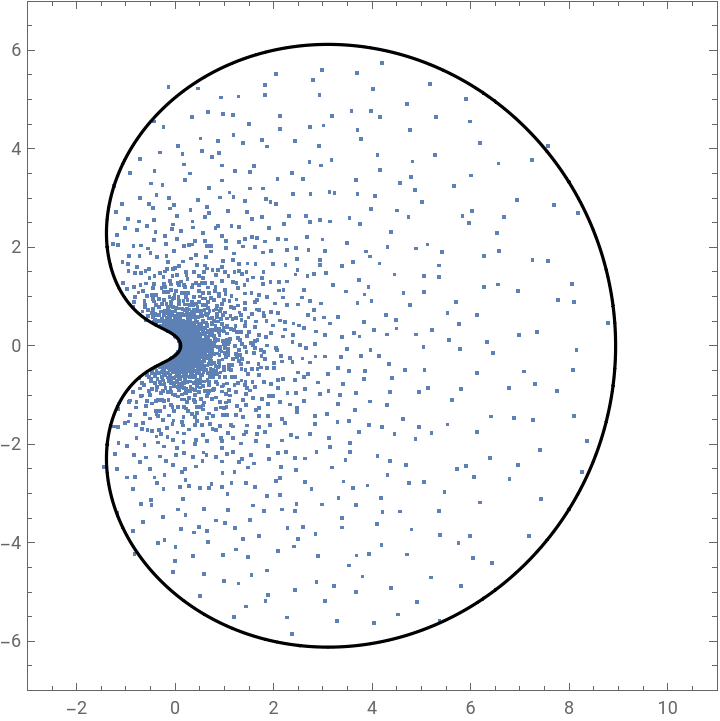
We start with simulations of the Brownian motion in GL(N;C). All simulations use and 200 steps in the time interval. Since the symbol "N" in Mathematica is reserved, we use for the size of the matrices. To simulate the Brownian motion, we multiply together a bunch of matrices of the form , for some small constant . In this special case, no Ito correction term is needed. On a fairly fast MacBook Pro, each simulations takes 3-4 minutes to run.
N=2,000
M
I+c(GUE)
c
+++ +++
t=2
In[]:=
M=2000;t=2.0;k=200;B200=IdentityMatrix[M];For[i=1,i<k+1,i++,B200=(IdentityMatrix[M]+RandomVariate[GaussianUnitaryMatrixDistribution[Sqrt[t]/Sqrt[2*k*M],M]]+*RandomVariate[GaussianUnitaryMatrixDistribution[Sqrt[t]/Sqrt[2*k*M],M]]).B200]a200=Eigenvalues[B200];Clear[t];
In[]:=
t=2.0;M=2000;g1=RegionPlot[T[x,y]<t,{x,-4,13},{y,-8.5,8.5},PlotPoints200,PlotStyle{Opacity[0],White},BoundaryStyleBlack,AspectRatio1];g2=ListPlot[Table[{Re[a200[[n]]],Im[a200[[n]]]},{n,1,M}],AspectRatio1,PlotRange{{-3,13},{-8.5,8.5}},AxesFalse,FrameTrue];evals20=Show[{g2,g1}]g5=ListPlot[Table[{Log[Abs[a200[[n]]]],Arg[a200[[n]]]},{n,1,M}],PlotRange{{-2,2},{-2,2}},AspectRatioTrue,AxesFalse,FrameTrue];q[w_]:=Exp[w]g6=RegionPlot[T[Re[q[x+*y]],Im[q[x+*y]]]<t,{x,-2,2},{y,-2,2},PlotPoints200,PlotStyle{Opacity[0],White},BoundaryStyleBlack,AspectRatio1];logs20=Show[{g5,g6}]Clear[t]
Out[]=
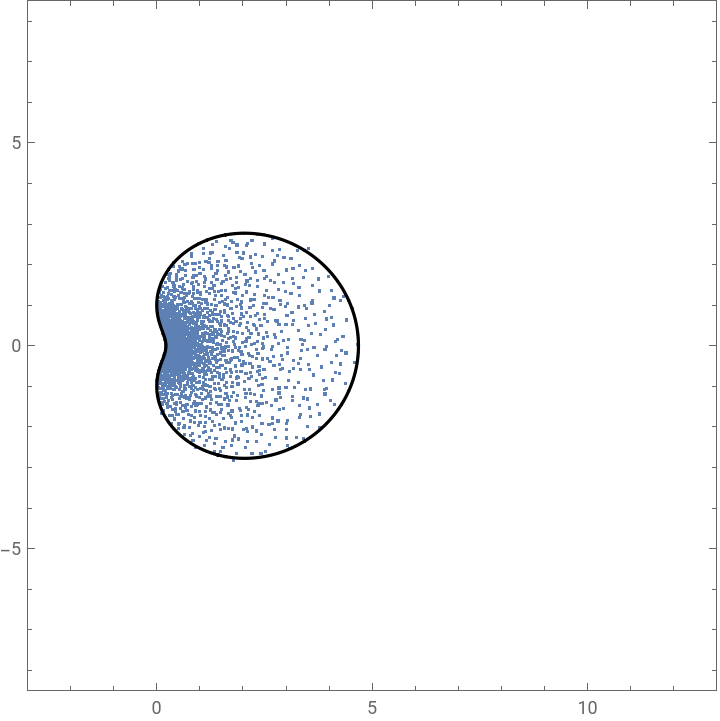
Out[]=
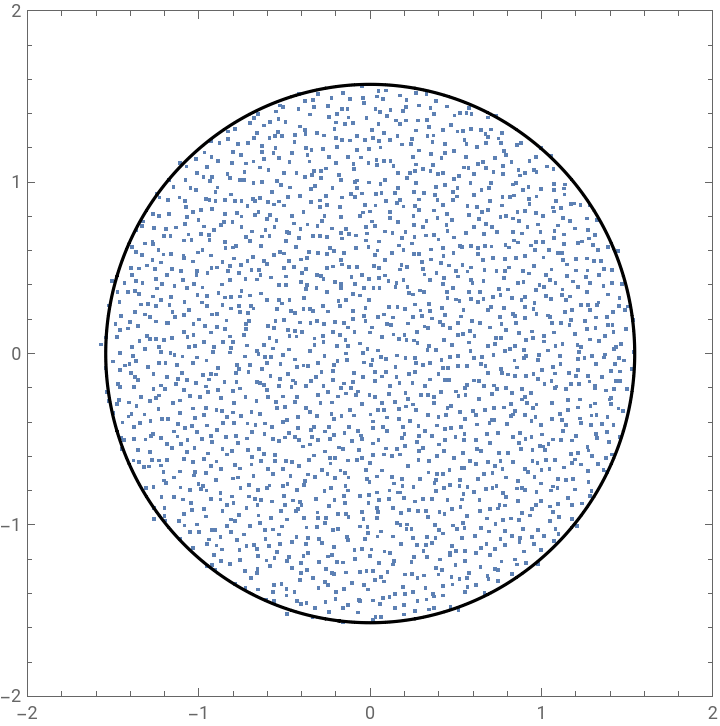
+++ +++
t=3.5
M=2000;t=3.5;k=200;B350=IdentityMatrix[M];For[i=1,i<k+1,i++,B350=(IdentityMatrix[M]+RandomVariate[GaussianUnitaryMatrixDistribution[Sqrt[t]/Sqrt[2*k*M],M]]+*RandomVariate[GaussianUnitaryMatrixDistribution[Sqrt[t]/Sqrt[2*k*M],M]]).B350]a350=Eigenvalues[B350];Clear[t];
In[]:=
t=3.5;M=2000;g1=RegionPlot[T[x,y]<t,{x,-3,11},{y,-7,7},PlotPoints200,PlotStyle{Opacity[0],White},BoundaryStyleBlack,AspectRatioTrue];g2=ListPlot[Table[{Re[a350[[n]]],Im[a350[[n]]]},{n,1,M}],AspectRatioTrue,PlotRange{{-3,11},{-7,7}},AxesFalse,FrameTrue];evals35=Show[{g2,g1}]g5=ListPlot[Table[{Log[Abs[a350[[n]]]],Arg[a350[[n]]]},{n,1,M}],PlotRange{{-Pi,Pi},{-Pi,Pi}},AspectRatioTrue,AxesFalse,FrameTrue];q[w_]:=Exp[w]g6=RegionPlot[T[Re[q[x+*y]],Im[q[x+*y]]]<t,{x,-Pi,Pi},{y,-Pi,Pi},PlotPoints200,PlotStyle{Opacity[0],White},BoundaryStyleBlack,AspectRatio1];logs35=Show[{g5,g6}]Clear[t]
Out[]=
This export command puts a file into your default directory containing the data for the eigenvalues of the five simulations.
End simulations
End simulations
But don't forget to run the "Export" command above!
In plot below, the image on the right comes out of GraphicsRow smaller than the one on the left. But we can resize either image by clicking to select and then dragging the boxes on the edges. It seems to work well to select the first image and reduce it by dragging first the top and then the bottom.
Illustration of the maximum value of θ.
Plots for Figure 18.
Small- and large-time asymptotics
Small- and large-time asymptotics
Here are some plots for Section 8.1, on the asymptotics of the density for small and large times.