0. Motivation
0. Motivation
A few years ago, I have been reading Silverstein’s “The Giving Tree” for my daughters. The title is translated into “The Love-heart Tree”《爱心树》 in Chinese version. The translator tweaked the word from its literal meaning, instead he spoke equally for author, “Love is giving”.
Tree is not only a common biological plant on our planet, but also an important concept in the “computational metaverse”, which is widely applied in art, computer games and film industry.
In the article, I am going to create a 3D graphics of naturally nonexistent heart-shaped tree on the most natural way. The next step is to transformed the tree into a depth function and relief plot for a necklace-pendant pattern.
In the article, I am going to create a 3D graphics of naturally nonexistent heart-shaped tree on the most natural way. The next step is to transformed the tree into a depth function and relief plot for a necklace-pendant pattern.
List of tree related function in WL:
In[]:=
?*Tree*
Out[]=
1. Boundary
1. Boundary
1.0 Initializing
1.0 Initializing
1.1 3D Heart region(Julia parametric surface)
1.1 3D Heart region(Julia parametric surface)
In[]:=
JuliaHeart3D[u_,v_]:=3{(4Sin[u]-Sin[3u])Sin[v],2Cos[v],1.2(4Cos[u]-Cos[2u]-Cos[3u]/2)Sin[v]}
In[]:=
heart=ParametricPlot3D[JuliaHeart3D[u,v],{u,0,2Pi},{v,0,Pi},AxesTrue,AxesLabel{"x","y","z"},PlotStyleRed,PlotLabelStyle["Julia's parametric heart surface",14,Bold],ViewPointFront,MaxRecursion2,PlotPoints30,ImageSize350{1,1}]
Out[]=

1.2 2D Heart region(Julia parametric curve)
1.2 2D Heart region(Julia parametric curve)
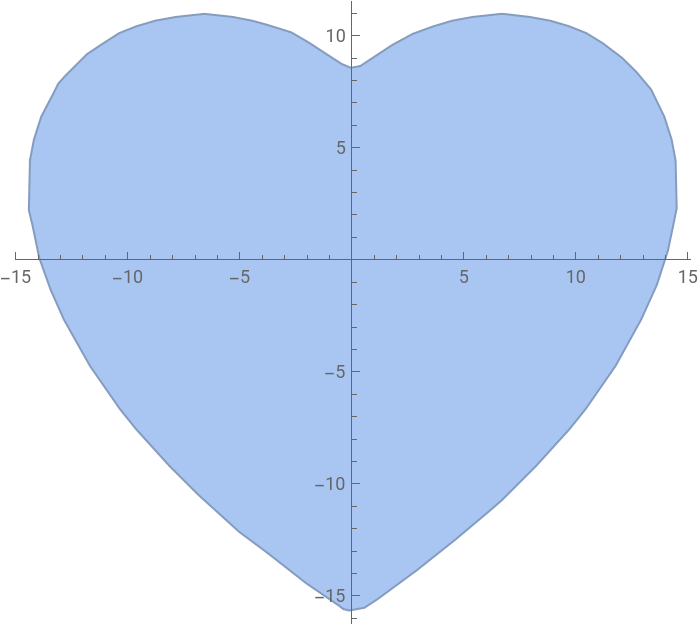
Remove one dimension (y), to get a Julia parametric curve in 2D plane.
In[]:=
JuliaHeart2D[u_,v_]:=3{(4Sin[u]-Sin[3u])Sin[v],1.2(4Cos[u]-Cos[2u]-Cos[3u]/2)Sin[v]}
In[]:=
heartRegion2D=BoundaryDiscretizeRegion[ParametricRegion[JuliaHeart2D[u,v],{{u,0,2Pi},{v,0,Pi}}],MaxCellMeasure{"Length"1},Axes->True,Boxed->True,ImageSize->350]
Out[]=
In[]:=
heartReg3D=RegionProduct[heartRegion2D,BoundaryMeshRegion[{{2},{-2}},Point[{1,2}]]];
1.3 2D Heart region(first heart curve)
1.3 2D Heart region(first heart curve)
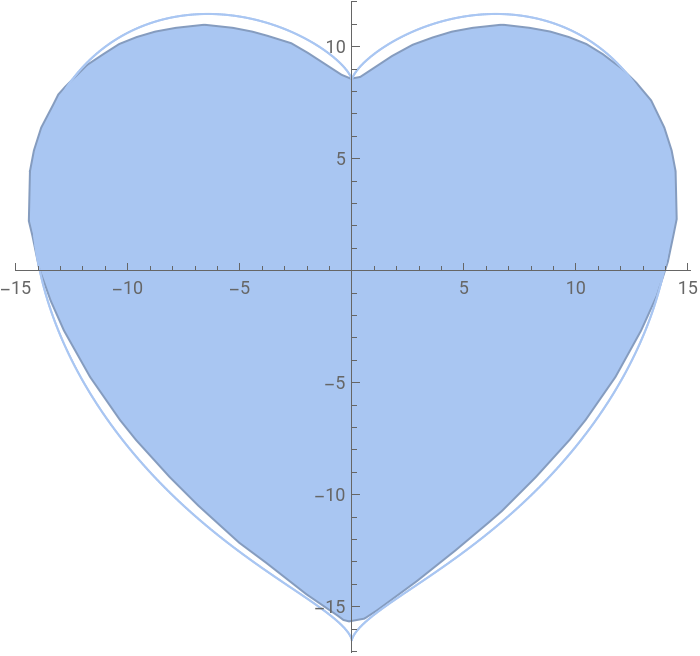
The Julia parametric curve seems slow and low-quality, so I resize the first heart curve to create a high quality 2D Region:
In[]:=
firstHeartCurve=With[{a=12.5,b=4},ImplicitRegion[-a≤0,{x,y}]];Show[heartRegion2D,heartReg=BoundaryDiscretizeRegion[firstHeartCurve,MaxCellMeasure{"Length"0.1},PlotTheme"Lines",Axes->True,Boxed->True],ImageSize->350]
3
(+-)
2
x
2
(y+b)
2
a
2
x
3
(y+b)
Out[]=
Extrude the planar shape to a 3D object:
In[]:=
heartReg3D=RegionProduct[heartReg,BoundaryMeshRegion[{{2},{-2}},Point[{1,2}]]]
Out[]=

2. Tree Design
2. Tree Design
2.1 Key points on boundary
2.1 Key points on boundary
Import a low-polygon heart as working boundary:
In[]:=
heartRegion=Import["heart_Simplified 2.stl"];
Generate a spatial uniformly distributed random points on boundary. I select less than 20 points for following clean illustrations.
In[]:=
SeedRandom[12345];randomPrts=RandomPoint[heartRegion,20];(*4000*)prts=DeleteDuplicates[randomPrts,(EuclideanDistance[#1,#2]<=1.5)&];Length@prts
Out[]=
19
In[]:=
Show[{heartRegion,Graphics3D[{Red,PointSize[0.02],Point[prts]}]},ImageSize->300]
Out[]=

2.2 Minimal spanning tree
2.2 Minimal spanning tree
2.3 Steiner minimal tree
2.3 Steiner minimal tree
The advantage of Steiner minimal tree is a bunch of complement points (called Steiner points) being automatically found within a given region.
2.4 Root, leaves and paths
2.4 Root, leaves and paths
2.4.1 Specify root
2.4.1 Specify root
2.4.2 Find leaves
2.4.2 Find leaves
2.4.1 Find paths
2.4.1 Find paths
Find the paths in the order from leaves to its root:
2.5 Trunk and branches structure
2.5 Trunk and branches structure
Based on the abstract Steiner tree graph, now we build the trunk and branches of a tree, concretely. I use BSplineCurve and Tube to represent curved structure of changing diameters:
3. Leaves Design
3. Leaves Design
In this chapter, the leaf (or leaves) is an broad and extensive concept like the “end effector” in robotics. You may regard it as a piece of leaf, a flower, or a fruit at the end of branches. My interesting is to reveal the law of nature, not just copy the shape and result from the nature. The orientation and size of leaves are decoupled and designed for three different purposes and functions, which are associated with tree, gravity and sun (or environment) , separately. The key concepts and relations are indicated in the following graph.
3.1 Leaf orientation and DOF (F1+F2+F3)
3.1 Leaf orientation and DOF (F1+F2+F3)
The positions of leaves have been calculated in the previous tree graph section. The following sections explain the optimal design for the leaf orientation.
The leaves frames control and indicate the leaves orientation. E.g., If we overlap x direction of a leaf frame on the tangent of tree curve, the orientation of leaf would be left only one DOF (degree of freedom), which is the rotation around the tangent vector.
3.2 Frenet-Serret system from tree (F1+F2+F3)
3.2 Frenet-Serret system from tree (F1+F2+F3)
Frenet Serret system frame (tangent, normal and binormal) are colorized respectively in MCY (magenta, cyan, yellow) color in the chapter .
3.3 Associating leaf direction with tangent from tree (F1)
3.3 Associating leaf direction with tangent from tree (F1)
The leaves are all growing from the end of trees, or extend from the end of branches. We establish the relation from tree to leaves based on the tangent of tree curve. In this section, I rotate the leaves frame to match with Frenet Serret system of the tree:
Visualize the attached frames on each branch, together with the tree:
3.4 Associating leaf size with overhang angle from gravity (F2)
3.4 Associating leaf size with overhang angle from gravity (F2)
3.5 Preparing boundary normal from sunshine (F3)
3.5 Preparing boundary normal from sunshine (F3)
The phenomenon by which the plant bends in the direction of light are called phototropism. However the light or sunshine is usually dynamic in nature, the sun rises in the east and sets in the west. Mostly the leaves of plants are located on its outside boundary and face outward its normal to maximizing the sunshine. The normal of tree boundary are calculated ahead in this section.
3.6 Associating leaf face with boundary normal (F3)
3.6 Associating leaf face with boundary normal (F3)
In this section, the hearts or leaves all face towards the normal of tree boundary. The boundary normal is projected on a plane, which is orthogonal to the tangent of tree curve.
Using the rotation matrix to calculate all the direction of leaves frames.
The following two graphics are plotted for comparing the difference of leave’s orientation between Frenet-Serret system and the leaves face rotated towards its boundary normal.
4. Visualizing
4. Visualizing
To create a wildly growing tree in this chapter, the number of vertexes increased to 547, with 1 root and 175 leaves.
4.1 Comparison
4.1 Comparison
The following four graphics are plotted for comparing the three leaf’s functions. On top-left graphics, the hearts are positioned according to the Cartesian coordinate of tree graph. On top-right graphics, the function 2 for hearts size from gravity is involved. On bottom-left graphics, the function 1 for heart orientation from Frenet Serret System is added. On top-right graphics, the function 3 for heart orientation from boundary normal is included. As Gottfried Wilhelm Leibniz asserted, “No two leaves of a tree are exactly identical.”
4.2 Colorizing
4.2 Colorizing
By changing the color attributes in the Graphics3D function, the heart color can be classic red or leaf green. It looks like a huge brunch of flowers or a living green plant, respectively.
More exotic or extraterrestrial style with gradient color:
5. Transforming
5. Transforming
Return to reality, the tree is a very complicated model right now. Even with the latest 3D Printing technology, there is a high-risk to manufacture the 3D model as a jewelry, directly. In SLM processing, the supports underneath the overhang volume would probably destroy all the leaves. In MJP + Lost-wax casting processing, the liquid silver can hardly flow through the thin twigs during casting. So I have to compromised on 3D effect and manufacturability, and raised up a 2.5 dimensional relief solution without losing the model completeness and real-world scale.
5.1 Depth mapping
5.1 Depth mapping
5.2 Relief plot
5.2 Relief plot
Convert depth mapping data into a relief model.
6. Rendering
6. Rendering
Import the final STL model.
The obverse side shows a tree relief the same pattern as previous one. The reverse side is carved an abstract tree, which is based on Steiner minimal tree, I skip the details. You may regard it as a piece of leaf, which is just another giant tree in microscale. Or you might find it look-likely a cardiovascular and heart, or a lightning in a dark sky. That’s all right, those are all trees from the viewpoint of computational science.
7. Prototype
7. Prototype
With 3DP MJP + Lost-wax casting processing, my jewelry is made in silver with a size approximately 1$. The obverse side is light-polished and reverse side is fine-polished. Electroplating for rose-gold color used as post-processing finish.
I prepared this necklace-pendant for my daughters, they might find a giving tree being exactly the same as this one at somewhere of metaverse in the near future.
8. Review
8. Review
◼
Building a 3D heart-shape tree graphics automatically;
◼
Finding a Steiner minimal tree graph based on minimal spanning tree;
◼
Designing trunk and branches structure based on BSplineCurve and Tube function;
◼
Establishing three key concepts and functions to reproduce living leaves;
◼
Calculating Frenet Serret System of B-spline curves;
◼
Associating leaf orientation with tangent of branches;
◼
Associating leaf orientation with normal of boundary;
◼
Associating leaf size with overhang angle of gravity;
◼
Transforming a 3D graphics into depth image and relief plot;
◼
3D Printing MJP wax part and lost-wax casting;
◼
Making a necklace-pendant with double-sides tree relief pattern.
9. Acknowledgments
9. Acknowledgments
10. Reference
10. Reference