Mexico City Subway Network
Mexico City Subway Network
The Mexico City subway network, officially known as the “Sistema de Transporte Colectivo” (STC) or the Mexico City Metro, is the network of interconnected subway lines that serves the metropolitan area of Mexico City, and some municipalities in the State of Mexico.
Graph
Graph
To perform a comprehensive analysis of the Mexico City subway network with graph metrics, we need to represent it as a graph. In this graph representation, each subway station becomes a vertex, and the connections between stations are represented as edges. This approach results in a series of line graphs (one for each subway line), interconnected at stations that serve as transfer points between multiple lines, facilitating passenger transfers.
In this subway network, the lines are numbered from 1 to 9, along with lines A, B, and 12. We incorporate geolocation data into the vertices to represent the precise positions of each station. And, we include information about passenger usage as weights of the vertices. It’s noteworthy that some stations have a weight of zero, such as those on line 1, which is undergoing maintenance, and those on line 12, that had a collapse on 2021.
Subway Lines
In[]:=
Geolocations of the vertices
In[]:=
Weights
In[]:=
Subway Path Graphs
In[]:=
Data Elements
Visualization
Visualization
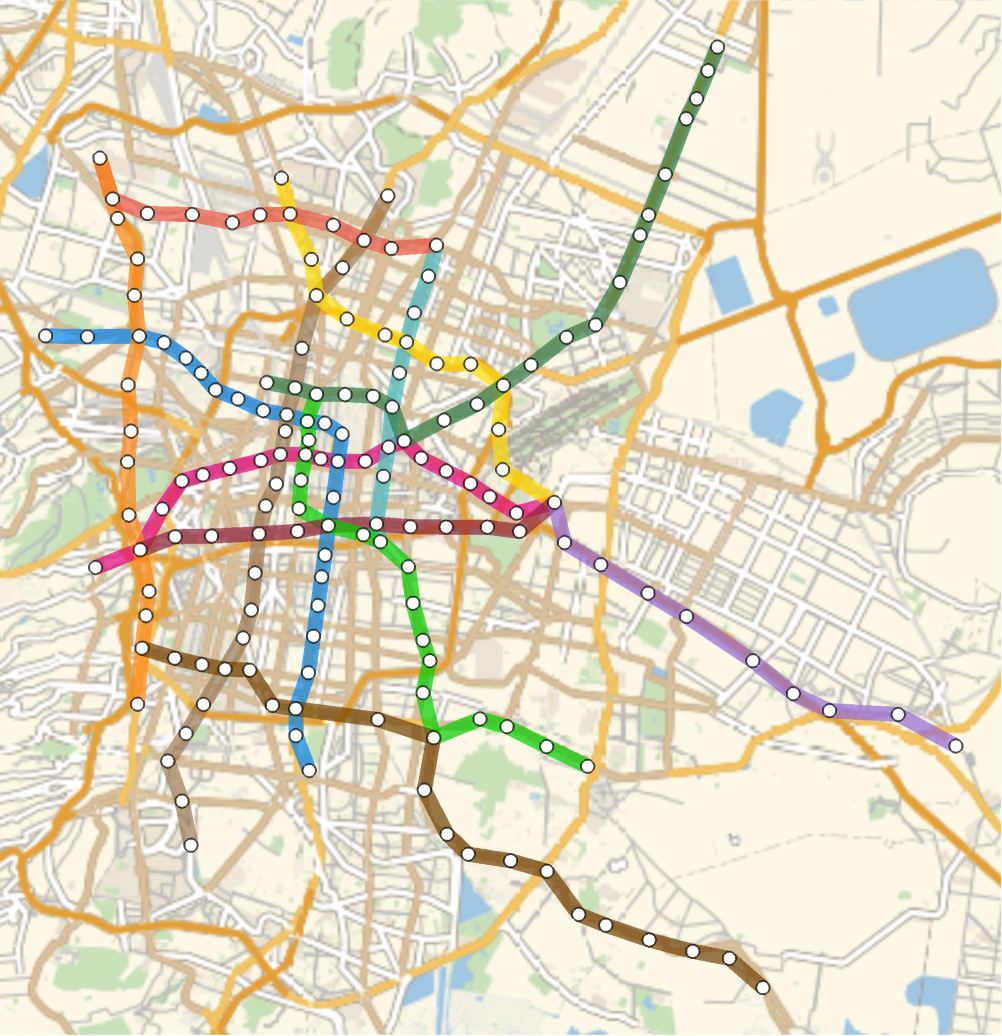
With all the line data in place, we can construct the entire network, visualizing it either geographically, reflecting the actual locations:
In[]:=
metrographgeoposition
Out[]=
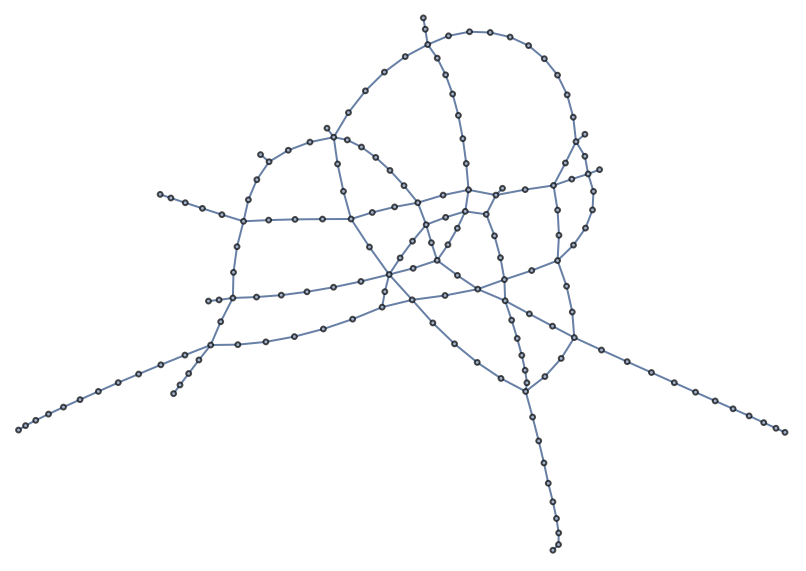
Or as a more simplified graph that maintains only the essential information:
In[]:=
g=metrograph
Out[]=
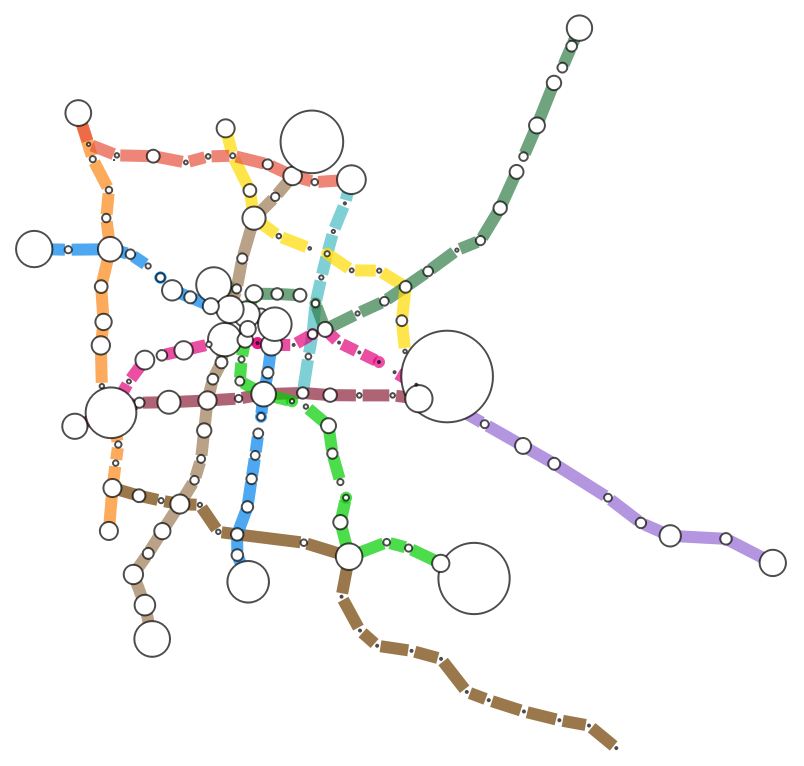
We can also visualize the vertices with more affluence:
In[]:=
Graph[g,VertexSize->Thread[VertexList[g]->AnnotationValue[g,VertexWeight]/1500000],VertexCoordinates->coordinates,EdgeStyle->Flatten@Table[Thread[EdgeList[indgraph[[i]]]->ConstantArray[{Thickness[.015],colors[[i]]},Length[EdgeList[indgraph[[i]]]]]],{i,1,Length[indgraph]}],VertexStyle->White]
Out[]=
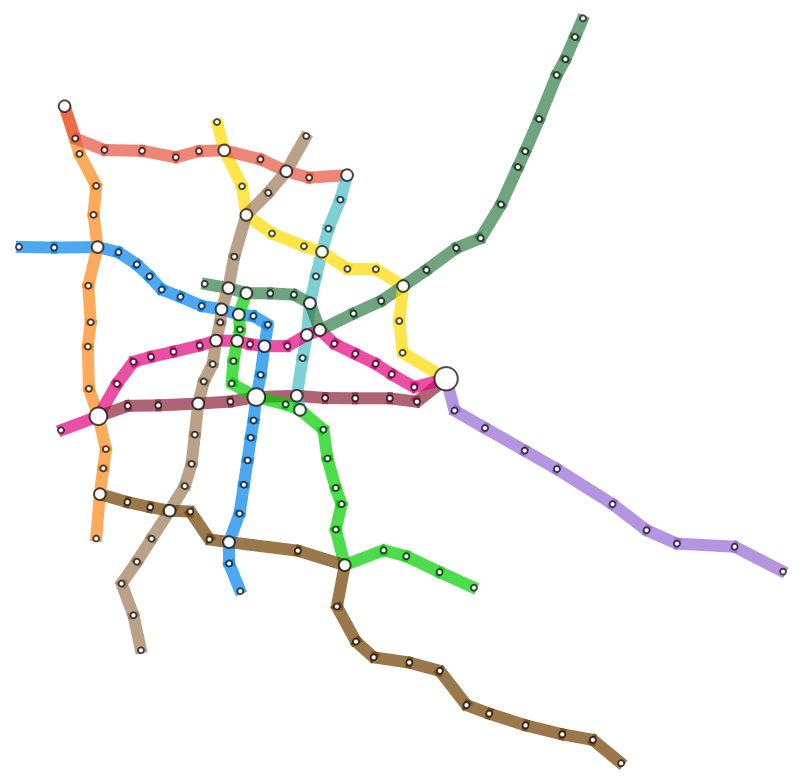
Or visualize the vertices where more lines intersect:
In[]:=
positionDuplicates[list_]:=GatherBy[Range@Length[list],list[[#]]&]fli=Flatten@({(Flatten@(VertexList[#]&/@indgraph))[[First[#]]]->Length[#]*.5}&/@Select[positionDuplicates[Flatten@(VertexList[#]&/@indgraph)],Length[#]>1&]);Graph[GraphUnion@@(EdgeList[#]&/@indgraph),VertexCoordinates->coordinates,EdgeStyle->Flatten@Table[Thread[EdgeList[indgraph[[i]]]->ConstantArray[{Thickness[.015],colors[[i]]},Length[EdgeList[indgraph[[i]]]]]],{i,1,Length[indgraph]}],VertexStyle->White,VertexSizeFlatten[{.5,fli}]]
Out[]=
Analysis
Analysis
Vertex and Edge Count
Vertex and Edge Count
The order (total number of vertices) and size (total number of edges) edges provide fundamental information about the structure of a graph or network.
We can calculate the number of vertex with the command:
In[]:=
VertexCount[metrograph]
Out[]=
163
We can calculate the number of edges with the command:
In[]:=
EdgeCount[metrograph]
Out[]=
183
This graph has an order of 163 and a size of 183. So, it has 163 vertices representing the stations and 183 edges representing the connections between them.
Vertex Degree
Vertex Degree
The vertex degree refers to the number of edges connected to that vertex.
We can calculate the vertex degree with the command:
In[]:=
VertexDegree[g]
Out[]=
{2,2,2,2,2,2,2,4,2,2,2,2,4,1,4,2,2,2,1,2,2,2,2,4,4,2,6,2,2,1,2,2,1,2,4,2,2,2,1,2,2,2,4,2,2,2,2,2,2,2,4,2,2,2,2,2,3,2,2,2,4,2,4,2,2,2,1,4,2,2,2,2,2,4,2,2,2,1,4,2,2,2,2,2,2,2,2,2,2,2,3,2,2,4,2,2,2,2,2,2,2,2,1,4,2,2,2,4,2,2,2,2,4,2,2,1,2,2,2,2,2,2,2,2,2,4,2,2,2,2,2,2,4,2,3,2,2,4,5,2,1,2,2,2,2,2,1,2,2,2,1,2,2,2,2,2,2,2,2,4,2,2,2}
We can calculate the mean vertex degree with the command:
In[]:=
Mean[VertexDegree[g]]//N
Out[]=
2.2454
The mean vertex degree is close to 2, this is because the graph is mostly created by path graphs.
Weights
Weights
We start our analysis by visualizing the vertices with more affluence:
Out[]=
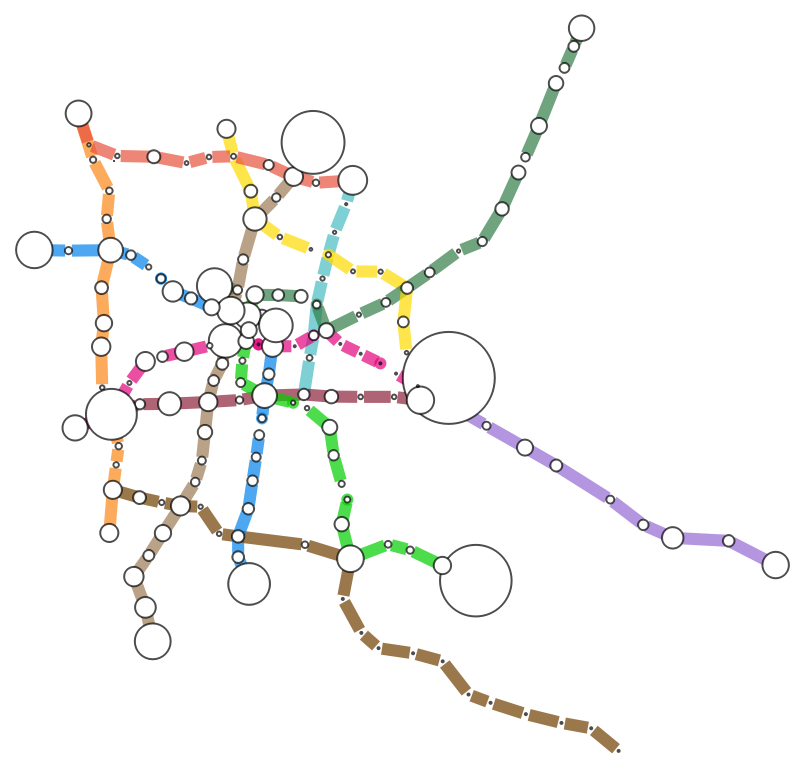
It is interesting that the vertices with the highest affluence are more peripheral. This reflects how the metro system is constructed, as it primarily serves the central areas of the metropolitan region. People living on the outskirts often rely on other modes of transport, such as small buses, to reach a metro station and continue their journey to work. The high affluence observed at these peripheral nodes shows a potential opportunity for improvement. Extending metro lines to better serve these areas could make the transport network more efficient and beneficial for its users.
Distance
Distance
Now we can analyse the distances in our graph. The graph distance matrix, often referred to as the “distance matrix”, is a square matrix that represents the pair-wise distances between vertices. Each entry in the matrix specifies the shortest path distance between two vertices, that represents the number of edges connecting the two vertices.
We can calculate the graph distance matrix with the command:
With the graph distance matrix, we can find the longest distance between any two vertices in the graph.
We can calculate the longest distance with the command:
The longest distance of 35 suggests that it takes 37 subway stops (including transfers) to travel from the most distance vertices between each other. This means that the subway network might not be the most efficient as passengers might need to make several stops and transfers to reach their destinations when their start and destiny is too far away.
Connectivity
Connectivity
Another important metric in graph theory is connectivity. Vertex connectivity measures the minimum number of vertices that must be removed from a graph to disconnect it, while edge connectivity quantifies the minimum number of edges that need to be removed for the same purpose. Vertex and edge connectivity help us understand the robustness and structural integrity of a graph or network.
We can calculate the vertex connectivity with the command:
A vertex connectivity of one means that there is at least one station in the subway system such that its removal would disconnect the subway network. This reveals a station, that if it fails or faces issues, it could significantly disrupt the graph.
We can calculate the edge connectivity with the command:
An edge connectivity of one means that there is at least one edge in the network such that its removal would disconnect the subway network. This suggests a link in the subway network where a failure could lead to network disruptions, so the addition of backup routes might be necessary.
Vertex and Edge Cut
Vertex and Edge Cut
Edge and vertex connectivity are strongly linked to the concepts of vertex and edge cuts. A vertex cut refers to a set of vertices in a graph whose removal would generate a disconnected graph. Vertex cuts are sometimes known as “articulation points” or “cut vertices.” In our subway network, they correspond to the stations that, if closed or inoperative, could split the entire network into separate parts, disrupting the flow of passengers within the city.
One example of a vertex cut can be:
Similarly, an edge cut is a set of edges in a graph whose removal would lead to the disconnection of the graph. In our case, they represent rail segments that, if interrupted, could disrupt the service, affecting the overall functionality of the subway system.
One example of the edge cut can be:
We can observe that there are various vertices that are part of the vertex-cut.
A graph where you have a large list of vertices and edges that you can remove to disconnect the graph means the network has multiple critical points or links. This means potential vulnerabilities in the system, so it implies the need for backup plans, alternative routes, and robustness in case of station or link failures, particularly in areas with high passenger traffic.
We can identify all the vertex cuts that have a biggest passenger affluence and identify the more important ones to reinforce. In the list of all the cut vertices, we can prioritize them based on their influence and the need to reinforce them.
We can find all the cut vertices with the command:
We can order all the cut vertices given their weights with the command:
And we can visualize this importance:
Graph Partition
Graph Partition
A graph partition is a division of the vertices of a graph into subsets or components, where each subset forms a connected subgraph. It involves breaking a graph into smaller parts.
In the subway system, it might reveal clusters of stations that are related or share similar characteristics. For instance, stations within the same partition might be on the same subway line or have similar passenger usage patterns.
One graph partition can be:
This is particularly intriguing as the partitioning can be aligned with the socioeconomic segregation in Mexico City, offering deeper insights into the social strata and urban hierarchies that manifest within the city’s transportation infrastructure.
Find Graph Communities
Find Graph Communities
Graph communities, also known as network communities, refer to subsets of vertices within a larger network that exhibit higher levels of interconnectedness or similarity among themselves compared to nodes outside of those subsets.
We can find the graph communities with the command:
In the subway system, graph communities might represent clusters of stations that have strong connections or similar characteristics. For instance, we can observe that stations within the same community usually belong to the same subway lines.
Eccentricity
Eccentricity
The eccentricity of a vertex is the maximum distance from that vertex to all the other vertices in the network. If the eccentricity of a vertex is small, then all the other vertices are close to that vertex. Conversely, if the eccentricity is large, then all the other vertices are far away. We can calculate the vertex eccentricity for each vertex and determine how far away each vertex is from the others.
We can find the vertex eccentricity with the command:
The diameter of a graph is the maximum eccentricity. This definition is intuitive because when two nodes are as far apart as possible, they must be placed at the diametrically opposite ends of the network.
We can calculate the graph diameter with the command:
The nodes with eccentricity equal to the diameter are the vertices farthest away; this is the periphery of a graph. In a subway context, these could be stations located farther away.
We can find the graph periphery with the command:
The radius of a network is the minimum eccentricity.
We can calculate the graph radius with the command:
The nodes with eccentricity equal to the radius are the center of the graph.
We can find the graph center with the command:
A central vertex has the property that its distance to the farthest vertex from the central vertex is as small as possible. In the subway network context, they represent the central stations that are well-connected. These central stations are often key points in the subway system.
Centrality
Centrality
Centrality helps to identify which nodes are the most influential or central in terms of communication, information flow, or connectivity within the network. There are different centrality metrics, each capturing a different aspect of centrality.
The choice of centrality measure depends on the specific insights you are looking. For a subway system, degree centrality, betweenness centrality and closeness centrality are often informative as they highlight critical transfer points.
Degree Centrality
Degree centrality is a measure used to evaluate the importance or centrality of a vertex within a network. Is calculated based on the number of edges connected to a node.
We can find the degree centrality of each vertex with the command:
In the subway context, the stations with high degree centrality have various transfers and are crucial for enabling passengers to switch lines efficiently.
In the subway context, the stations with high degree centrality have various transfers and are crucial for enabling passengers to switch lines efficiently.
Closeness Centrality
Closeness centrality is a network metric that measures how close a node is to all other nodes in a network on average. It quantifies how quickly or easily information or influence can spread from a particular node to other nodes in the network.
We can find the closeness centrality of each vertex with the command:
In the subway context, stations with high closeness centrality are close to many other stations in terms of travel time, making them essential for minimizing commute times.
Betweenness Centrality
Betweenness centrality is a network metric that measures the extent to which a node in a network acts as a bridge or intermediary between other nodes. It quantifies how often a particular node lies on the shortest paths between pairs of other nodes in the network.
We can find the betweenness centrality of each vertex with the command:
In the subway context, stations with high betweenness centrality act as critical transfer points and are crucial for the overall flow of passengers in the network.
Postman Tour
Postman Tour
The postman tour, also known as the Chinese Postman Problem, finds the shortest route that covers all edges in the graph at least once.
We can find the postman tour with the command:
In the subway network, it would help to find optimal routes for maintenance or inspection.
Closure of Line 3
Closure of Line 3
Recently, the Mexico City Metro Collective Transport System (STC) announced the closure of Line 3, which runs from “Indios Verdes” to “Universidad”. This decision sparked significant controversy, as this line is heavily relied upon by students commuting to the Universidad Nacional Autónoma de México (UNAM).
Let’s analyze the potential impact of closing the line 3 that includes the following stations:
We can find the maximum number of people using these stations with the command:
The maximum weight of Line 3 is 8,326,959, indicating that the removal of this line will impact at least 8,326,959 passengers per month who rely on this route. This substantial figure highlights the significance of Line 3 in the transportation network, as its absence will lead to increased travel times, longer wait periods, and potential overcrowding on alternative routes. The removal of this line not only disrupts the commuting patterns of these individuals but also poses challenges for the overall efficiency of the city’s transportation system, needing careful consideration of mitigation strategies to accommodate the displaced passengers.
Now, if we remove these stations, we will be left with the new graph:
Find Graph Communities
Graph communities, also known as network communities or network clusters, refer to subsets of vertices within a larger network that exhibit higher levels of interconnectedness or similarity among themselves compared to nodes outside of those subsets.
We can find the graph communities for the original graph with the command:
We can find the graph communities for the new graph with the command:
If we compare the graph communities, we observe that the main difference with the removal of Line 3 is an increase in the number of communities within the network. This suggests that the network’s overall connectivity is reduced, as areas that were previously well-connected now show signs of fragmentation creating different communities. This means that the removal of Line 3 causes a disruption in routes that connect various regions. As a result, the transport network is less cohesive.
Eccentricity
We can calculate the original graph diameter with the command:
We can calculate the new graph diameter with the command:
We can calculate the original graph radius with the command:
We can calculate the new graph radius with the command:
The graph diameter and graph radius do not change, this means that although connectivity may be disrupted in certain areas (as reflected in the increased number of communities), the overall reach of the network is not changed by the removal of Line 3. This suggests that, despite the loss of a key transit line, there are still alternative paths available that maintain the maximum distance between the farthest nodes. So, the fundamental ability to traverse the network over long distances remains intact.
Centrality
Closeness Centrality
We can find the mean closeness centrality in the original graph with the command:
We can find the mean closeness centrality in the new graph with the command:
We can observe that the mean closeness centrality decreases, indicating that the network is less “centralized.” This implies that, on average, nodes are farther from each other, and the ease of access to central points in the network is reduced. So, the removal of Line 3 affects how efficiently passengers can reach different parts of the network, resulting in longer travel times.
Betweenness Centrality
We can find the mean betweenness centrality in the original graph with the command:
We can find the mean betweenness centrality in the new graph with the command:
The reduction is also seen in the betweenness centrality. This indicates that fewer nodes serve as critical transit points or “bridges” within the network, leading to a reduction in the number of paths that pass through a node. As a result, the network becomes less efficient, with fewer high-betweenness nodes to facilitate movement across different sections. This also means that passengers may have to rely more heavily on less optimal paths, which can lead to congestion on alternative lines and longer travel times, further fragmenting the connectivity of the metro system.
Conclusion
Conclusion
Graph theory metrics can help optimize subway network design, identify critical transfer points and optimize the network’s efficiency.
Additionally, the removal of Line 3 does not lower the eccentricity but does lowers the centrality of the Mexico City Metro network and fragmentizes the communities in the network. This suggests that the removal of Line 3 impacts local connectivity rather than the network’s overall reach. So, with fewer nodes acting as key transit hubs, alternative routes will be more used, likely causing congestion on other lines and extending travel times for passengers.
References
References
◼
Ubicación de líneas y estaciones del Sistema de Transporte Colectivo Metro.(2023, 7 de julio). Portal de Datos Abiertos. Gobierno de la Ciudad de México. https://datos.cdmx.gob.mx/dataset/lineas-y-estaciones-del-metro
◼
Sistema de Transporte Colectivo, (2023). «Afluencia de estación por línea». Sistema de Transporte Colectivo CMS CDMX v2.8.0 2023. Consultado el 2 de septiembre de 2023. ABRIL - JUNIO 2023 https://metro.cdmx.gob.mx/operacion/mas-informacion/afluencia-de-estacion-por-linea
CITE THIS NOTEBOOK
CITE THIS NOTEBOOK
Analysis of the Mexico City subway network
by Alejandra Ortiz Duran
Wolfram Community, STAFF PICKS, October 31, 2024
https://community.wolfram.com/groups/-/m/t/3312239
by Alejandra Ortiz Duran
Wolfram Community, STAFF PICKS, October 31, 2024
https://community.wolfram.com/groups/-/m/t/3312239