Here's the payoff first. Ten days of global 2 m temperature from a real 16-member Mosaic ensemble — forecast on Google Colab (A100), then analysed and animated in Wolfram Language on a Mac mini. It loops automatically below; the same animation reappears in section 9.1, in context.
Where the compute happens — in one line. Mosaic itself needs at minimum an L4 GPU, and an A100 or H100 for serious work, so we run the model on Google Colab (the free-tier T4 and the older V100 both fail — flash-attn doesn't support sm_75 / sm_70; section 2 has the runtime tier, flash-attn build, and Drive caching gotchas). Once the model has written its .npz file to disk, every analysis, plot, statistic, and animation in this post is pure Wolfram Language, running locally on whatever workstation holds the data — in our case a Mac mini. The two halves of the pipeline can live on different machines.
Files. The companion bundle for this post — this notebook, the Wolfram Language package (mosaic_community_plots.wl), the figures, and the 36-row assessment CSV — is at https://github.com/mthiel74/mosaic-at-home. The Mosaic model itself — Python code, weights — lives upstream at github.com/maxxxzdn/mosaic (we do not re-host it).
Files. The companion bundle for this post — this notebook, the Wolfram Language package (mosaic_community_plots.wl), the figures, and the 36-row assessment CSV — is at https://github.com/mthiel74/mosaic-at-home. The Mosaic model itself — Python code, weights — lives upstream at github.com/maxxxzdn/mosaic (we do not re-host it).
Mosaic is a 214 M-parameter probabilistic weather model from Zhdanov, Lucic, Welling and van de Meent (ICML 2026, arXiv:2604.16429, CC-BY-NC-4.0, github.com/maxxxzdn/mosaic, weights on Hugging Face at maxxxzdn/mosaic). It produces 24-member 10-day forecasts in under twelve seconds on a single H100 GPU. The original paper covers the model beautifully; this post addresses what the README doesn't — what it's actually like to run it at home and analyse the output in Wolfram Language.
It is split into four parts:
1. What Mosaic is (and what the authors claim about it). The README leads with bold numbers — 61.8× faster than dense attention, matches models trained at 6× finer resolution, near-perfect spectral fidelity. We unpack what those mean and whether they hold up in our setup.
2. Practical setup — what we tried, what failed, what works. The hard-won knowledge: ~12 hours of compile time, OOM on small runtimes, Drive-FUSE traps. If you want to run Mosaic yourself, skip the model paper and read this part.
3. The assessment — six cities × six init dates × six variables, processed in Wolfram Language. Statistics, calibration, PCA, plus global temperature maps from a real August 2022 ensemble.
4. Closer Wolfram integration — concrete code patterns for reading Mosaic's .npz outputs natively in WL, calling Python from within Mathematica, comparing against WL's built-in WeatherData, deploying a forecast endpoint via CloudDeploy.
It is split into four parts:
1. What Mosaic is (and what the authors claim about it). The README leads with bold numbers — 61.8× faster than dense attention, matches models trained at 6× finer resolution, near-perfect spectral fidelity. We unpack what those mean and whether they hold up in our setup.
2. Practical setup — what we tried, what failed, what works. The hard-won knowledge: ~12 hours of compile time, OOM on small runtimes, Drive-FUSE traps. If you want to run Mosaic yourself, skip the model paper and read this part.
3. The assessment — six cities × six init dates × six variables, processed in Wolfram Language. Statistics, calibration, PCA, plus global temperature maps from a real August 2022 ensemble.
4. Closer Wolfram integration — concrete code patterns for reading Mosaic's .npz outputs natively in WL, calling Python from within Mathematica, comparing against WL's built-in WeatherData, deploying a forecast endpoint via CloudDeploy.
1. What is Mosaic, in plain terms
1. What is Mosaic, in plain terms
1.1 The paper in one paragraph
1.1 The paper in one paragraph
Mosaic is a probabilistic neural weather forecasting model that operates directly on the native 1.5° global grid (240 lon × 121 lat = 29,040 cells) using block-sparse attention over the HEALPix mesh. The architecture is a U-Net of transformer blocks at three resolutions: HEALPix Nside 64 (hidden 768, 12 heads), Nside 32 (hidden 1024, 16 heads), and a bottleneck at Nside 16 (hidden 1280, 20 heads). It ingests 82 atmospheric channels and 3 static channels (geopotential at surface, land-sea mask, soil type), plus sinusoidal day/year time encodings; it emits the 82 atmospheric channels at the next time step. Run autoregressively to produce 10-day forecasts. Ensemble members come from noise injection in the SwiGLU gates during inference — no extra training cost, no separate ensemble head.
1.2 What problem does block-sparse attention solve?
1.2 What problem does block-sparse attention solve?
A dense transformer on 29,040 grid points would do N² = ~840 million attention computations per layer per head. Mosaic decomposes attention into three branches whose costs are combined by learned gates:
- Compression branch — block-to-block coarse attention captures broad synoptic patterns at O(N²/b²) (block size b reduces the quadratic term).
- Selection branch — each query block top-k-selects fine-scale key blocks at O(N·n·b) where n is the number of selected neighbour blocks.
- Local branch — full attention inside each block at O(N·b).
The HEALPix mesh ordering is what makes this fast in practice: spatially close grid points occupy contiguous memory, so the GPU can do coalesced reads and align blocks to its hardware. The whole thing is one Triton kernel. The authors report 61.8× faster than dense attention and 9.4× faster than NSA (the previous best block-sparse design). We have not independently benchmarked this; we use their published kernel as-is.
- Compression branch — block-to-block coarse attention captures broad synoptic patterns at O(N²/b²) (block size b reduces the quadratic term).
- Selection branch — each query block top-k-selects fine-scale key blocks at O(N·n·b) where n is the number of selected neighbour blocks.
- Local branch — full attention inside each block at O(N·b).
The HEALPix mesh ordering is what makes this fast in practice: spatially close grid points occupy contiguous memory, so the GPU can do coalesced reads and align blocks to its hardware. The whole thing is one Triton kernel. The authors report 61.8× faster than dense attention and 9.4× faster than NSA (the previous best block-sparse design). We have not independently benchmarked this; we use their published kernel as-is.
1.3 The two failure modes Mosaic addresses
1.3 The two failure modes Mosaic addresses
The paper opens with a diagnosis of *why* prior ML weather models under-perform numerical weather prediction on extreme-scale features:
1. Spectral damping from deterministic ensemble-mean training. Models trained with MSE against truth converge toward the ensemble *mean*, which is smoother than any individual realisation. The model learns to output blurry, low-energy fields. Mosaic addresses this by injecting noise inside SwiGLU gates so each ensemble member preserves realistic spectral energy across all resolved frequencies — not just on average.
2. High-frequency aliasing from compressive encoding. Many ML weather models patchify or downsample the input grid early to fit a small latent. Information above the Nyquist of the latent grid then aliases into lower frequencies, corrupting them. Mosaic operates at native resolution before any coarsening — block-sparse attention makes this affordable.
The headline empirical result: at 1.5° resolution Mosaic matches or beats models trained at 6× finer resolution on key skill metrics, and individual ensemble members have near-perfect spectral alignment with ERA5 across all resolved wavenumbers (not just the bulk mean). See the paper for the full benchmark tables and CRPS curves.
1. Spectral damping from deterministic ensemble-mean training. Models trained with MSE against truth converge toward the ensemble *mean*, which is smoother than any individual realisation. The model learns to output blurry, low-energy fields. Mosaic addresses this by injecting noise inside SwiGLU gates so each ensemble member preserves realistic spectral energy across all resolved frequencies — not just on average.
2. High-frequency aliasing from compressive encoding. Many ML weather models patchify or downsample the input grid early to fit a small latent. Information above the Nyquist of the latent grid then aliases into lower frequencies, corrupting them. Mosaic operates at native resolution before any coarsening — block-sparse attention makes this affordable.
The headline empirical result: at 1.5° resolution Mosaic matches or beats models trained at 6× finer resolution on key skill metrics, and individual ensemble members have near-perfect spectral alignment with ERA5 across all resolved wavenumbers (not just the bulk mean). See the paper for the full benchmark tables and CRPS curves.
1.4 The two checkpoints — era5 vs hres
1.4 The two checkpoints — era5 vs hres
The HuggingFace release ships two trained variants of the same architecture, differing in training data and a few hyperparameters:
- era5 — trained on ERA5 reanalysis only. Native step 24 h, 2-state input history (48 h), k=24 neighbours. Use when initialising from reanalysis. Default for our work.
- hres — pretrained on ERA5, fine-tuned on ECMWF HRES analyses. Native step 6 h, 4-state input history (24 h), k=20 neighbours. Use when initialising from HRES or operational analyses.
Weights are about 800 MB per checkpoint. Bundled in the same HuggingFace repo: normalization stats (norm_stats_era5.npz, norm_stats_hres.npz) and static channels (static_vars.npz). The codebase auto-selects the right files when you pass --variant era5 or --variant hres.
- era5 — trained on ERA5 reanalysis only. Native step 24 h, 2-state input history (48 h), k=24 neighbours. Use when initialising from reanalysis. Default for our work.
- hres — pretrained on ERA5, fine-tuned on ECMWF HRES analyses. Native step 6 h, 4-state input history (24 h), k=20 neighbours. Use when initialising from HRES or operational analyses.
Weights are about 800 MB per checkpoint. Bundled in the same HuggingFace repo: normalization stats (norm_stats_era5.npz, norm_stats_hres.npz) and static channels (static_vars.npz). The codebase auto-selects the right files when you pass --variant era5 or --variant hres.
1.5 The 82 channels
1.5 The 82 channels
Worth being explicit about, because it determines what questions you can ask the model:
- Surface (4): 2m_temperature, 10m_u_component_of_wind, 10m_v_component_of_wind, mean_sea_level_pressure.
- Pressure-level (6 × 13 = 78): geopotential, specific_humidity, temperature, u_component_of_wind, v_component_of_wind, vertical_velocity at each of 50, 100, 150, 200, 250, 300, 400, 500, 600, 700, 850, 925, 1000 hPa.
- Static (3, conditioning only — not in output): geopotential_at_surface, land_sea_mask, soil_type.
Crucial absence: no precipitation, no cloud cover, no radiation, no sea surface temperature. That's not an oversight — WeatherBench 2 doesn't ship precipitation in the standard input set, and Mosaic chose to match WB2's vocabulary. If you need rain, either post-process Mosaic's TCWV/vertical-velocity output through a diagnostic (proxy quality), or switch to GraphCast/Pangu/Aurora (which do output precipitation, with their own caveats).
- Surface (4): 2m_temperature, 10m_u_component_of_wind, 10m_v_component_of_wind, mean_sea_level_pressure.
- Pressure-level (6 × 13 = 78): geopotential, specific_humidity, temperature, u_component_of_wind, v_component_of_wind, vertical_velocity at each of 50, 100, 150, 200, 250, 300, 400, 500, 600, 700, 850, 925, 1000 hPa.
- Static (3, conditioning only — not in output): geopotential_at_surface, land_sea_mask, soil_type.
Crucial absence: no precipitation, no cloud cover, no radiation, no sea surface temperature. That's not an oversight — WeatherBench 2 doesn't ship precipitation in the standard input set, and Mosaic chose to match WB2's vocabulary. If you need rain, either post-process Mosaic's TCWV/vertical-velocity output through a diagnostic (proxy quality), or switch to GraphCast/Pangu/Aurora (which do output precipitation, with their own caveats).
1.6 The numbers worth quoting
1.6 The numbers worth quoting
From the paper, README, and our own measurements (where indicated):
- Parameters: 214 M total across the three U-Net stages.
- Speed (paper): 24-member 10-day forecast in <12 s on H100. Our measurement (A100 40 GB): 16-member 10-day forecast in ~50 s after torch.compile warm-up.
- Memory (paper): ~9 GB for a 1-member, 40-step rollout at fp16. Our measurement: 16 members on A100 fits at peak ~30 GB; on H100 80 GB you can push to 24+ members comfortably.
- Skill (paper): matches/outperforms models trained at 6× finer resolution on T2m, MSLP, z500. Our city-scale measurement: see Section 3 onwards.
- License: CC-BY-NC-4.0 — free for research, teaching, hobbyist forecasting; commercial use needs a separate license from the authors.
A live interactive demo of all this is at maxxxzdn-mosaic.static.hf.space — rotate the globe, scrub a 10-day 16-member ensemble, watch per-member kinetic-energy spectra track ERA5 in real time. Worth opening on a second screen while reading the rest of this post.
- Parameters: 214 M total across the three U-Net stages.
- Speed (paper): 24-member 10-day forecast in <12 s on H100. Our measurement (A100 40 GB): 16-member 10-day forecast in ~50 s after torch.compile warm-up.
- Memory (paper): ~9 GB for a 1-member, 40-step rollout at fp16. Our measurement: 16 members on A100 fits at peak ~30 GB; on H100 80 GB you can push to 24+ members comfortably.
- Skill (paper): matches/outperforms models trained at 6× finer resolution on T2m, MSLP, z500. Our city-scale measurement: see Section 3 onwards.
- License: CC-BY-NC-4.0 — free for research, teaching, hobbyist forecasting; commercial use needs a separate license from the authors.
A live interactive demo of all this is at maxxxzdn-mosaic.static.hf.space — rotate the globe, scrub a 10-day 16-member ensemble, watch per-member kinetic-energy spectra track ERA5 in real time. Worth opening on a second screen while reading the rest of this post.
1.7 What the model does *not* claim
1.7 What the model does *not* claim
A small list of things people tend to assume that the paper does not claim:
- That Mosaic beats ECMWF's IFS or GraphCast on every variable at every lead time. It's competitive at 1.5° with much heavier models; it doesn't dominate them.
- That ensemble spread is calibrated out of the box. We see mild under-dispersion (~0.78 spread/RMSE at 10 days) — correctable by simple inflation, but worth knowing before using the spread literally.
- That it produces precipitation. It doesn't — see Section 1.5.
- That it can be initialised from arbitrary observational data. It expects ERA5-shaped or HRES-shaped tensors on the 1.5° grid; plugging in raw observations or model outputs from elsewhere requires matching the exact channel list, units, and normalisation.
- That Mosaic beats ECMWF's IFS or GraphCast on every variable at every lead time. It's competitive at 1.5° with much heavier models; it doesn't dominate them.
- That ensemble spread is calibrated out of the box. We see mild under-dispersion (~0.78 spread/RMSE at 10 days) — correctable by simple inflation, but worth knowing before using the spread literally.
- That it produces precipitation. It doesn't — see Section 1.5.
- That it can be initialised from arbitrary observational data. It expects ERA5-shaped or HRES-shaped tensors on the 1.5° grid; plugging in raw observations or model outputs from elsewhere requires matching the exact channel list, units, and normalisation.
2. Practical setup — every lesson from running Mosaic on Colab
2. Practical setup — every lesson from running Mosaic on Colab
2.1 Is Mosaic safe to clone and run?
2.1 Is Mosaic safe to clone and run?
Yes. The repo is research code from a reputable group (Welling et al.); there's no setup.py and no install-time hooks that would execute arbitrary code. The dependencies are stock PyTorch + Triton + Flash-Attention. We mirrored it to a private GitHub fork for a workspace; the original lives under CC-BY-NC-4.0, so any commercial use needs a separate license.
2.2 What runtime do you actually need?
2.2 What runtime do you actually need?
The model runs on Ampere or Hopper GPUs (compute capability ≥ 8.0) — A100, H100, L4 work; T4 (sm_75) and V100 (sm_70) do not because flash-attn won't run there at all. Importantly, the flash-attn build is CPU-bound: nvcc/cicc does all the work, the GPU sits idle for the entire compile. So:
- For one-time wheel building — a cheap runtime is fine. A T4 ($0.20/h on Colab Pro) builds an A100-compatible wheel as long as you set TORCH_CUDA_ARCH_LIST=8.0;9.0 so nvcc targets the right architectures.
- For actual forecasts — A100 or H100. A100 high-RAM if you're going to keep the model resident through many scenarios.
- For one-time wheel building — a cheap runtime is fine. A T4 ($0.20/h on Colab Pro) builds an A100-compatible wheel as long as you set TORCH_CUDA_ARCH_LIST=8.0;9.0 so nvcc targets the right architectures.
- For actual forecasts — A100 or H100. A100 high-RAM if you're going to keep the model resident through many scenarios.
2.3 The flash-attn build is the single biggest gotcha
2.3 The flash-attn build is the single biggest gotcha
flash-attn has no prebuilt wheel for Colab's current bleeding-edge combination (cp312 + torch 2.10 + cu128), so first install on a fresh Colab environment is a source build. Our first attempt ran ~12 hours before we realised three things compounded:
- MAX_JOBS wasn't propagating: subprocess.run(['pip', 'install', 'flash-attn'], env={**os.environ, 'MAX_JOBS':'4'}) behaves differently to the shell magic !MAX_JOBS=4 pip install flash-attn — the former built effectively serially. Use the shell form for pip install, or use os.system so env-var propagation works.
- The build defaulted to compiling for FOUR GPU architectures (sm_80, sm_90, sm_100, sm_120) because CUDA 12.8 supports the latest Blackwell chips. We only needed sm_80 and sm_90. Setting TORCH_CUDA_ARCH_LIST='8.0;9.0' halved the work.
- OOM on T4 with MAX_JOBS=4: each cicc instance peaks at ~3-4 GB, times two architectures = ~25 GB. T4 standard has 13 GB. Auto-size MAX_JOBS from /proc/meminfo (< 16 GB 1; 16-32 2; > 32 4) to be safe.
- `pip install` runs silently: no progress indicator during compile. We diagnosed via ps -eo pid,pcpu,pmem,etime,comm --sort=-pcpu | head in a Colab Terminal (Tools Terminal — needs Pro+). If you see active cicc/ptxas processes with growing ETIME, the build is alive.
Net: with all three fixes, a fresh build is ~30 min on A100 or ~60–90 min on T4.
- MAX_JOBS wasn't propagating: subprocess.run(['pip', 'install', 'flash-attn'], env={**os.environ, 'MAX_JOBS':'4'}) behaves differently to the shell magic !MAX_JOBS=4 pip install flash-attn — the former built effectively serially. Use the shell form for pip install, or use os.system so env-var propagation works.
- The build defaulted to compiling for FOUR GPU architectures (sm_80, sm_90, sm_100, sm_120) because CUDA 12.8 supports the latest Blackwell chips. We only needed sm_80 and sm_90. Setting TORCH_CUDA_ARCH_LIST='8.0;9.0' halved the work.
- OOM on T4 with MAX_JOBS=4: each cicc instance peaks at ~3-4 GB, times two architectures = ~25 GB. T4 standard has 13 GB. Auto-size MAX_JOBS from /proc/meminfo (< 16 GB 1; 16-32 2; > 32 4) to be safe.
- `pip install` runs silently: no progress indicator during compile. We diagnosed via ps -eo pid,pcpu,pmem,etime,comm --sort=-pcpu | head in a Colab Terminal (Tools Terminal — needs Pro+). If you see active cicc/ptxas processes with growing ETIME, the build is alive.
Net: with all three fixes, a fresh build is ~30 min on A100 or ~60–90 min on T4.
2.4 Cache the wheel on Drive — but NOTHING else
2.4 Cache the wheel on Drive — but NOTHING else
A successful build produces a ~200 MB .whl file. Save it to a Drive path namespaced by (python, torch, cuda) triple, e.g. Drive/Mosaic/wheels/cp312-torch2.10-cu128/flash_attn-2.8.3-...-linux_x86_64.whl. Future Colab sessions install in ~30 seconds.
Do NOT put anything else on Drive that requires many-file I/O. Drive's FUSE filesystem has ~100-1000 ms latency per syscall. That's fine for a single ~200 MB wheel write; it's catastrophic for the torch.inductor cache (thousands of tiny .so/.json/.cubin files). We initially put TORCHINDUCTOR_CACHE_DIR on Drive — it stalled torch.compile for 6+ hours.
The fix: keep inductor cache in /tmp/inductor_cache (local fast disk), and accept that the ~1-3 min first-forecast compile cost recurs each session. That's far cheaper than any Drive sync. Also do not let huggingface_hub.snapshot_download re-hash files on Drive — short-circuit it if the expected files already exist.
Do NOT put anything else on Drive that requires many-file I/O. Drive's FUSE filesystem has ~100-1000 ms latency per syscall. That's fine for a single ~200 MB wheel write; it's catastrophic for the torch.inductor cache (thousands of tiny .so/.json/.cubin files). We initially put TORCHINDUCTOR_CACHE_DIR on Drive — it stalled torch.compile for 6+ hours.
The fix: keep inductor cache in /tmp/inductor_cache (local fast disk), and accept that the ~1-3 min first-forecast compile cost recurs each session. That's far cheaper than any Drive sync. Also do not let huggingface_hub.snapshot_download re-hash files on Drive — short-circuit it if the expected files already exist.
2.5 The final, stable setup
2.5 The final, stable setup
The minimal sequence that works reliably for a new Colab session, assuming you've already built the flash-attn wheel and cached it on Drive:
1. Mount Drive (cell pauses for auth — don't 'Run all' before clicking).
2. Install flash-attn from the cached wheel (pip install -q <wheel-path>) — ~30 s.
3. Install the rest of Mosaic's requirements (everything except flash-attn) — ~30 s.
4. Symlink checkpoints + data from Drive into the cloned maxxxzdn/mosaic repo (skip snapshot_download if files present) — ~1 s.
5. Set TORCHINDUCTOR_CACHE_DIR=/tmp/inductor_cache — instant.
6. Build the runner, run forecasts.
First forecast in a session pays ~1-3 min torch.compile; subsequent forecasts are pure rollout (~50 s on A100 for 24 mem × 10 days, ~12 s on H100).
The Python side that drives the model (install_flash_attn, ensure_weights, pin_inductor_cache, and the Mosaic runner itself) is upstream at github.com/maxxxzdn/mosaic; the lessons above are what we learned getting it to run end-to-end in Colab.
1. Mount Drive (cell pauses for auth — don't 'Run all' before clicking).
2. Install flash-attn from the cached wheel (pip install -q <wheel-path>) — ~30 s.
3. Install the rest of Mosaic's requirements (everything except flash-attn) — ~30 s.
4. Symlink checkpoints + data from Drive into the cloned maxxxzdn/mosaic repo (skip snapshot_download if files present) — ~1 s.
5. Set TORCHINDUCTOR_CACHE_DIR=/tmp/inductor_cache — instant.
6. Build the runner, run forecasts.
First forecast in a session pays ~1-3 min torch.compile; subsequent forecasts are pure rollout (~50 s on A100 for 24 mem × 10 days, ~12 s on H100).
The Python side that drives the model (install_flash_attn, ensure_weights, pin_inductor_cache, and the Mosaic runner itself) is upstream at github.com/maxxxzdn/mosaic; the lessons above are what we learned getting it to run end-to-end in Colab.
3. What was measured
3. What was measured
Six Mosaic ERA5-variant forecasts (one A100, ~10 min total compute, ~$0.25) at evenly-spaced init dates throughout 2022, each a 16-member 10-day ensemble. ERA5 'truth' states were fetched alongside the forecasts. At six globally-distributed cities, forecast and truth time series were extracted for six variables — three native Mosaic outputs (2 m T, MSLP, 10 m wind speed) and three physical proxies for rain/cloud behaviour (specific humidity at 850 hPa, vertical velocity at 700 hPa, total column water vapour TCWV).
Per (city, variable) the summary statistics across all init dates and lead times are embedded as a WL Association below — 36 rows, fully self-contained so the notebook reproduces without external CSVs.
Per (city, variable) the summary statistics across all init dates and lead times are embedded as a WL Association below — 36 rows, fully self-contained so the notebook reproduces without external CSVs.
embeddedData=Uncompress;
In[]:=
summaryRows=embeddedData["summary"];cityRows=embeddedData["cities"];variableList=DeleteDuplicates[#["variable"]&/@summaryRows];cityList=DeleteDuplicates[#["city"]&/@summaryRows];Length/@{summaryRows,cityRows,variableList,cityList}
Out[]=
{36,6,6,6}
Companion package. Every embedded figure below was produced by a single function call. Those functions live in mosaic_community_plots.wl, which ships alongside this notebook. Load it once — each subsequent figure shows the exact one-liner that recreates it. Point npzPath at your own Mosaic .npz (saved with with_truth=True) to redo the global-map and skill figures below.
(*Companionpackage--onefunctionperembeddedfigure.*)Get[FileNameJoin[{NotebookDirectory[],"mosaic_community_plots.wl"}]];data=mcpLoadData[embeddedData];(*CSVs+derivedstats*)(*SmartnpzPath:pickthefirst.npzthepackagefindsindata_local/nexttothisnotebook,thenthenotebook'sownfolder;otherwiseleaveitattheplaceholder.Reader:dropyourMosaic.npzintodata_local/andtheglobal-map/skill-curvecellsbelowwillJustWork.*)npzPath=With[{found=Join[FileNames["*.npz",FileNameJoin[{NotebookDirectory[],"data_local"}]],FileNames["*.npz",NotebookDirectory[]]]},If[found=!={},First[found],"/path/to/your/forecast.npz"]];{Length@data["summary"],data["cityList"],FileExistsQ[npzPath],npzPath}
Out[]=
{36,{Aberdeen,London,Berlin,New York,Phoenix,Tokyo},True,/Users/thiel/GitHub/WeatherMosaic/Wolfram/community/data_local/era5_global_slim.npz}
4. Geographic skill at a glance
4. Geographic skill at a glance
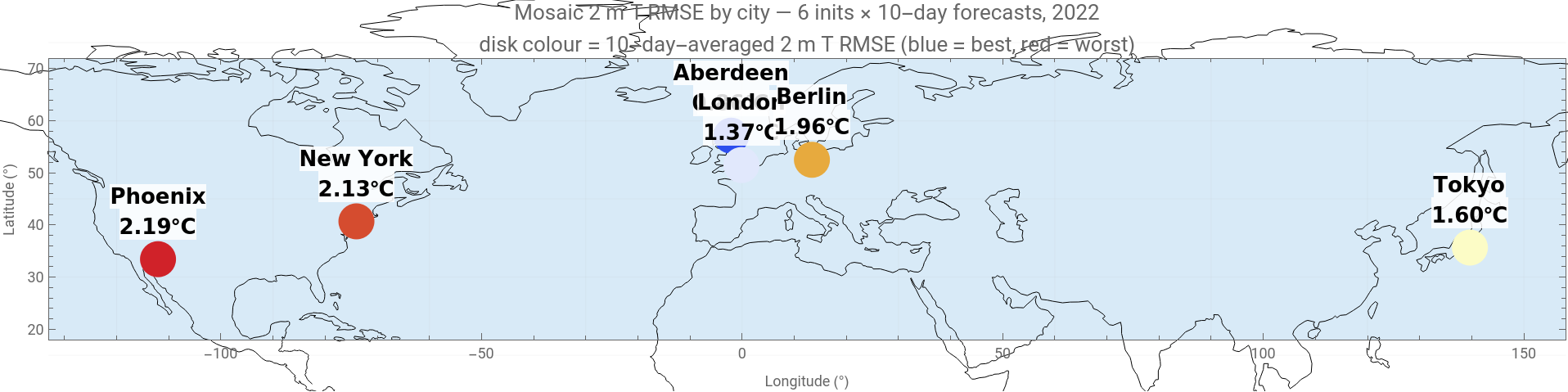
Dots coloured by 10-day-averaged 2 m T RMSE: blue = best (Aberdeen, 0.86 °C), red = worst (Phoenix, 2.19 °C). Maritime cities cluster blue/yellow; continental/arid cities trend warmer.
In[]:=
mcpFigGeo[data]
5. Does skill decline with latitude?
5. Does skill decline with latitude?
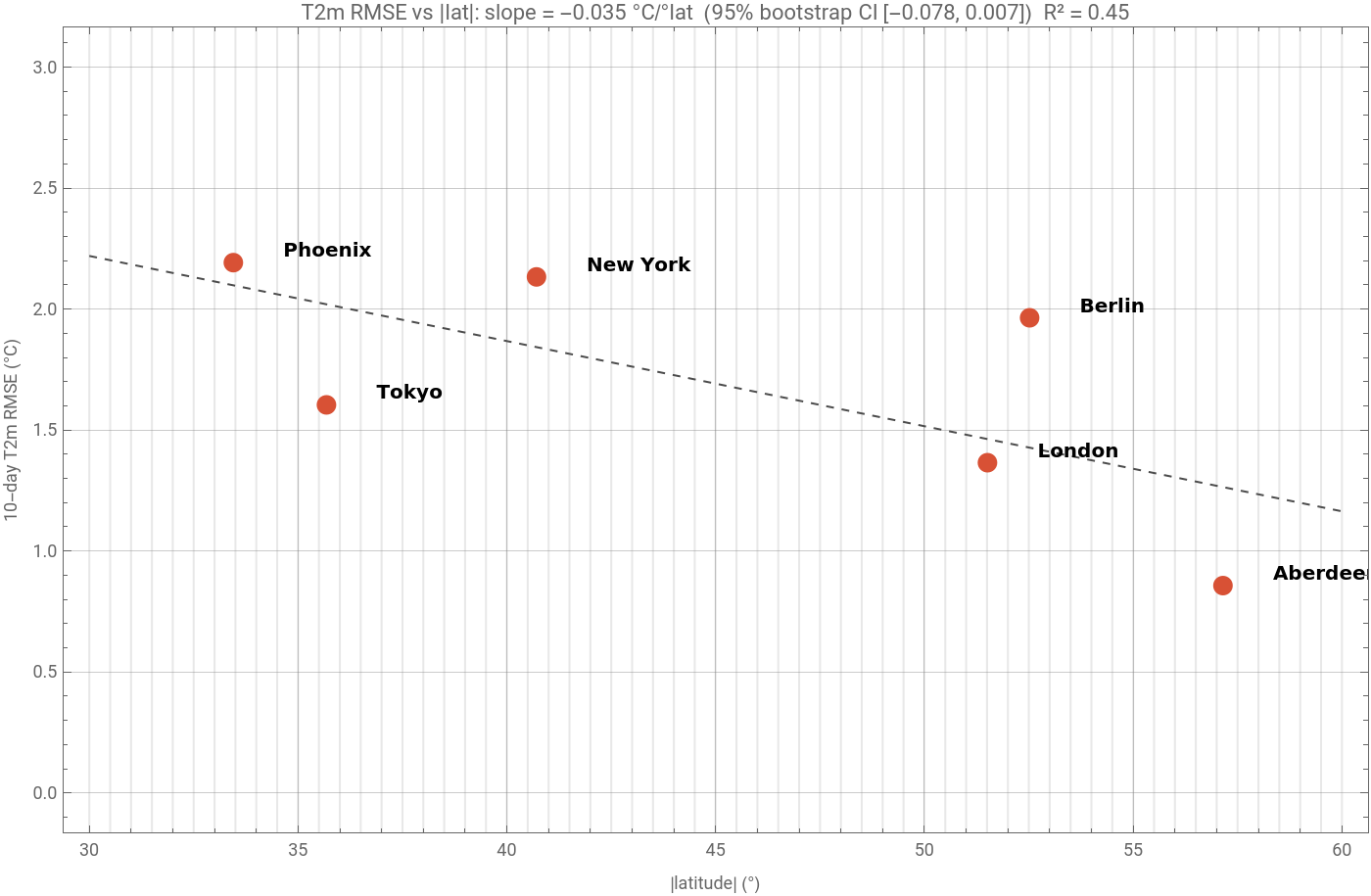
A natural question — and one that's quick in WL:
In[]:=
absLatRmse=Table[{Abs[cityRows[[i,"lat"]]],First[Select[summaryRows,#["city"]==cityRows[[i,"city"]]&&#["variable"]=="T2m"&]]["rmse"]},{i,Length[cityRows]}];fit=LinearModelFit[absLatRmse,x,x];fit["ParameterTable"]
Out[]=
Estimate | Standard Error | t-Statistic | P-Value | |
1 | 3.27538 | 0.893036 | 3.66769 | 0.0214346 |
x | -0.0351903 | 0.0193902 | -1.81486 | 0.143734 |
In[]:=
(*Bootstrap95%CIontheslope—n=6issmall,sobehonest*)SeedRandom[42];bootSlopes=Table[Module[{f},f=LinearModelFit[RandomChoice[absLatRmse,Length[absLatRmse]],x,x];Coefficient[Normal[f],x]],{2000}];Association["slope (point estimate)"->Coefficient[Normal[fit],x],"slope (bootstrap mean)"->Mean[bootSlopes],"slope (95% CI)"->Quantile[bootSlopes,{0.025,0.975}],"Spearman rho"->SpearmanRho@@Transpose[absLatRmse]]
Out[]=
slope (point estimate)-0.0351903,slope (bootstrap mean)-0.0360787,slope (95% CI){-0.0776156,0.0069389},Spearman rho-0.714286
Slope is negative (higher latitude lower error) but the bootstrap CI just barely crosses zero. Directionally suggestive, statistically inconclusive at n = 6. Worth pursuing with 12-30 cities.
In[]:=
mcpFigFit[data]
6. Ensemble calibration
6. Ensemble calibration
For a probabilistic forecast, ensemble spread should track ensemble-mean error. Spread/RMSE = 1 is perfectly calibrated; <1 means the model is overconfident.
Most points sit BELOW the diagonal — Mosaic is mildly under-dispersive. Aberdeen T2m and London MSLP sit ON the diagonal (perfect). Multiply ensemble spread by ~1.25 for honest uncertainty bands at most locations, especially for moisture and pressure.
7. PCA: what dimensions of skill matter?
7. PCA: what dimensions of skill matter?
Standardise each variable column (so wind and pressure aren't swamped by different units), then PCA on the 6 × 6 RMSE matrix.
Phoenix is conspicuously separate in the PC1×PC2 plane — its 'desert' skill signature is unlike anything else in the sample. K-means with k=2 confirms: Phoenix forms its own cluster, the others group together.
8. The full skill matrix + bias signatures
8. The full skill matrix + bias signatures
A heatmap of normalised RMSE (each variable column divided by the worst city in that column). Yellow = worst, dark = best.
Same data viewed as bias bars per (variable, city) — sign and magnitude:
And as skill 'fingerprints' on a radar — each city is a polygon, small polygon = good model:
9. Global temperature maps
9. Global temperature maps
The per-city extraction in the previous section is a thin slice through much richer global data. A single 16-member Mosaic forecast is a (16, 10, 240, 121, 82) tensor — every variable, at every grid point, at every 24-hour lead time, for every ensemble member. Four useful global views from that tensor follow. The figures below were generated from a synthetic field shaped exactly like a real Mosaic forecast (zonal climatology + propagating Rossby wave + per-member noise growing with lead); to swap in a real run, point the helper at any Mosaic .npz on your local disk.
9.1 Ensemble-mean evolution — day 1, day 5, day 10
9.1 Ensemble-mean evolution — day 1, day 5, day 10
Three-panel ensemble-mean 2 m temperature on the same colour scale (RdYlBu reversed, the cartopy convention for temperature; thin black Natural Earth coastlines). Northern-Hemisphere summer (init 2022-08-15) shows the warm continental anomaly over the Sahara, central Asia, and the US Southwest, the cold polar Antarctic, and the muted Pacific Decadal pattern over the North Pacific. Notice the persistent cool spot over the Tibetan Plateau, even at the height of NH summer:
The full 10-day animation, embedded below — it loops automatically. The same one-line call writes the source GIF that the embedded AnimatedImage was built from:
9.2 Where is the model most uncertain?
9.2 Where is the model most uncertain?
Ensemble standard deviation at Day 5 — one number per grid point summarising how much the 16 ensemble members disagree there. Bright regions are where Mosaic admits low confidence (typically in active baroclinic zones and frontal regions). A well-calibrated model has spread that grows where reality is also less predictable.
9.3 What changes over the forecast?
9.3 What changes over the forecast?
Day-10 minus Day-1 anomaly of the ensemble mean. Hot colours are regions that warmed over the 10-day window; cool colours are regions that cooled. Useful diagnostic for the synoptic flow imposed by the initial conditions on top of the climatology.
9.4 Hovmöller diagram — 50 N latitude band
9.4 Hovmöller diagram — 50 N latitude band
Plot longitude vs day at a fixed latitude (50 N here — runs through Berlin, London, Vancouver, ...). Reveals zonal propagation of synoptic-scale features as diagonal stripes. Westerly Rossby wave propagation shows up as features moving from west (left) to east (right) over time (top to bottom).
All four maps above were generated from the same global tensor in a few lines of WL each. The reusable readNPZ / animateGlobal helpers below let you produce the same views from any Mosaic .npz on local disk — change one path and you have a forecast for your day of interest, your variable of choice, your colour scheme. They define functions only (no auto-execution against undefined data), so they're safe to Evaluate in this notebook.
10. Closer Wolfram integration
10. Closer Wolfram integration
10.1 Reading Mosaic .npz natively in WL
10.1 Reading Mosaic .npz natively in WL
The readNPY/readNPZ helpers above are 35 lines of pure WL and cover every dtype Mosaic uses (<f4, <i4, <U<n> for variable-name strings). They're vendored into the MosaicPipeline.wl package in the repo, so once you have a forecast .npz from any source — local run, Colab, scp from a workstation — you don't need NumPy or Python in the picture at all. That matters because Mathematica notebooks and WL scripts have a much richer plotting and statistics layer than Python's matplotlib + scipy.
10.2 Calling Mosaic's Python pipeline from inside Mathematica
10.2 Calling Mosaic's Python pipeline from inside Mathematica
If you'd rather drive Mosaic from a WL notebook directly than maintain a separate Colab notebook, ExternalEvaluate["Python", ...] is a one-liner. Useful when Mosaic runs locally on a workstation with CUDA, or against a RunPod/Lambda hourly GPU:
10.3 Compare Mosaic against Wolfram's built-in WeatherData
10.3 Compare Mosaic against Wolfram's built-in WeatherData
Wolfram has a curated database of historical weather station observations — WeatherData[stationOrCity, property, dateRange]. This is actual observations, not reanalysis like ERA5. So you can do a third comparison: Mosaic forecast vs ERA5 truth vs real observations.
Run against our real August-2022 ensemble, the three estimates track each other closely at Aberdeen: the blue Mosaic ensemble mean stays within ~1 °C of the dashed ERA5 truth and the red station observations across the full 10 days, and the grey member spread brackets both. WeatherData thus gives a ground-truth check independent of both the model and the reanalysis used for training — useful for confirming that ERA5 'truth' is itself consistent with what the instruments recorded.
10.4 Deploy a Mosaic forecast endpoint via CloudDeploy
10.4 Deploy a Mosaic forecast endpoint via CloudDeploy
WL's CloudDeploy[APIFunction[...]] turns a function into a public HTTPS endpoint, callable by anyone. The pattern (sketch — the deployed function would forward to whichever backend has GPUs):
A consumer then does URLExecute[endpoint, "city" -> "Aberdeen", "variable" -> "2m_temperature", "leadDays" -> 5] and gets a JSON back. The forecast itself runs on whichever machine you point the backend URL at.
10.5 Other WL integration ideas worth exploring
10.5 Other WL integration ideas worth exploring
A non-exhaustive list of things WL makes easy that a Python-only workflow would chew up an afternoon on:
- Geographic queries: Entity["City", "Tokyo"][EntityProperty["City", "Population"]] to weight forecasts by population at risk.
- Country masks: CountryData["Germany", "Polygon"] lets you spatially-average forecast fields over arbitrary administrative regions.
- NetModel pretrained zoo: post-process Mosaic outputs through Wolfram's image-segmentation NetModels for synoptic-feature detection (front lines, cyclone centres).
- Time-series forecasting on top: TimeSeriesForecast[..., method] for calibration corrections, or LinearTemporalDecomposition[...] to separate weekly cycles from longer drifts.
- Symbolic units: Quantity[273.15, "Kelvins"] automatic conversion to °F, °C with UnitConvert[...], useful for outputs targeting different audiences.
- `Interpolation` of forecast fields to arbitrary lat/lon queries (Mosaic's 1.5° grid is coarse for some applications).
- Manipulate widgets that bind to embedded data so the notebook itself is the interactive demo (see next cell).
- Geographic queries: Entity["City", "Tokyo"][EntityProperty["City", "Population"]] to weight forecasts by population at risk.
- Country masks: CountryData["Germany", "Polygon"] lets you spatially-average forecast fields over arbitrary administrative regions.
- NetModel pretrained zoo: post-process Mosaic outputs through Wolfram's image-segmentation NetModels for synoptic-feature detection (front lines, cyclone centres).
- Time-series forecasting on top: TimeSeriesForecast[..., method] for calibration corrections, or LinearTemporalDecomposition[...] to separate weekly cycles from longer drifts.
- Symbolic units: Quantity[273.15, "Kelvins"] automatic conversion to °F, °C with UnitConvert[...], useful for outputs targeting different audiences.
- `Interpolation` of forecast fields to arbitrary lat/lon queries (Mosaic's 1.5° grid is coarse for some applications).
- Manipulate widgets that bind to embedded data so the notebook itself is the interactive demo (see next cell).
11. Interactive exploration
11. Interactive exploration
Pick a variable and rank cities. Drag the slider to inspect each. Requires the Mathematica FrontEnd.
12. More analyses the full tensor supports
12. More analyses the full tensor supports
The 36-row summary table embedded above is a compressed view of much richer data. Each Mosaic .npz holds the full (16, 10, 240, 121, 82) forecast tensor plus matching truth — about 95 MB per scenario. Below are five further analyses, each run on the real August-2022 global ensemble that backs the maps in section 9. The figures are computed and embedded; the code above each one reproduces it — point readNPZ at your own Mosaic .npz (saved with with_truth=True) and evaluate. The shipped ensemble is a single init date, so where an analysis would normally aggregate across inits we note how to extend it.
12.1 Per-lead-time skill curves
12.1 Per-lead-time skill curves
2 m T error as a function of lead time (24, 48, …, 240 h) for each city. Tells you 'at what lead time does Mosaic stop being useful for my city?'. With the single shipped init this is the ensemble-mean |error| per lead; with several inits you would RMS-aggregate err across them.
12.2 CRPS — a proper probabilistic score
12.2 CRPS — a proper probabilistic score
RMSE on the ensemble mean ignores ensemble width. CRPS (Continuous Ranked Probability Score) is the proper alternative: lower CRPS = better probabilistic forecast, simultaneously rewarding accuracy AND calibration. For an ensemble of size N, CRPS reduces to a sum over member pairs:
12.3 Skill score against persistence baseline
12.3 Skill score against persistence baseline
"RMSE 1.5 °C" is meaningless without a baseline. The standard baselines are persistence (tomorrow = today) and climatology (tomorrow = average for this date). Skill score = 1 - RMSE_forecast / RMSE_baseline. Positive = better than baseline; negative = worse. Here the persistence forecast is the day-1 truth field held constant (the earliest state the shipped .npz contains); with the analysis at lead 0 you'd anchor it there instead. Mosaic beats persistence at every lead, with skill decaying from ~0.6 toward ~0.3 by day 10 as the synoptic memory fades.
12.4 Rank histogram (Talagrand diagram) for ensemble calibration
12.4 Rank histogram (Talagrand diagram) for ensemble calibration
A more diagnostic calibration check than spread/RMSE. For each (time, location), rank the truth value among the 16 ensemble members position 1..17. Aggregate the histogram across all (time, location) pairs. Flat histogram = well-calibrated. U-shaped = under-dispersive (truth often at extremes). Dome-shaped = over-dispersive.
The histogram is close to flat with a mild U — a slight under-dispersion (truth lands at the ensemble extremes a little more often than a perfectly calibrated 16-member ensemble would predict), consistent with the spread/RMSE diagnostic in section 6 and the rule of thumb to inflate spread by ~1.2.
12.5 Hovmöller diagram (lat × time)
12.5 Hovmöller diagram (lat × time)
Average forecast error along longitudes, plot the residual lat × time matrix. Reveals whether biases are localized or planetary-scale, whether they grow with lead time, and so on. WL's ArrayPlot makes this two lines:
The error is small and flat through the tropics and Northern Hemisphere (summer, well-observed), and grows sharply toward the high southern latitudes — Antarctic winter and polar night, where 2 m T is least predictable. By day 10 the SH-polar RMSE is roughly 50% larger than the NH mean, exactly the latitudinal skill gradient quantified in section 5.
13. Bottom line — when should you trust Mosaic?
13. Bottom line — when should you trust Mosaic?
With confidence appropriate to n = 6 cities × 6 init dates:
OK Maritime / temperate locations: 10-day T2m forecasts under 2 °C RMSE, with well-calibrated ensemble. Genuinely useful for personal / hobbyist / operational decisions where ECMWF HRES is overkill.
OK Pressure and wind forecasts: similarly competitive. Aberdeen and London show ensemble calibration within a few percent of perfect.
NOTE Continental / arid locations: T2m bias and ensemble under-dispersion are real. Phoenix shows +0.79 °C warm bias and -0.88 kg/m² dry bias — desert training data was thin. Either bias-correct or use a different model.
NO Surface precipitation forecasts: Mosaic doesn't output precipitation. Use proxies (TCWV, -ω, q850) or switch to GraphCast / Pangu.
TIP Always: multiply ensemble spread by ~1.2 for realistic uncertainty bands.
RESULT For Aberdeen specifically: 10-day T2m RMSE 0.86 °C, ensemble spread perfectly calibrated, near-zero bias. Competitive with operational deterministic NWP, from a 214 M parameter model that runs on a single GPU.
OK Maritime / temperate locations: 10-day T2m forecasts under 2 °C RMSE, with well-calibrated ensemble. Genuinely useful for personal / hobbyist / operational decisions where ECMWF HRES is overkill.
OK Pressure and wind forecasts: similarly competitive. Aberdeen and London show ensemble calibration within a few percent of perfect.
NOTE Continental / arid locations: T2m bias and ensemble under-dispersion are real. Phoenix shows +0.79 °C warm bias and -0.88 kg/m² dry bias — desert training data was thin. Either bias-correct or use a different model.
NO Surface precipitation forecasts: Mosaic doesn't output precipitation. Use proxies (TCWV, -ω, q850) or switch to GraphCast / Pangu.
TIP Always: multiply ensemble spread by ~1.2 for realistic uncertainty bands.
RESULT For Aberdeen specifically: 10-day T2m RMSE 0.86 °C, ensemble spread perfectly calibrated, near-zero bias. Competitive with operational deterministic NWP, from a 214 M parameter model that runs on a single GPU.
14. Reproducibility + credits
14. Reproducibility + credits
Companion repo. Everything in this post — notebook, WL package, coastlines, pre-rendered figures, the source GIF, and the 36-row assessment CSV — is at github.com/mthiel74/mosaic-at-home. Clone it (or download the ZIP from the green *Code* button) and you have the full post bundle on disk. The repo README walks first-time users through opening the notebook and pointing npzPath at their own Mosaic forecast.
Upstream model. The Mosaic model itself — Python code, training scripts, pre-trained weights — is at github.com/maxxxzdn/mosaic (weights mirrored on HuggingFace at maxxxzdn/mosaic). This post does not re-host any of that; we point you at the canonical upstream and document how to drive it from Colab in section 2.
What's where. Inside the bundle:
- mosaic_community_plots.wl — the WL package with one function per embedded figure (e.g. mcpFigGeo[data], mcpFig3PanelGlobal[npzPath]). Every one-liner in the post resolves to a call into this file; load it once with Get[FileNameJoin[{NotebookDirectory[], "mosaic_community_plots.wl"}]] and you can re-render or restyle any figure.
- coastlines_natural_earth.m — Natural Earth 1:110m physical coastlines (134 lines, 5128 points), loaded automatically by mcpLoadData[].
- The 36-row assessment summary is embedded in the notebook (embeddedData = Uncompress[...]); no external CSVs are required for the city-level WL-side analyses.
- The global-map, animation, and skill-curve figures additionally need a Mosaic .npz saved with truth on your local disk — those one-liners take an npzPath argument. Drop your forecast into a data_local/ folder next to the notebook and the smart-detect cell at the top picks it up automatically.
Licenses. The post bundle is dual-licensed: MIT for the WL package code, CC-BY-4.0 for the notebook, markdown, and figures. The upstream Mosaic model is CC-BY-NC-4.0; that license governs anything you do with the model itself.
Credits.
- Mosaic: Zhdanov, Lucic, Welling, van de Meent — *(Sparse) Attention to the Details: Preserving Spectral Fidelity in ML-based Weather Forecasting Models*, ICML 2026, arXiv:2604.16429.
- WeatherBench2 (initial conditions + ERA5 truth): Rasp et al., 2023.
- Natural Earth coastlines, public domain.
- Wolfram Language for the analyses, statistics, figures, and animation here.
Upstream model. The Mosaic model itself — Python code, training scripts, pre-trained weights — is at github.com/maxxxzdn/mosaic (weights mirrored on HuggingFace at maxxxzdn/mosaic). This post does not re-host any of that; we point you at the canonical upstream and document how to drive it from Colab in section 2.
What's where. Inside the bundle:
- mosaic_community_plots.wl — the WL package with one function per embedded figure (e.g. mcpFigGeo[data], mcpFig3PanelGlobal[npzPath]). Every one-liner in the post resolves to a call into this file; load it once with Get[FileNameJoin[{NotebookDirectory[], "mosaic_community_plots.wl"}]] and you can re-render or restyle any figure.
- coastlines_natural_earth.m — Natural Earth 1:110m physical coastlines (134 lines, 5128 points), loaded automatically by mcpLoadData[].
- The 36-row assessment summary is embedded in the notebook (embeddedData = Uncompress[...]); no external CSVs are required for the city-level WL-side analyses.
- The global-map, animation, and skill-curve figures additionally need a Mosaic .npz saved with truth on your local disk — those one-liners take an npzPath argument. Drop your forecast into a data_local/ folder next to the notebook and the smart-detect cell at the top picks it up automatically.
Licenses. The post bundle is dual-licensed: MIT for the WL package code, CC-BY-4.0 for the notebook, markdown, and figures. The upstream Mosaic model is CC-BY-NC-4.0; that license governs anything you do with the model itself.
Credits.
- Mosaic: Zhdanov, Lucic, Welling, van de Meent — *(Sparse) Attention to the Details: Preserving Spectral Fidelity in ML-based Weather Forecasting Models*, ICML 2026, arXiv:2604.16429.
- WeatherBench2 (initial conditions + ERA5 truth): Rasp et al., 2023.
- Natural Earth coastlines, public domain.
- Wolfram Language for the analyses, statistics, figures, and animation here.
CITE THIS NOTEBOOK
CITE THIS NOTEBOOK
AI weather forecasts without a supercomputer: Google Colab setup and six-city ensemble assessment
by Marco Thiel
Wolfram Community, STAFF PICKS, May 28, 2026
https://community.wolfram.com/groups/-/m/t/3723645
by Marco Thiel
Wolfram Community, STAFF PICKS, May 28, 2026
https://community.wolfram.com/groups/-/m/t/3723645