Valencia’s Catastrophic October 2024 Flooding
Valencia’s Catastrophic October 2024 Flooding
Late last month, a series of devastating flash floods hit the eastern region of Valencia, Spain, resulting in over 200 confirmed deaths (as reported by the AP and Reuters). These floods were caused by intense downpours that overwhelmed riverbanks and drainage systems, leaving destruction in their wake. The region’s infrastructure was severely affected, with roads, railways, homes, and businesses submerged. Thousands of volunteers and government forces have mobilized for relief efforts.
On October 30th, the ESA released USGS imagery of the Valencia Region from the US Landsat 8 Satellite, highlighting the extent of the flooding:
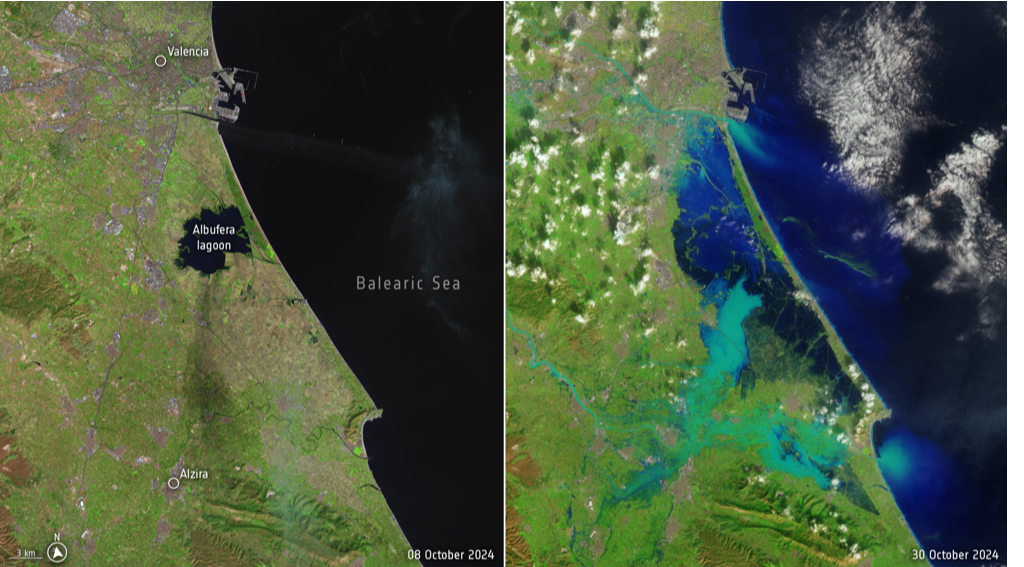
(Image: USGS, processed by ESA)
For those looking to support the relief efforts, one way to do so is through donations to the Secours Populaire’s Urgent Appeal.
Goals of this Article
Goals of this Article
My primary goal for this technical article is to demonstrate how one can use Wolfram Language to fetch and analyse MODIS NRT Flood Product remote sensing imagery to monitor flood events in near real-time. My exploration will focus on the recent catastrophic flooding in the Valencia region of Spain. Through this work, I hope to inform readers about existing resources for flood monitoring, and to raise awareness about the impacts of climate change on extreme weather events.
Introduction to Flood Monitoring Remote Sensing Services
Introduction to Flood Monitoring Remote Sensing Services
Remote sensing offers vital tools for monitoring flood events and other natural disasters. These resources help assess the extent of flooding and assist in disaster response and recovery efforts. The following tools have helped me to deepen my understanding of the Valencia floods:
◼
The MODIS Near Real-Time Global Flood Product, processed by NASA’s LANCE, offers daily, near-global flood data at ~250 m resolution. It uses MODIS optical sensors on Terra and Aqua satellites to detect flood and surface water. It uses MODIS optical sensors on Terra and Aqua satellites to detect flood and surface water. The product employs multi-day compositing (1-day, 2-day, and 3-day) to reduce false positives from clouds and shadows. The 2- and 3-day composites are generally preferred for accuracy.
◼
NASA’s Global Imagery Browse Services (GIBS) provides access to visualizations of Earth science data. It offers full-resolution satellite imagery layers that support natural hazard decision-making and public awareness. GIBS imagery can be accessed through NASA Worldview or the GIBS API.
◼
The Copernicus Emergency Management Service (EMS) provides rapid mapping for disaster events, delivering detailed flood extent and damage assessments. For the Valencia flooding, Copernicus EMS provided high-resolution imagery and delineation products that were critical for evaluating affected areas.
◼
The FLOODS Map Viewer, part of NASA’s MODIS platform, allows users to browse global flood detections. It offers near real-time data, typically available within hours of satellite overpass.
What is the RemoteSensing Paclet?
What is the RemoteSensing Paclet?
So how might we perform flood monitoring in a Wolfram notebook? Let’s explore.
In Summer 2023, I wrote a WL paclet to connect to the NASA GIBS and AρρEEARS Remote Sensing Services. This tool provides a straightforward way to fetch georeferenced satellite imagery and other remote sensing products from the GIBS API, including several NASA flood monitoring products.
To install the RemoteSensing Paclet, run the following code:
In[]:=
(*PacletInstall["PhileasDazeleyGaist/RemoteSensing"]*)
Once the paclet is installed, load it into your notebook with like so:
In[]:=
Needs["PhileasDazeleyGaist`RemoteSensing`"]
Accessing GIBS Imagery Using the RemoteSensing Paclet
Accessing GIBS Imagery Using the RemoteSensing Paclet
The following examples illustrate how one might fetch and visualise data from GIBS using the paclet:
List available GIBS Products:
In[]:=
GIBSData[]//Shallow
Out[]//Shallow=
{MERRA2_2m_Air_Temperature_Monthly,MERRA2_2m_Air_Temperature_Assimilated_Monthly,GEDI_ISS_L4B_Aboveground_Biomass_Density_Mean_201904-202303,GEDI_ISS_L4B_Aboveground_Biomass_Density_PercentStandardError_201904-202303,GEDI_ISS_L4B_Aboveground_Biomass_Density_StandardError_201904-202303,AVISO_Absolute_Dynamic_Topography,SWDB_Aerosol_Angstrom_Exponent_Daily,SWDB_Aerosol_Angstrom_Exponent_Monthly,OMPS_SNPP_LimbProfiler_Aerosol_ExinctionCoefficient_12KM,OMPS_SNPP_LimbProfiler_Aerosol_ExinctionCoefficient_14KM,1113}
How many GIBS products are there?
In[]:=
GIBSData[]//Length
Out[]=
1123
Show information about a GIBS product:
In[]:=
GIBSData["Landsat_WELD_NDVI_Global_Annual","Dataset"]
Out[]=
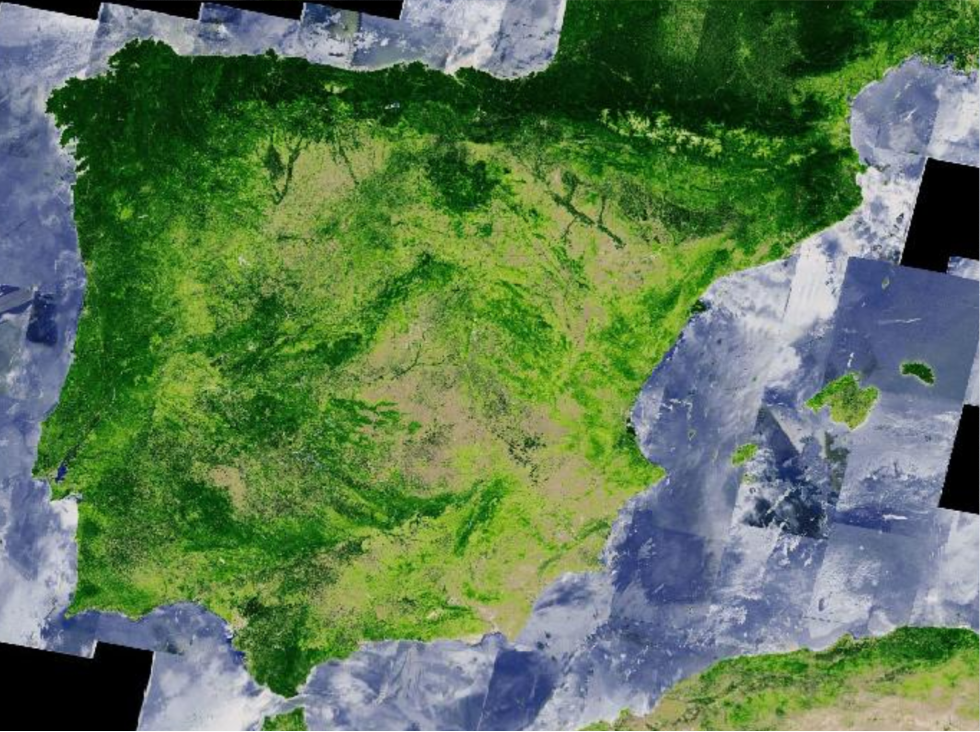
Fetch imagery, and display it with GeoGraphics:
In[]:=
GeoGraphics,GeoServer->GIBSGeoServer["Landsat_WELD_NDVI_Global_Annual"]
Out[]=
Flood Monitoring with the RemoteSensing Paclet
Flood Monitoring with the RemoteSensing Paclet
Setting a Map View Region
Setting a Map View Region
First, let’s define the region in which to retrieve flooding data.
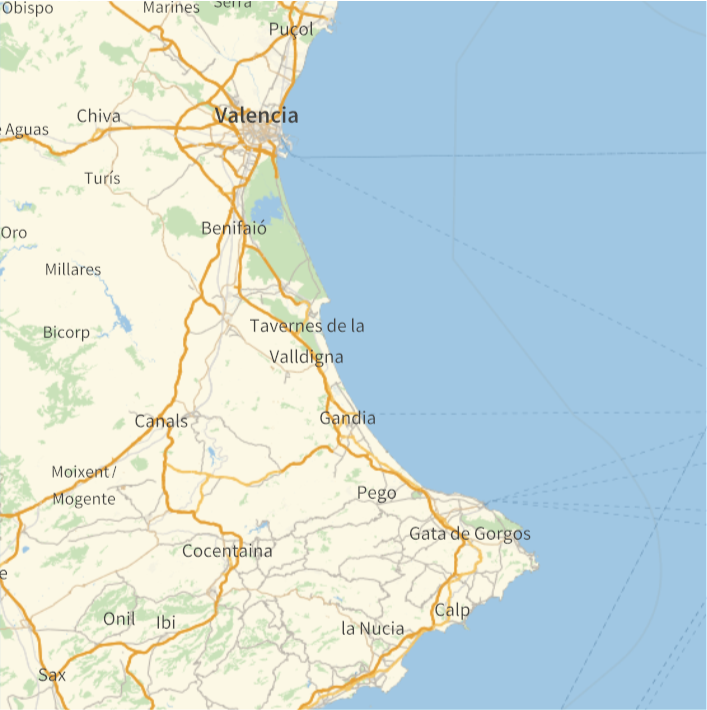
Define the map view as a 30 kilometer radius disk centered halfway between Valencia and Benissa:
In[]:=
viewRegion=Withcenter=MeanFirst/@EntityValue,,"Position",GeoDiskGeoPosition[center],;
Preview a map of the selected region:
In[]:=
GeoGraphics[GeoRange->viewRegion]
Out[]=
GIBS Flood Products
GIBS Flood Products
GIBS provides access to several flood monitoring and risk assessment products.
Make a tabular dataset of GIBS products containing the word “Flood”:
In this article, I’ll use the MODIS NRT Global Flood Product (1-Day, 2-Day, and 3-Day) to track Valencia floods.
Implementation: MODISFloodImage
Implementation: MODISFloodImage
Below, I define a custom function MODISFloodImage to fetch MODIS Flood product imagery using GIBSGeoServer and style the resulting images. The function supports the following options:
◼
“DetectionWindow”
◼
Description: Sets the flood detection window to use for the MODIC Flood Product
◼
“FeatureColors”
◼
Description: Sets the colors of flood MODIS Flood product features.
◼
Supporting settings: An association of “Feature Name” → Color rules, where feature names can be any of “Flood”, “Surface Water”, “Insufficient Data”, or “No Water”.
◼
All options accepted by GeoImage.
Define a function to fetch flood imagery from MODIS:
Using the MODISFloodImage Function
Using the MODISFloodImage Function
Let’s use this new function to fetch flood imagery.
Load the MODIS NRT Global 2-Day Flood Product image for the defined view region on October 31st 2024:
We can control the way features are displayed with the “FeatureColors” option for MODISFloodImage.
Load the same MODIS 2-Day Flood image, but this time with custom colors:
We can also hide features by assigning them a color with a low or 0 opacity value.
Display only the flood feature from MODIS 2-Day Flood imagery:
We can plot MODIS Flood Imagery on a map in any supported projection using GeoStyling in GeoGraphics.
Display the detected flood data on a map:
Finally, we can create animations from MODIS flood data requesting maps over a date range, and wrapping the result in ListAnimate:
Note that in the animation above, the lack of detected flooding does not necessarily indicate that no flooding is occurring. Clouds and shadows can cause flooding to go undetected. Cases like these are classified as “Insufficient Data”.
Estimating the Total Area Damaged By October Flooding in the Chosen View Region for A Given Date
Estimating the Total Area Damaged By October Flooding in the Chosen View Region for A Given Date
Let’s use MODIS NRT Flood Product data to estimate the fluctuation the total area affected by flooding over the past weeks.
Define a helper function to construct an explicit geodetic bounding box polygon from a provided geographic region:
Apply this function to the previously defined view region:
Compute the area of this region:
Now that we know the total area we are monitoring (the area covered by our MODISFloodImage data), we can estimate the area in the view region affected by flooding on any given day by calculating the proportion of pixels in the MODIS flooding imagery corresponding to detected flooding.
Calculate the proportion of pixels corresponding to flooding in a MODISFloodImage of the view region on October 31 2024:
Use the result to estimate the total area in the view region affected by flooding on that date:
We can apply this method to a list of MODIS images to create a time series plot of the estimated daily flooded area.
Compute the daily area in the view region affected by flooding over a range of dates, and plot the resulting time series:
Keep in mind that these estimates likely come with significant limitations and drawbacks. I am providing them here for illustrative purposes only.
Closing Notes
Closing Notes
The recent catastrophic flooding in Valencia highlights the crucial role that remote sensing tools play in disaster monitoring and management. Technologies like the MODIS NRT Global Flood Product provide precious insights into flood dynamics and their impacts. This article has demonstrated how to fetch and analyze flood imagery using Wolfram Language, hopefully offering a glimpse of the potential of real-time environmental monitoring.
In addition to their value in informing response efforts, flood monitoring remote sensing tools also contribute to a broader understanding of the growing impacts of climate change, and its contribution to increasing rates of extreme weather events and natural disasters. As these events become more frequent, our remote sensing and data analysis capabilities will become increasingly important to tackle the challenges and risks they pose.
Thank you for following this exploration, and I encourage further engagement with these technologies to support disaster preparedness and resilience.
Again, for those looking to support the relief efforts, I encourage you to do so through donations to the Secours Populaire’s Urgent Appeal.
CITE THIS NOTEBOOK
CITE THIS NOTEBOOK
Near real time flood monitoring of Valencia, Spain with NASA remote sensing data
by Phileas Dazeley-Gaist
Wolfram Community, STAFF PICKS, November 6, 2024
https://community.wolfram.com/groups/-/m/t/3315380
by Phileas Dazeley-Gaist
Wolfram Community, STAFF PICKS, November 6, 2024
https://community.wolfram.com/groups/-/m/t/3315380