The Fear and Greed Index is a popular sentiment indicator that measures emotions driving the financial markets. This notebook shows how to visualize the Index using for the current value and for historical trends.
Data Acquisition
Data Acquisition
In this case, a basic HTTP request is sufficient to access the data. However, you may need to include a user-agent header in your request. You can typically find your browser’s user-agent string by checking the developer tools while making a request online.
In[]:=
req=HTTPRequest["https://production.dataviz.cnn.io/index/fearandgreed/graphdata",<|"UserAgent"->"Mozilla/5.0 (Macintosh; Intel Mac OS X 10_15_7) AppleWebKit/537.36 (KHTML, like Gecko) Chrome/147.0.0.0 Safari/537.36 Edg/147.0.0.0"|>]
Out[]=
HTTPRequest

Check whether the request was successful: a status code of 200 indicates a successful connection and complete data transfer:
In[]:=
resp=URLRead[req]
Out[]=
HTTPResponse

Convert the retrieved data to :
In[]:=
data=ImportString[resp["Body"],"RawJSON"];
Find the available fields in the data above:
In[]:=
Keys[data]
Out[]=
{fear_and_greed,fear_and_greed_historical,market_momentum_sp500,market_momentum_sp125,stock_price_strength,stock_price_breadth,put_call_options,market_volatility_vix,market_volatility_vix_50,junk_bond_demand,safe_haven_demand}
Create a that stores only the history (use to prevent multiple runs of the code)
In[]:=
tab=OnceWith{tab=ToTabular[data["fear_and_greed_historical"]["data"]]},ConstructColumnstab,"Date"->FunctionDateObjectFromUnixTime@,"Day","FGIdx"->Function[Ceiling@#y],"Rating"->Function[#rating]//Most
Floor[#x]
1000
Out[]=
Tabular


Clean the stored intermediate data:
In[]:=
data=.
Gauge Design
Gauge Design
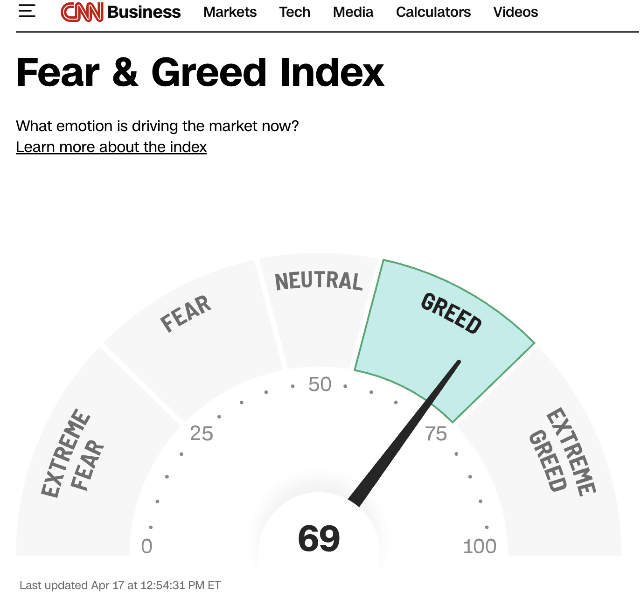
Utilize the code below to create a gauge similar to the one featured on CNN’s webpage:
Construct a stone bridge effect encircling the gauge by using the function. Specify both the inner and outer radii:
In[]:=
ri=3;ro=4.6;
List the angular range corresponding to each segment of the partial annulus:
In[]:=
segmentAnnulus={{135.5,180},{99.5,134.5},{81.5,98.5},{45.5,80.5},{0,44.5}};
Design a gauge in the form of a semi-disk:
In[]:=
Clear[g]
In[]:=
g[t_]:=AngularGauge[t,{0,100},ScaleOrigin->{π,0},GaugeStyle->StandardOrange,ImageSize->100];
Emphasize the segment of the annulus that aligns with the direction indicated by the gauge’s hand:
In[]:=
styledAnnulus[v1_,v2_,input_]:=With[{s=Annulus[{0,0},{ri,ro},{v1Degree,v2Degree}]},If[Floor@v1<input<Ceiling@v2,{EdgeForm[{Thick,StandardBlue}],StandardOrange,s},{Cyan,s}]]
The function places the words in the correct positions with the appropriate orientation:
In[]:=
PlaceWord[txt_String,r_,θ_]:=Rotate[Text[Style[txt,10,FontFamily->"Helvetica",Black,Bold],r*{Cos[θ],Sin[θ]}],θ-π/2]
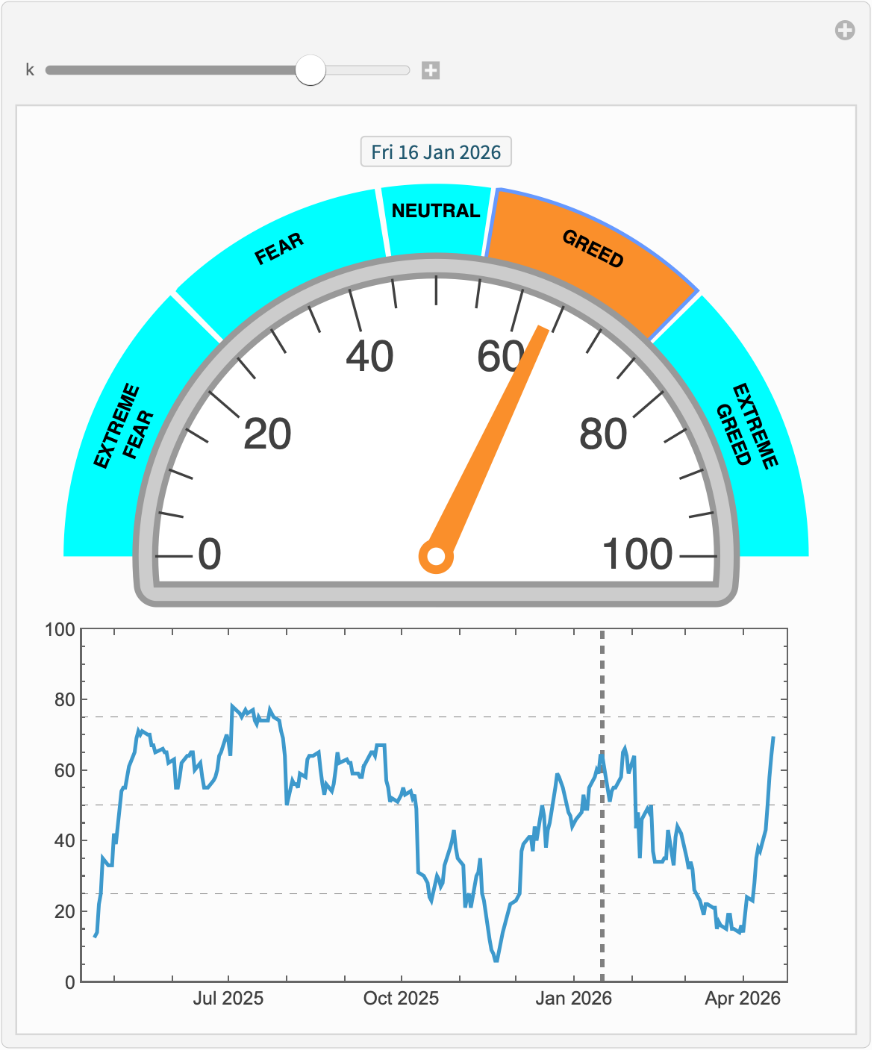
Generate a chart of the CNN Fear and Greed Index, including a time series plot of the index values:
ManipulateWith{idx=tab[k,"FGIdx"],date=tab[k,"Date"]},ColumnGraphicsstyledAnnulus#11,#12,(100-idx)180&/@segmentAnnulus,Inset[g[idx],{0,0},{0,0},Scaled[0.86`]],PlaceWord["EXTREME\nFEAR",ro-0.5`,157.75`°],PlaceWord["FEAR",ro-0.35`,117°],PlaceWord["NEUTRAL",ro-0.35`,90°],PlaceWord["GREED",ro-0.35`,63°],PlaceWord["EXTREME\nGREED",ro-0.5`,22.25`°],Text[date,{0,5.`}],ImagePadding{{2,2},{20,1}},ImageSize420,DateListPlottab{"Date","FGIdx"},,{k,1,Length[tab],1},SaveDefinitionsTrue
1
100
Out[]=
CITE THIS NOTEBOOK
CITE THIS NOTEBOOK
Animate the CNN fear and greed index gauge
by Shenghui Yang
Wolfram Community, STAFF PICKS, April 18, 2026
https://community.wolfram.com/groups/-/m/t/3694627
by Shenghui Yang
Wolfram Community, STAFF PICKS, April 18, 2026
https://community.wolfram.com/groups/-/m/t/3694627