Introduction
Introduction
The Wolfram Language has such a great deal of built-in functions that it would be impossible to memorise them all. Some of them are for very niche interests - one of these, that I become interested in only the other day, was the WeatherData function. I began wondering how simple it would to mimic a weather forecast using something like Mathematica, say to present a map with the temperature of major cities. The answer is, of course, ‘very’.
Main
Main
The WeatherData Function and Purpose
The WeatherData Function and Purpose
This function is exceedingly easy to use, but it is worth noting that it only returns data for a specific property, such as wind-speed or temperature.
In[]:=
WeatherData["London","Temperature"]
Out[]=
It also, as seen above, can give some values that are particularly close to an integer, so it is generally best to round the results:
In[]:=
Round[WeatherData["London","Temperature"]]
Out[]=
After seeing this I deemed it best to just consider temperature: because this is, after all, a very small example just to see what is possible. The aims, therefore, were just to overlay the data onto a map of Britain (or some other country or island), showing information about its major cities.
The City Data Function
The City Data Function
To consider the temperature of every major city we must have some list of said cities. Thankfully, the Wolfram Language has just what we need once more. The CityData function has numerous purposes, such as getting a city’s population or coordinates: but we can also use it to get all the ‘large’ cities within a location. Wolfram seems to identify these cities as those with a population over one hundred thousand.
After some syntax trickery we can get our list of large cities and get the temperature for each using a simple map function, like so:
After some syntax trickery we can get our list of large cities and get the temperature for each using a simple map function, like so:
Round[WeatherData[#,"Temperature"]]&/@CityData[{Large,"Britain"}]
Out[]=
,,,,,,,,,,,,,,,,,,,,,,,,,,,,,,,,,,,,,,,,,,,,,,,,,,,,,,,,,,,,,,,,,,,,,,,,,,,,,,,,,,,
One thing I noted, however, was that this presents an exceedingly large list of places: it would make my map look very cluttered. The CityData function does return the cities in order of size, so I could have truncated my list - but I thought that would be too short-term of a solution. Instead, I decided to look at their populations, and only get the cities with a population over 300,000.
This makes use of the CityData function twice, once to get the complete list and once to check their populations are within the bounds we set out.
In[]:=
IfCityData[#,"Population"]>,Round[WeatherData[#,"Temperature"]]&/@CityData[{Large,"Britain"}]
Out[]=
,,,,,,,,,,,,,,,Null,Null,Null,Null,Null,Null,Null,Null,Null,Null,Null,Null,Null,Null,Null,Null,Null,Null,Null,Null,Null,Null,Null,Null,Null,Null,Null,Null,Null,Null,Null,Null,Null,Null,Null,Null,Null,Null,Null,Null,Null,Null,Null,Null,Null,Null,Null,Null,Null,Null,Null,Null,Null,Null,Null,Null,Null,Null,Null,Null,Null,Null,Null,Null,Null,Null,Null,Null,Null
The use of the If and Map functions does mean that we end up with a great deal of ‘Null’ responses. We can easily be rid of them using the DeleteCases function, which removes unwanted elements from a list:
In[]:=
DeleteCasesIfCityData[#,"Population"]>,Round[WeatherData[#,"Temperature"]]&/@CityData[{Large,"Britain"}],Null
Out[]=
,,,,,,,,,,,,,,
Which makes things seem much nicer.
Mapping the Data
Mapping the Data
If you have never looked at Wolfram’s maps before they actually function very similarly to Plots: and make use of many of the same options. Before using it, however, we need a more comprehensive list of our temperatures. To be able to display them on the map, we need their coordinates, and for the sake of future functionality I decided to include the city names, too.
GeoPosition gets the coordinates of, in this case, the cities, aligning with the coordinates system of the map function.
In[]:=
data=IfCityData[#,"Population"]>,{#,GeoPosition[#],Round[WeatherData[#,"Temperature"]]}&/@CityData[{Large,"Britain"}];data=DeleteCases[data,Null]
Out[]=
,GeoPosition[{51.5,-0.116667}],,,GeoPosition[{52.4667,-1.91667}],,,GeoPosition[{53.7997,-1.54917}],,,GeoPosition[{55.8612,-4.25017}],,,GeoPosition[{53.7944,-1.75192}],,,GeoPosition[{53.5,-2.21667}],,,GeoPosition[{53.3667,-1.5}],,,GeoPosition[{53.4167,-3.}],,,GeoPosition[{52.6333,-1.13333}],,,GeoPosition[{51.4538,-2.5973}],,,GeoPosition[{55.9533,-3.18837}],,,GeoPosition[{51.3727,-0.1099}],,,GeoPosition[{52.4167,-1.55}],,,GeoPosition[{51.4817,-3.17919}],,,GeoPosition[{52.9534,-1.14965}],
To represent this on a map took me more time than I would like to admit. I didn’t want any map-labels other than the ones we ourselves place on it (hence why we included city names in the list above, so we could put those on if we wished). Eventually I needed to ‘overlay’ two maps, and then we can use the data from above to put text onto it. The Text option requires coordinates and, of course, the actual text and styling, which our list gives adequately. We end up, eventually, with this:
After some slight tinkering with the sizing we can represent our text on a map.
In[]:=
p1=GeoListPlotPolygon,Text[Style[#[[3]],9,Bold,Blue],#[[2]]]&/@data;p2=GeoGraphics;Show[p1,p2]
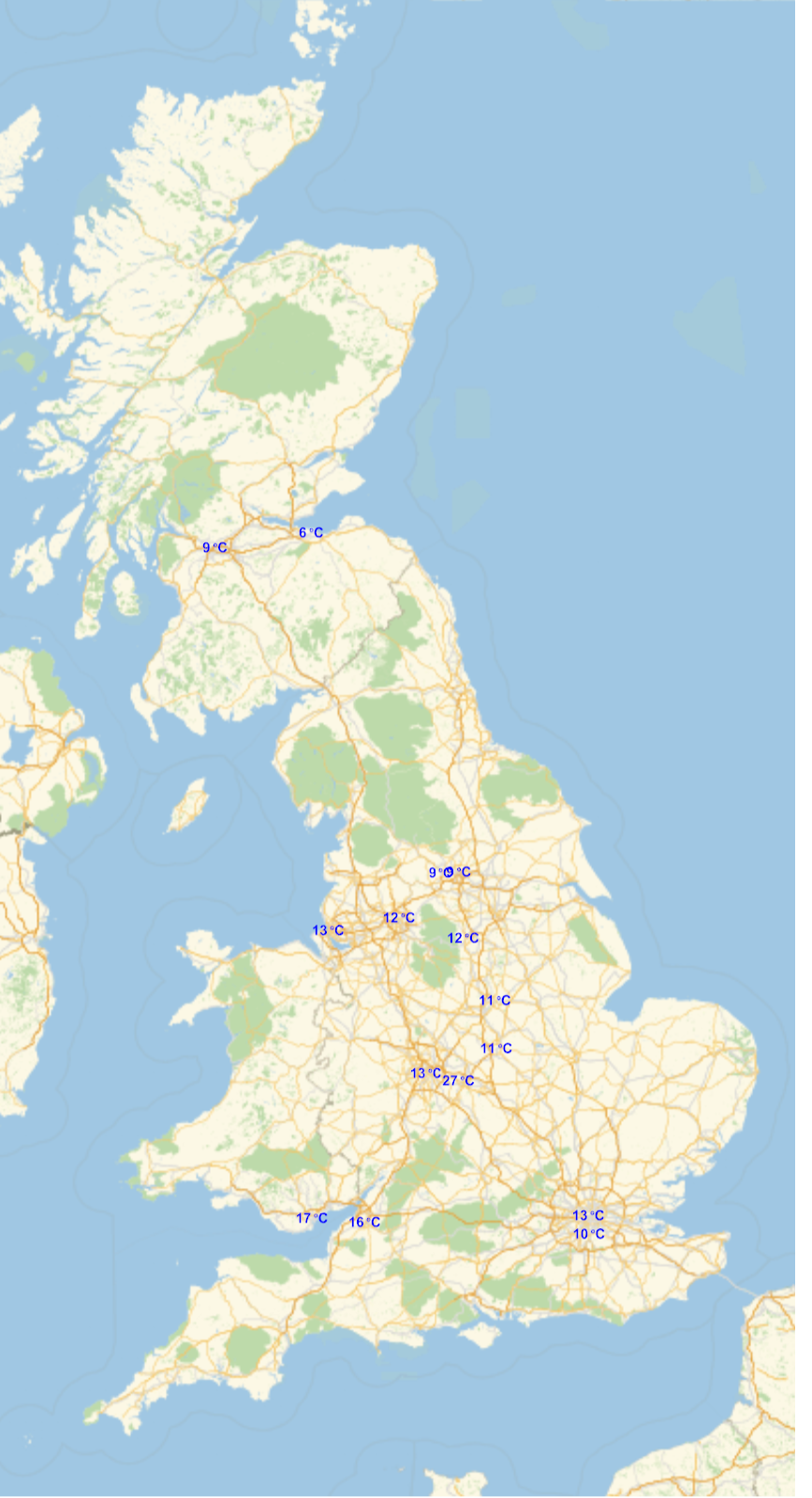
It’s a fantastically ugly thing, with certain overlapping sections and very little information: but I think we will leave it there. Happily, it is no trouble at all to represent data on Wolfram’s maps, as has been demonstrated - although it might perhaps be worth noting that some of the weather data is erratic. Unless climate change has proceeded at an exceedingly terrible rate, I should hope Coventry is not having temperatures of 27 degrees Celsius at this time of the year.
Conclusion
Conclusion
All in all I was pleased by how much we could do in a short time. It certainly gives rise to some interesting ideas of how we could expand something like this: particularly with things like dynamic maps, and combatting close-together cities. I feel there must be room to present more information, too, but that is something for another day.
Rather humorously I stumbled onto an Example Repository doing a very similar thing to this after writing this up. It deals with it in a different way, and doesn’t explain itself like this essay, but it would be remiss of me not to credit it:
https://resources.wolframcloud.com/ExampleRepository/resources/Create-a-Weather-Map/
I would recommend checking it out, as it presents an interesting alternative method.
This was a very light essay, and a very light exploration of what is a very complicated set of functions. I hope, notwithstanding, that you have found this interest in some way or another. Until the next time!
Rather humorously I stumbled onto an Example Repository doing a very similar thing to this after writing this up. It deals with it in a different way, and doesn’t explain itself like this essay, but it would be remiss of me not to credit it:
https://resources.wolframcloud.com/ExampleRepository/resources/Create-a-Weather-Map/
I would recommend checking it out, as it presents an interesting alternative method.
This was a very light essay, and a very light exploration of what is a very complicated set of functions. I hope, notwithstanding, that you have found this interest in some way or another. Until the next time!